1. పరిచయం
ధన్యవాదాలు, ధన్యవాదాలు.asing the SOAR XL ShockBox BTH6 Wireless Bluetooth Speaker. This speaker is designed to provide high-quality audio with versatile connectivity options, including Bluetooth 5.0, AM/FM radio, USB, and Aux inputs. Its portable and shockproof design, combined with dynamic multicolor LED lights, makes it suitable for various environments. Please read this manual carefully to ensure proper use and maintenance of your device.
2. ఉత్పత్తి ముగిసిందిview
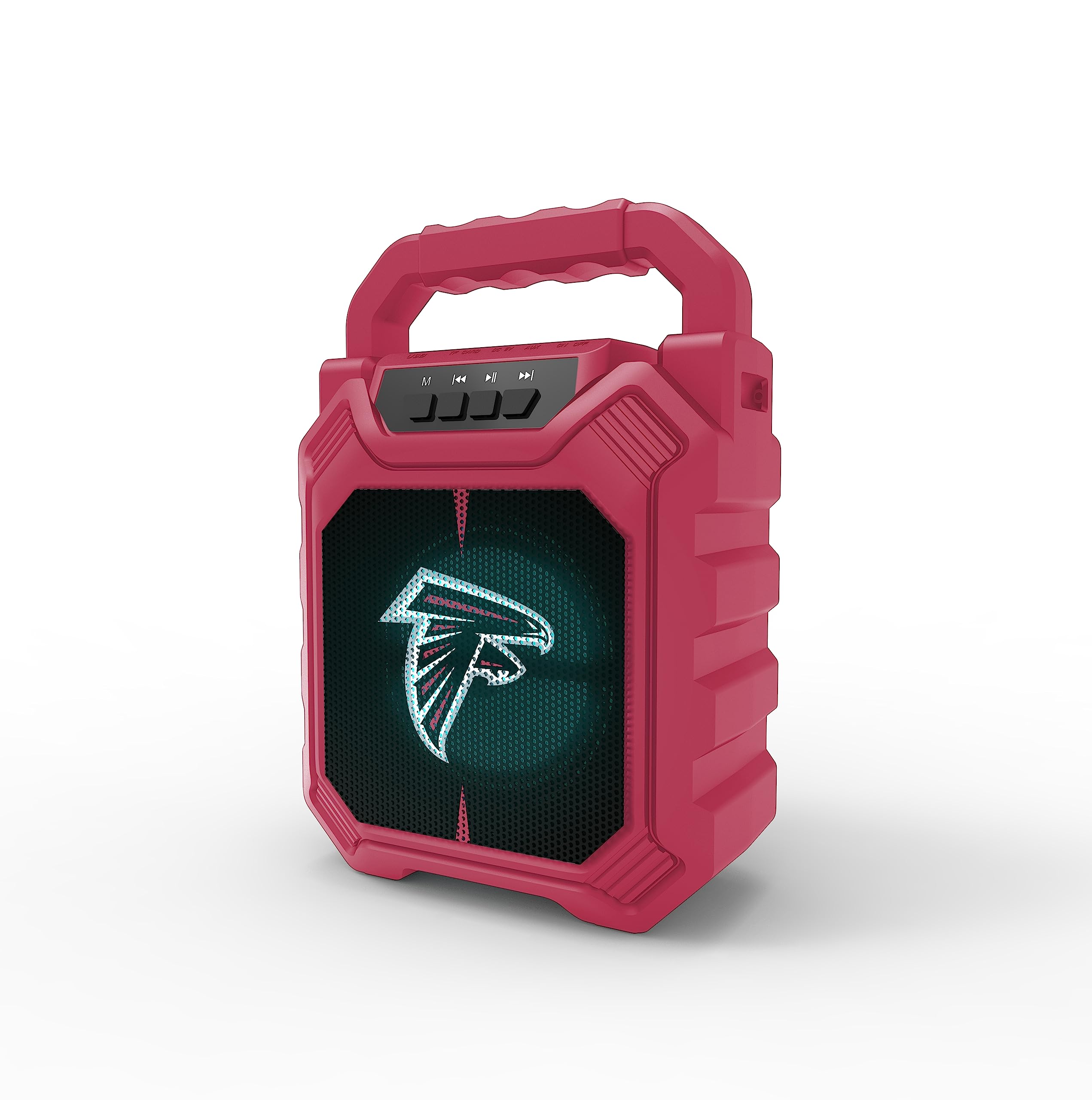
చిత్రం 1: ముందు view of the SOAR XL ShockBox BTH6 Wireless Bluetooth Speaker, featuring the Atlanta Falcons logo.
ముఖ్య లక్షణాలు:
- బ్లూటూత్ 5.0 కనెక్టివిటీ: For seamless wireless audio streaming.
- బహుళ ఆడియో ఇన్పుట్లు: Supports AM/FM radio, USB, and Aux connections.
- పోర్టబుల్ డిజైన్: Features a convenient top handle and shockproof construction.
- సుదీర్ఘ బ్యాటరీ జీవితం: Provides over 5 hours of playback on a single charge.
- డైనమిక్ LED లైట్లు: Multicolor LED lights pulse with the music.
- నిజమైన వైర్లెస్ స్టీరియో (TWS): Connect two speakers for enhanced stereo sound.
3. నియంత్రణలు మరియు పోర్టులు

Image 2: Top panel of the speaker, illustrating the control buttons and various input ports.
బటన్ విధులు:
- పవర్ బటన్: Press and hold to turn the speaker ON/OFF. Short press to switch modes (Bluetooth, FM, USB, Aux).
- 'M' (Mode) Button: Short press to cycle through input modes (Bluetooth, FM Radio, USB, Aux).
- మునుపటి ట్రాక్ / వాల్యూమ్ డౌన్: Short press for previous track (in Bluetooth/USB mode). Press and hold to decrease volume.
- ప్లే/పాజ్ బటన్: Short press to play or pause audio. In FM mode, short press to auto-scan and save stations.
- తదుపరి ట్రాక్ / వాల్యూమ్ అప్: Short press for next track (in Bluetooth/USB mode). Press and hold to increase volume.
ఇన్పుట్ పోర్ట్లు:
- మైక్రో-USB ఛార్జింగ్ పోర్ట్: స్పీకర్ను ఛార్జ్ చేసినందుకు.
- USB పోర్ట్: USB ఫ్లాష్ డ్రైవ్ నుండి ఆడియో ప్లే చేయడానికి.
- Aux-in Port (3.5mm): For connecting external audio devices via an auxiliary cable.
- మైక్రో SD కార్డ్ స్లాట్: For playing audio from a MicroSD card.
4. సెటప్ మరియు ఆపరేషన్
4.1 స్పీకర్ను ఛార్జ్ చేయడం
- Connect the provided micro-USB cable to the charging port on the speaker.
- కేబుల్ యొక్క మరొక చివరను USB పవర్ అడాప్టర్ (చేర్చబడలేదు) లేదా కంప్యూటర్ యొక్క USB పోర్ట్కు కనెక్ట్ చేయండి.
- ఛార్జింగ్ ఇండికేటర్ లైట్ వెలుగుతుంది. పూర్తిగా ఛార్జ్ అయిన తర్వాత, లైట్ రంగు మారవచ్చు లేదా ఆపివేయబడవచ్చు.
- A full charge provides over 5 hours of playback time.
4.2 పవర్ చేయడం ఆన్/ఆఫ్
- To turn ON, press and hold the Power button until you hear an audible prompt.
- To turn OFF, press and hold the Power button again until the speaker powers down.
4.3 బ్లూటూత్ జత చేయడం
- స్పీకర్ను ఆన్ చేయండి. ఇది స్వయంచాలకంగా బ్లూటూత్ జత చేసే మోడ్లోకి ప్రవేశిస్తుంది, ఇది ఫ్లాషింగ్ LED లైట్ మరియు వినిపించే ప్రాంప్ట్ ద్వారా సూచించబడుతుంది.
- మీ పరికరంలో (స్మార్ట్ఫోన్, టాబ్లెట్, మొదలైనవి), బ్లూటూత్ను ప్రారంభించి, అందుబాటులో ఉన్న పరికరాల కోసం శోధించండి.
- Select "SOAR BTH6" from the list of devices.
- జత చేసిన తర్వాత, స్పీకర్ వినగల నిర్ధారణను విడుదల చేస్తుంది మరియు LED లైట్ మెరుస్తూ ఆగిపోతుంది.
- పరికరం పరిధిలో ఉండి, బ్లూటూత్ ప్రారంభించబడి ఉంటే, స్పీకర్ పవర్ ఆన్ చేసినప్పుడు చివరిగా జత చేసిన పరికరానికి స్వయంచాలకంగా తిరిగి కనెక్ట్ అవుతుంది.
4.4 FM రేడియో ఆపరేషన్
- Turn on the speaker and press the 'M' (Mode) button until you enter FM Radio mode.
- To auto-scan and save available FM stations, short press the Play/Pause button. The speaker will scan and store stations automatically.
- Use the Previous Track and Next Track buttons to navigate between saved stations.
4.5 USB and Aux Input
- USB ఇన్పుట్: Insert a USB flash drive into the USB port. The speaker will automatically switch to USB mode and begin playing audio files.
- ఆక్స్ ఇన్పుట్: Connect an external audio device (e.g., MP3 player) to the Aux-in port using a 3.5mm audio cable. Press the 'M' button to switch to Aux mode.
4.6 LED లైటింగ్ మోడ్లు

Image 3: The speaker displaying its dynamic LED lights in a vibrant setting.
The speaker features dynamic multicolor LED lights that pulse to the rhythm of the music. These lights activate automatically when the speaker is in use. There are no user-adjustable modes for the LED lights; they are designed to enhance the audio experience visually.
4.7 ట్రూ వైర్లెస్ స్టీరియో (TWS) జత చేయడం

Image 4: Two SOAR XL ShockBox BTH6 speakers paired together for True Wireless Stereo (TWS) sound.
విస్తృత శబ్దాలను సాధించడానికిtage, you can pair two SOAR XL ShockBox BTH6 speakers together using the TWS function:
- Ensure both speakers are turned OFF.
- Turn ON both speakers. They will enter Bluetooth pairing mode.
- On one of the speakers (this will be your primary speaker), double-press the 'M' (Mode) button. The speakers will attempt to connect to each other.
- విజయవంతంగా జత చేసిన తర్వాత, మీరు వినగల నిర్ధారణను వింటారు. రెండు స్పీకర్లలోని LED లైట్లు సమకాలీకరించబడతాయి.
- ఇప్పుడు, విభాగం 4.3లో వివరించిన విధంగా బ్లూటూత్ ద్వారా మీ పరికరాన్ని ప్రాథమిక స్పీకర్కు కనెక్ట్ చేయండి. స్టీరియోలోని రెండు స్పీకర్ల ద్వారా ఆడియో ప్లే అవుతుంది.
5. నిర్వహణ
- శుభ్రపరచడం: స్పీకర్ బాహ్య భాగాన్ని శుభ్రం చేయడానికి మృదువైన, పొడి వస్త్రాన్ని ఉపయోగించండి. రాపిడి క్లీనర్లను లేదా ద్రావకాలను ఉపయోగించవద్దు.
- నిల్వ: స్పీకర్ను ప్రత్యక్ష సూర్యకాంతి మరియు తీవ్రమైన ఉష్ణోగ్రతలకు దూరంగా చల్లని, పొడి ప్రదేశంలో నిల్వ చేయండి.
- బ్యాటరీ సంరక్షణ: బ్యాటరీ జీవితకాలాన్ని పొడిగించడానికి, తరచుగా ఉపయోగించకపోయినా, స్పీకర్ను క్రమం తప్పకుండా ఛార్జ్ చేయండి. ఎక్కువసేపు బ్యాటరీని పూర్తిగా డిశ్చార్జ్ చేయకుండా ఉండండి.
- నీటి నిరోధకత: While designed to be durable, avoid submerging the speaker in water.
6. ట్రబుల్షూటింగ్
| సమస్య | సాధ్యమైన పరిష్కారం |
|---|---|
| స్పీకర్ ఆన్ చేయలేదు. | Ensure the battery is charged. Connect the speaker to a power source using the micro-USB cable. |
| బ్లూటూత్ ద్వారా జత చేయడం సాధ్యం కాదు. | Make sure the speaker is in Bluetooth mode and within range (approx. 10 meters). Turn off and on your device's Bluetooth. Forget "SOAR BTH6" from your device's Bluetooth list and try pairing again. |
| శబ్దం లేదు లేదా తక్కువ వాల్యూమ్ ఉంది. | స్పీకర్ మరియు మీ కనెక్ట్ చేయబడిన పరికరం రెండింటిలోనూ వాల్యూమ్ స్థాయిలను తనిఖీ చేయండి. సరైన ఇన్పుట్ మోడ్ ఎంచుకోబడిందని నిర్ధారించుకోండి. |
| FM రేడియో రిసెప్షన్ పేలవంగా ఉంది. | Adjust the speaker's position. Ensure you are in an area with good signal strength. |
| TWS జత చేయడం విఫలమైంది. | Ensure both speakers are fully charged and not connected to any other Bluetooth devices. Follow the TWS pairing steps carefully. |
7. స్పెసిఫికేషన్లు
| ఫీచర్ | వివరాలు |
|---|---|
| మోడల్ సంఖ్య | BTH6 (Variant: NFL-BTH6-DLPH) |
| బ్లూటూత్ వెర్షన్ | 5.0 |
| ఆడియో ఇన్పుట్లు | Bluetooth, AM/FM Radio, USB, Aux-in, MicroSD |
| ప్లే టైమ్ | Over 5 hours (per charge) |
| ఛార్జింగ్ పోర్ట్ | మైక్రో-USB |
| తయారీదారు | ప్రైమ్ బ్రాండ్స్ గ్రూప్ ఇంక్ |
| మొదటి తేదీ అందుబాటులో ఉంది | సెప్టెంబర్ 6, 2023 |
8. అధికారిక ఉత్పత్తి వీడియో
వీడియో 1: అధికారిక ఉత్పత్తి వీడియో ప్రదర్శనasing the features and dynamic LED lights of the SOAR BTH6 Wireless Bluetooth Speaker.
9. వారంటీ మరియు మద్దతు
For warranty information and customer support, please refer to the documentation included with your product or contact the manufacturer, Prime Brands Group Inc., directly. Details regarding specific warranty periods and support procedures are typically provided at the point of purchase or on the manufacturer's official webసైట్.


