పరిచయం
This manual provides essential instructions for the proper setup, operation, and maintenance of your GRIPX Digital Commercial Price Scale. Please read this manual thoroughly before using the scale to ensure optimal performance and longevity. This scale is designed for general weighing purposes and is not certified for trade or legal-for-trade applications.
ఉత్పత్తి ముగిసిందిview
The GRIPX Digital Commercial Price Scale features a stainless steel platform, a green backlight LCD display for both operator and customer, and a keypad for easy operation. It is capable of weighing items up to 66 lbs (30 kg) with a division of 0.1 lbs (50 g).

Image: GRIPX Digital Commercial Price Scale displaying weight, unit price, and total.

Image: Operator and Customer Displays for simultaneous viewing.
సెటప్
అన్ప్యాకింగ్: Carefully remove all components from the packaging. Inspect the scale for any signs of damage. Retain packaging for future transport or storage.
ప్లాట్ఫారమ్ ప్లేస్మెంట్: Place the stainless steel weighing platform securely onto the scale base. Ensure it sits flat and is stable.

Image: Stainless steel weighing platform.
బ్యాటరీ ఇన్స్టాలేషన్: Locate the battery compartment on the underside of the scale. Open the compartment cover and insert three (3) D-size batteries, ensuring correct polarity (+/-). Close the cover securely.

Image: D-size batteries for power.

Image: Battery compartment.
పవర్ ఆన్: Locate the rocker power switch on the underside of the scale. Flip the switch to the 'ON' position. The display will illuminate.

Image: Power rocker switch.
ప్లేస్మెంట్: Place the scale on a firm, level, and stable surface to ensure accurate readings.
ఆపరేషన్
పవర్ ఆన్/ఆఫ్: Use the rocker switch on the underside of the scale to turn the unit on or off.
స్కేల్ జీరోయింగ్: After powering on, if the display does not show '0.000', press the సున్నా button to reset the scale to zero. This ensures accurate measurements.
తారే ఫంక్షన్: కంటైనర్ బరువును చేర్చకుండా కంటైనర్లోని వస్తువులను తూకం వేయడానికి:
- ఖాళీ కంటైనర్ను తూకం వేసే వేదికపై ఉంచండి.
- నొక్కండి తారే బటన్. డిస్ప్లే '0.000' కి రీసెట్ అవుతుంది.
- Add the items to be weighed into the container. The display will show only the net weight of the items.
బరువు వస్తువులు: Place the item(s) directly on the stainless steel platform or in a tared container. The weight will be displayed on both the operator and customer screens.
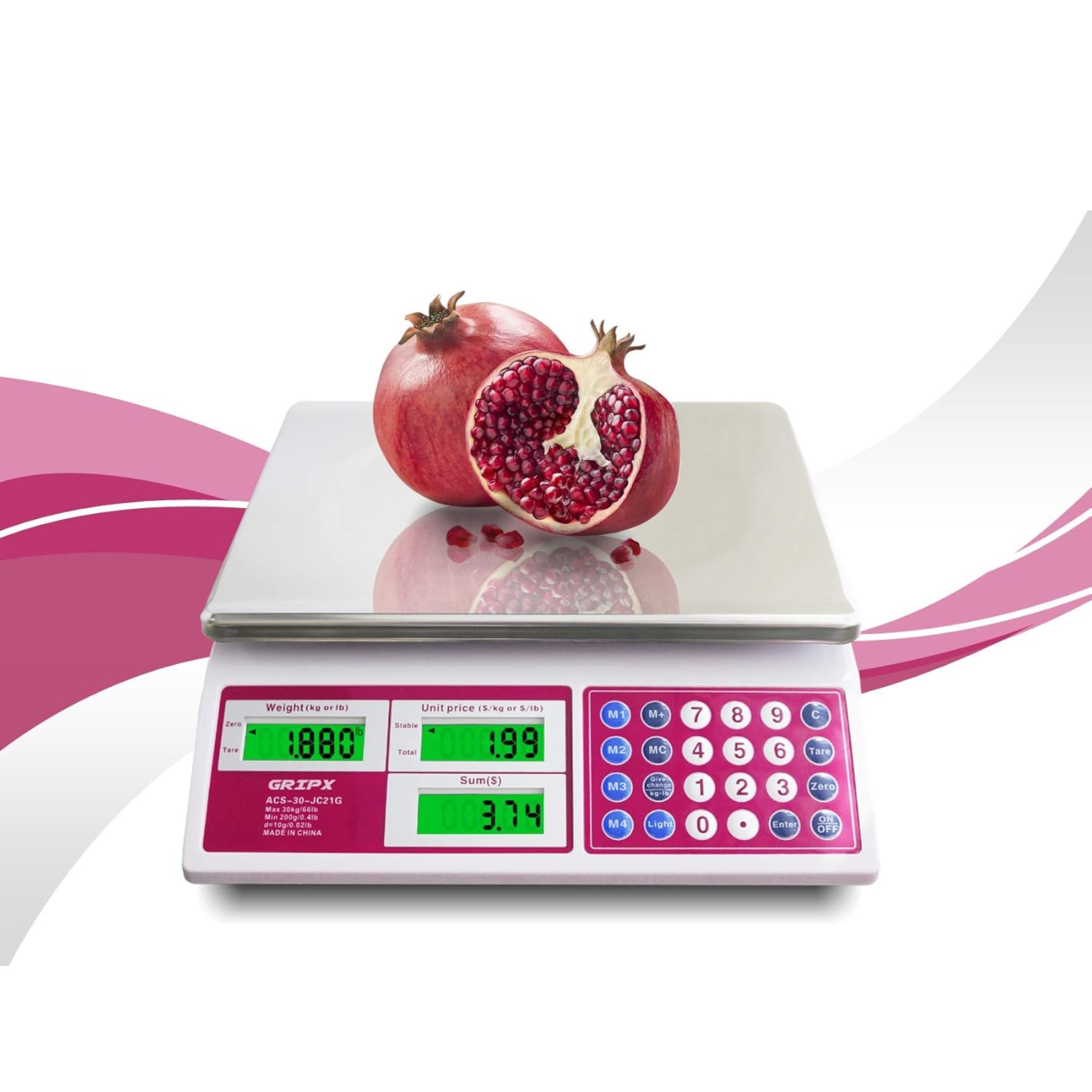
Image: Weighing a pomegranate on the scale.
Unit Price Input:
- With an item on the scale, use the numeric keypad (0-9) to enter the desired unit price (e.g., 1.99 for $1.99 per lb/kg).
- The scale will automatically calculate and display the total price based on the weight and entered unit price.
Memory Functions (M1-M4, MC, M+): These buttons allow you to store frequently used unit prices for quick recall. Refer to the keypad for specific memory locations (M1-M4) and functions (MC for Memory Clear, M+ for Memory Plus/Store).
Unit Conversion (kg/lb): నొక్కండి కాంతి button to toggle between kilograms (kg) and pounds (lb) display units.

Image: Display showing both kg and lb units.
బ్యాక్లైట్ నియంత్రణ: ది కాంతి button also controls the green backlight for the LCD display, enhancing visibility in various lighting conditions.
నిర్వహణ
శుభ్రపరచడం: The stainless steel platform is easy to clean. Wipe it with a damp cloth and mild detergent. Avoid using abrasive cleaners, harsh chemicals, or immersing the scale in water, as this can damage electronic components.
బ్యాటరీ భర్తీ: When the low power indicator ('Lo') appears on the display, replace all three D-size batteries promptly to ensure continued accurate operation.
నిల్వ: Store the scale in a dry, cool environment away from direct sunlight and extreme temperatures.
ట్రబుల్షూటింగ్
No Display / Scale Not Turning On:
- Ensure the rocker power switch on the underside is in the 'ON' position.
- Check that the D-size batteries are correctly installed with proper polarity.
- బ్యాటరీలు అయిపోతే వాటిని మార్చండి.
'Lo' Indicator: This indicates low battery power. Replace the D-size batteries.
'O-Ld' Indicator: This indicates the scale is overloaded. Remove items exceeding the maximum capacity of 66 lbs (30 kg).
సరికాని రీడింగ్లు:
- స్కేల్ చదునైన, స్థిరమైన మరియు సమతల ఉపరితలంపై ఉందని నిర్ధారించుకోండి.
- Check for any obstructions under or around the weighing platform.
- నొక్కండి సున్నా button before weighing.
- బలమైన విద్యుదయస్కాంత క్షేత్రాలు లేదా కంపించే పరికరాల దగ్గర స్కేల్ను ఉంచకుండా ఉండండి.
Important Note on Usage: This GRIPX Digital Commercial Price Scale is intended for general purpose weighing. It is not NTEP certified and therefore cannot be legally used for commercial trade transactions where certified scales are required (e.g., selling goods by weight at a farmers market or retail store). Use for personal or non-trade commercial applications only.
స్పెసిఫికేషన్లు
| బ్రాండ్ | GRIPX |
| మోడల్ సంఖ్య | ACS-30-JC21G-UK |
| కెపాసిటీ | 66 పౌండ్లు (30 కిలోలు) |
| విభజన | 0.1 పౌండ్లు (50 గ్రా) |
| ప్లాట్ఫామ్ మెటీరియల్ | స్టెయిన్లెస్ స్టీల్ |
| ప్రదర్శన రకం | Green Backlight LCD (Operator and Customer) |
| శక్తి మూలం | 3 x 1.5V D-size batteries (AC adapter port available, adapter not included) |
| సుమారు కొలతలు (L x W x H) | 13.2 in x 11.8 in x 4.3 in (33.5 cm x 30 cm x 11 cm) |

Image: Scale dimensions.
వారంటీ మరియు మద్దతు
For product support, troubleshooting assistance, or warranty inquiries, please contact the retailer or manufacturer directly. Information regarding optional protection plans may be available from your point of purchase.


