1. ముఖ్యమైన భద్రతా సమాచారం
Please read all instructions carefully before operating the dehumidifier. Retain this manual for future reference.
- నీరు చిందకుండా నిరోధించడానికి యూనిట్ ఒక సమతల, స్థిరమైన ఉపరితలంపై ఉంచబడిందని నిర్ధారించుకోండి.
- Maintain adequate clearance (at least 20 cm) around the unit for proper airflow.
- Do not operate the unit with a damaged power cord. Contact customer support for replacement.
- ఏదైనా నిర్వహణ లేదా శుభ్రపరిచే ముందు డీహ్యూమిడిఫైయర్ను అన్ప్లగ్ చేయండి.
- ఎయిర్ ఇన్లెట్ లేదా అవుట్లెట్లోకి వస్తువులను చొప్పించవద్దు.
- ఉష్ణ వనరులు మరియు ప్రత్యక్ష సూర్యకాంతి నుండి యూనిట్ను దూరంగా ఉంచండి.
- ఈ ఉపకరణం వారి భద్రతకు బాధ్యత వహించే వ్యక్తి ద్వారా ఉపకరణాన్ని ఉపయోగించడం గురించి పర్యవేక్షణ లేదా సూచనలను అందిస్తే తప్ప, శారీరక, ఇంద్రియ లేదా మానసిక సామర్థ్యాలు తగ్గిన వ్యక్తులు (పిల్లలతో సహా) లేదా అనుభవం మరియు జ్ఞానం లేకపోవడం కోసం ఉద్దేశించబడలేదు.
2. ఉత్పత్తి ముగిసిందిview
The Waykar 80 Pints Dehumidifier is designed to efficiently remove excess moisture from your environment, improving air quality and comfort. It is suitable for spaces up to 5,000 square feet.

మూర్తి 2.1: ముందు view of the Waykar 80 Pints Dehumidifier.

Figure 2.2: Dehumidifier operating in a room, illustrating its coverage capability and adjustable humidity range (30-80% RH).
ముఖ్య లక్షణాలు ఉన్నాయి:
- 80 పింట్ సామర్థ్యం: రోజుకు 80 పింట్ల తేమను తొలగిస్తుంది.
- ఎనర్జీ స్టార్ సర్టిఫికేట్: Designed for high energy efficiency.
- Wide-Angle Swing: Automatic 30°-90° swing function for improved air circulation.
- నిశ్శబ్ద ఆపరేషన్: Operates as low as 42 dB.
- స్మార్ట్ టచ్ కంట్రోల్: Intuitive panel for easy settings adjustment.
- 24-గంటల టైమర్: Schedule operations for convenience.
- Auto Defrost & Memory Restart: Ensures stable performance and resumes settings after power interruption.
- సౌకర్యవంతమైన డ్రైనేజీ: Options for manual tank emptying or continuous drainage.
- ఉతికిన ఎయిర్ ఫిల్టర్: శుభ్రపరచడం మరియు నిర్వహించడం సులభం.
- 360° Swivel Wheels & Integrated Handle: సులభమైన కదలిక కోసం.
3. సెటప్ మరియు ఇన్స్టాలేషన్
3.1 అన్ప్యాకింగ్
Carefully remove the dehumidifier from its packaging. Inspect the unit for any signs of damage. If any damage is found, do not operate the unit and contact customer support.
3.2 ప్లేస్మెంట్
Place the dehumidifier on a firm, level surface in a location where the ambient temperature will not fall below 5°C (41°F). Ensure there is at least 20 cm (8 inches) of space around the unit for proper air circulation. Avoid placing the unit near heat-generating appliances or in direct sunlight.

Figure 3.1: The dehumidifier features 360° swivel wheels and an integrated handle for easy movement, along with tidy cable storage.
3.3 పవర్ కనెక్షన్
పవర్ కార్డ్ను గ్రౌండ్ చేయబడిన ఎలక్ట్రికల్ అవుట్లెట్లోకి ప్లగ్ చేయండి. వాల్యూమ్ను నిర్ధారించుకోండిtage and frequency of the power supply match the specifications on the unit's rating label.
4. ఆపరేటింగ్ సూచనలు
డీహ్యూమిడిఫైయర్ యొక్క అన్ని విధులను నిర్వహించడానికి కంట్రోల్ ప్యానెల్ మిమ్మల్ని అనుమతిస్తుంది.
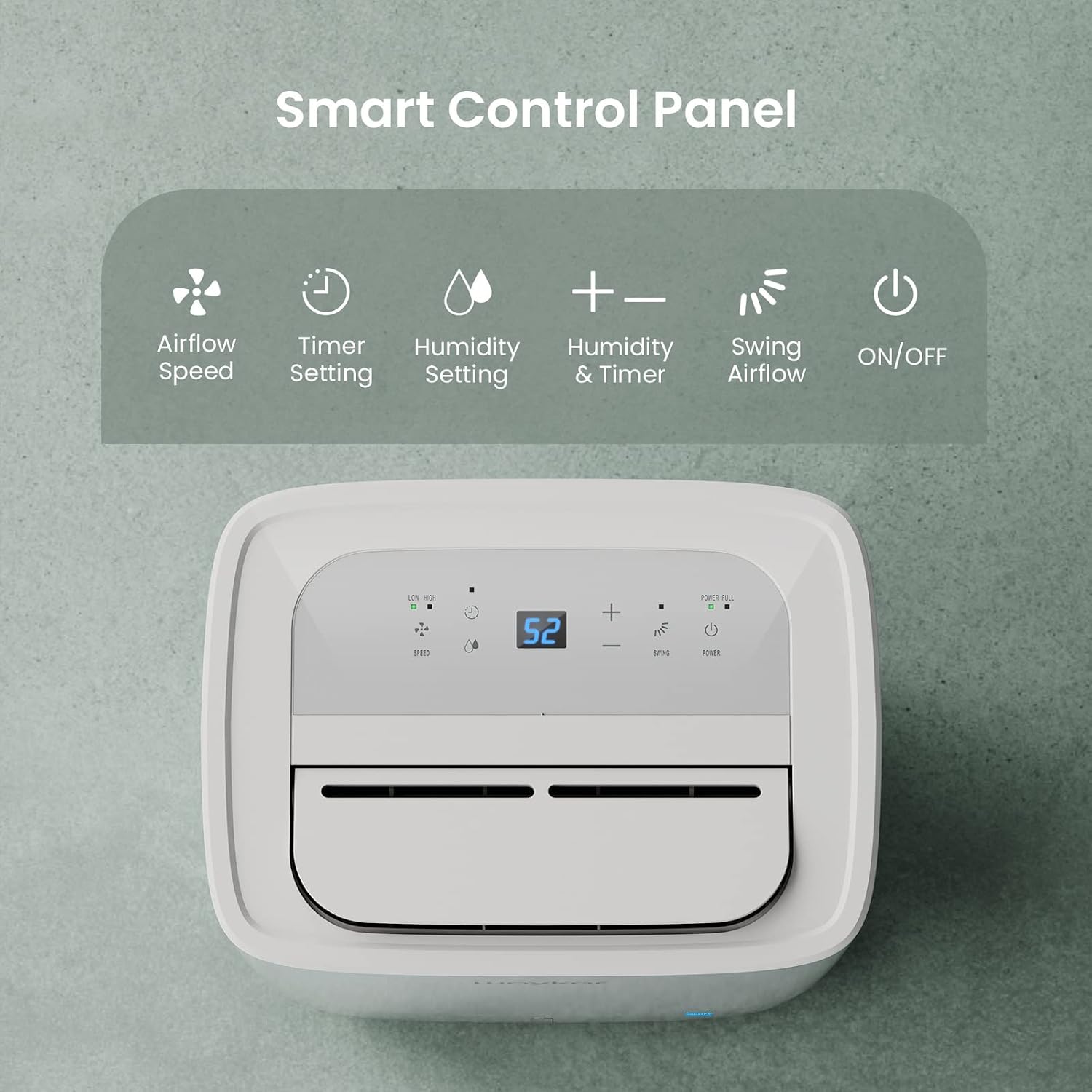
Figure 4.1: Smart Control Panel with buttons for Airflow Speed, Timer Setting, Humidity Setting, Swing Airflow, and ON/OFF.
4.1 పవర్ ఆన్/ఆఫ్
- నొక్కండి శక్తి యూనిట్ని ఆన్ లేదా ఆఫ్ చేయడానికి బటన్.
4.2 తేమ స్థాయిని సెట్ చేయడం
- నొక్కండి + or - buttons to adjust the desired humidity level between 30% and 80% Relative Humidity (RH). The unit will operate until the set humidity level is reached, then cycle ON/OFF to maintain it.
4.3 ఫ్యాన్ వేగం
- నొక్కండి వేగం button to toggle between Low and High fan speeds.
4.4 టైమర్ ఫంక్షన్
- నొక్కండి టైమర్ button to set a delay for the unit to turn ON or OFF. The timer can be set from 0.5 to 24 hours.
4.5 Swing Airflow
- నొక్కండి స్వింగ్ button to activate the automatic 30°-90° airflow oscillation. This helps distribute dehumidified air more evenly.
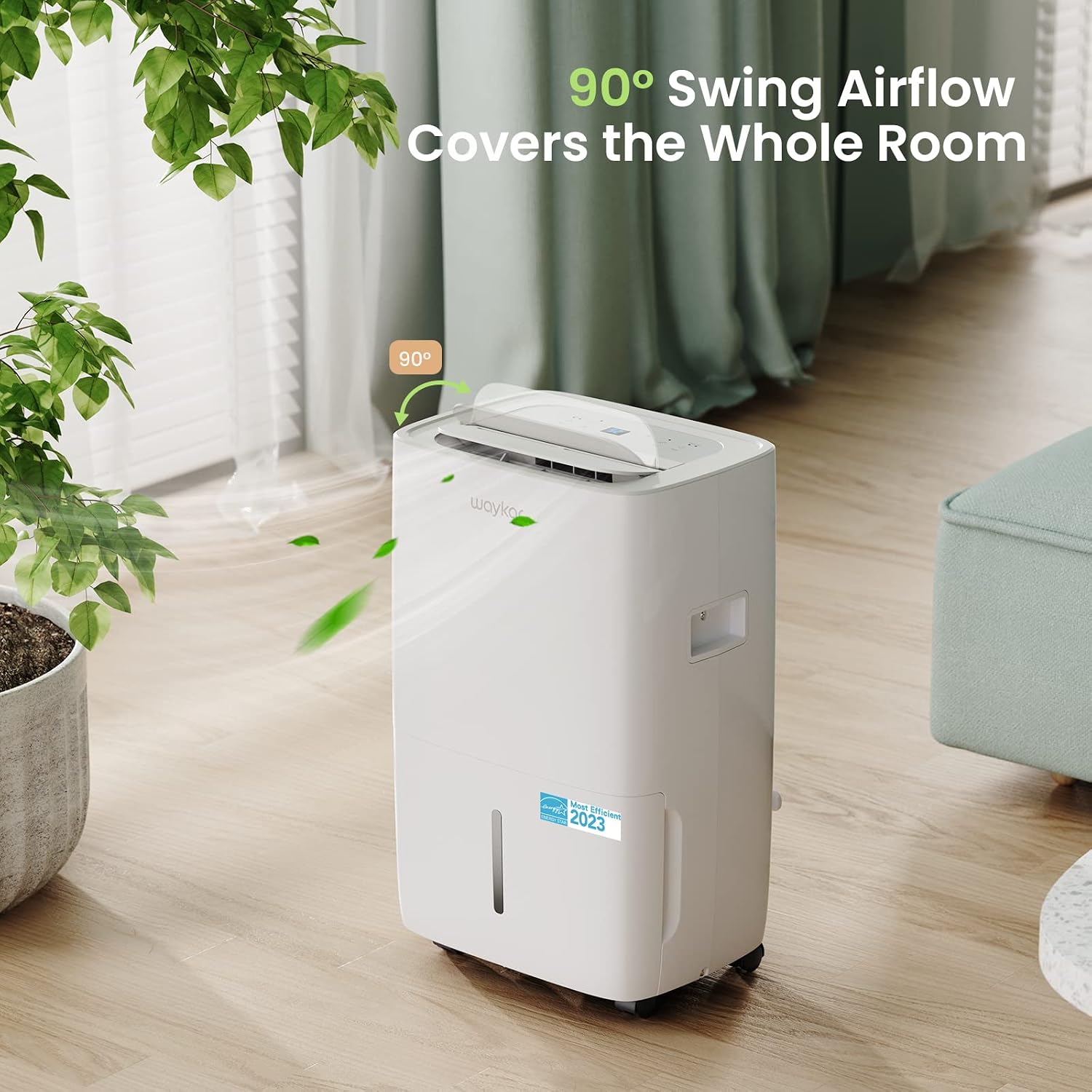
Figure 4.2: The 90° swing airflow feature helps cover the entire room for efficient dehumidification.
4.6 చైల్డ్ లాక్
- చైల్డ్ లాక్ని యాక్టివేట్ చేయడానికి, నొక్కి పట్టుకోండి టైమర్ button for 3 seconds. The control panel will be locked to prevent accidental changes. Repeat to unlock.
4.7 Auto Defrost and Memory Restart
- The unit features an automatic defrost function that activates when frost builds up on the evaporator coils, ensuring efficient operation in cooler environments.
- ఒక పవర్ విషయంలో outage, the Memory Restart function will automatically resume the previous settings once power is restored.
5. డ్రైనేజీ ఎంపికలు
The Waykar dehumidifier offers two convenient drainage methods:
5.1 మాన్యువల్ డ్రైనేజీ (నీటి ట్యాంక్)
- When the 1.14-gallon (4.3L) water tank is full, the unit will automatically shut off and an indicator light will illuminate on the control panel.
- యూనిట్ ముందు నుండి వాటర్ ట్యాంక్ను జాగ్రత్తగా బయటకు తీయండి.
- సేకరించిన నీటిని ఖాళీ చేయండి.
- ఖాళీ ట్యాంక్ను యూనిట్లోకి తిరిగి జారండి, అది స్థానంలో క్లిక్ అయ్యే వరకు ఉంచండి. అప్పుడు యూనిట్ తిరిగి పనిచేయడం ప్రారంభిస్తుంది.
5.2 నిరంతర డ్రైనేజీ (డ్రెయిన్ హోస్)
- For continuous operation without needing to empty the tank, attach the included 3.3 ft (1 m) drain hose to the drainage outlet at the back of the unit.
- Ensure the hose is securely tightened to prevent leaks.
- Direct the other end of the hose to a suitable drain (e.g., floor drain, sink). Ensure the hose is sloped downwards to allow gravity drainage.

Figure 5.1: Illustration of both manual drainage (left) and continuous drainage (right) options.
6. నిర్వహణ
క్రమం తప్పకుండా నిర్వహణ మీ డీహ్యూమిడిఫైయర్ యొక్క ఉత్తమ పనితీరు మరియు దీర్ఘాయువును నిర్ధారిస్తుంది.
6.1 ఎయిర్ ఫిల్టర్ను శుభ్రపరచడం
The washable air filter should be cleaned regularly (approximately every 250 hours of operation or when the filter indicator light illuminates) to maintain efficiency.
- యూనిట్ను ఆపివేసి, పవర్ అవుట్లెట్ నుండి దాన్ని అన్ప్లగ్ చేయండి.
- యూనిట్ వెనుక నుండి ఎయిర్ ఫిల్టర్ను తొలగించండి.
- ఫిల్టర్ను గోరువెచ్చని, సబ్బు నీటితో కడగాలి. బాగా కడగాలి.
- ఫిల్టర్ను యూనిట్లోకి తిరిగి చొప్పించే ముందు పూర్తిగా గాలిలో ఆరనివ్వండి.
- Once the filter is reinstalled, press and hold the ఫిల్టర్ చేయండి button for 3 seconds to reset the filter indicator.

Figure 6.1: The detachable and washable water tank, featuring a visible water level indicator.
6.2 వాటర్ ట్యాంక్ శుభ్రపరచడం
Clean the water tank periodically to prevent mold and bacteria growth.
- యూనిట్ నుండి నీటి ట్యాంక్ తొలగించండి.
- ట్యాంక్ను గోరువెచ్చని నీరు మరియు తేలికపాటి డిటర్జెంట్తో కడగాలి.
- దానిని తిరిగి డీహ్యూమిడిఫైయర్లో ఉంచే ముందు పూర్తిగా కడిగి ఆరబెట్టండి.
6.3 బాహ్య క్లీనింగ్
- యూనిట్ యొక్క బాహ్య భాగాన్ని మృదువైన, డితో తుడవండిamp వస్త్రం. కఠినమైన రసాయనాలు లేదా రాపిడి క్లీనర్లను ఉపయోగించవద్దు.
7. ట్రబుల్షూటింగ్ గైడ్
కస్టమర్ సపోర్ట్ను సంప్రదించే ముందు, దయచేసి ఈ క్రింది సాధారణ సమస్యలు మరియు పరిష్కారాలను చూడండి:
| సమస్య | సాధ్యమైన కారణం | పరిష్కారం | ||||||||||
|---|---|---|---|---|---|---|---|---|---|---|---|---|
| Dehumidifier does not turn ON | No power supply; Power cord not plugged in; Water tank full or incorrectly installed. | Check power outlet; Plug in power cord securely; Empty and correctly reinstall water tank. | ||||||||||
| Unit is running but not dehumidifying | ఎయిర్ ఫిల్టర్ మూసుకుపోయింది; గది ఉష్ణోగ్రత చాలా తక్కువగా ఉంది; తేమ చాలా ఎక్కువగా ఉంది. | Clean air filter; Ensure room temperature is above 5°C (41°F); Lower desired humidity setting. | ||||||||||
| యూనిట్ ధ్వనించేది | యూనిట్ సమతల ఉపరితలంపై లేదు; ఎయిర్ ఫిల్టర్ మూసుకుపోయింది. | యూనిట్ను చదునైన, స్థిరమైన ఉపరితలంపై ఉంచండి; గాలి ఫిల్టర్ను శుభ్రం చేయండి. | ||||||||||
| యూనిట్ నుండి నీరు లీక్ అవుతుంది | Water tank incorrectly installed; Drain hose not securely attached (continuous drainage). | Reinstall water tank correctly; Securely tighten drain hose connection. | ||||||||||
ఎర్రర్ కోడ్
సంబంధిత పత్రాలు - JD025CE-80-CA
|


