పరిచయం
This user manual provides detailed instructions for the operation and maintenance of your Jensen CD-660 Portable Stereo CD Player Boombox. Please read this manual thoroughly before using the device to ensure proper function and to maximize your listening experience. Keep this manual for future reference.
ముఖ్యమైన భద్రతా సూచనలు
విద్యుత్ షాక్, అగ్ని ప్రమాదం లేదా గాయం ప్రమాదాన్ని తగ్గించడానికి, ఎల్లప్పుడూ ఈ ప్రాథమిక భద్రతా జాగ్రత్తలను అనుసరించండి:
- ఈ ఉపకరణాన్ని వర్షం లేదా తేమకు బహిర్గతం చేయవద్దు.
- ఏ వెంటిలేషన్ ఓపెనింగ్లను నిరోధించవద్దు.
- రేడియేటర్లు, హీట్ రిజిస్టర్లు, స్టవ్లు లేదా ఇతర ఉపకరణాలు (సహా ampలిఫైయర్లు) వేడిని ఉత్పత్తి చేస్తాయి.
- పవర్ కార్డ్ను నడవకుండా లేదా పించ్ చేయకుండా రక్షించండి.
- తయారీదారు పేర్కొన్న జోడింపులు/యాక్సెసరీలను మాత్రమే ఉపయోగించండి.
- మెరుపు తుఫానుల సమయంలో లేదా ఎక్కువ కాలం ఉపయోగించనప్పుడు ఈ ఉపకరణాన్ని అన్ప్లగ్ చేయండి.
- అన్ని సేవలను అర్హత కలిగిన సేవా సిబ్బందికి సూచించండి.
ప్యాకేజీ విషయాలు
క్రింద జాబితా చేయబడిన అన్ని వస్తువులు మీ ప్యాకేజీలో చేర్చబడ్డాయని ధృవీకరించండి:
- Jensen CD-660 Portable Stereo CD Player Boombox
- AC అడాప్టర్ (120V)
- యజమాని మాన్యువల్
ఉత్పత్తి ముగిసిందిview
Familiarize yourself with the various parts and controls of your Jensen CD-660 boombox.
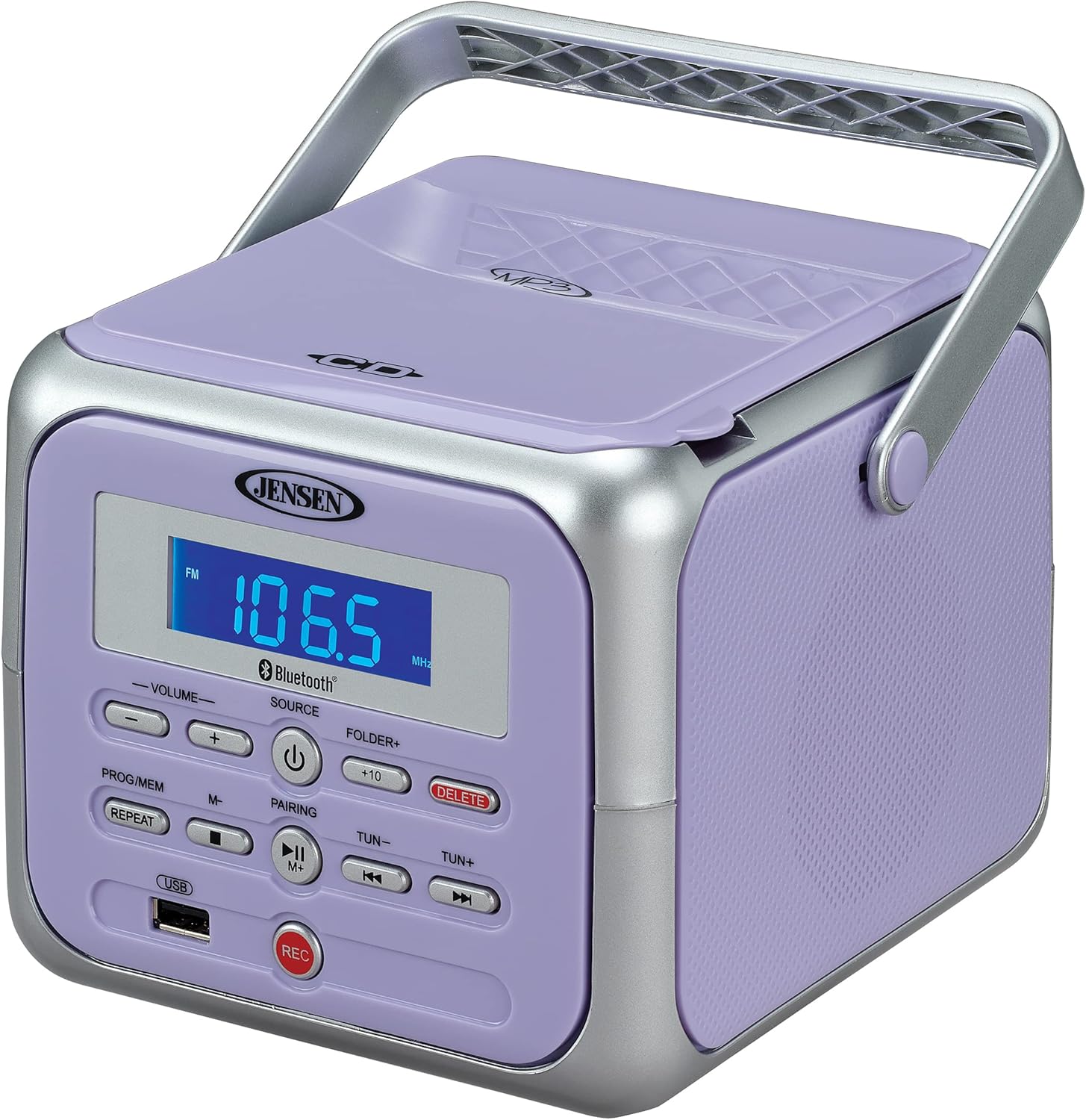
మూర్తి 1: ముందు view of the Jensen CD-660 with the carrying handle extended. This image displays the main control panel, including the display screen, volume controls, source selection, and playback buttons.

మూర్తి 2: ముందు view of the Jensen CD-660 with the carrying handle folded down. This perspective highlights the compact design and the arrangement of buttons and the LCD display.

మూర్తి 3: టాప్ view of the Jensen CD-660 with the CD compartment lid open, revealing the CD tray. This illustrates the top-loading mechanism for disc insertion.
కంట్రోల్ ప్యానెల్ ఫీచర్లు:
- LCD డిస్ప్లే: Shows current mode, track number, frequency, and other information.
- వాల్యూమ్ +/- బటన్లు: Adjust the audio output level.
- మూలాధార బటన్: Selects between CD, Bluetooth, FM Radio, and Aux-in modes.
- పవర్ బటన్: యూనిట్ని ఆన్ లేదా ఆఫ్ చేస్తుంది.
- PROG/MEM Button: Programs CD tracks or stores FM radio presets.
- రిపీట్ బటన్: ప్రస్తుత ట్రాక్ లేదా అన్ని ట్రాక్లను పునరావృతం చేస్తుంది.
- PAIRING Button: బ్లూటూత్ జత చేసే మోడ్ను ప్రారంభిస్తుంది.
- ప్లే/పాజ్ బటన్: ప్లేబ్యాక్ను ప్రారంభిస్తుంది లేదా పాజ్ చేస్తుంది.
- STOP బటన్: ప్లేబ్యాక్ను ఆపివేస్తుంది.
- SKIP/SEARCH Buttons (◀◀ / ▶▶): ట్రాక్లను దాటవేస్తుంది లేదా ట్రాక్లోని శోధనలను చేస్తుంది.
- TUN +/- Buttons: Tunes FM radio frequency.
- FOLDER+ Button: Navigates to the next folder on a USB device.
- +10 Button: Skips 10 tracks forward on CD/USB.
- తొలగించు బటన్: రికార్డ్ చేసిన వాటిని తొలగిస్తుంది fileUSB నుండి s.
- REC బటన్: Initiates recording to a USB flash drive.
- USB పోర్ట్: For USB flash drive playback and recording.
- ఆక్స్-ఇన్ జాక్: బాహ్య ఆడియో పరికరాలను కనెక్ట్ చేస్తుంది.
- హెడ్ఫోన్ జాక్: ప్రైవేట్ వినడం కోసం.
సెటప్
యూనిట్కు శక్తిని అందిస్తోంది
The Jensen CD-660 can be powered by either the included AC adapter or batteries.
AC పవర్ ఆపరేషన్:
- Plug the AC adapter into the AC IN jack located on the back of the unit.
- AC అడాప్టర్ యొక్క మరొక చివరను ప్రామాణిక 120V AC వాల్ అవుట్లెట్లోకి ప్లగ్ చేయండి.
బ్యాటరీ పవర్ ఆపరేషన్:
For portable use, the unit requires 6 x 'C' (UM-2) batteries (not included).
- యూనిట్ దిగువన ఉన్న బ్యాటరీ కంపార్ట్మెంట్ కవర్ను తెరవండి.
- కంపార్ట్మెంట్ లోపల సూచించిన విధంగా సరైన ధ్రువణత (+/-) ఉండేలా చూసుకుంటూ 6 'C' సైజు బ్యాటరీలను చొప్పించండి.
- బ్యాటరీ కంపార్ట్మెంట్ కవర్ను సురక్షితంగా మూసివేయండి.
గమనిక: Disconnect the AC adapter when operating on battery power. Remove batteries if the unit will not be used for an extended period.
ఆపరేటింగ్ సూచనలు
సాధారణ ఆపరేషన్:
- నొక్కండి శక్తి యూనిట్ని ఆన్ చేయడానికి బటన్.
- నొక్కండి మూలం button repeatedly to select your desired mode (CD, Bluetooth, FM, USB, AUX).
- ఉపయోగించి వాల్యూమ్ను సర్దుబాటు చేయండి వాల్యూమ్ +/- బటన్లు.
CD ప్లేబ్యాక్:
The unit supports CD, CD-R/RW, MP3, and WMA disc formats.
- CD కంపార్ట్మెంట్ మూతను తెరవండి.
- లేబుల్ వైపు పైకి ఎదురుగా ఉండేలా CD ని స్పిండిల్ పై ఉంచండి.
- CD కంపార్ట్మెంట్ మూతను మూసివేయండి.
- నొక్కండి మూలం CD మోడ్ను ఎంచుకోవడానికి బటన్.
- నొక్కండి ప్లే/పాజ్ చేయండి ప్లేబ్యాక్ ప్రారంభించడానికి బటన్.
- ఉపయోగించండి స్కిప్ / సెర్చ్ buttons (◀◀ / ▶▶) to navigate tracks.
- నొక్కండి ఆపు ప్లేబ్యాక్ ఆపడానికి బటన్.
బ్లూటూత్ ఆపరేషన్:
మీ బ్లూటూత్-ప్రారంభించబడిన పరికరం నుండి వైర్లెస్గా ఆడియోను ప్రసారం చేయండి.
- నొక్కండి మూలం బ్లూటూత్ మోడ్ను ఎంచుకోవడానికి బటన్. డిస్ప్లే "BT" మరియు ఫ్లాష్ను చూపుతుంది, ఇది జత చేసే మోడ్ను సూచిస్తుంది.
- మీ బ్లూటూత్ పరికరంలో, బ్లూటూత్ని ప్రారంభించి, అందుబాటులో ఉన్న పరికరాల కోసం వెతకండి.
- Select "JENSEN CD-660" from the list of devices.
- Once paired, the display will stop flashing and show "BT".
- Start playing audio on your connected device.
- ఉపయోగించండి ప్లే/పాజ్ చేయండి మరియు స్కిప్ / సెర్చ్ buttons on the boombox or your device to control playback.
FM రేడియో:
మీకు ఇష్టమైన FM రేడియో స్టేషన్లను వినండి.
- నొక్కండి మూలం FM రేడియో మోడ్ను ఎంచుకోవడానికి బటన్.
- Extend the FM wire antenna for optimal reception.
- నొక్కండి ట్యూన్ +/- స్టేషన్కు మాన్యువల్గా ట్యూన్ చేయడానికి బటన్లు.
- నొక్కండి మరియు పట్టుకోండి ట్యూన్ +/- తదుపరి అందుబాటులో ఉన్న స్టేషన్కు ఆటోమేటిక్ స్కానింగ్ కోసం బటన్లు.
Storing and Recalling Presets:
The unit can store up to 30 FM presets.
- కావలసిన FM స్టేషన్కు ట్యూన్ చేయండి.
- నొక్కండి PROG / MEM button. The display will show a flashing preset number.
- ఉపయోగించండి స్కిప్ / సెర్చ్ buttons (◀◀ / ▶▶) to select the desired preset number.
- నొక్కండి PROG / MEM స్టేషన్ను నిర్ధారించడానికి మరియు సేవ్ చేయడానికి మళ్ళీ బటన్ను నొక్కండి.
- ప్రీసెట్ను రీకాల్ చేయడానికి, PROG / MEM button repeatedly to cycle through stored stations.
USB ప్లేబ్యాక్:
Play MP3, WAV, or FLAC audio fileఒక USB ఫ్లాష్ డ్రైవ్ నుండి.
- USB పోర్టులో USB ఫ్లాష్ డ్రైవ్ను చొప్పించండి.
- నొక్కండి మూలం USB మోడ్ని ఎంచుకోవడానికి బటన్.
- యూనిట్ స్వయంచాలకంగా మొదటి అనుకూల ఆడియోను ప్లే చేయడం ప్రారంభిస్తుంది. file.
- ఉపయోగించండి స్కిప్ / సెర్చ్ buttons (◀◀ / ▶▶) to navigate tracks.
- ఉపయోగించండి ఫోల్డర్+ button to navigate between folders on the USB drive.
- ది +10 button can be used to skip 10 tracks forward.
USB రికార్డింగ్:
Record audio directly to a USB flash drive from CD, FM Radio, Aux-in, or Bluetooth sources.
- USB పోర్టులో USB ఫ్లాష్ డ్రైవ్ను చొప్పించండి.
- Select the desired audio source (CD, FM, AUX, or Bluetooth).
- Start playback of the audio you wish to record.
- నొక్కండి REC button to begin recording. The display will indicate recording status.
- నొక్కండి REC రికార్డింగ్ ఆపివేయడానికి మళ్లీ బటన్.
- రికార్డ్ చేసిన వాటిని తొలగించడానికి file, కు నావిగేట్ చేయండి file in USB playback mode and press the తొలగించు బటన్.
ఆక్స్-ఇన్ కనెక్షన్:
Connect external audio devices like smartphones or tablets.
- Connect one end of a 3.5mm audio cable (not included) to the Aux-in jack on the boombox.
- కేబుల్ యొక్క మరొక చివరను హెడ్ఫోన్ జాక్ లేదా మీ బాహ్య పరికరం యొక్క ఆడియో అవుట్పుట్కు కనెక్ట్ చేయండి.
- నొక్కండి మూలం button to select Aux-in mode.
- Start playing audio on your external device.
- Adjust the volume on both the boombox and your external device for optimal sound.
నిర్వహణ
యూనిట్ శుభ్రపరచడం:
- యూనిట్ యొక్క బాహ్య భాగాన్ని మృదువైన, డితో తుడవండిamp గుడ్డ. రాపిడి క్లీనర్లు లేదా ద్రావకాలు ఉపయోగించవద్దు.
- CD లెన్స్ కోసం, ప్రత్యేకమైన CD లెన్స్ క్లీనర్ డిస్క్ను ఉపయోగించండి.
బ్యాటరీ సంరక్షణ:
- లీకేజీని నివారించడానికి యూనిట్ ఎక్కువ కాలం ఉపయోగించబడకపోతే బ్యాటరీలను తీసివేయండి.
- పాత మరియు కొత్త బ్యాటరీలు లేదా వివిధ రకాల బ్యాటరీలను కలపవద్దు.
ట్రబుల్షూటింగ్
If you encounter issues with your Jensen CD-660, refer to the following table for common problems and solutions.
| సమస్య | సాధ్యమైన కారణం | పరిష్కారం |
|---|---|---|
| శక్తి లేదు | AC అడాప్టర్ కనెక్ట్ చేయబడలేదు; బ్యాటరీలు అయిపోయాయి లేదా తప్పుగా చొప్పించబడ్డాయి. | Ensure AC adapter is securely plugged in; Replace batteries or check polarity. |
| శబ్దం లేదు | వాల్యూమ్ చాలా తక్కువగా ఉంది; తప్పు మూలం ఎంచుకోబడింది; హెడ్ఫోన్లు కనెక్ట్ చేయబడ్డాయి. | Increase volume; Select correct source; Disconnect headphones. |
| CD ప్లే కావడం లేదు | CD inserted incorrectly; Disc is dirty or scratched; CD compartment not closed. | Insert CD with label side up; Clean or replace disc; Close compartment securely. |
| బ్లూటూత్ జత చేయడం విఫలమైంది | Device too far; Bluetooth not enabled on external device; Boombox not in pairing mode. | Move device closer; Enable Bluetooth; Ensure boombox is in BT pairing mode. |
| FM రిసెప్షన్ పేలవంగా ఉంది | యాంటెన్నా విస్తరించబడలేదు; సిగ్నల్ బలహీనంగా ఉంది. | Fully extend the FM wire antenna; Reposition the unit for better reception. |
| USB ప్లేబ్యాక్ సమస్యలు | మద్దతు లేదు file format; USB drive not properly inserted or corrupted. | నిర్ధారించండి files are MP3/WAV/FLAC; Reinsert USB drive; Try a different USB drive. |
స్పెసిఫికేషన్లు
| ఫీచర్ | వివరాలు |
|---|---|
| మోడల్ సంఖ్య | CD-660 |
| శక్తి మూలం | AC 120V (included adapter) or 6 x 'C' (UM-2) batteries (not included) |
| కనెక్టివిటీ | Bluetooth 5.1 (A2DP, AVRCP), USB, Aux-in |
| CD అనుకూలత | CD, CD-R/RW, MP3, WMA |
| USB ప్లేబ్యాక్ | MP3, WAV, FLAC |
| FM రేడియో | Stereo Receiver with 30 Presets, PLL Digital Tuning |
| కొలతలు (W x H x D) | 6.38" x 5.2" x 6.57" (16.2 సెం.మీ x 13.2 సెం.మీ x 16.7 సెం.మీ) |
| బరువు | సుమారు 2.46 పౌండ్లు (1.12 కిలోలు) |
వారంటీ మరియు మద్దతు
This Jensen CD-660 Portable Stereo CD Player Boombox comes with a manufacturer's warranty. Please refer to the included Owner's Manual for specific details regarding warranty coverage, terms, and conditions. For technical support or service inquiries, please contact Jensen customer service directly. Contact information can typically be found in the Owner's Manual or on the official Jensen webసైట్.


