పరిచయం
Thank you for choosing the GYMAX Foldable Desk Treadmill. This manual provides essential information for the safe and efficient use, setup, operation, and maintenance of your new fitness equipment. Please read this manual thoroughly before initial use and retain it for future reference.
ముఖ్యమైన భద్రతా సూచనలు
- ఏదైనా వ్యాయామ కార్యక్రమాన్ని ప్రారంభించే ముందు ఎల్లప్పుడూ వైద్యుడిని సంప్రదించండి.
- ఆపరేషన్ సమయంలో పిల్లలు మరియు పెంపుడు జంతువులను ట్రెడ్మిల్ నుండి దూరంగా ఉంచండి.
- ట్రెడ్మిల్ను చదునైన, స్థిరమైన ఉపరితలంపై ఉంచండి, దాని చుట్టూ తగినంత క్లియరెన్స్ ఉండాలి.
- తగిన అథ్లెటిక్ పాదరక్షలు మరియు దుస్తులు ధరించండి.
- ట్రెడ్మిల్కు దెబ్బతిన్న త్రాడు లేదా ప్లగ్ ఉంటే, లేదా అది సరిగ్గా పని చేయకపోతే దాన్ని ఆపరేట్ చేయవద్దు.
- Use the safety key at all times. In case of emergency, the safety key will immediately stop the treadmill.
- Maximum user weight capacity: 265 lbs.
సెటప్ మరియు అసెంబ్లీ
The GYMAX Foldable Desk Treadmill is designed for minimal assembly. Most components come pre-assembled. A free ratchet wrench is included for any necessary adjustments.
ట్రెడ్మిల్ను విప్పుతోంది
- ట్రెడ్మిల్ను దాని ప్యాకేజింగ్ నుండి జాగ్రత్తగా తొలగించండి.
- Unscrew the platform bolts to unfold the running deck.
- Loosen the handlebar screws to raise the handlebars to the upright position.
- ఉపయోగించే ముందు అన్ని స్క్రూలు సురక్షితంగా బిగించబడ్డాయని నిర్ధారించుకోండి.

Figure 1: The 3-step folding process of the GYMAX treadmill, illustrating how to unscrew the platform, loosen handlebar screws, and achieve complete folding for compact storage. Built-in transport wheels are also shown.
Adjusting Desktop Height
The treadmill features a desktop with 6 adjustable height levels, ranging from 27.5 inches to 40.5 inches (height from running surface to handrails). Use the provided scales on the handrails to set your preferred working height.

Figure 2: The 6-level height adjustable handrail, demonstrating the various height settings available for the desktop, measured from the running surface to the handrails.
ఆపరేటింగ్ సూచనలు
నియంత్రణ ప్యానెల్ మరియు ప్రదర్శన
The intuitive LED display on the control panel shows essential exercise data including time, calories burned, distance, heart rate, and speed. The control panel is designed with a 45-degree adjustable angle for optimal viewing by users of different heights.
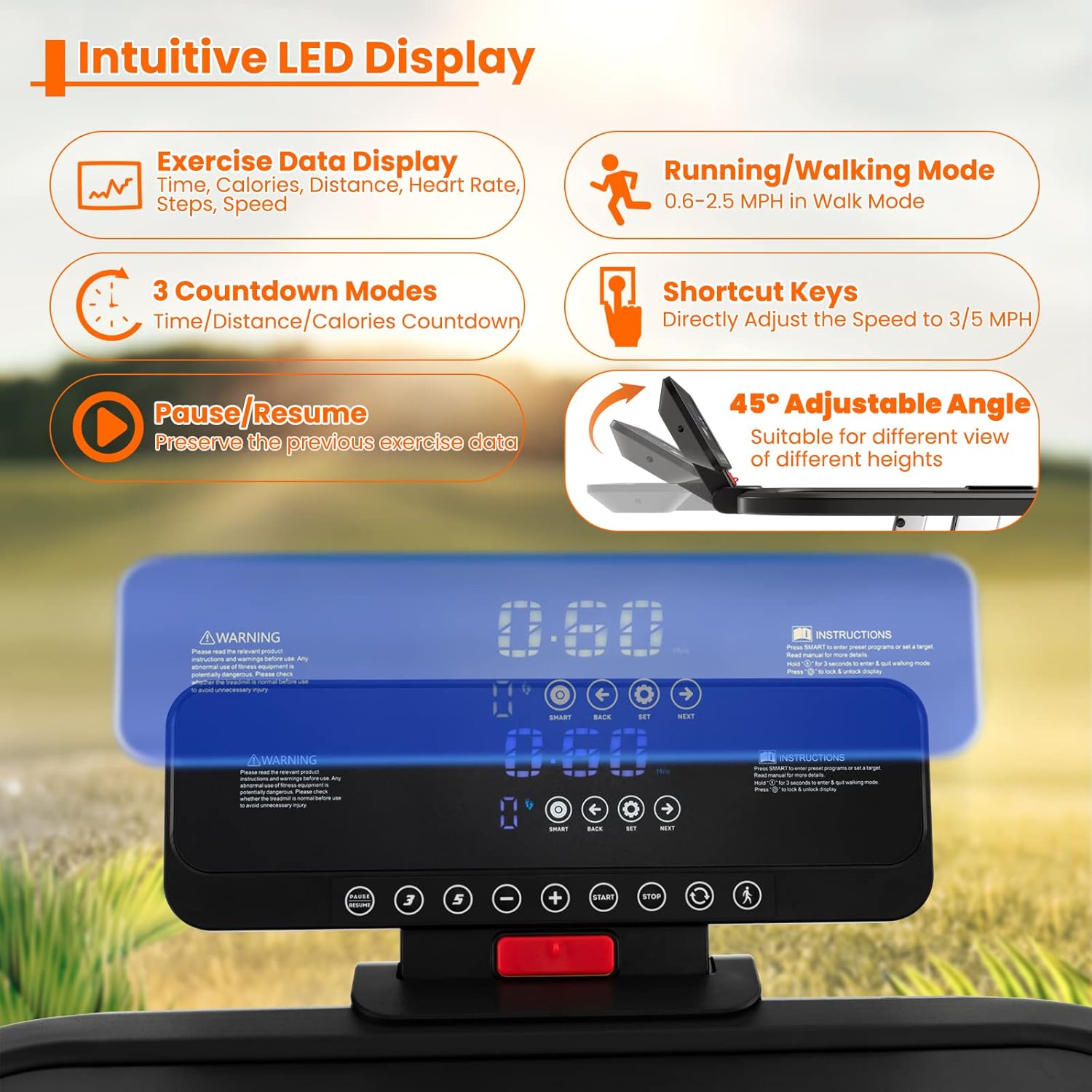
Figure 3: The intuitive LED display and control panel, detailing the various buttons for speed adjustment, mode selection (running/walking, countdown), and preset programs.
Speed and Modes
- వేగ పరిధి: 0.6 - 8.6 MPH.
- నడక మోడ్: Specifically designed for speeds between 0.6 - 2.5 MPH.
- రన్నింగ్ మోడ్: For speeds above 2.5 MPH up to 8.6 MPH.
- కౌంట్డౌన్ మోడ్లు: Choose from 3 countdown modes for time, distance, or calories.
- షార్ట్కట్ కీలు: Quickly adjust speed to 3 MPH or 5 MPH.
- పాజ్/రెస్యూమ్: Press to pause your workout and resume later without losing data.
Preset Programs and Smart App
The treadmill includes 25 preset programs (P1-P25) to guide your workouts. These programs offer varied intensity levels to suit different fitness goals.

Figure 4: Visual representation of the 25 preset programs, each with a unique profile to offer diverse workout routines.
Connect the treadmill to the GYMAX app via Bluetooth for enhanced features:
- Access various training courses.
- Create personal sport plans.
- Record and track exercise data.
- Participate in real-time sport rankings and a dynamic community.

Figure 5: The GYMAX app interface, showcasing its capabilities for personalized training, data tracking, and social engagement.
నిర్వహణ
క్రమం తప్పకుండా నిర్వహణ మీ ట్రెడ్మిల్ యొక్క దీర్ఘాయువు మరియు సరైన పనితీరును నిర్ధారిస్తుంది.
- సరళత: The treadmill includes lubricant. Refer to the full user manual for specific instructions on how and when to lubricate the running belt. Proper lubrication is crucial for smooth operation and to prevent wear.
- శుభ్రపరచడం: ట్రెడ్మిల్ను క్రమం తప్పకుండా ప్రకటనతో తుడవండిamp దుమ్ము మరియు చెమట తొలగించడానికి వస్త్రం. రాపిడి క్లీనర్లను ఉపయోగించడం మానుకోండి.
- బెల్ట్ సర్దుబాటు: Periodically check the running belt for proper tension and alignment. Adjust as needed according to the detailed instructions in the complete user manual to prevent slipping or excessive wear.
- తనిఖీ: Routinely inspect all parts for any signs of wear, damage, or loose connections. Tighten any loose bolts or nuts.
ట్రబుల్షూటింగ్
If you encounter any issues with your GYMAX Foldable Desk Treadmill, please refer to the comprehensive troubleshooting section in the full user manual. For problems not covered or if issues persist, contact customer support.
స్పెసిఫికేషన్లు

Figure 6: Detailed product specifications and dimensions of the GYMAX Foldable Desk Treadmill.
| ఫీచర్ | వివరాలు |
|---|---|
| బ్రాండ్ | జిమాక్స్ |
| మోడల్ పేరు | Height Adjustable Folding Treadmill |
| రంగు | నలుపు |
| ఉత్పత్తి కొలతలు (విస్తరించబడ్డాయి) | 55"డి x 26.5"వా x 49.5"హ |
| మడత పరిమాణం | 55" x 26.5" x 5" (L x W x H) |
| వస్తువు బరువు | 87 పౌండ్లు |
| మెటీరియల్ | Metal, ABS, PVC, MDF |
| గరిష్ట వేగం | గంటకు 8.6 మైళ్లు |
| కనిష్ట వేగం | గంటకు 0.6 మైళ్లు |
| గరిష్ట హార్స్ పవర్ | 3 హార్స్ పవర్ |
| ప్రత్యేక లక్షణాలు | Adjustable Height, Bluetooth, Built-In Speaker, Foldable, Portable |
| సిఫార్సు చేసిన ఉపయోగాలు | Home Gym Running, Walking, Jogging, Cardio Training, Weight Loss |
| టార్గెట్ ఆడియన్స్ | పెద్దలు |
| అసెంబ్లీ అవసరం | నం |
| ప్రదర్శన రకం | LED |
| శక్తి మూలం | కార్డెడ్ ఎలక్ట్రిక్ |
| కనెక్టివిటీ టెక్నాలజీ | బ్లూటూత్ |
| చేర్చబడిన భాగాలు | Lubricant, Treadmill, User Manual |
| కొలవబడిన కొలమానాలు | Calories Burned, Distance, Heart Rate, Speed, Time |
| గరిష్ట బరువు సిఫార్సు | 265 పౌండ్లు |
| డెక్ పొడవు | 43.5 అంగుళాలు |
| డెక్ వెడల్పు | 16.5 అంగుళాలు |
| ఇన్పుట్ పవర్ | 110 వాట్స్ |
వారంటీ మరియు మద్దతు
This GYMAX Foldable Desk Treadmill comes with a 3 నెలల వారంటీ కొనుగోలు తేదీ నుండి. వారంటీ క్లెయిమ్ల కోసం దయచేసి మీ కొనుగోలు రుజువును ఉంచుకోండి.
For customer support, technical assistance, or warranty inquiries, please refer to the contact information provided in your purchase documentation or visit the official GYMAX store on Amazon.


