1. పరిచయం
Thank you for choosing the BuTure VC70 Cordless Vacuum Cleaner. This manual provides important information on the safe operation, maintenance, and troubleshooting of your new appliance. Please read this manual thoroughly before first use and keep it for future reference.
2. భద్రతా సూచనలు
అగ్ని ప్రమాదాలు, విద్యుత్ షాక్ లేదా గాయం ప్రమాదాన్ని తగ్గించడానికి విద్యుత్ ఉపకరణాలను ఉపయోగిస్తున్నప్పుడు ఎల్లప్పుడూ ప్రాథమిక భద్రతా జాగ్రత్తలను అనుసరించండి.
- ఆరుబయట లేదా తడి ఉపరితలాలపై ఉపయోగించవద్దు.
- బొమ్మలాగా వాడుకోవడానికి అనుమతించవద్దు. పిల్లలు లేదా సమీపంలో ఉపయోగించినప్పుడు దగ్గరగా శ్రద్ధ అవసరం.
- ఈ మాన్యువల్లో వివరించిన విధంగా మాత్రమే ఉపయోగించండి. తయారీదారు సిఫార్సు చేసిన అటాచ్మెంట్లను మాత్రమే ఉపయోగించండి.
- దెబ్బతిన్న త్రాడు లేదా ప్లగ్తో ఉపయోగించవద్దు. ఉపకరణం సరిగ్గా పని చేయకపోతే, పడిపోయినట్లయితే, పాడైపోయినట్లయితే, ఆరుబయట వదిలివేయబడినట్లయితే లేదా నీటిలో పడిపోయినట్లయితే, దానిని సేవా కేంద్రానికి తిరిగి ఇవ్వండి.
- త్రాడుతో లాగడం లేదా తీసుకెళ్లడం చేయవద్దు, త్రాడును హ్యాండిల్గా ఉపయోగించవద్దు, త్రాడుపై తలుపును మూసివేయండి లేదా పదునైన అంచులు లేదా మూలల చుట్టూ త్రాడును లాగండి. త్రాడుపై ఉపకరణాన్ని నడపవద్దు. వేడిచేసిన ఉపరితలాల నుండి త్రాడును దూరంగా ఉంచండి.
- త్రాడుపై లాగడం ద్వారా అన్ప్లగ్ చేయవద్దు. అన్ప్లగ్ చేయడానికి, ప్లగ్ని పట్టుకోండి, త్రాడు కాదు.
- తడి చేతులతో ప్లగ్ లేదా ఉపకరణాన్ని నిర్వహించవద్దు.
- ఓపెనింగ్స్లో ఏ వస్తువును ఉంచవద్దు. ఏ ఓపెనింగ్ బ్లాక్ చేయబడినా ఉపయోగించవద్దు; దుమ్ము, మెత్తటి, జుట్టు మరియు గాలి ప్రవాహాన్ని తగ్గించే ఏదైనా లేకుండా ఉంచండి.
- జుట్టు, వదులుగా ఉండే దుస్తులు, వేళ్లు మరియు శరీరంలోని అన్ని భాగాలను ఓపెనింగ్స్ మరియు కదిలే భాగాలకు దూరంగా ఉంచండి.
- సిగరెట్లు, అగ్గిపుల్లలు లేదా వేడి బూడిద వంటి కాలుతున్న లేదా ధూమపానం చేసే ఏదైనా తీసుకోవద్దు.
- గ్యాసోలిన్ వంటి మండే లేదా మండే ద్రవాలను తీయడానికి లేదా అవి ఉండే ప్రాంతాల్లో ఉపయోగించవద్దు.
- క్లోరిన్ బ్లీచ్, అమ్మోనియా లేదా డ్రెయిన్ క్లీనర్ వంటి విషపూరిత పదార్థాలను తీసుకోకండి.
- డస్ట్ బ్యాగ్ మరియు/లేదా ఫిల్టర్లు లేకుండా ఉపయోగించవద్దు.
- అన్ప్లగ్ చేయడానికి ముందు అన్ని నియంత్రణలను ఆఫ్ చేయండి.
- మెట్లపై శుభ్రం చేసేటప్పుడు అదనపు జాగ్రత్తలు తీసుకోండి.
- గాజు, మేకులు, స్క్రూలు, నాణేలు మొదలైన గట్టి లేదా పదునైన వస్తువులను తీయడానికి ఉపయోగించవద్దు.
3. ప్యాకేజీ విషయాలు
Carefully unpack your BuTure VC70 and check that all items are present and in good condition. If any items are missing or damaged, please contact customer support.

మూర్తి 3.1: All components of the BuTure VC70 cordless vacuum cleaner, including the main unit, extension wand, floor brush, crevice tool, 2-in-1 brush, wall mount, charger, and spare filter.
- Main Vacuum Body (with dustbin and motor)
- పొడిగింపు మంత్రదండం
- మోటరైజ్డ్ ఫ్లోర్ బ్రష్
- చీలిక సాధనం
- 2-ఇన్-1 బ్రష్ సాధనం
- వాల్ మౌంట్ బ్రాకెట్
- పవర్ అడాప్టర్/ఛార్జర్
- స్పేర్ ఫిల్టర్
- వినియోగదారు మాన్యువల్ (ఈ పత్రం)
4. ఉత్పత్తి ముగిసిందిview
Familiarize yourself with the main parts of your BuTure VC70 vacuum cleaner.

మూర్తి 4.1: The BuTure VC70 cordless vacuum cleaner shown as a stick vacuum, and in handheld configurations with different attachments, along with the wall mount and filters.
- ప్రధాన యూనిట్: Contains the motor, dustbin, and control panel.
- పొడిగింపు మంత్రదండం: నిటారుగా శుభ్రం చేయడానికి ప్రధాన యూనిట్ను ఫ్లోర్ బ్రష్కు కలుపుతుంది.
- మోటరైజ్డ్ ఫ్లోర్ బ్రష్: Features an integrated brush with soft and hard bristles for effective cleaning on various floor types.
- చెత్త కుండీ: దుమ్ము మరియు చెత్తను సేకరించడానికి పారదర్శక కంటైనర్.
- వడపోత వ్యవస్థ: Multi-layer system designed to capture fine dust and allergens.
- LED టచ్ స్క్రీన్: Displays battery level, current mode, and maintenance reminders.
5. సెటప్ మరియు అసెంబ్లీ
Follow these steps to assemble your vacuum cleaner for first use.
5.1 ప్రారంభ ఛార్జింగ్
Before first use, fully charge the battery. The battery is removable for convenient charging.
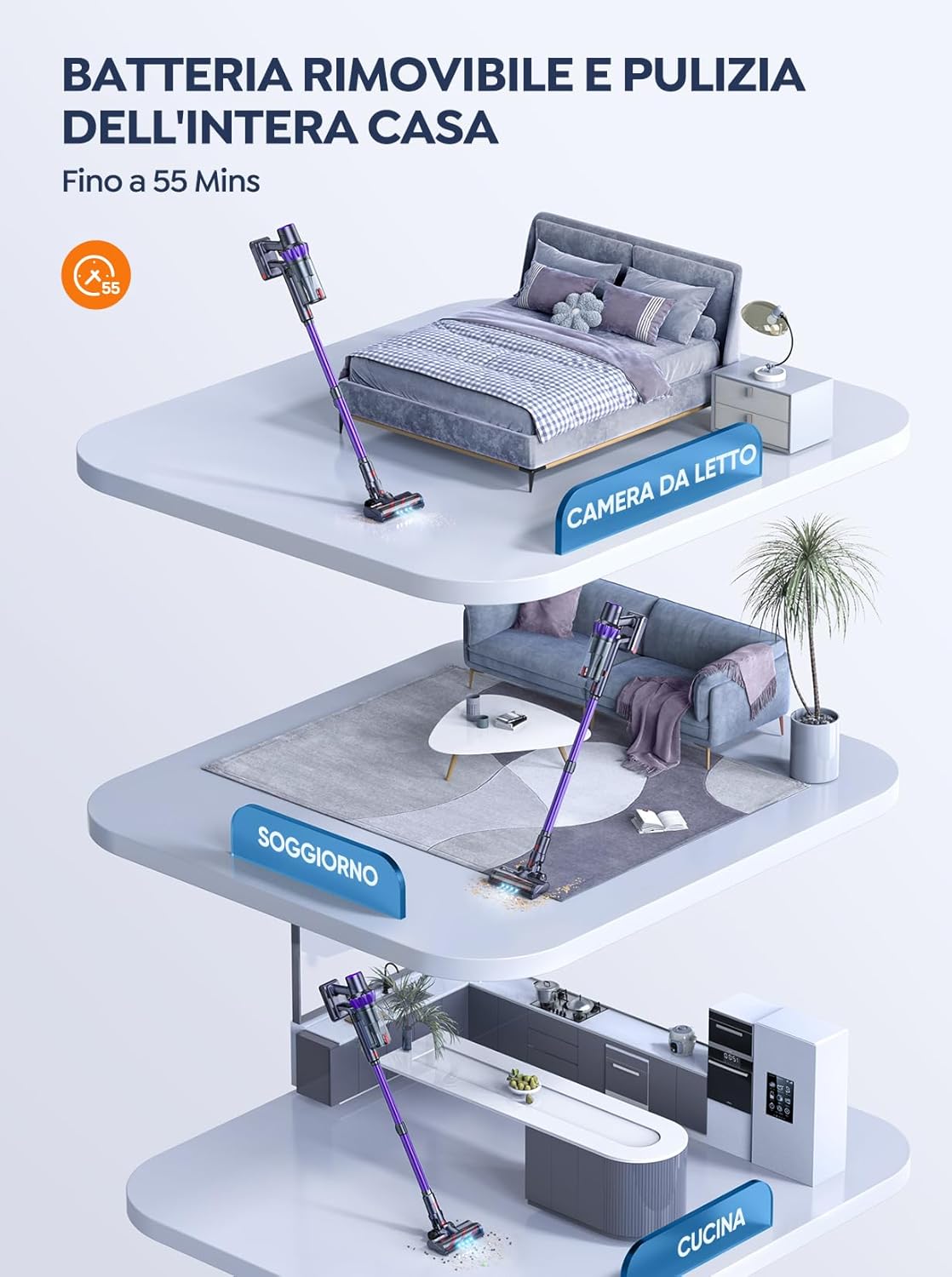
మూర్తి 5.1: The removable battery allows for flexible charging options and extended cleaning time across multiple rooms.
- Connect the power adapter to the charging port on the main unit or directly to the battery if removed.
- అడాప్టర్ను గోడ అవుట్లెట్లోకి ప్లగ్ చేయండి.
- The LED screen will indicate charging status. A full charge typically takes 4-5 hours.
5.2 వాక్యూమ్ను అసెంబుల్ చేయడం
- ఎక్స్టెన్షన్ వాండ్ను అటాచ్ చేయండి: Insert the top end of the extension wand into the main vacuum body until it clicks into place.
- ఫ్లోర్ బ్రష్ను అటాచ్ చేయండి: Insert the bottom end of the extension wand into the motorized floor brush until it clicks into place.
- Attach Accessories (for handheld use): For handheld cleaning, you can directly attach the crevice tool or 2-in-1 brush tool to the main vacuum body.
6. వాక్యూమ్ క్లీనర్ను నిర్వహించడం
Learn how to effectively use your BuTure VC70 for various cleaning tasks.
6.1 పవర్ ఆన్/ఆఫ్ మరియు మోడ్ ఎంపిక

మూర్తి 6.1: The intelligent LED touch screen provides real-time information on battery status and selected cleaning mode.
- పవర్ ఆన్ చేయడానికి: Press the power button on the main unit. The vacuum will start in the default mode.
- మోడ్లను మార్చడానికి: Use the mode selection button on the LED touch screen to cycle through available suction modes (e.g., Eco, Standard, Max, Auto).
- పవర్ ఆఫ్ చేయడానికి: పవర్ బటన్ను మళ్లీ నొక్కండి.
6.2 Intelligent Automatic Suction Mode
The BuTure VC70 features an intelligent automatic suction mode that adjusts power based on floor type.
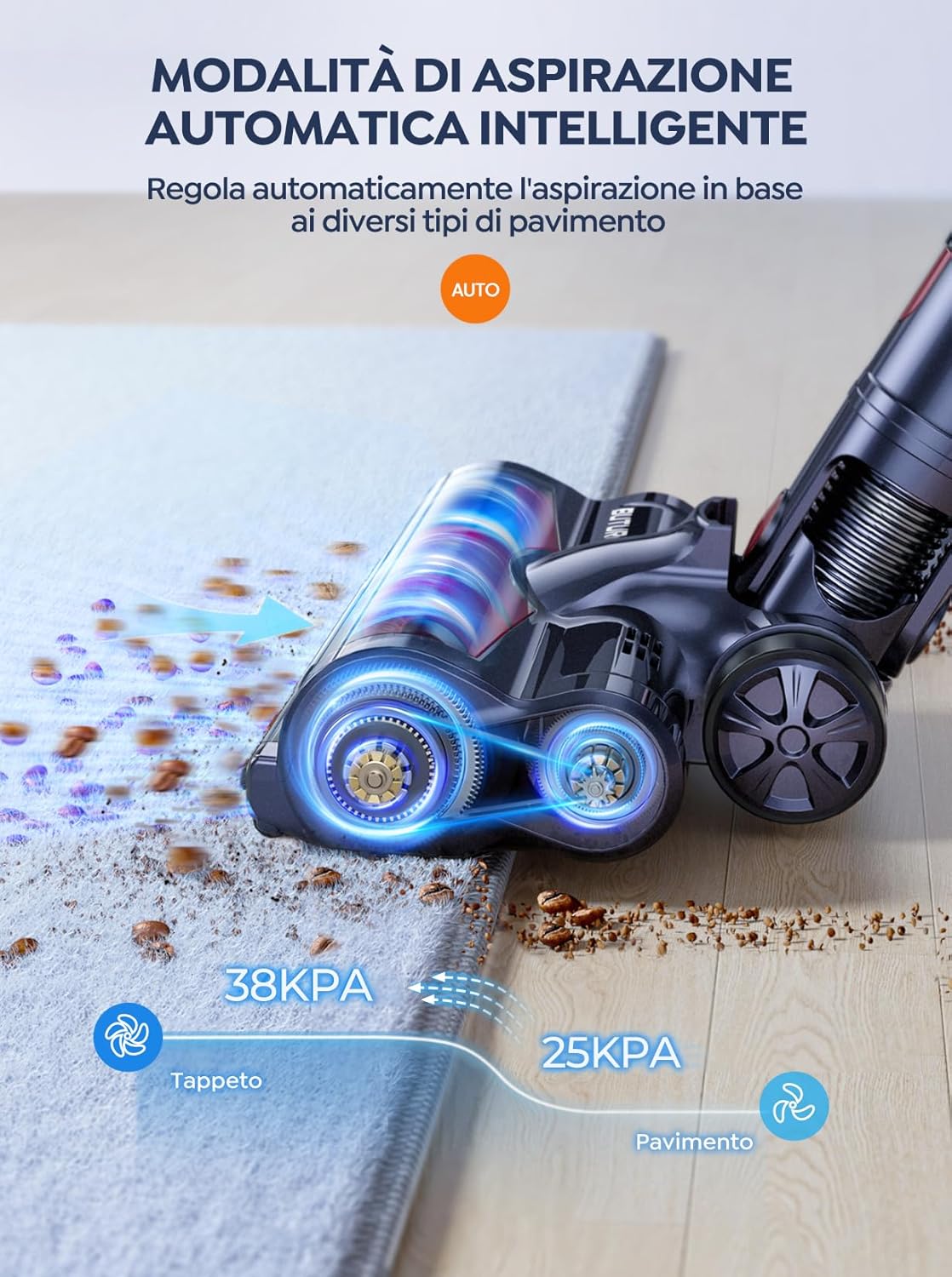
మూర్తి 6.2: The vacuum automatically adjusts suction power, providing 38KPA for carpets and 25KPA for hard floors in Auto mode.
In Auto mode, the vacuum detects the floor type and automatically increases suction for carpets (up to 38KPA) and reduces it for hard floors (25KPA), optimizing cleaning efficiency and battery life.
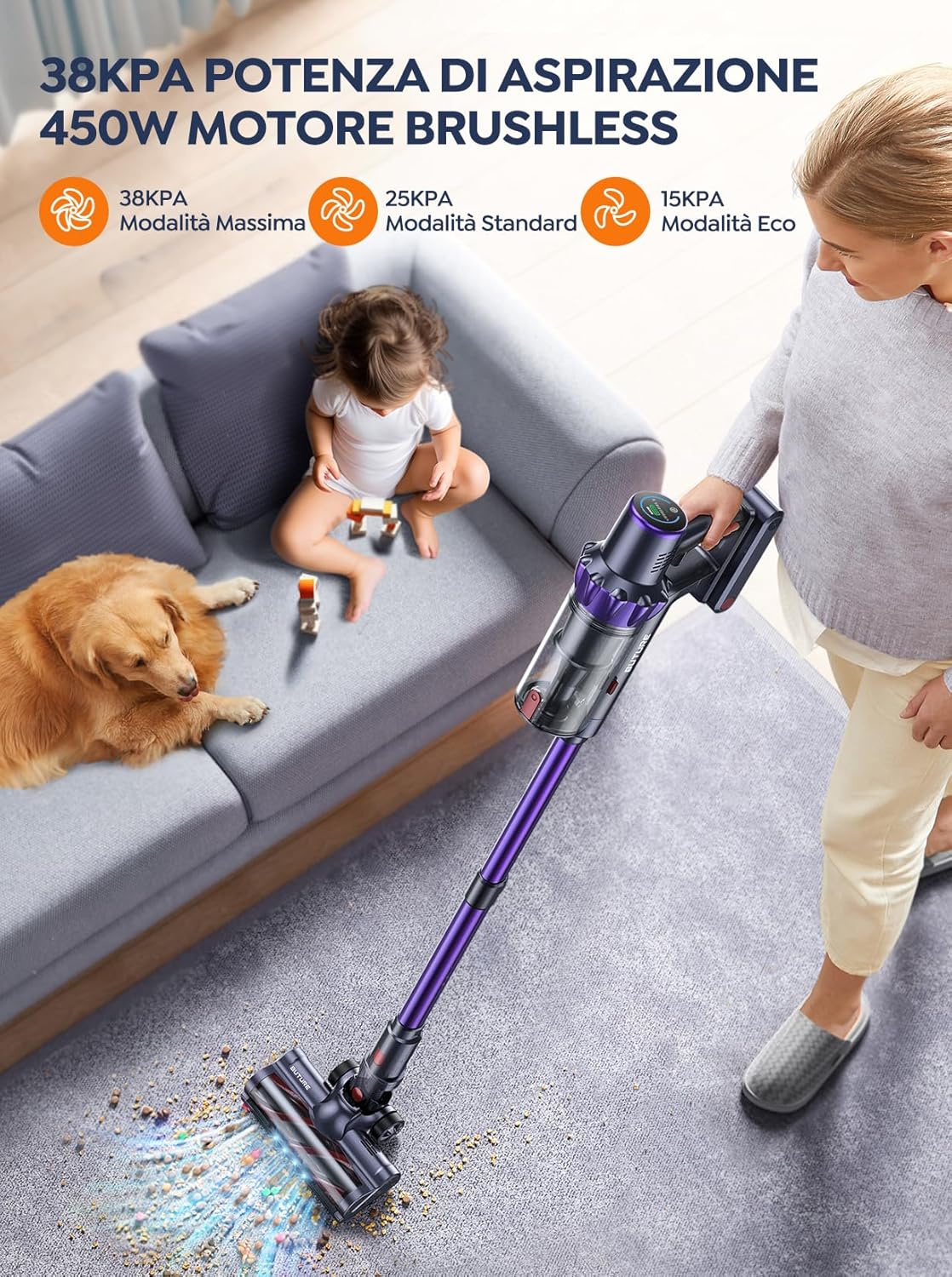
మూర్తి 6.3: The 450W brushless motor delivers powerful suction, with modes including 38KPA Max, 25KPA Standard, and 15KPA Eco.
6.3 అటాచ్మెంట్లను ఉపయోగించడం
- చీలిక సాధనం: ఇరుకైన ఖాళీలు, మూలలు మరియు అంచులకు అనువైనది.
- 2-ఇన్-1 బ్రష్ టూల్: Use the brush for delicate surfaces like upholstery or curtains, and the nozzle for general dusting.
- మోటరైజ్డ్ ఫ్లోర్ బ్రష్: Designed for efficient cleaning of both hard floors and carpets. Its integrated bristles effectively pick up various debris.

మూర్తి 6.4: The motorized floor brush features a combination of soft and hard bristles to effectively clean different types of debris from various floor surfaces.
7. నిర్వహణ
క్రమం తప్పకుండా నిర్వహణ సరైన పనితీరును నిర్ధారిస్తుంది మరియు మీ వాక్యూమ్ క్లీనర్ యొక్క జీవితకాలాన్ని పొడిగిస్తుంది.
7.1 చెత్తబుట్టను ఖాళీ చేయడం
ప్రతి ఉపయోగం తర్వాత లేదా MAX ఫిల్ లైన్ చేరుకున్న తర్వాత డస్ట్బిన్ను ఖాళీ చేయండి.
- ప్రధాన యూనిట్ నుండి దానిని వేరు చేయడానికి డస్ట్బిన్ విడుదల బటన్ను నొక్కండి.
- Open the dustbin lid and empty contents into a trash can.
- మూత మూసివేసి, డస్ట్బిన్ను ప్రధాన యూనిట్కు తిరిగి అటాచ్ చేయండి.
7.2 ఫిల్టర్లను శుభ్రపరచడం
The BuTure VC70 features an advanced multi-layer filtration system. Clean filters regularly to maintain suction power.

మూర్తి 7.1: The advanced multi-layer filtration system captures 99.99% of dust and dirt, ensuring cleaner exhaust air.
- చెత్తబుట్టను తీసివేసి లోపల ఫిల్టర్లను గుర్తించండి.
- వదులుగా ఉన్న దుమ్మును తొలగించడానికి ఫిల్టర్లను సున్నితంగా తట్టండి.
- Rinse the filters under cold running water. Ensure they are completely dry before reinserting (allow 24-48 hours for air drying).
- Replace filters every 3-6 months depending on usage.
7.3 బ్రష్ రోల్ శుభ్రపరచడం
చిక్కుబడ్డ జుట్టు లేదా చెత్త కోసం బ్రష్ రోల్ను క్రమానుగతంగా తనిఖీ చేయండి.
- వాక్యూమ్ను ఆపివేసి, మోటరైజ్డ్ ఫ్లోర్ బ్రష్ను వేరు చేయండి.
- Locate the brush roll access latch/button and open it.
- Remove the brush roll. Use scissors or a cleaning tool to cut and remove any tangled hair or fibers.
- బ్రష్ రోల్ను తిరిగి చొప్పించి, యాక్సెస్ లాచ్ను భద్రపరచండి.
8. ట్రబుల్షూటింగ్
మీ వాక్యూమ్ క్లీనర్తో మీకు సమస్యలు ఎదురైతే, సాధారణ సమస్యలు మరియు పరిష్కారాల కోసం క్రింది పట్టికను చూడండి.
| సమస్య | సాధ్యమైన కారణం | పరిష్కారం |
|---|---|---|
| వాక్యూమ్ ఆన్ చేయదు | బ్యాటరీ ఛార్జ్ చేయబడదు బ్యాటరీ సరిగ్గా అమర్చబడలేదు | బ్యాటరీని పూర్తిగా ఛార్జ్ చేయండి బ్యాటరీ సురక్షితంగా స్థానంలో క్లిక్ చేయబడిందని నిర్ధారించుకోండి |
| తక్కువ చూషణ శక్తి | డస్ట్బిన్ నిండిపోయింది ఫిల్టర్లు అడ్డుపడేవి బ్రష్ రోల్ చిక్కుబడి ఉంది గొట్టం/నాజిల్ మూసుకుపోయింది | డస్ట్బిన్ను ఖాళీ చేయండి ఫిల్టర్లను శుభ్రం చేయండి లేదా భర్తీ చేయండి బ్రష్ రోల్ శుభ్రం చేయండి అడ్డంకులను తనిఖీ చేసి తొలగించండి |
| బ్రష్ రోల్ స్పిన్నింగ్ కాదు | బ్రష్ రోల్ చిక్కుబడి ఉంది బ్రష్ రోల్ మోటార్ సమస్య | బ్రష్ రోల్ శుభ్రం చేయండి సమస్య కొనసాగితే కస్టమర్ సపోర్ట్ను సంప్రదించండి |
| Vacuum stops suddenly | వేడెక్కడం రక్షణ సక్రియం చేయబడింది బ్యాటరీ తక్కువ | Turn off and allow to cool for 30 minutes బ్యాటరీని ఛార్జ్ చేయండి |
9. స్పెసిఫికేషన్లు
Technical specifications for the BuTure VC70 Cordless Vacuum Cleaner.
| ఫీచర్ | స్పెసిఫికేషన్ |
|---|---|
| మోడల్ సంఖ్య | VC70 |
| బ్రాండ్ | బుతురే |
| రేట్ చేయబడిన శక్తి | 450 వాట్స్ |
| వాల్యూమ్tage | 100-240 వోల్ట్లు |
| డస్ట్బిన్ కెపాసిటీ | 1.5 లీటర్లు |
| శబ్దం స్థాయి | 68 డిబి |
| వస్తువు బరువు | 1.81 కిలోగ్రాములు (సుమారు 4 పౌండ్లు) |
| బ్యాటరీ రకం | లిథియం-అయాన్ |
| రంగు | వైలెట్ |
10. వారంటీ మరియు మద్దతు
BuTure products are manufactured to the highest quality standards. For warranty information or technical support, please refer to the warranty card included with your purchase or visit the official BuTure website. Please have your model number (VC70) and purchase details ready when contacting support.


