పరిచయం
Thank you for choosing the NETUM NT-5090 Desktop 2D Barcode Scanner. This device is designed for efficient and versatile barcode scanning in various environments. This manual provides essential information to help you set up, operate, and maintain your scanner for optimal performance.
The NT-5090 scanner offers hands-free operation, supporting both 1D and 2D barcode types, including QR codes, from labels, paper, and digital displays. Its plug-and-play design ensures easy integration with compatible systems.
1. సెటప్
1.1 ప్యాకేజీ విషయాలు
- NETUM NT-5090 Desktop 2D Barcode Scanner
- USB కేబుల్
- వినియోగదారు మాన్యువల్
1.2 స్కానర్ను కనెక్ట్ చేయడం
The NT-5090 scanner features a simple plug-and-play setup via its USB interface. No additional drivers or software installation is required for basic functionality.
- USB కేబుల్ను స్కానర్ పోర్ట్కు కనెక్ట్ చేయండి.
- Plug the other end of the USB cable into an available USB port on your computer (PC, laptop, or POS system).
- The scanner will automatically power on and be recognized by your operating system.

మూర్తి 1.1: The NETUM NT-5090 scanner connected to a laptop, demonstrating its plug-and-play USB setup.
2. ఆపరేటింగ్ సూచనలు
2.1 Hands-Free Scanning
The NT-5090 is designed for hands-free operation, allowing you to place items in front of the scanning window without needing to hold the scanner. This improves efficiency in busy environments.

మూర్తి 2.1: The NT-5090 scanner in a typical retail setting, demonstrating hands-free scanning of a mobile payment QR code.
2.2 Automatic Sensing Mode
The scanner features an automatic sensing function. When a barcode is presented within its scanning field, the scanner will automatically activate and decode the barcode. This rapid recognition enhances operational speed.

మూర్తి 2.2: The scanner's auto-sensing capability, where it automatically detects and scans barcodes when presented.
2.3 మద్దతు ఉన్న బార్కోడ్ రకాలు
The NT-5090 is capable of decoding a wide range of 1D and 2D barcodes, including those that are damaged, distorted, folded, or reflective. It supports common formats such as:
- 1D బార్కోడ్లు: CODE128, EAN8, EAN13, UPCE, UPCA, CODE39, CODABAR, CODE93, ITF25, MATRIX25, CHNPOST25, INDUSTRIAL25, COOP25, STANDARD25, PLESSEY, MSIPLESSEY, CODE11.
- 2D బార్కోడ్లు: QR Code, PDF417.
మూర్తి 2.3: The scanner's ability to decode both 1D and 2D barcodes, including those displayed on mobile screens.
2.4 అప్లికేషన్లు
This scanner is suitable for various commercial and industrial applications due to its robust decoding capabilities and hands-free design.
- సూపర్ మార్కెట్లు మరియు రిటైల్ దుకాణాలు
- రెస్టారెంట్లు మరియు కేఫ్లు
- Pharmacies and Chemists
- Libraries and Warehouses

మూర్తి 2.4: The NT-5090 scanner's versatility across different business environments.
3. నిర్వహణ
3.1 శుభ్రపరచడం
To ensure consistent performance, keep the scanning window clean. Use a soft, lint-free cloth, slightly dampened with water or a mild cleaning solution, to gently wipe the surface. Avoid abrasive materials or harsh chemicals that could scratch the window.
3.2 నిల్వ
Store the scanner in a cool, dry place away from direct sunlight and extreme temperatures. Protect it from dust and moisture when not in use.
4. ట్రబుల్షూటింగ్
If you encounter issues with your NETUM NT-5090 scanner, please refer to the following common solutions:
- స్కానర్ ఆన్ చేయడం లేదు: Ensure the USB cable is securely connected to both the scanner and the computer. Try a different USB port or cable.
- స్కానర్ బార్కోడ్లను చదవడం లేదు:
- బార్కోడ్ శుభ్రంగా, పాడవకుండా మరియు స్పష్టంగా కనిపించేలా చూసుకోండి.
- Position the barcode correctly within the scanning window.
- Check if the scanner's light is active when a barcode is presented.
- Verify that the correct barcode symbologies are enabled in your system settings, if applicable.
- No data output to computer: Confirm the scanner is properly connected and recognized by your computer. Test with a different application or text editor to see if data is being transmitted.
If the problem persists, please contact NETUM customer support for further assistance.
5. స్పెసిఫికేషన్లు
| మోడల్ సంఖ్య | NT-5090 |
| బ్రాండ్ | NETUM |
| కనెక్టివిటీ టెక్నాలజీ | USB వైర్డ్ |
| డీకోడింగ్ సామర్ధ్యం | 1D (CODE128, EAN8, EAN13, UPCE, UPCA, CODE39, CODABAR, CODE93, ITF25, MATRIX25, CHNPOST25, INDUSTRIAL25, COOP25, STANDARD25, PLESSEY, MSIPLESSEY, CODE11), 2D (QR Code, PDF417) |
| అనుకూలత | Windows, Android (6, 7, 8, 9, 10, 11 and above) |
| ఫీచర్లు | Hands-free, Automatic Sensing, Audible Indication, Fill Light |
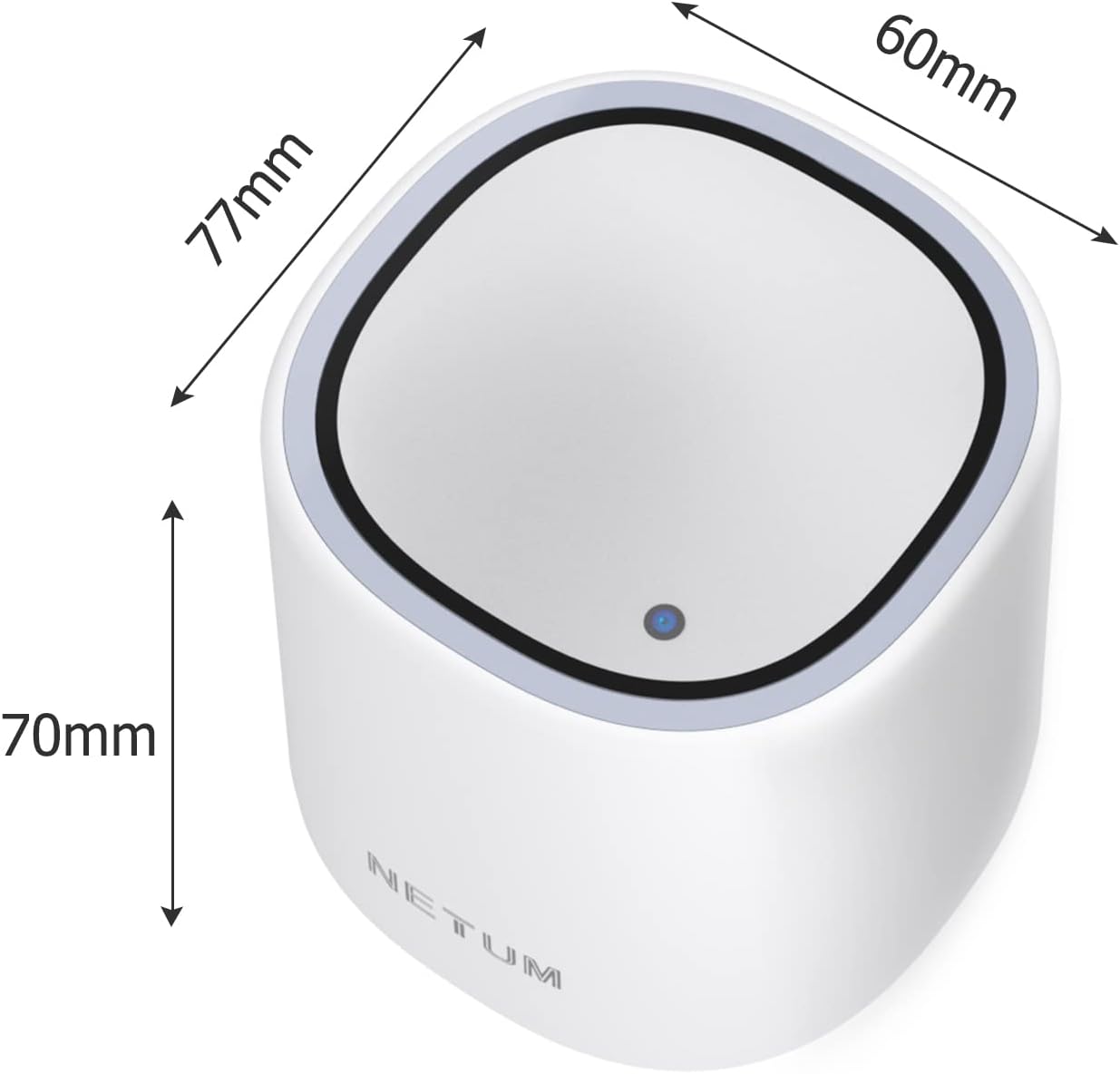
| కొలతలు (సుమారుగా) | 77mm (పొడవు) x 60mm (వెడల్పు) x 70mm (ఎత్తు) |
| శక్తి మూలం | కార్డెడ్ ఎలక్ట్రిక్ (USB ద్వారా) |

మూర్తి 5.1: Approximate dimensions of the NT-5090 Desktop 2D Barcode Scanner.
6. వారంటీ సమాచారం
NETUM products are manufactured to high-quality standards. For specific warranty terms and conditions, please refer to the warranty card included with your product or visit the official NETUM webవారంటీ క్లెయిమ్ల కోసం కొనుగోలు రుజువుగా మీ కొనుగోలు రసీదును ఉంచండి.
7. కస్టమర్ మద్దతు
For technical assistance, troubleshooting, or any inquiries regarding your NETUM NT-5090 scanner, please contact NETUM customer support. Contact details can typically be found on the product packaging, the official NETUM webసైట్ లేదా మీ రిటైలర్ ద్వారా.
తయారీదారు: GUANGZHOU NETUM ELECTRONIC TECHNOLOGY CO LTD
చిరునామా: Room 301, 6th Floor and full 3rd Floor, Building 1, No. 51 Xiangshan Avenue, Ningxi Street, Zengcheng District, Guangzhou, Guangdong, China


