1. ముఖ్యమైన భద్రతా సూచనలు
Please read all instructions carefully before using this appliance and retain them for future reference. Failure to follow these instructions may result in electric shock, fire, or injury.
- ఈ ఉపకరణం ఇండోర్ ఉపయోగం కోసం మాత్రమే.
- విద్యుత్ సరఫరా వాల్యూమ్తో సరిపోలుతుందని నిర్ధారించుకోండిtagఇ రేటింగ్ లేబుల్పై పేర్కొనబడింది.
- దెబ్బతిన్న త్రాడు లేదా ప్లగ్తో యూనిట్ను ఆపరేట్ చేయవద్దు. సరఫరా త్రాడు దెబ్బతిన్నట్లయితే, ప్రమాదాన్ని నివారించడానికి తయారీదారు, దాని సేవా ఏజెంట్ లేదా అదే అర్హత కలిగిన వ్యక్తులు దానిని భర్తీ చేయాలి.
- Keep the unit at least 50 cm away from walls and other objects to ensure proper airflow.
- గాలి ఇన్లెట్ లేదా అవుట్లెట్లోకి వేళ్లు లేదా విదేశీ వస్తువులను చొప్పించవద్దు.
- ఏదైనా నిర్వహణ లేదా శుభ్రపరిచే ముందు ఎల్లప్పుడూ యూనిట్ను అన్ప్లగ్ చేయండి.
- యూనిట్ శుభ్రం చేయడానికి రసాయన ద్రావకాలను (ఉదా. బెంజీన్, ఆల్కహాల్, గ్యాసోలిన్) ఉపయోగించవద్దు.
- ఈ ఉపకరణాన్ని 8 సంవత్సరాలు మరియు అంతకంటే ఎక్కువ వయస్సు ఉన్న పిల్లలు మరియు తక్కువ శారీరక, ఇంద్రియ లేదా మానసిక సామర్థ్యాలు లేదా అనుభవం మరియు జ్ఞానం లేని వ్యక్తులు సురక్షితమైన మార్గంలో ఉపకరణాన్ని ఉపయోగించడం గురించి పర్యవేక్షణ లేదా సూచనలను అందించినట్లయితే మరియు ప్రమాదాలను అర్థం చేసుకుంటే వాటిని ఉపయోగించవచ్చు. .
- పిల్లలు ఉపకరణంతో ఆడకూడదు. పర్యవేక్షణ లేకుండా పిల్లలచే శుభ్రపరచడం మరియు వినియోగదారు నిర్వహణ చేయరాదు.
2. ఉత్పత్తి ముగిసిందిview
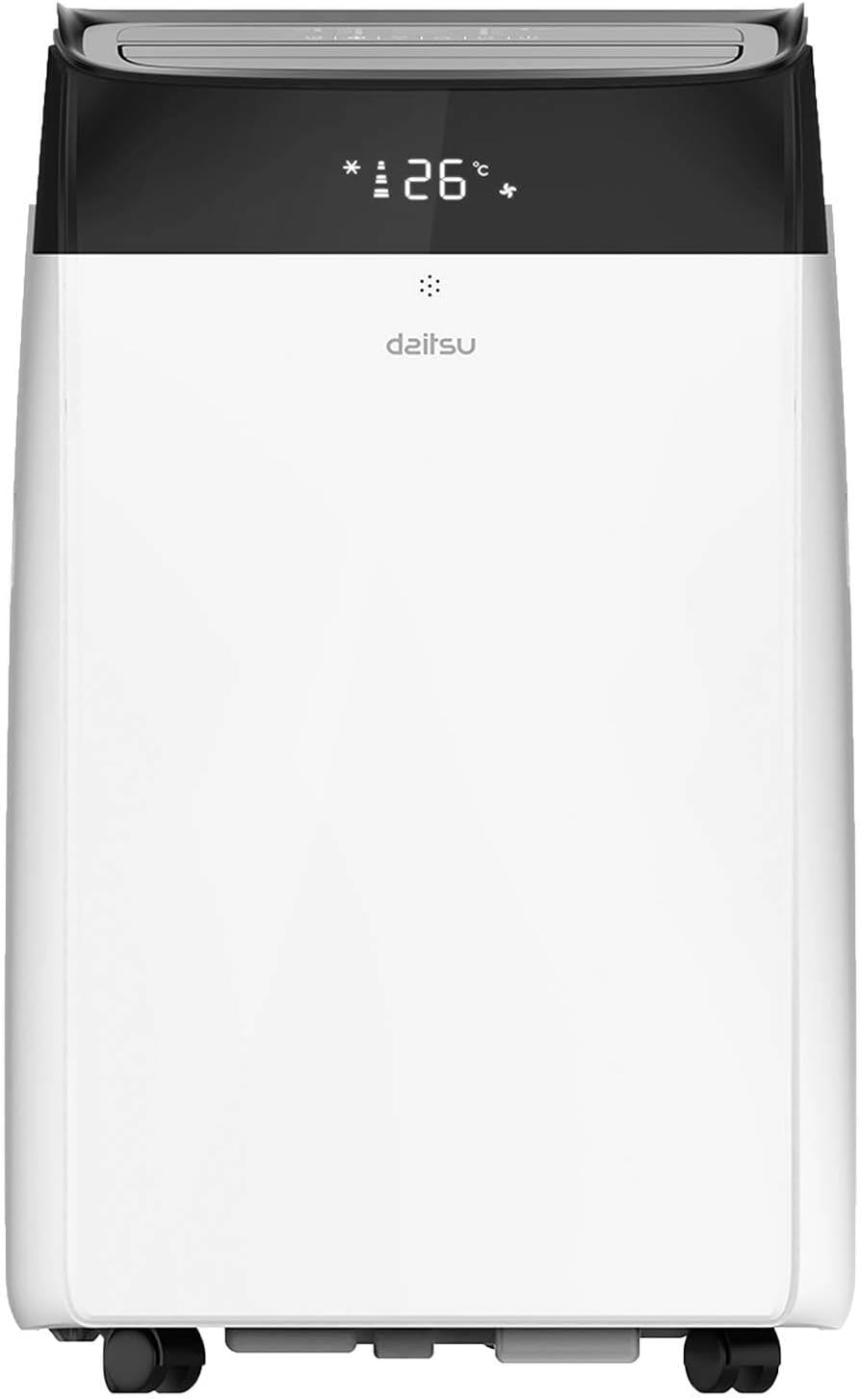
The Daitsu Alisios Premium APD12FCX is a portable air conditioner designed for efficient cooling, heating, dehumidification, and fan operation. It features Wi-Fi connectivity for smart control.
2.1 యూనిట్ భాగాలు
- ముందు ప్యానెల్: Air outlet, control panel, display.
- వెనుక ప్యానెల్: Air inlet with filter, exhaust air outlet, continuous drainage port.
- సైడ్ ప్యానెల్లు: Integrated handles for portability.
- ఆధారం: Caster wheels for easy movement.


3. సెటప్ మరియు ఇన్స్టాలేషన్
3.1 అన్ప్యాకింగ్
- దాని ప్యాకేజింగ్ నుండి యూనిట్ను జాగ్రత్తగా తొలగించండి.
- Check for any damage during transit. If damaged, contact your retailer immediately.
- భవిష్యత్తులో నిల్వ లేదా రవాణా కోసం ప్యాకేజింగ్ను ఉంచండి.
3.2 ప్లేస్మెంట్
Place the unit on a firm, level surface in a location that allows for proper air circulation and exhaust hose installation.
- Ensure there is at least 50 cm of space around the unit for optimal performance.
- యూనిట్ను ప్రత్యక్ష సూర్యకాంతిలో లేదా ఉష్ణ వనరుల దగ్గర ఉంచకుండా ఉండండి.
- The unit should be placed near a window or opening for the exhaust hose.

3.3 ఎగ్జాస్ట్ హోస్ ఇన్స్టాలేషన్
The exhaust hose expels hot air outside, which is essential for the unit's cooling efficiency.
- Attach the exhaust hose connector to the exhaust air outlet on the rear of the unit.
- ఎగ్జాస్ట్ గొట్టాన్ని విస్తరించి, విండో కిట్ అడాప్టర్ను మరొక చివరకు అటాచ్ చేయండి.
- Install the window kit in a suitable window opening, ensuring a tight seal to prevent hot air from re-entering the room.
- Keep the exhaust hose as short and straight as possible to maximize efficiency. Avoid kinks or sharp bends.
3.4 డ్రైనేజీ సెటప్
During cooling and dehumidifying modes, water will accumulate inside the unit. This water needs to be drained.
- Intermittent Drainage: The unit will stop operating when the internal water tank is full. Drain the water manually from the drainage port at the rear of the unit into a suitable container.
- నిరంతర పారుదల: For continuous operation, especially in high humidity or dehumidifier mode, attach a drainage hose (not included) to the continuous drainage port and direct it to a floor drain or a larger container. Ensure the hose is sloped downwards for gravity drainage.
4. ఆపరేటింగ్ సూచనలు
The unit can be operated via the control panel on the unit or the included remote control.
4.1 నియంత్రణ ప్యానెల్
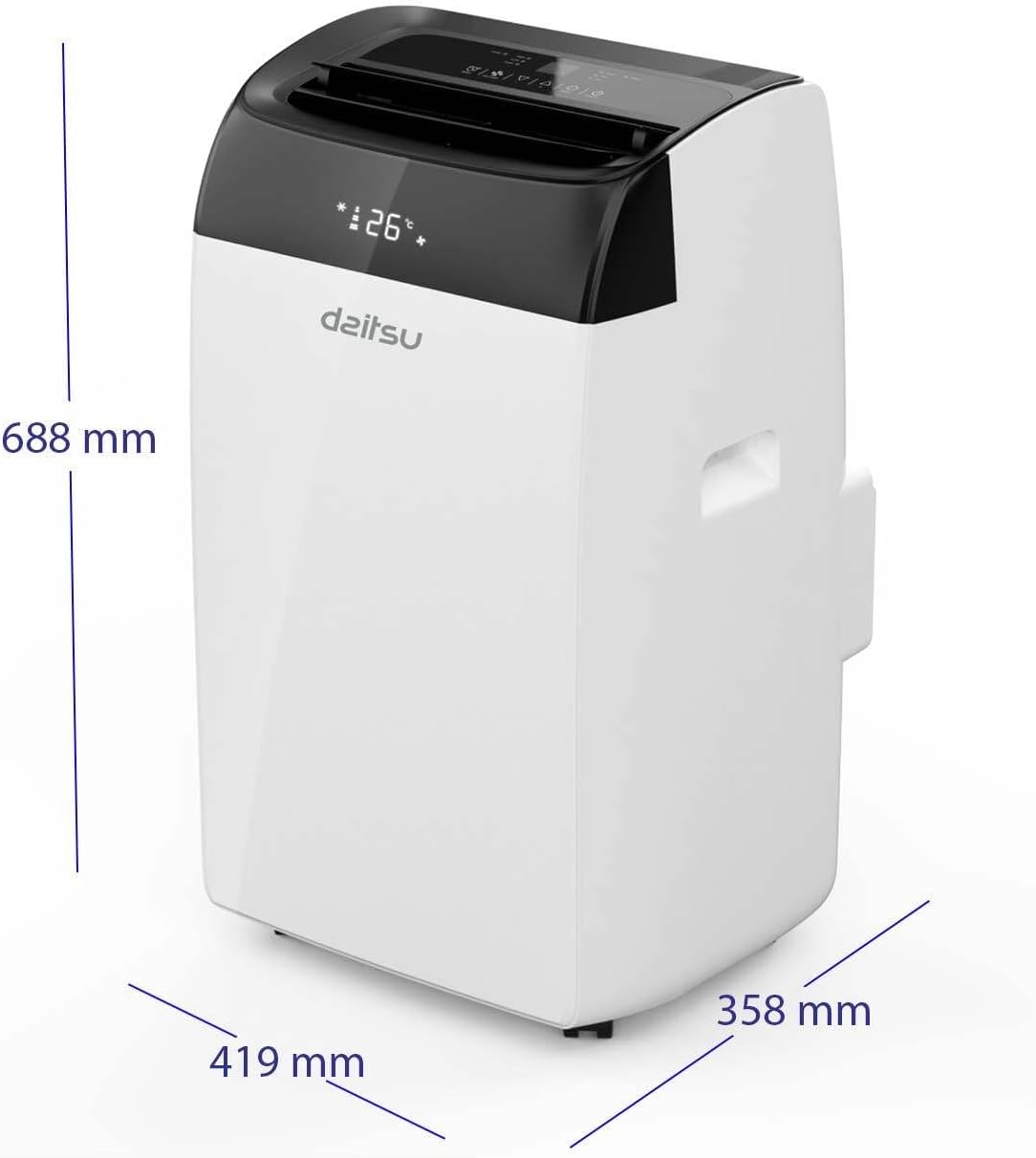
The control panel on the top of the unit allows you to power on/off, select modes, adjust temperature, and set fan speed.
4.2 రిమోట్ కంట్రోల్
రిమోట్ కంట్రోల్ దూరం నుండి అన్ని ఫంక్షన్లకు అనుకూలమైన యాక్సెస్ను అందిస్తుంది.

4.3 ఆపరేటింగ్ మోడ్లు
- శీతలీకరణ మోడ్: Select the snowflake icon. Adjust the desired temperature using the up/down arrows.
- హీటింగ్ మోడ్: Select the sun icon. Adjust the desired temperature.
- అభిమాని మోడ్: Select the fan icon. The unit will circulate air without cooling or heating. Adjust fan speed.
- డీహ్యూమిడిఫైయర్ మోడ్: Select the water drop icon. The unit will remove moisture from the air.
4.4 ఉష్ణోగ్రత మరియు ఫ్యాన్ వేగం సర్దుబాటు
- ఉపయోగించండి పైకి (^) మరియు డౌన్ (v) arrows on the control panel or remote to set the desired temperature.
- నొక్కండి ఫ్యాన్ వేగం తక్కువ, మధ్యస్థ మరియు అధిక ఫ్యాన్ వేగం ద్వారా సైకిల్ చేయడానికి బటన్.
4.5 టైమర్ ఫంక్షన్
24-గంటల టైమర్ నిర్దిష్ట వ్యవధి తర్వాత యూనిట్ స్వయంచాలకంగా ఆన్ లేదా ఆఫ్ అయ్యేలా సెట్ చేయడానికి మిమ్మల్ని అనుమతిస్తుంది.
- నొక్కండి టైమర్ బటన్.
- Use the up/down arrows to set the desired delay in hours.
- కొన్ని సెకన్ల తర్వాత టైమర్ యాక్టివేట్ అవుతుంది.
4.6 స్లీప్ మోడ్
Sleep mode adjusts the temperature and fan speed for comfortable sleeping conditions and reduced energy consumption.
- Activate Sleep mode by pressing the dedicated button on the remote control (if available) or through the control panel.
4.7 వై-ఫై కనెక్టివిటీ
The Daitsu Alisios Premium APD12FCX features Wi-Fi connectivity, allowing control via the Smart Life application on your smartphone.
- డౌన్లోడ్ చేయండి స్మార్ట్ లైఫ్ app from your device's app store (available on App Store and Google Play).
- Follow the in-app instructions to register an account and add your Daitsu APD12FCX unit.
- Ensure your unit is powered on and your smartphone is connected to a 2.4GHz Wi-Fi network during the pairing process.
- Once connected, you can control the unit's modes, temperature, fan speed, and timer remotely.

5. నిర్వహణ
క్రమం తప్పకుండా నిర్వహణ సరైన పనితీరును నిర్ధారిస్తుంది మరియు మీ ఎయిర్ కండిషనర్ యొక్క జీవితకాలం పొడిగిస్తుంది.
5.1 ఎయిర్ ఫిల్టర్ను శుభ్రపరచడం
గాలి నాణ్యత మరియు దాని వాడకాన్ని బట్టి ప్రతి రెండు వారాలకు ఒకసారి లేదా అంతకంటే ఎక్కువసార్లు ఎయిర్ ఫిల్టర్ను శుభ్రం చేయాలి.
- పవర్ అవుట్లెట్ నుండి యూనిట్ను అన్ప్లగ్ చేయండి.
- Locate the air filter on the rear panel (refer to Figure 2.2).
- ఫిల్టర్ను సున్నితంగా బయటకు తీయండి.
- ఫిల్టర్ను గోరువెచ్చని నీరు మరియు తేలికపాటి డిటర్జెంట్తో కడగాలి. బాగా కడగాలి.
- ఫిల్టర్ను యూనిట్లోకి తిరిగి చొప్పించే ముందు పూర్తిగా గాలికి ఆరనివ్వండి. ప్రత్యక్ష సూర్యకాంతికి గురికావద్దు.
5.2 Cleaning the Unit Surface
- యూనిట్ను అన్ప్లగ్ చేయండి.
- ఉపరితలాన్ని మృదువైన, డితో తుడవండిamp గుడ్డ.
- Do not use harsh chemicals, abrasives, or solvents, as these can damage the unit's finish.
5.3 పేరుకుపోయిన నీటిని తీసివేయడం
If the unit stops operating and displays a 'Full Water' indicator, you need to drain the internal water tank.
- యూనిట్ను ఆపివేసి, అన్ప్లగ్ చేయండి.
- Place a shallow pan or container under the drainage port at the rear of the unit.
- డ్రైనేజ్ పోర్ట్ నుండి రబ్బరు స్టాపర్ తొలగించండి.
- నీళ్లన్నీ బయటకు పోనివ్వండి.
- రబ్బరు స్టాపర్ను గట్టిగా మార్చండి.
5.4 నిల్వ
యూనిట్ను ఎక్కువ కాలం నిల్వ చేసేటప్పుడు:
- యూనిట్ నుండి పేరుకుపోయిన నీటిని పూర్తిగా తీసివేయండి.
- Clean the air filter and the unit's surface.
- అంతర్గత భాగాలను ఆరబెట్టడానికి యూనిట్ను ఫ్యాన్-ఓన్లీ మోడ్లో కొన్ని గంటల పాటు అమలు చేయండి.
- పవర్ కార్డ్ను తీసివేసి, దానిని చక్కగా చుట్టండి.
- యూనిట్ను పొడి, చల్లని ప్రదేశంలో, ప్రాధాన్యంగా దాని అసలు ప్యాకేజింగ్లో నిల్వ చేయండి.
6. ట్రబుల్షూటింగ్
కస్టమర్ సపోర్ట్ను సంప్రదించే ముందు, సాధారణ సమస్యల కోసం దయచేసి కింది ట్రబుల్షూటింగ్ గైడ్ను చూడండి.
| సమస్య | సాధ్యమైన కారణం | పరిష్కారం |
|---|---|---|
| యూనిట్ ఆన్ చేయబడలేదు | విద్యుత్ సరఫరా లేదు పవర్ కార్డ్ ప్లగ్ ఇన్ చేయబడలేదు సర్క్యూట్ బ్రేకర్ ట్రిప్ అయింది | పవర్ అవుట్లెట్ని తనిఖీ చేయండి పవర్ కార్డ్ సురక్షితంగా ప్లగిన్ చేయబడిందని నిర్ధారించుకోండి సర్క్యూట్ బ్రేకర్ని రీసెట్ చేయండి |
| యూనిట్ సమర్థవంతంగా చల్లబడటం లేదు. | కిటికీలు/తలుపులు తెరిచి ఉన్నాయి Exhaust hose blocked or kinked ఎయిర్ ఫిల్టర్ మురికి గది చాలా పెద్దది ఉష్ణోగ్రత అమరిక చాలా ఎక్కువగా ఉంది | అన్ని కిటికీలు మరియు తలుపులు మూసివేయండి Ensure exhaust hose is clear and straight ఎయిర్ ఫిల్టర్ను శుభ్రం చేయండి Consider unit capacity for room size ఉష్ణోగ్రత సెట్టింగ్ను తగ్గించండి |
| యూనిట్ ధ్వనించేది | యూనిట్ సమతల ఉపరితలంపై లేదు ఎయిర్ ఫిల్టర్ మురికి Internal components vibrating | యూనిట్ను చదునైన, స్థిరమైన ఉపరితలంపై ఉంచండి ఎయిర్ ఫిల్టర్ను శుభ్రం చేయండి This is normal operating noise for portable ACs. If excessive, contact support. |
| నీటి లీకేజీ | డ్రెయిన్ ప్లగ్ వదులుగా ఉంది Drain hose not properly connected (continuous drainage) | Ensure drain plug is securely in place Check drain hose connection and ensure proper slope |
| Display shows 'FL' (Full Water) | Internal water tank is full | Drain the water from the unit (refer to Section 5.3) |
7. స్పెసిఫికేషన్లు
Technical specifications for the Daitsu Alisios Premium APD12FCX portable air conditioner.
| ఫీచర్ | స్పెసిఫికేషన్ |
|---|---|
| బ్రాండ్ | దైట్సు |
| మోడల్ సంఖ్య | APD12FCX |
| కొలతలు (L x W x H) | 35.8 x 41.9 x 68.8 సెం.మీ |
| బరువు | 25 కిలోలు |
| శీతలీకరణ సామర్థ్యం | 3009 Frigorias (approx. 3.5 kW) |
| శబ్దం స్థాయి | 53 డెసిబెల్స్ |
| వాల్యూమ్tage | 230 వోల్ట్లు |
| శక్తి | 3.5 KW |
| ప్రత్యేక లక్షణాలు | Dehumidifier, Silent Mode, Remote Control, Wi-Fi Enabled |
| ఫిల్టర్ రకం | ముందుగా ఫిల్టర్ చేయండి |
| శక్తి మూలం | ఎలక్ట్రిక్ కేబుల్ |
| సంస్థాపన రకం | పోర్టబుల్ |
| సీజనల్ ఎనర్జీ ఎఫిషియన్సీ రేషియో (SEER) | 14 |
8. వారంటీ మరియు మద్దతు
The Daitsu Alisios Premium APD12FCX typically comes with a 3 సంవత్సరాల వారంటీ, as indicated on product packaging. Please refer to your purchase documentation for specific warranty terms and conditions.
For technical support, warranty claims, or service inquiries, please contact your retailer or the authorized Daitsu service center in your region. Keep your proof of purchase for warranty validation.


