పరిచయం
Thank you for choosing The Voice Hollywood Wireless Headphones. These headphones are designed to provide a superior audio experience with the convenience of wireless connectivity. Featuring HD Ultra Max Sound, a comfortable adjustable headband, and a tri-fold design for portability, they are optimized for seamless integration with Siri and Google Assistant. This manual provides detailed instructions for setup, operation, maintenance, and troubleshooting to ensure optimal performance and longevity of your device.
భద్రతా సమాచారం
- హెడ్ఫోన్లను తీవ్రమైన ఉష్ణోగ్రతలు, తేమ లేదా తినివేయు పదార్థాలకు బహిర్గతం చేయవద్దు.
- వినికిడి దెబ్బతినకుండా నిరోధించడానికి ఎక్కువ కాలం పాటు అధిక వాల్యూమ్ స్థాయిలలో వినడం మానుకోండి.
- Do not use the headphones while driving, cycling, or in situations where inability to hear ambient sounds could be dangerous.
- హెడ్ఫోన్లను పిల్లలు మరియు పెంపుడు జంతువులకు దూరంగా ఉంచండి.
- Only use the provided charging cable and accessories.
- హెడ్ఫోన్లను విడదీయడానికి లేదా సవరించడానికి ప్రయత్నించవద్దు. ఇది వారంటీని రద్దు చేస్తుంది.
ప్యాకేజీ విషయాలు
దయచేసి మీ ప్యాకేజీలో అన్ని అంశాలు ఉన్నాయని ధృవీకరించండి:
- The Voice Hollywood Wireless Headphones
- USB టైప్-సి ఛార్జింగ్ కేబుల్
- 3.5mm ఆడియో కేబుల్ (AUX)

Figure 1: Included components and key features of the headphones.
ఉత్పత్తి ముగిసిందిview
The Hollywood Wireless Headphones feature an ergonomic design for extended comfort and intuitive controls for ease of use. The over-ear cups provide a comfortable fit, and the adjustable headband ensures a secure fit for various head sizes. The tri-fold design allows for compact storage and portability.

మూర్తి 2: ముందు view హెడ్ఫోన్ల.

Figure 3: Headphones in folded position for portability.
నియంత్రణలు మరియు పోర్టులు
Refer to Figure 1 for a visual guide to the controls and ports. The main controls are located on the ear cups and include:
- పవర్ బటన్: Used to power on/off and initiate Bluetooth pairing.
- వాల్యూమ్ పెంచు/తదుపరి ట్రాక్ బటన్: వాల్యూమ్ పెంచడానికి షార్ట్ ప్రెస్ చేయండి, తదుపరి ట్రాక్ కోసం లాంగ్ ప్రెస్ చేయండి.
- వాల్యూమ్ డౌన్/మునుపటి ట్రాక్ బటన్: వాల్యూమ్ తగ్గించడానికి షార్ట్ ప్రెస్ చేయండి, మునుపటి ట్రాక్ కోసం లాంగ్ ప్రెస్ చేయండి.
- మల్టీ-ఫంక్షన్ బటన్ (MFB): ప్లే/పాజ్ చేయండి, కాల్స్కు సమాధానం ఇవ్వండి/ముగించండి, వాయిస్ అసిస్టెంట్ను యాక్టివేట్ చేయండి.
- USB టైప్-సి పోర్ట్: హెడ్ఫోన్లను ఛార్జ్ చేయడానికి.
- 3.5mm ఆడియో జాక్: For wired connection using the AUX cable.
- అంతర్నిర్మిత మైక్రోఫోన్: హ్యాండ్స్-ఫ్రీ కాలింగ్ మరియు వాయిస్ అసిస్టెంట్ ఆదేశాల కోసం.
సెటప్
హెడ్ఫోన్లను ఛార్జ్ చేస్తోంది
Before first use, fully charge your headphones. A full charge typically takes approximately 2-3 hours.
- Connect the small end of the USB Type-C charging cable to the charging port on the headphone ear cup.
- USB కేబుల్ యొక్క పెద్ద చివరను USB పవర్ అడాప్టర్ (చేర్చబడలేదు) లేదా కంప్యూటర్ యొక్క USB పోర్ట్కి కనెక్ట్ చేయండి.
- The LED indicator light will illuminate during charging and turn off or change color once fully charged.
బ్లూటూత్ పెయిరింగ్
మీ హెడ్ఫోన్లను మీ బ్లూటూత్-ఎనేబుల్డ్ పరికరంతో (ఉదా. స్మార్ట్ఫోన్, టాబ్లెట్, కంప్యూటర్) జత చేయండి.
- హెడ్ఫోన్లు ఆఫ్ చేయబడి ఉన్నాయని నిర్ధారించుకోండి.
- Press and hold the Power button for approximately 5-7 seconds until the LED indicator light flashes blue and red alternately, indicating pairing mode.
- మీ పరికరంలో, బ్లూటూత్ను ప్రారంభించి, కొత్త పరికరాల కోసం శోధించండి.
- Select "Hollywood" from the list of available devices.
- Once successfully paired, the LED indicator will flash blue slowly or turn solid blue.
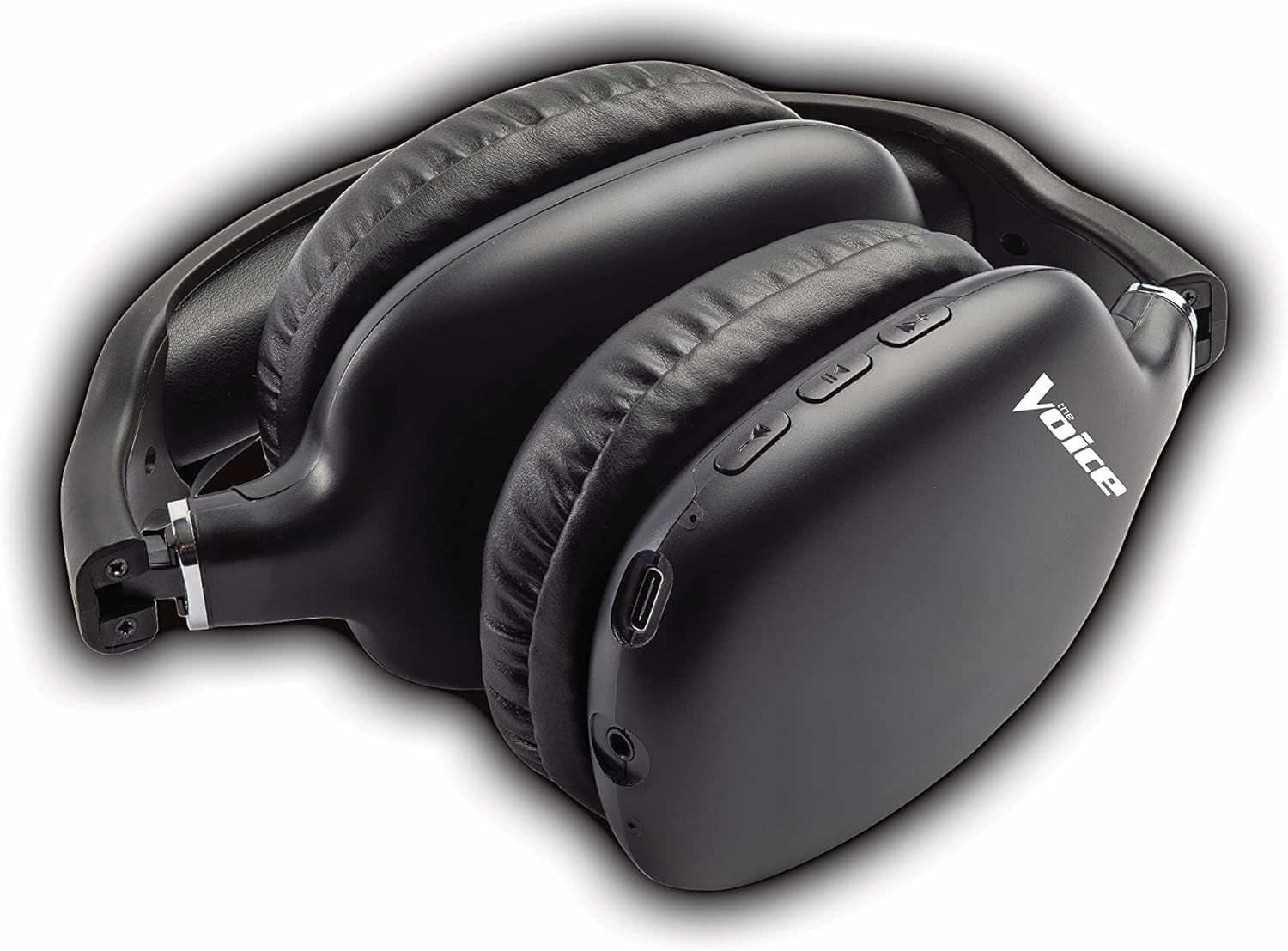
Figure 4: Headphones paired with a smartphone.
వైర్డు కనెక్షన్ (AUX మోడ్)
You can use the headphones with non-Bluetooth devices or when the battery is depleted using the included 3.5mm audio cable.
- Plug one end of the 3.5mm audio cable into the audio jack on the headphone ear cup.
- Plug the other end into the 3.5mm audio output jack of your device.
- హెడ్ఫోన్లు స్వయంచాలకంగా వైర్డు మోడ్కి మారుతాయి.
ఆపరేటింగ్ సూచనలు
పవర్ ఆన్/ఆఫ్
- పవర్ ఆన్: LED సూచిక నీలం రంగులో మెరిసే వరకు పవర్ బటన్ను దాదాపు 3 సెకన్ల పాటు నొక్కి పట్టుకోండి.
- పవర్ ఆఫ్: LED సూచిక ఆఫ్ అయ్యే వరకు పవర్ బటన్ను దాదాపు 3 సెకన్ల పాటు నొక్కి పట్టుకోండి.
మ్యూజిక్ ప్లేబ్యాక్
- ప్లే/పాజ్: మల్టీ-ఫంక్షన్ బటన్ (MFB) ను షార్ట్ ప్రెస్ చేయండి.
- తదుపరి ట్రాక్: వాల్యూమ్ అప్ బటన్ను ఎక్కువసేపు నొక్కండి.
- మునుపటి ట్రాక్: వాల్యూమ్ డౌన్ బటన్ను ఎక్కువసేపు నొక్కండి.
- ధ్వని పెంచు: వాల్యూమ్ అప్ బటన్ను చిన్నగా నొక్కండి.
- వాల్యూమ్ డౌన్: వాల్యూమ్ డౌన్ బటన్ను చిన్నగా నొక్కండి.
కాల్ నిర్వహణ
- సమాధానం/ముగింపు కాల్: మల్టీ-ఫంక్షన్ బటన్ (MFB) ను షార్ట్ ప్రెస్ చేయండి.
- కాల్ని తిరస్కరించండి: మల్టీ-ఫంక్షన్ బటన్ (MFB) ని ఎక్కువసేపు నొక్కండి.
- చివరి నంబర్ని మళ్లీ డయల్ చేయండి: మల్టీ-ఫంక్షన్ బటన్ (MFB) ను రెండుసార్లు నొక్కండి.
వాయిస్ అసిస్టెంట్ యాక్టివేషన్
- సిరి/గూగుల్ అసిస్టెంట్ని యాక్టివేట్ చేయండి: మల్టీ-ఫంక్షన్ బటన్ (MFB) ను మూడుసార్లు నొక్కండి.
Video 1: Demonstrates the adjustable and padded comfort, built-in mic, and connectivity to Google or Siri for The Voice Hollywood Wireless Headphones.

Figure 5: User enjoying audio with the headphones, highlighting comfort and usability.
నిర్వహణ
క్లీనింగ్
Regular cleaning helps maintain the headphones' appearance and functionality.
- Wipe the ear cups and headband with a soft, dry, lint-free cloth.
- మొండి ధూళికి, కొద్దిగా dampen నీరు మరియు తేలికపాటి సబ్బుతో గుడ్డను తుడిచి, వెంటనే ఆరబెట్టండి.
- రాపిడి క్లీనర్లు, ఆల్కహాల్ లేదా రసాయన ద్రావకాలను ఉపయోగించవద్దు.
నిల్వ
When not in use, store your headphones in a cool, dry place, away from direct sunlight and extreme temperatures. Utilize the tri-fold feature for compact storage.
ట్రబుల్షూటింగ్
మీ హెడ్ఫోన్లతో మీకు సమస్యలు ఎదురైతే, సాధారణ సమస్యలు మరియు పరిష్కారాల కోసం క్రింది పట్టికను చూడండి.
| సమస్య | సాధ్యమైన కారణం | పరిష్కారం |
|---|---|---|
| హెడ్ఫోన్లు ఆన్ అవ్వవు | తక్కువ బ్యాటరీ | హెడ్ఫోన్లను పూర్తిగా ఛార్జ్ చేయండి. |
| పరికరంతో జత చేయడం సాధ్యం కాదు | హెడ్ఫోన్లు జత చేసే మోడ్లో లేవు; పరికరం బ్లూటూత్ ఆఫ్లో ఉంది; పరికరం నుండి చాలా దూరంలో ఉంది | Ensure headphones are in pairing mode (flashing red/blue). Turn device Bluetooth on/off. Move headphones closer to device (within 10 meters). |
| శబ్దం లేదు | Volume too low; Not connected; Incorrect audio source | Increase volume on headphones and device. Ensure headphones are properly paired/connected. Check audio output settings on your device. |
| ధ్వని వక్రీకరణ | Interference; Device volume too high | Move away from other wireless devices. Lower the volume on your device. |
| మైక్రోఫోన్ పని చేయడం లేదు | Not connected; Device settings | Ensure headphones are properly paired. Check microphone input settings on your device. |
స్పెసిఫికేషన్లు
| ఫీచర్ | వివరాలు |
|---|---|
| మోడల్ పేరు | హాలీవుడ్ |
| కనెక్టివిటీ టెక్నాలజీ | Wireless, Wired (Bluetooth) |
| చెవి ప్లేస్మెంట్ | ఓవర్ చెవి |
| ఫారమ్ ఫ్యాక్టర్ | ఓవర్ చెవి |
| నియంత్రణ రకం | Voice Control, Built-in buttons and microphone |
| ఫ్రీక్వెన్సీ రేంజ్ | 20 హెర్ట్జ్ - 20 కిలోహెర్ట్జ్ |
| వస్తువు బరువు | 13.4 ఔన్సులు |
| కొలతలు (ప్యాకేజీ) | 9.65 x 8.35 x 3.58 అంగుళాలు |
| మోడల్ సంఖ్య | VHOL-6/2069 |
| UPC | 841133120698 |
వారంటీ మరియు మద్దతు
The Voice Hollywood Wireless Headphones come with a standard manufacturer's warranty. For detailed warranty information, technical support, or service inquiries, please refer to the warranty card included in your product packaging or visit the official The Voice Electronics website. Do not attempt to repair the product yourself.


