పరిచయం
Thank you for choosing Roseland Over-Ear Bluetooth Headphones. These wireless headphones are designed to provide an optimal audio experience with comfort and convenience. Featuring soft ear cushions and an integrated microphone, they are perfect for listening to music and making calls on the go. This manual provides essential information on setting up, operating, maintaining, and troubleshooting your headphones.
ఉత్పత్తి ముగిసిందిview

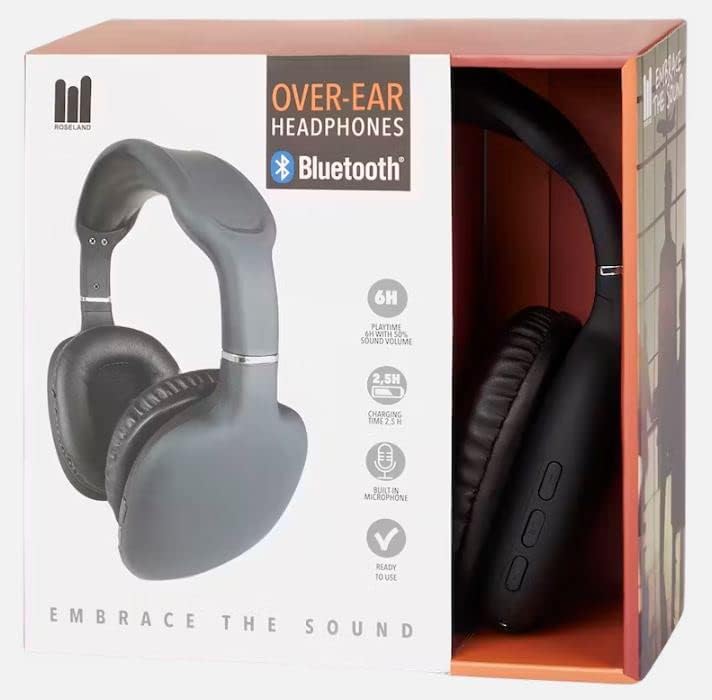
సెటప్
1. హెడ్ఫోన్లను ఛార్జ్ చేయడం
Before first use, fully charge your headphones. Connect the included charging cable to the charging port on the headphones and the other end to a USB power source (e.g., computer USB port, wall adapter). The charging indicator light will show the charging status. A full charge takes approximately 2.5 గంటలు.
2. పవర్ చేయడం ఆన్/ఆఫ్
- To power on: Press and hold the Power button until the indicator light flashes.
- పవర్ ఆఫ్ చేయడానికి: సూచిక లైట్ ఆఫ్ అయ్యే వరకు పవర్ బటన్ను నొక్కి పట్టుకోండి.
3. బ్లూటూత్ పెయిరింగ్
The Roseland headphones use Bluetooth 5.0 for stable and efficient connection.
- హెడ్ఫోన్లు పవర్ ఆఫ్లో ఉన్నాయని నిర్ధారించుకోండి.
- జత చేసే మోడ్ను సూచిస్తూ, సూచిక కాంతి ఎరుపు మరియు నీలం రంగుల్లో ప్రత్యామ్నాయంగా మెరిసే వరకు పవర్ బటన్ను దాదాపు 5-7 సెకన్ల పాటు నొక్కి పట్టుకోండి.
- మీ స్మార్ట్ఫోన్ లేదా ఇతర బ్లూటూత్-ప్రారంభించబడిన పరికరంలో, బ్లూటూత్ సెట్టింగ్లకు వెళ్లండి.
- కోసం వెతకండి "Roseland Casque Bluetooth" or a similar name in the list of available devices.
- Select the headphones to connect. Once connected, the indicator light will turn solid blue or flash slowly.
- పాస్వర్డ్ అడిగితే, "0000" ఎంటర్ చేయండి.
Note: The headphones will automatically try to reconnect to the last paired device when powered on.
ఆపరేటింగ్ సూచనలు
Basic Controls (Buttons on the side)
- పవర్ బటన్: Power on/off, Play/Pause music, Answer/End calls.
- వాల్యూమ్ అప్ (+): వాల్యూమ్ పెంచండి, తదుపరి ట్రాక్ (ఎక్కువసేపు నొక్కి ఉంచండి).
- వాల్యూమ్ డౌన్ (-): వాల్యూమ్ తగ్గించండి, మునుపటి ట్రాక్ (ఎక్కువసేపు నొక్కి ఉంచండి).
మ్యూజిక్ ప్లేబ్యాక్
- ప్లే/పాజ్: పవర్ బటన్ని ఒకసారి నొక్కండి.
- తదుపరి ట్రాక్: వాల్యూమ్ అప్ (+) బటన్ను ఎక్కువసేపు నొక్కండి.
- మునుపటి ట్రాక్: వాల్యూమ్ డౌన్ (-) బటన్ను ఎక్కువసేపు నొక్కండి.
- వాల్యూమ్ సర్దుబాటు: వాల్యూమ్ అప్ (+) లేదా వాల్యూమ్ డౌన్ (-) బటన్లను షార్ట్ ప్రెస్ చేయండి.
ఫోన్ కాల్స్
ఇంటిగ్రేటెడ్ మైక్రోఫోన్ హ్యాండ్స్-ఫ్రీ కాలింగ్ను అనుమతిస్తుంది.
- సమాధానం కాల్: కాల్ వచ్చినప్పుడు పవర్ బటన్ను ఒకసారి నొక్కండి.
- కాల్ ముగించు: కాల్ సమయంలో పవర్ బటన్ను ఒకసారి నొక్కండి.
- కాల్ని తిరస్కరించండి: కాల్ వచ్చినప్పుడు పవర్ బటన్ను ఎక్కువసేపు నొక్కి ఉంచండి.
- చివరి నంబర్ని మళ్లీ డయల్ చేయండి: పవర్ బటన్ను రెండుసార్లు నొక్కండి.
బ్యాటరీ లైఫ్
The headphones provide approximately 6 గంటల ఆట సమయం on a single charge, depending on volume level and usage.
ధరించే సౌకర్యం
The soft, memory foam earcups are designed for superior comfort during extended listening sessions. They provide a circum-aural fit, enveloping your ears for an immersive sound experience. For optimal comfort and ear health, it is recommended to remove the headphones every 2 నుండి 3 గంటలు to allow your ears to rest.
నిర్వహణ
- శుభ్రపరచడం: హెడ్ఫోన్లను శుభ్రం చేయడానికి మృదువైన, పొడి వస్త్రాన్ని ఉపయోగించండి. రాపిడి క్లీనర్లు లేదా ద్రావకాలను ఉపయోగించవద్దు.
- నిల్వ: హెడ్ఫోన్లను ప్రత్యక్ష సూర్యకాంతి మరియు విపరీతమైన ఉష్ణోగ్రతలకు దూరంగా చల్లని, పొడి ప్రదేశంలో నిల్వ చేయండి.
- నీటి నిరోధకత: ఈ హెడ్ఫోన్లు జలనిరోధిత కాదు. Avoid exposure to water, rain, or excessive moisture. While they are sweat-resistant, prolonged exposure to heavy sweat should be avoided.
- ఛార్జింగ్: ఎల్లప్పుడూ అందించిన ఛార్జింగ్ కేబుల్ లేదా సర్టిఫైడ్ దానికి సమానమైన దాన్ని ఉపయోగించండి.
ట్రబుల్షూటింగ్
- హెడ్ఫోన్లు ఆన్ కావు: హెడ్ఫోన్లు పూర్తిగా ఛార్జ్ అయ్యాయని నిర్ధారించుకోండి.
- పరికరంతో జత చేయడం సాధ్యం కాదు:
- మీ పరికరంలో బ్లూటూత్ ప్రారంభించబడిందని నిర్ధారించుకోండి.
- హెడ్ఫోన్లు జత చేసే మోడ్లో ఉన్నాయని నిర్ధారించుకోండి (ఎరుపు మరియు నీలం రంగుల్లో మెరుస్తున్నాయి).
- హెడ్ఫోన్లను మీ పరికరానికి దగ్గరగా తరలించండి.
- హెడ్ఫోన్లు మరియు మీ పరికరం రెండింటినీ ఆఫ్ చేసి ఆన్ చేయండి.
- Clear previous Bluetooth connections on your device if too many are stored.
- శబ్దం లేదు లేదా తక్కువ వాల్యూమ్:
- హెడ్ఫోన్లు మరియు మీ కనెక్ట్ చేయబడిన పరికరం రెండింటిలోనూ వాల్యూమ్ స్థాయిని తనిఖీ చేయండి.
- Ensure the headphones are properly paired.
- వేరే అప్లికేషన్ లేదా మూలం నుండి ఆడియోను ప్లే చేయడానికి ప్రయత్నించండి.
- పేలవమైన ధ్వని నాణ్యత:
- జోక్యాన్ని నివారించడానికి మీ కనెక్ట్ చేయబడిన పరికరానికి దగ్గరగా వెళ్లండి.
- హెడ్ఫోన్లు మరియు పరికరం మధ్య ఎటువంటి భౌతిక అడ్డంకులు లేవని నిర్ధారించుకోండి.
- Check if the audio source quality is good.
- ఛార్జింగ్ సమస్యలు:
- ఛార్జింగ్ కేబుల్ సురక్షితంగా కనెక్ట్ చేయబడిందని నిర్ధారించుకోండి.
- వేరే USB పోర్ట్ లేదా పవర్ అడాప్టర్ని ప్రయత్నించండి.
స్పెసిఫికేషన్లు
| బ్రాండ్ | రోజ్ల్యాండ్ |
| మోడల్ సంఖ్య | GE015877 |
| కనెక్టివిటీ టెక్నాలజీ | వైర్లెస్ (బ్లూటూత్ 5.0) |
| శైలి | చెవి పైన (సర్కమ్-ఆరల్) |
| చెవి ప్లేస్మెంట్ | Supra-Aural |
| రంగు | నలుపు |
| మెటీరియల్ | ప్లాస్టిక్ |
| బ్యాటరీ లైఫ్ (ప్లేటైమ్) | సుమారు 6 గంటలు |
| ఛార్జింగ్ సమయం | సుమారు 2.5 గంటలు |
| ఫ్రీక్వెన్సీ రేంజ్ | 20 హెర్ట్జ్ - 20,000 హెర్ట్జ్ |
| నియంత్రణ రకం | వాల్యూమ్ నియంత్రణ |
| ప్రత్యేక లక్షణాలు | Lightweight, Sweat-resistant, Built-in Microphone |
| నీటి నిరోధక స్థాయి | జలనిరోధిత కాదు |
| అనుకూల పరికరాలు | స్మార్ట్ఫోన్లు |
| సిఫార్సు చేసిన ఉపయోగాలు | Sport, Running, Calls, Music Listening |
| చేర్చబడిన భాగాలు | ఛార్జింగ్ కేబుల్ |
వారంటీ మరియు మద్దతు
Specific warranty information for the Roseland Over-Ear Bluetooth Headphones (Model: GE015877) is not available in the provided product details. Please refer to the product packaging or the retailer's website for any applicable warranty terms.
For technical support or further assistance, please contact the manufacturer, ZD Trading, or your point of purchase. Contact details are typically found on the product packaging or the manufacturer's official webసైట్.


