Liquid Ears True Wireless Bud Earphones
వినియోగదారు మాన్యువల్
పరిచయం
Thank you for choosing Liquid Ears True Wireless Bud Earphones. These earphones are designed to provide a superior audio experience with seamless Bluetooth 5.0 connectivity, extended playtime, and easy-to-use controls. This manual will guide you through the setup, operation, and maintenance of your new earphones to ensure optimal performance.

Image: Liquid Ears True Wireless Bud Earphones with charging case.
ప్యాకేజీ విషయాలు
దయచేసి ఈ క్రింది అంశాల కోసం పెట్టెను ఎంచుకోండి:
- Liquid Ears True Wireless Bud Earphones (Left and Right)
- పోర్టబుల్ ఛార్జింగ్ కేసు
- USB ఛార్జింగ్ కేబుల్
- వినియోగదారు మాన్యువల్
ఉత్పత్తి ముగిసిందిview
Familiarize yourself with the components of your Liquid Ears True Wireless Bud Earphones.
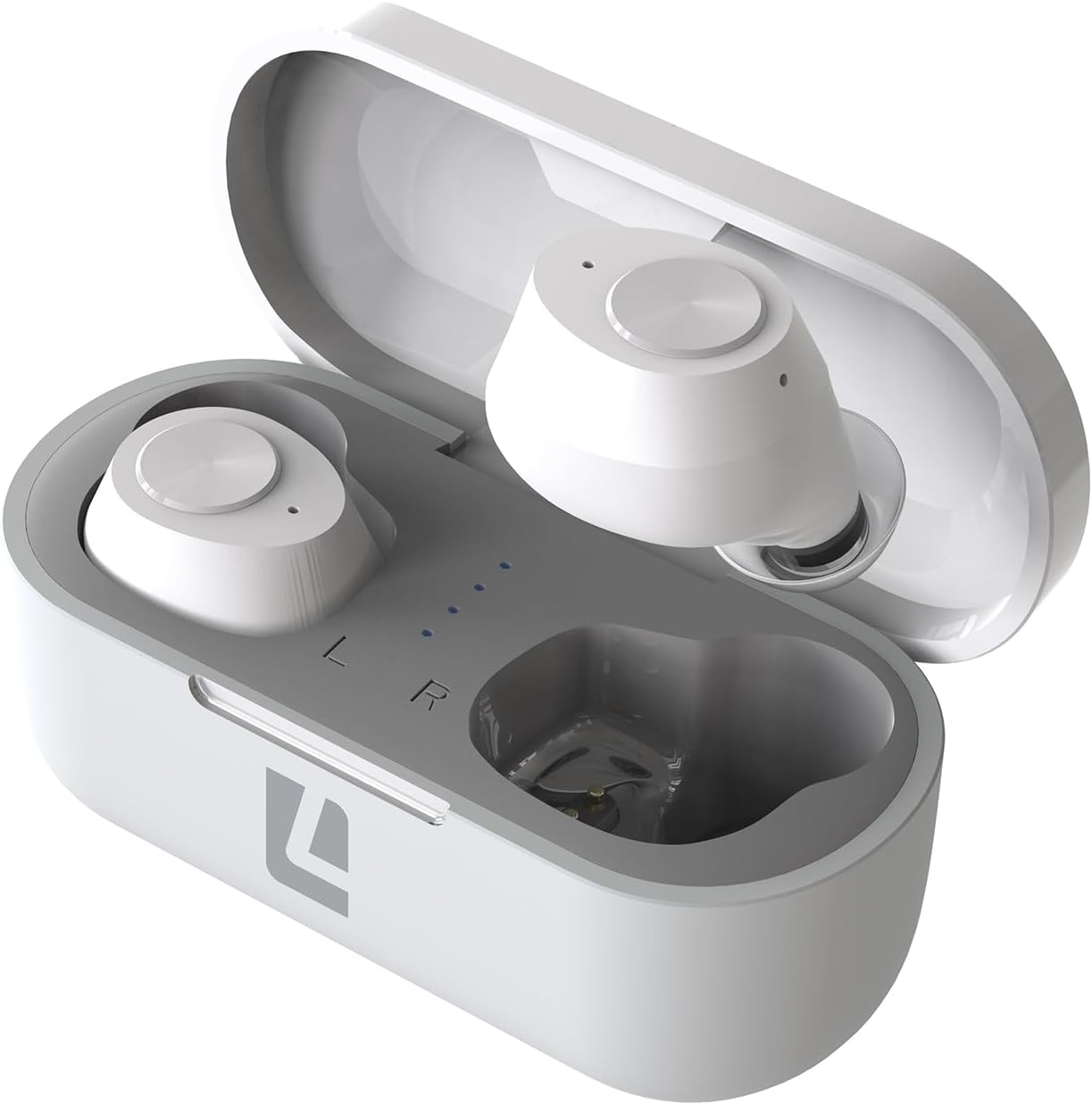
Image: The Liquid Ears True Wireless Bud Earphones in their open charging case, showing the left and right earbuds and charging indicators.
The earphones feature tactile button controls on each bud for easy management of audio playback and calls. The compact charging case provides additional battery life and protects the earphones when not in use.

Image: A visual representation of the earbuds within the charging case, highlighting the touch control area.
మీ ఇయర్ఫోన్లను ఛార్జ్ చేస్తోంది
Ensure your earphones and charging case are fully charged before first use.
ఛార్జింగ్ కేసును వసూలు చేయడం:
- అందించిన USB ఛార్జింగ్ కేబుల్ను కేస్లోని ఛార్జింగ్ పోర్ట్కు కనెక్ట్ చేయండి.
- కేబుల్ యొక్క మరొక చివరను USB పవర్ సోర్స్కి (ఉదా. కంప్యూటర్, వాల్ అడాప్టర్) ప్లగ్ చేయండి.
- The indicator lights on the case will show charging status. Once fully charged, the lights will indicate a full charge.
ఇయర్ఫోన్లను ఛార్జ్ చేయడం:
- Place the earphones into their respective slots in the charging case. Ensure they are correctly seated.
- Close the charging case lid. The earphones will begin charging automatically.
- The indicator lights on the earphones or case will show charging status.
A full charge provides approximately 3.5 hours of playtime for the earbuds, with the charging case offering an additional 12 hours of playtime.

Image: The charging case with an overlayed lightning bolt icon, indicating its charging function.
ప్రారంభ సెటప్ మరియు జత చేయడం
Follow these steps to pair your Liquid Ears True Wireless Bud Earphones with your Bluetooth-enabled device:
- ఇయర్ఫోన్లను ఛార్జ్ చేయండి: Ensure both earphones and the charging case are sufficiently charged.
- పవర్ ఆన్: Open the charging case. The earphones will automatically power on and enter pairing mode. You may see indicator lights flashing on the earbuds.
- బ్లూటూత్ని యాక్టివేట్ చేయండి: మీ పరికరంలో (స్మార్ట్ఫోన్, టాబ్లెట్, కంప్యూటర్), బ్లూటూత్ను ప్రారంభించండి.
- కోసం వెతకండి పరికరాలు: మీ పరికరం బ్లూటూత్ సెట్టింగ్లలో, అందుబాటులో ఉన్న పరికరాల కోసం శోధించండి.
- ఇయర్ఫోన్లను ఎంచుకోండి: From the list of devices, select "Liquid Ears TWS" (or similar name).
- జత చేయడాన్ని నిర్ధారించండి: Once selected, your device should confirm that the earphones are connected. The indicator lights on the earphones may change to a solid color or turn off.
After successful pairing, the earphones will automatically connect to the last paired device when removed from the charging case and Bluetooth is enabled on your device.
మీ ఇయర్ఫోన్లను ఆపరేట్ చేయడం
ప్రాథమిక నియంత్రణలు:
The earphones feature easy-to-use button controls for managing your audio and calls.
| ఫంక్షన్ | చర్య |
|---|---|
| ప్లే/పాజ్ చేయండి | Single press on either earbud |
| తదుపరి ట్రాక్ | Double press on the Right earbud |
| మునుపటి ట్రాక్ | Double press on the Left earbud |
| వాల్యూమ్ అప్ | Triple press on the Right earbud |
| వాల్యూమ్ డౌన్ | Triple press on the Left earbud |
| వాయిస్ అసిస్టెంట్ని యాక్టివేట్ చేయండి | Press and hold for 2 seconds on either earbud |
కాల్స్ చేయడం మరియు స్వీకరించడం:
Manage your calls effortlessly with the earbud controls.
- సమాధానం/ముగింపు కాల్: Single press on either earbud during an incoming call or active call.
- కాల్ని తిరస్కరించండి: Press and hold for 2 seconds on either earbud during an incoming call.

Image: A person using the earbuds, indicating their suitability for calls and communication.
ధ్వని నాణ్యత:
These earphones deliver exceptional sound quality with rich, clear tones and well-defined bass, enhancing your listening experience for music, podcasts, and calls.

Image: A person enjoying audio through the earbuds, symbolizing the sound quality feature.
సంరక్షణ మరియు నిర్వహణ
To ensure the longevity and optimal performance of your earphones, follow these care instructions:
- శుభ్రపరచడం: ఇయర్ఫోన్లు మరియు ఛార్జింగ్ కేసును మృదువైన, పొడి, మెత్తటి బట్టతో క్రమం తప్పకుండా శుభ్రం చేయండి. కఠినమైన రసాయనాలు లేదా రాపిడి పదార్థాలను ఉపయోగించవద్దు.
- నిల్వ: ఉపయోగంలో లేనప్పుడు, ఇయర్ఫోన్లను దుమ్ము మరియు నష్టం నుండి రక్షించడానికి వాటి ఛార్జింగ్ కేసులో నిల్వ చేయండి.
- నీటిని నివారించండి: ఇయర్ఫోన్లు వాటర్ప్రూఫ్ కాదు. నీరు, తేమ లేదా తీవ్రమైన ఉష్ణోగ్రతలకు గురికాకుండా ఉండండి.
- ఛార్జింగ్: అందించిన ఛార్జింగ్ కేబుల్ లేదా సర్టిఫైడ్ దానికి సమానమైన దాన్ని మాత్రమే ఉపయోగించండి.
ట్రబుల్షూటింగ్ గైడ్
If you encounter any issues with your earphones, refer to the following common problems and solutions:
| సమస్య | పరిష్కారం |
|---|---|
| ఇయర్ఫోన్లు జత కావడం లేదు | Ensure earphones are charged. Turn off and on Bluetooth on your device. Forget the device in Bluetooth settings and re-pair. |
| ఒక ఇయర్బడ్ నుండి శబ్దం లేదు | Place both earbuds back in the case, close the lid, wait a few seconds, then take them out again. Ensure both are charged. |
| తక్కువ వాల్యూమ్ | Adjust volume on both the earphones and your connected device. Ensure earbuds are properly seated in your ears. |
| ఛార్జింగ్ కేసు ఛార్జింగ్ కాదు | Check the USB cable and power source connection. Try a different USB port or adapter. |
| కనెక్షన్ తరచుగా పడిపోతుంది | Ensure you are within the Bluetooth range (typically 10 meters/33 feet) of your device. Avoid obstacles between the earphones and device. |
ఉత్పత్తి లక్షణాలు
Key technical specifications for your Liquid Ears True Wireless Bud Earphones:
| ఫీచర్ | వివరాలు |
|---|---|
| వైర్లెస్ కమ్యూనికేషన్ టెక్నాలజీ | బ్లూటూత్ 5.0 |
| ప్లేటైమ్ (ఇయర్బడ్స్) | 3.5 గంటల వరకు |
| ఛార్జింగ్ కేస్తో మొత్తం ప్లేటైమ్ | 12 గంటల వరకు |
| చేర్చబడిన భాగాలు | ఛార్జింగ్ కేసు |
| మెటీరియల్ | ప్లాస్టిక్ |
| కనెక్టివిటీ టెక్నాలజీ | వైర్లెస్ |
| హెడ్ఫోన్స్ జాక్ | USB |
| ఫారమ్ ఫ్యాక్టర్ | చెవిలో |
| రంగు | తెలుపు |
| వస్తువు బరువు | 80 గ్రాములు |
| బ్యాటరీ సెల్ కంపోజిషన్ | లిథియం పాలిమర్ |
| వాల్యూమ్tage | 5 వోల్ట్లు (DC) |
వారంటీ మరియు మద్దతు
Liquid Ears products are manufactured to high-quality standards. For information regarding warranty coverage, technical support, or service inquiries, please refer to the warranty card included with your product or visit the official Liquid Ears webసైట్. ఏవైనా వారంటీ క్లెయిమ్ల కోసం దయచేసి మీ కొనుగోలు రుజువును ఉంచుకోండి.


