1. పరిచయం
The thinkcar TPMS T90 is a professional diagnostic tool designed for automotive technicians and enthusiasts. It specializes in Tire Pressure Monitoring System (TPMS) services, including sensor activation, reading, and re-learning. Additionally, it provides essential OBDII diagnostic functions for comprehensive vehicle health checks. This manual provides detailed instructions for the safe and effective use of your TPMS T90 device.
2. భద్రతా సమాచారం
Please read all safety instructions carefully before operating the device. Failure to follow these instructions may result in injury or damage to the device or vehicle.
- సురక్షితమైన వాతావరణంలో ఎల్లప్పుడూ ఆటోమోటివ్ పరీక్షను నిర్వహించండి.
- ANSI ప్రమాణాలకు అనుగుణంగా ఉండే భద్రతా కంటి రక్షణను ధరించండి.
- అన్ని కదిలే లేదా వేడి ఇంజిన్ భాగాలకు దూరంగా దుస్తులు, జుట్టు, చేతులు, సాధనాలు, పరీక్షా పరికరాలు మొదలైనవి ఉంచండి.
- బాగా వెంటిలేషన్ ఉన్న పని ప్రదేశంలో వాహనాన్ని నడపండి; ఎగ్జాస్ట్ వాయువులు విషపూరితమైనవి.
- డ్రైవింగ్ చక్రాల ముందు బ్లాక్లను ఉంచండి మరియు పరీక్షలను నడుపుతున్నప్పుడు వాహనాన్ని గమనింపకుండా ఉంచవద్దు.
- ఇగ్నిషన్ కాయిల్, డిస్ట్రిబ్యూటర్ క్యాప్, ఇగ్నిషన్ వైర్లు మరియు స్పార్క్ ప్లగ్ల చుట్టూ పనిచేసేటప్పుడు అత్యంత జాగ్రత్తగా ఉండండి. ఈ భాగాలు ప్రమాదకరమైన వాల్యూమ్ను సృష్టిస్తాయిtagఇంజిన్ నడుస్తున్నప్పుడు es.
- Ensure the device is powered off and disconnected from the vehicle before cleaning.
3. ప్యాకేజీ విషయాలు
మీ ప్యాకేజీలో అన్ని అంశాలు ఉన్నాయని ధృవీకరించండి:
- thinkcar TPMS T90 Diagnostic Scanner Unit
4. ఉత్పత్తి ముగిసిందిview
The thinkcar TPMS T90 features a compact design with a clear display and intuitive button layout for easy navigation and operation.

మూర్తి 4.1: ముందు view of the thinkcar TPMS T90 Diagnostic Scanner, showing the screen and control buttons.
ముఖ్య భాగాలు:
- 2.8" Screen: Displays diagnostic information, menus, and results.
- పవర్ బటన్: పరికరాన్ని ఆన్/ఆఫ్ చేస్తుంది.
- నావిగేషన్ బటన్లు (పైకి, క్రిందికి, ఎడమ, కుడి): మెనూల ద్వారా కదలడానికి మరియు ఎంపికలను ఎంచుకోవడానికి ఉపయోగించబడుతుంది.
- సరే బటన్: ఎంపికలను నిర్ధారిస్తుంది.
- రిటర్న్ బటన్: మునుపటి స్క్రీన్ లేదా మెనూకు తిరిగి నావిగేట్ చేస్తుంది.
- TPMS Activation Button: Initiates TPMS sensor activation.
- OBDII Connector Cable: Connects the device to the vehicle's OBDII port.
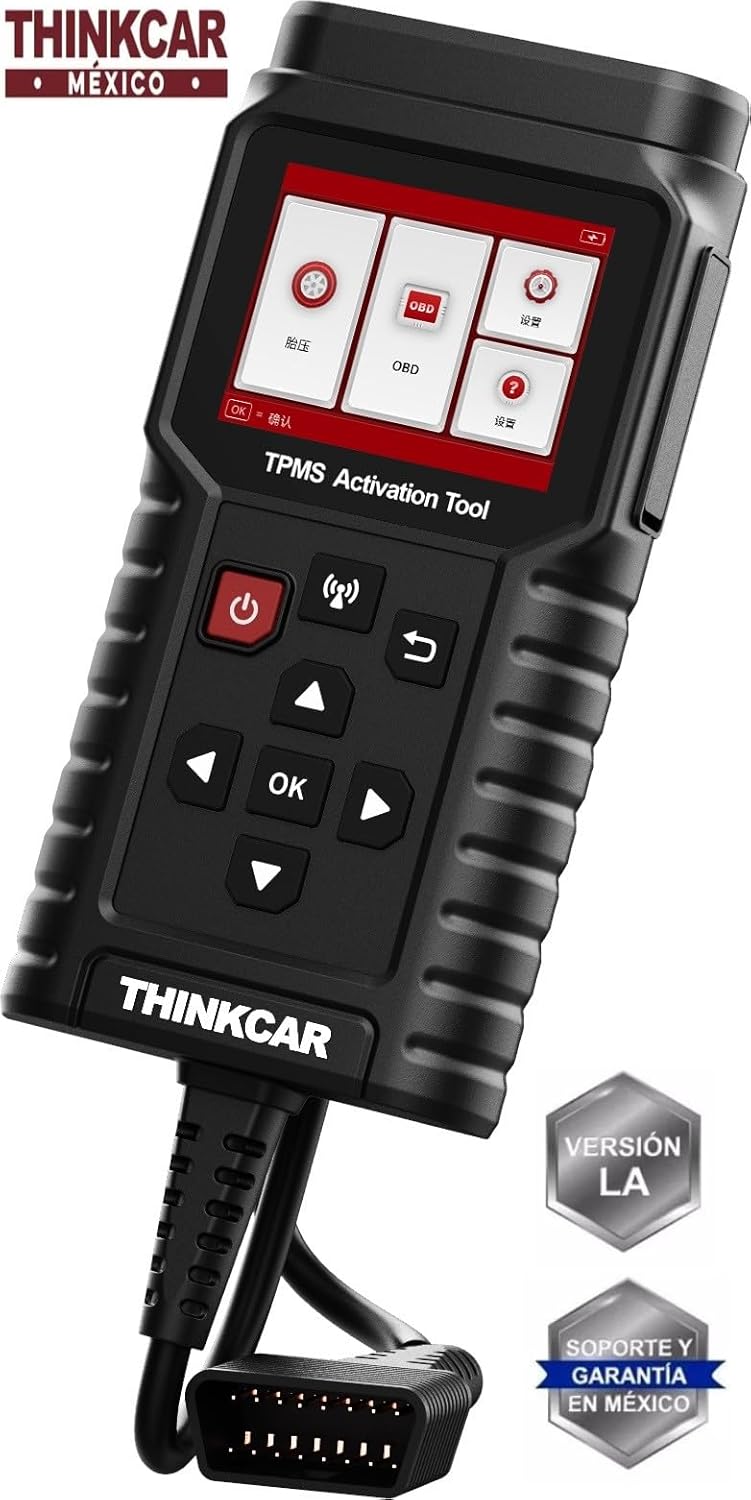
Figure 4.2: The thinkcar TPMS T90 connected via its integrated OBDII cable.
5. సెటప్
Follow these steps for initial setup and connection to your vehicle:
- పవర్ ఆన్: స్క్రీన్ వెలిగే వరకు పవర్ బటన్ను నొక్కి పట్టుకోండి.
- భాష ఎంపిక: If prompted, select your preferred language using the navigation buttons and confirm with the OK button.
- OBDII పోర్ట్ను గుర్తించండి: Identify the 16-pin OBDII diagnostic port in your vehicle. This is typically located under the dashboard on the driver's side.
- వాహనానికి కనెక్ట్ చేయండి: Plug the TPMS T90's OBDII connector cable firmly into the vehicle's OBDII port. The device will draw power from the vehicle.
- ప్రారంభ బూట్: పరికరం బూట్ అవుతుంది మరియు ప్రధాన మెనుని ప్రదర్శిస్తుంది.
6. ఆపరేటింగ్ సూచనలు
The TPMS T90 offers two primary diagnostic functions: TPMS services and OBDII diagnostics.
6.1 TPMS Functions
The TPMS T90 can activate, read, and re-learn TPMS sensors.
- Access TPMS Menu: From the main menu, select the 'TPMS' option using the navigation buttons and press OK.
- వాహనాన్ని ఎంచుకోండి: Follow the on-screen prompts to select the vehicle's make, model, and year.
- ఫంక్షన్ ఎంచుకోండి: Select from the available TPMS functions:
- సెన్సార్ని యాక్టివేట్ చేయండి: Position the device near each tire's sensor and press the TPMS activation button to wake up and read sensor data.
- Read Sensor: After activation, the device will display sensor ID, tire pressure, temperature, and battery status.
- Re-learn Sensor: Follow the specific re-learn procedure for the vehicle, which may involve driving, stationary re-learn, or OBDII re-learn. The device will guide you through the process.
- Program Sensor (if applicable): If using programmable sensors, select this option to program new sensor IDs.
- పూర్తి ప్రక్రియ: Follow all on-screen instructions until the TPMS service is successfully completed.
6.2 OBDII డయాగ్నోస్టిక్స్
The OBDII function allows you to read and clear diagnostic trouble codes (DTCs) and view ప్రత్యక్ష డేటా.
- Access OBDII Menu: From the main menu, select the 'OBD' option and press OK.
- కోడ్లను చదవండి: Select 'Read Codes' to retrieve current, pending, and permanent DTCs. The device will display the code and a brief description.
- కోడ్లను క్లియర్ చేయండి: After addressing the issue, select 'Clear Codes' to erase DTCs and turn off the Malfunction Indicator Lamp (MIL). హెచ్చరిక: Do not clear codes before diagnosing and fixing the underlying problem.
- ప్రత్యక్ష డేటా: 'లైవ్ డేటా' ను ఎంచుకోండి view real-time sensor data from the vehicle's engine control unit (ECU). This can include engine RPM, vehicle speed, oxygen sensor readings, etc.
- I/M సంసిద్ధత: వివిధ ఉద్గార సంబంధిత మానిటర్ల సంసిద్ధత స్థితిని తనిఖీ చేయండి.
7. నిర్వహణ
Proper maintenance ensures the longevity and optimal performance of your TPMS T90.
- శుభ్రపరచడం: ఒక మృదువైన ఉపయోగించండి, డిamp పరికరం యొక్క బాహ్య భాగాన్ని శుభ్రం చేయడానికి వస్త్రం. రాపిడి క్లీనర్లను లేదా ద్రావకాలను ఉపయోగించవద్దు.
- నిల్వ: పరికరాన్ని పొడి, చల్లని వాతావరణంలో, ప్రత్యక్ష సూర్యకాంతి మరియు తీవ్రమైన ఉష్ణోగ్రతలకు దూరంగా నిల్వ చేయండి.
- సాఫ్ట్వేర్ అప్డేట్లు: Regularly check the official thinkcar website for software updates. Updates often include new vehicle coverage, bug fixes, and improved functionality. Follow the provided instructions for updating the device's firmware.
- బ్యాటరీ సంరక్షణ: The device is powered by the vehicle's OBDII port. If it has an internal battery (2600 M/A, 3.7 V), ensure it is charged periodically if stored for extended periods without use.
8. ట్రబుల్షూటింగ్
This section addresses common issues you might encounter with your TPMS T90.
| సమస్య | సాధ్యమైన కారణం | పరిష్కారం |
|---|---|---|
| పరికరం పవర్ ఆన్ చేయదు. | Loose OBDII connection; vehicle's ignition off; vehicle battery low. | Ensure the OBDII cable is securely connected. Turn the vehicle's ignition to the ON position. Check vehicle battery voltage. |
| Cannot communicate with vehicle. | Incorrect vehicle selection; faulty OBDII port; device software issue. | Verify vehicle make, model, and year. Test the OBDII port with another known-good device. Update device software. |
| TPMS sensor not activating/reading. | Incorrect sensor type selected; sensor too far from device; faulty sensor; low sensor battery. | Ensure correct sensor type is selected. Hold the device close to the tire valve stem. Check sensor battery or replace sensor if necessary. |
| OBDII codes not clearing. | Underlying fault still present; vehicle ignition not in ON position. | Diagnose and repair the fault before attempting to clear codes. Ensure ignition is ON (engine off). |
9. స్పెసిఫికేషన్లు
Technical specifications for the thinkcar TPMS T90 Diagnostic Scanner:
- CPU: GD32F407
- నిల్వ: 128MB (equipped with 16GB TF card)
- స్క్రీన్ పరిమాణం: 2.8 అంగుళాలు
- బ్యాటరీ: 2600 mAh, 3.7 V
- కేబుల్ పొడవు: 1.2 మీటర్లు
- వస్తువు బరువు: సుమారు 1.5 పౌండ్లు
- ఉత్పత్తి కొలతలు: 5.51 x 11.42 x 2.76 అంగుళాలు
- తయారీదారు పార్ట్ నంబర్: TPMS T-90
- UPC: 810094610524
10. వారంటీ మరియు మద్దతు
For warranty information, please refer to the documentation provided with your purchase or visit the official thinkcar webసైట్. వారంటీ నిబంధనలు మరియు షరతులు ప్రాంతం మరియు రిటైలర్ను బట్టి మారవచ్చు.
For technical support, software updates, or additional assistance, please visit the official thinkcar support portal or contact their customer service department. Contact information is typically available on the manufacturer's webసైట్.


