1. ఉత్పత్తి ముగిసిందిview
The MACHINIST B75 Micro ATX Gaming PC Motherboard is designed to support Intel 2nd and 3rd generation Core i3, i5, i7, Xeon E3/V2 series, Celeron G series, and Pentium G series processors. This motherboard features a compact Micro-ATX form factor, making it suitable for various desktop PC builds, including gaming systems and workstations. It integrates essential components and expansion capabilities for a balanced performance.

Image: The MACHINIST B75 Micro ATX Motherboard alongside its product packaging, highlighting its compact design and readiness for integration into a PC system.
2 కీ ఫీచర్లు
- ఇంటెల్ LGA 1155 సాకెట్: Supports Intel 2nd or 3rd gen Core i3/i5/i7, Xeon E3/V2 series, Celeron G series, and Pentium G series processors.
- PCI/PCI-E 2.0 Expansion Slots: Includes 2 PCI-E slots (1x PCIe 2.0 X16, 1x PCIe 2.0 X1) and 1 PCI slot for graphics cards, sound cards, and network cards.
- SATA M.2 Interface: Supports AHCI protocol with transfer rates up to 6Gbps, providing a fast storage solution.
- Dual-channel DDR3 Memory Slots: Two DDR3 Non ECC desktop memory slots supporting 1280/1333/1600/1866MHz frequencies, up to 16GB capacity.
- హై-డెఫినిషన్ వీడియో అవుట్పుట్: Compatible with VGA+HDMI dual output interface, supporting 4K video and audio output.
- బలమైన డిజైన్: 6-layer PCB motherboard with all solid capacitors for stable operation and durability.

చిత్రం: క్లోజప్ view of the PCI-E X16, PCI-E X1, and PCI expansion slots on the motherboard, indicating their positions and types.

Image: Illustration of the SATA M.2 (NGFF M.2) interface, showing its location on the motherboard and highlighting its function for high-speed storage.

Image: Diagram illustrating the VGA and HDMI output ports, emphasizing the motherboard's capability for high-definition dual screen display.
3. సెటప్ గైడ్
3.1 ప్యాకేజీ విషయాలు
ఇన్స్టాలేషన్ ప్రారంభించే ముందు, అన్ని భాగాలు ఉన్నాయని నిర్ధారించుకోండి:
- 1x MACHINIST B75 Motherboard
- 1x SATA కేబుల్
- 1x I/O Baffle

Image: A visual representation of the items included in the product package: the motherboard, a SATA cable, and an I/O baffle.
3.2 CPU ఇన్స్టాలేషన్
Follow these steps carefully to install your CPU:
- Press the wire buckle by hand and lift it up. Do not remove the black cover before installing the CPU.
- The motherboard base has 3 bayonets, and the CPU itself has three bayonets. Align them one by one, and then place the CPU gently into the socket.
- Lower the wire buckle that was lifted up, and the black cover on it will pop up automatically. Remember not to remove the black cover before installing the CPU.
- జాగ్రత్త: Do not open the CPU top cover. Do not touch the CPU pins to contact the core. Do not touch the motherboard interface pins.
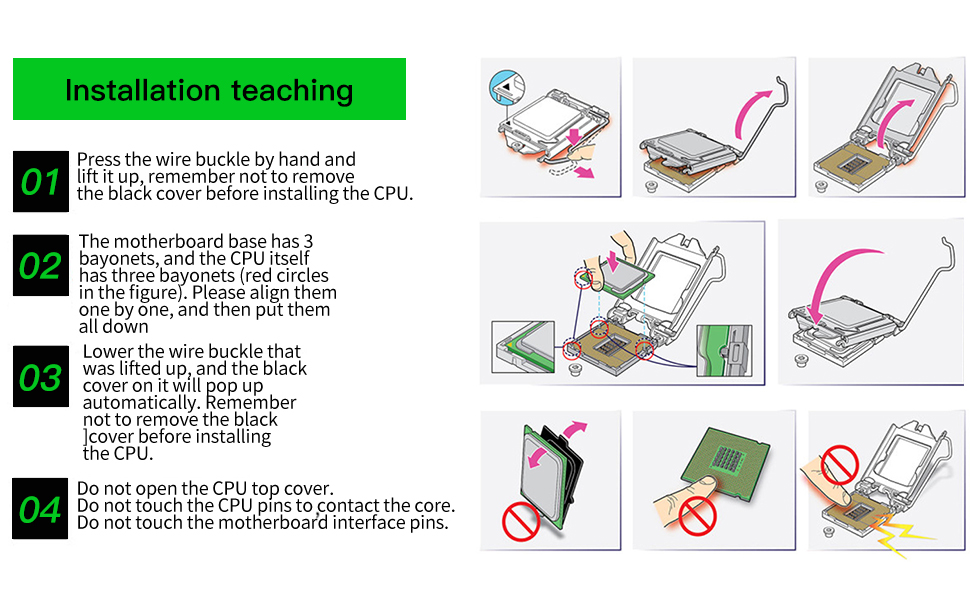
Image: Step-by-step visual guide for installing the CPU into the LGA 1155 socket, emphasizing proper alignment and handling.
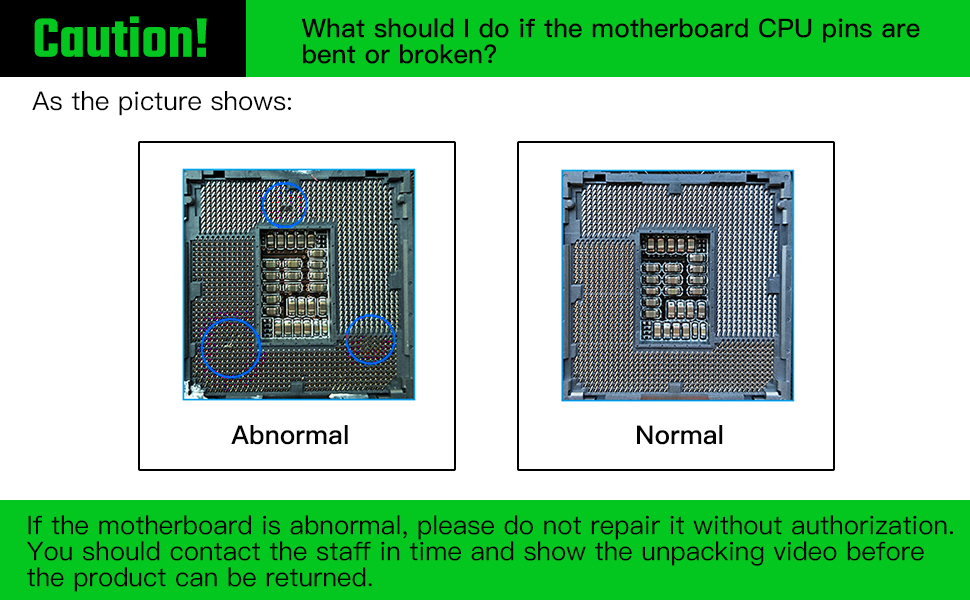
Image: A warning illustration showing the difference between abnormal (bent/broken) and normal CPU pins, advising against unauthorized repair.
3.3 మెమరీ (RAM) సంస్థాపన
The motherboard features two dual-channel DDR3 memory slots. To install RAM:
- మెమరీ స్లాట్ యొక్క రెండు చివర్లలోని క్లిప్లను తెరవండి.
- మెమరీ స్లాట్లోని కీతో DDR3 మెమరీ మాడ్యూల్లోని నాచ్ను సమలేఖనం చేయండి.
- క్లిప్లు సరిగ్గా అమర్చబడే వరకు మెమరీ మాడ్యూల్ యొక్క రెండు చివర్లను గట్టిగా నొక్కండి.

Image: Close-up of the DDR3 memory slots on the motherboard, highlighting their design and support for DDR3 modules.
3.4 నిల్వ పరికర సంస్థాపన (SATA & M.2)
This motherboard supports both SATA and M.2 storage devices.
- SATA పరికరాలు: Connect your SATA SSDs or HDDs to the SATA 3.0 (6Gbps) or SATA 2.0 ports using SATA cables.
- M.2 Devices: Install your SATA M.2 (NGFF M.2) SSD into the dedicated M.2 slot. Ensure it is properly seated and secured with the provided screw. Note that using the M.2 slot may disable one SATA 3.0 port.
3.5 పవర్ కనెక్షన్లు
Connect the main 24-pin ATX power connector and the 4-pin CPU power connector from your power supply unit (PSU) to the corresponding ports on the motherboard.
3.6 ఫ్రంట్ ప్యానెల్ కనెక్షన్లు
Connect the front panel headers (Power LED, HDD LED, Power Switch, Reset Switch, USB, Audio) to their respective pins on the motherboard. Refer to the motherboard layout diagram for pin assignments.

Image: Detailed layout of the motherboard, showing the location of various ports and connectors including USB, audio, Ethernet, and front panel headers.
4. ఆపరేటింగ్ సూచనలు
4.1 Initial Boot-up and BIOS Access
After assembling your PC, connect a monitor, keyboard, and mouse. Power on the system. To enter the BIOS/UEFI setup utility, repeatedly press the "Del" key immediately after pressing the power button. Do not wait for the startup logo to appear, as it may be too late.
Within the BIOS, you can configure boot order, system time, and other hardware settings. Save changes before exiting.
4.2 డ్రైవర్ ఇన్స్టాలేషన్
For optimal performance, install the necessary drivers for your motherboard components (chipset, audio, LAN, etc.).
- If you are using Windows 10, the operating system can often automatically detect and install most drivers.
- For specific drivers or if automatic installation fails, visit the MACHINIST official website or refer to the product page for driver downloads.
4.3 Integrated Graphics Usage
The motherboard supports integrated graphics output via VGA and HDMI. Note that some Intel Xeon E3 V1 and V2 series CPUs do not have integrated graphics. Generally, only CPU models with the suffix "5" (e.g., E3-1245) or Intel Core i3, i5, i7 series (unless they have an "F" suffix) support integrated display.
5. నిర్వహణ
Proper maintenance ensures the longevity and stable operation of your motherboard:
- దుమ్ము తొలగింపు: Regularly clean dust from the motherboard and other PC components using compressed air. Ensure the system is powered off and unplugged before cleaning.
- ఉష్ణోగ్రత పర్యవేక్షణ: Ensure adequate airflow within your PC case to prevent overheating. Monitor CPU and chipset temperatures using system monitoring software.
- బయోస్ బ్యాటరీ: The motherboard requires a CR2032 CMOS battery (not included in package). Replace it if you experience issues with BIOS settings resetting or incorrect system time.
- కేబుల్ నిర్వహణ: Organize internal cables to improve airflow and prevent interference.
6. ట్రబుల్షూటింగ్
మదర్బోర్డును ఇన్స్టాల్ చేసిన తర్వాత మీకు సమస్యలు ఎదురైతే, ఈ క్రింది ట్రబుల్షూటింగ్ దశలను పరిగణించండి:
- No Display/No Boot/No Picture:
- అన్ని పవర్ కేబుల్స్ (24-పిన్ ATX, 4-పిన్ CPU) సురక్షితంగా కనెక్ట్ చేయబడ్డాయని నిర్ధారించుకోండి.
- Reseat the RAM modules. Try booting with only one RAM stick if you have multiple.
- Reseat the CPU. Check for any bent pins on the CPU socket (refer to the "Caution!" image in Setup Guide).
- If using a dedicated graphics card, ensure it is properly seated in the PCIe slot and has adequate power. Try booting without the graphics card if your CPU has integrated graphics.
- Reset CMOS: Locate the CMOS clear jumper or remove the CMOS battery for a few minutes, then reinsert it.
- No Network Card/No Sound Card:
- Ensure drivers are correctly installed. For Windows 10, try updating drivers via Device Manager.
- Check BIOS settings to ensure integrated LAN/Audio are enabled.
- సిస్టమ్ అస్థిరత/క్రాష్లు:
- Verify RAM compatibility and ensure it is running at supported frequencies.
- Check CPU and chipset temperatures.
- Ensure all components are properly seated and connections are secure.
If the motherboard is abnormal (e.g., bent CPU pins), do not attempt to repair it without authorization. Contact support and provide an unboxing video if possible before returning the product.
7. స్పెసిఫికేషన్లు
| ఫీచర్ | వివరాలు |
|---|---|
| ఉత్పత్తి కొలతలు | 9.45 x 6.69 x 1.5 అంగుళాలు |
| వస్తువు బరువు | 1.43 పౌండ్లు |
| తయారీదారు | మెషినిస్ట్ |
| అంశం మోడల్ సంఖ్య | B75 PRO U5 |
| CPU సాకెట్ | LGA 1155 |
| అనుకూల పరికరాలు | వ్యక్తిగత కంప్యూటర్ |
| RAM మెమరీ టెక్నాలజీ | DDR3 |
| అనుకూల ప్రాసెసర్లు | Intel 2nd/3rd Gen Core i3/i5/i7, Xeon E3/V2 series, Celeron G series, Pentium G series (e.g., E3-1220, i7-3770, i5-3570, i3-3250) |
| చిప్సెట్ రకం | ఇంటెల్ B75 ఎక్స్ప్రెస్ |
| మెమరీ క్లాక్ స్పీడ్ | 1600 MHz (supports 1280/1333/1600/1866MHz) |
| వేదిక | Windows 10 |
| గరిష్ట RAM సామర్థ్యం | 16GB |
| PCI-E స్లాట్లు | 1x PCI-E 3.0 X16, 1x PCI-E X1 |
| PCI స్లాట్లు | 1x PCI |
| SATA ఇంటర్ఫేస్ | 1x SATA3.0, 3x SATA2.0, 1x SATA M.2 (NGFF M.2) |
| USB ఇంటర్ఫేస్ | 2x USB 3.0, 3x USB 2.0 |
| నెట్వర్క్ కార్డ్ | గిగాబిట్ ఈథర్నెట్ |
| ఇంటిగ్రేటెడ్ గ్రాఫిక్స్ | Yes (VGA+HDMI dual output) |

Image: A visual table summarizing the key technical parameters and specifications of the B75 Pro U5 motherboard.
8. వారంటీ మరియు మద్దతు
MACHINIST provides support for its products. While a physical manual is not included, a PDF user manual can be downloaded from the product page on Amazon. For driver issues, using Windows 10 is recommended as it often resolves driver problems automatically.
If you encounter issues that cannot be resolved through troubleshooting, or if you suspect physical damage (e.g., bent CPU pins), it is recommended to contact MACHINIST customer support. Providing an unboxing video may be required for returns or warranty claims related to physical damage.
మరిన్ని వివరాలకు, దయచేసి అధికారిని సందర్శించండి. MACHINIST Store on Amazon.
9. ఉత్పత్తి వీడియో
Video: An official display video showcasing the key features and components of the MACHINIST B75 Motherboard.


