1. పరిచయం
The WhalesBot E7 Pro Coding Robot Kit is an educational engineering and science toy designed for children aged 8 and above. This kit provides a hands-on learning experience in robotics and programming, supporting multiple coding languages including Scratch, Python, and C. Users can build various robot models and control them through a dedicated app, fostering creativity and problem-solving skills.

Image: Children engaged in building and interacting with WhalesBot E7 Pro robots, demonstrating the fun and educational aspects of the kit.
2. పెట్టెలో ఏముంది
The WhalesBot E7 Pro kit includes a comprehensive set of components for building and programming robots. All parts are organized within a durable storage box.

చిత్రం: పైగాview of the WhalesBot E7 Pro kit, showing an assembled robot, various electronic components, structural parts, and accompanying manuals in a blue storage box.
ముఖ్య భాగాలు:
- Blue Storage Box: 1 unit, for organized storage of all kit components.
- ఎలక్ట్రానిక్ భాగాలు:
- Smart Controller x1
- Closed-loop Motors x2
- LED Expression Screen x1
- Infrared Sensor x1
- Touch Sensor x1
- 5-in-1 Grayscale Sensor x1
- Structural Components: Over 600 various beams, plates, connectors, shafts, gears, wheels, and decorative parts for building diverse robot models.
- డాక్యుమెంటేషన్: User Manual, Quick-Start Card, Part List, and three engaging storybooks for guided learning.

Image: A visual breakdown of the 637 building blocks and electronic components included in the WhalesBot E7 Pro kit, categorized for easy identification and assembly.
3. సెటప్
3.1 బ్యాటరీ ఇన్స్టాలేషన్
The Smart Controller requires 6 AA batteries (not included). Ensure batteries are inserted with correct polarity as indicated inside the battery compartment.
3.2 యాప్ డౌన్లోడ్ మరియు కనెక్షన్
The WhalesBot E7 Pro utilizes a dedicated mobile application for building instructions, programming, and control. The app is compatible with phones, tablets, and PCs.
- Download the "WhalesBot" app from your device's app store (Google Play Store for Android, Apple App Store for iOS).
- Launch the app and follow the on-screen prompts to select your E7 Pro kit.
- మీ పరికరం యొక్క బ్లూటూత్ ప్రారంభించబడిందని నిర్ధారించుకోండి.
- Power on the Smart Controller.
- Within the app, navigate to the connection screen. The app will automatically detect and connect to the E7 Pro Smart Controller via Bluetooth.

Image: A robot model with a smartphone displaying the WhalesBot app's connection interface, illustrating the automatic Bluetooth pairing process for easy setup.
3.3 Robot Assembly
The kit includes materials for building 12 different robot models. Detailed 3D step-by-step building guides are available within the WhalesBot app.
- Open the WhalesBot app and select the desired robot model from the available projects.
- Follow the interactive 3D instructions to assemble your robot. The app allows for rotation and zooming to view details from all angles.
- Connect the electronic components (motors, sensors) to the Smart Controller as indicated in the app's building guide.

Image: Various robot configurations possible with the WhalesBot E7 Pro kit, including a large humanoid robot, a dinosaur, and other vehicles, demonstrating the 12-in-1 STEM projects.
4. ఆపరేటింగ్ సూచనలు
4.1 రోబోట్ ప్రోగ్రామింగ్
The E7 Pro supports multiple programming languages to cater to different skill levels:
- స్క్రాచ్: Ideal for beginners, using a drag-and-drop block-based interface to create programs.
- Python/C: For advanced learners, offering more complex programming capabilities.
Access the programming interface through the WhalesBot app or compatible PC software. Follow the guided tutorials and storybooks provided to learn coding logic and create custom behaviors for your robot.
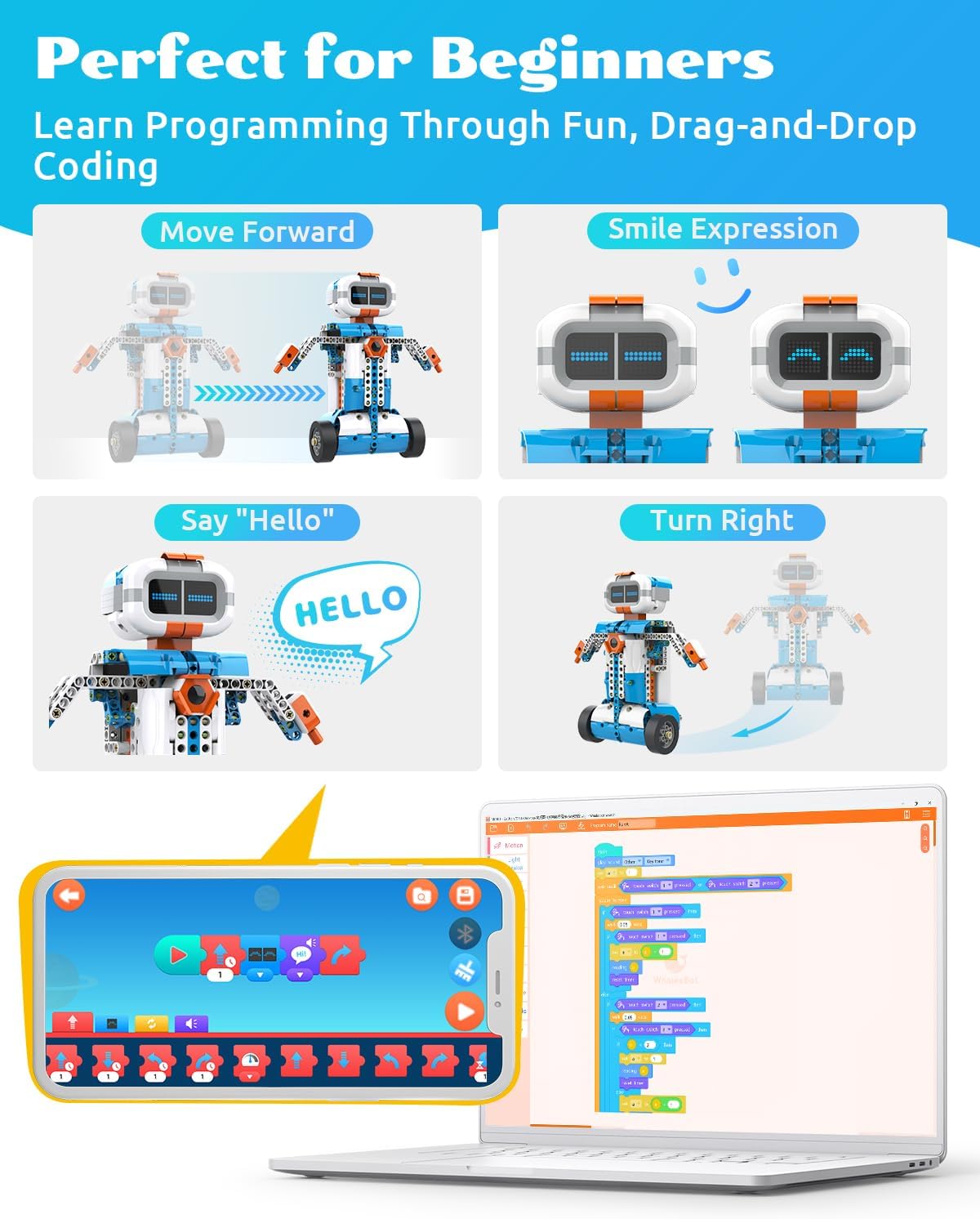
Image: Screenshots of the WhalesBot app and a laptop screen showing the Scratch-like drag-and-drop coding interface, with examples of programming blocks for movement and expressions.
4.2 రిమోట్ కంట్రోల్
Once assembled and connected, your robot can be controlled remotely via the WhalesBot app.
- Open the app and select the remote control mode for your robot.
- Use the on-screen joystick or tilt controls to maneuver the robot.
- Trigger programmed actions, sounds, or light effects through dedicated buttons in the app.

Image: A child interacting with a dinosaur robot using a tablet, demonstrating the remote control features of the WhalesBot app, including tap and tilt movements and various action buttons.
5. అధునాతన ఫీచర్లు
The E7 Pro kit includes advanced components that enable complex builds and interactive functionalities:
- స్మార్ట్ కంట్రోలర్: The central processing unit equipped with a powerful chip, ARM processor, built-in Bluetooth, speaker, and multiple ports for sensor connections.
- Closed-loop Motors: Provide precise speed and position control for accurate robot movements.
- LED Expression Screen: A dot-matrix display that shows various expressions and animations, adding personality to your robot.
- ఇన్ఫ్రారెడ్ సెన్సార్: Detects obstacles and measures distance, enabling obstacle avoidance and navigation.
- టచ్ సెన్సార్: Senses physical contact and collisions, allowing for interactive responses.
- 5-ఇన్-1 గ్రేస్కేల్ సెన్సార్: Detects black lines for line-following capabilities, enhancing robot autonomy.

Image: A diagram highlighting the advanced features of the WhalesBot E7 Pro robot, including the LED Expression Screen, Closed-loop Motors, Controller, Infrared Sensor, Touch Sensor, and 5-in-1 Grayscale Sensor.
6. నిర్వహణ
6.1 శుభ్రపరచడం
To clean the robot components, use a soft, dry cloth. Avoid using water or cleaning solutions directly on electronic parts. For stubborn dirt, a slightly damp cloth can be used on plastic structural parts, ensuring they are completely dry before reassembly.
6.2 నిల్వ
Store all components in the provided blue storage box when not in use. This helps prevent loss of small parts and protects them from dust and damage. Remove batteries from the Smart Controller if the robot will not be used for an extended period to prevent battery leakage.
7. ట్రబుల్షూటింగ్
| సమస్య | సాధ్యమైన కారణం | పరిష్కారం |
|---|---|---|
| రోబోట్ పవర్ ఆన్ చేయదు. | బ్యాటరీలు తక్కువగా ఉన్నాయి లేదా తప్పుగా ఇన్స్టాల్ చేయబడ్డాయి. | Replace with fresh AA batteries and ensure correct polarity. |
| బ్లూటూత్ ద్వారా యాప్కి కనెక్ట్ చేయడం సాధ్యం కాలేదు. | Bluetooth is disabled on the device or controller is off. App permissions are not granted. | Ensure Bluetooth is active on your device and the robot controller is powered on. Check app permissions for Bluetooth and location access. Restart both the app and the controller. |
| Robot movements are erratic or unresponsive. | Loose connections, incorrect assembly, or programming error. | Check all cable connections between motors/sensors and the Smart Controller. Review the assembly steps in the app. Verify your programming code for logical errors. |
| App building instructions are slow to load. | Poor internet connection or large file పరిమాణం. | Ensure a stable and strong internet connection. Download instructions in advance if possible. |
8. స్పెసిఫికేషన్లు
- మోడల్: ఇ 7 ప్రో
- బ్రాండ్: వేల్స్బాట్
- ఉత్పత్తి కొలతలు: 16.1 x 11.8 x 5.1 అంగుళాలు
- వస్తువు బరువు: 7.15 పౌండ్లు
- సిఫార్సు చేసిన వయస్సు: 8 - 12 సంవత్సరాలు
- బ్యాటరీలు: 6 AA బ్యాటరీలు అవసరం (చేర్చబడలేదు)
- కనెక్టివిటీ: బ్లూటూత్
- Supported Coding Languages: Scratch, Python, C
- ప్రాజెక్ట్ల సంఖ్య: 12-in-1 buildable models
9. వారంటీ మరియు మద్దతు
For warranty information, technical support, or further assistance, please refer to the official WhalesBot website or contact their customer service directly. Details can typically be found on the product packaging or within the WhalesBot app.
ఆన్లైన్ వనరులు:
- Official WhalesBot Store: WhalesBot Amazon Store
- యూజర్ మాన్యువల్ (PDF): PDFని డౌన్లోడ్ చేయండి


