1. పరిచయం
This manual provides detailed instructions for the setup, operation, and maintenance of your BOMGE CT80S-pro 8-Channel Professional Mixer. Please read this manual thoroughly before using the device to ensure proper functionality and to prevent damage.
The BOMGE CT80S-pro 8-channel mixer supports wired and wireless connections for microphones, instruments, and other audio sources. It is suitable for various applications including home KTV, band performances, campus events, and conferences.
2. ఉత్పత్తి ముగిసిందిview
The BOMGE CT80S-pro is a compact 8-channel audio mixer designed for versatile audio mixing and recording. It features multiple input options, integrated digital signal processing (DSP) effects, Bluetooth connectivity, and USB recording capabilities.
2.1 ముఖ్య లక్షణాలు
- 8 input channels with XLR and 6.35mm unbalanced jacks.
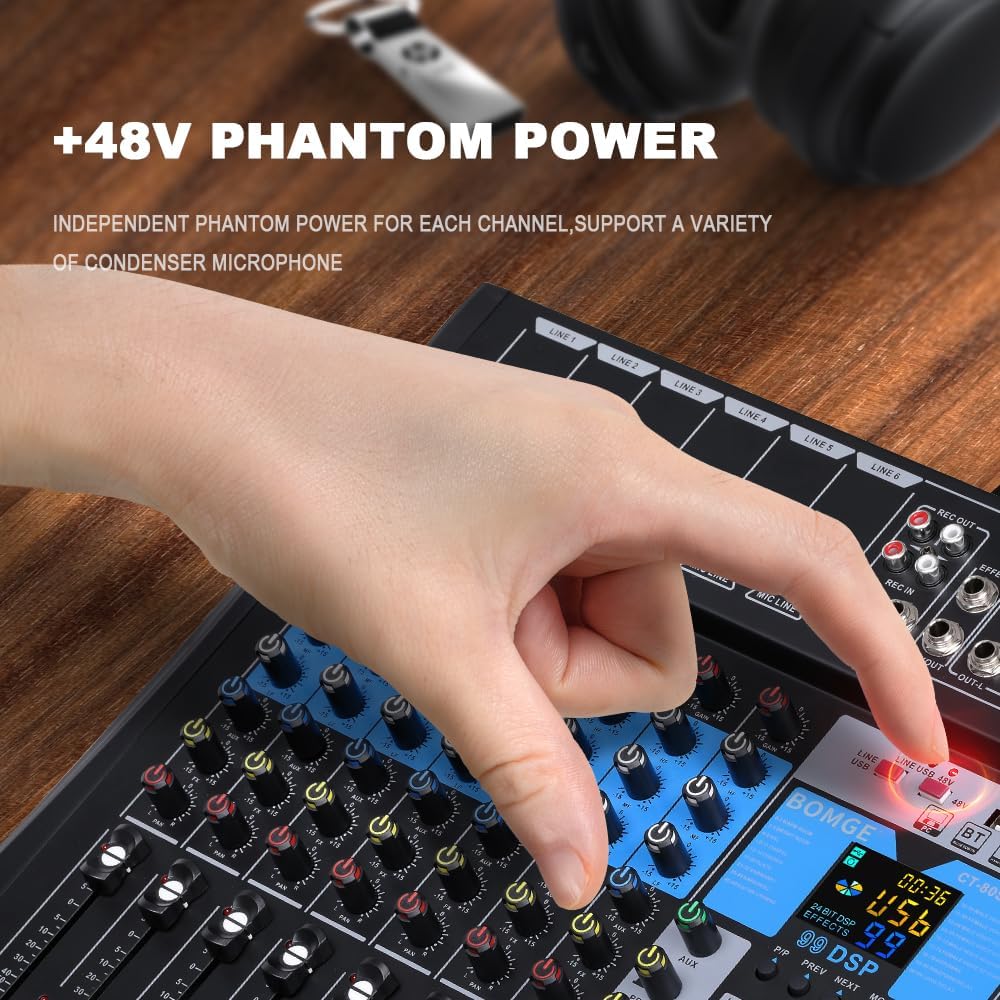
- +48V Phantom Power for condenser microphones.
- Integrated 99-bit DSP effects processor.
- 3-band equalizer on all channels.
- USB/Flash drive/MP3 compatibility for playback and recording.
- బ్లూటూత్ వైర్లెస్ స్ట్రీమింగ్.
- LED peak level indicators and 10-segment stereo output level meter.
- Compact chassis with sealed rotary controls for dust resistance.
2.2 Mixer Layout

The mixer features a control panel with individual channel controls, master controls, and a digital display for DSP effects and media playback. Input and output ports are located on the top and rear panels.
3. సెటప్
3.1 పవర్ కనెక్షన్
The mixer operates on a 5V power supply. It can be powered via a power bank, a standard power plug, or a computer USB port.
- Connect the provided USB power cable to the DC 5V input port on the rear of the mixer.
- Connect the other end of the USB cable to a compatible 5V power source (e.g., power bank, USB wall adapter, computer USB port).
- Press the POWER button on the top right of the mixer to turn it on.
3.2 ఆడియో మూలాలను కనెక్ట్ చేయడం
The mixer provides multiple input options for various audio devices.

- మైక్రోఫోన్లు: Connect XLR or 6.35mm (1/4 inch) microphone cables to the MIC/LINE input jacks (LINE 1-6). For condenser microphones requiring phantom power, activate the +48V PHANTOM POWER button for the respective channel.
- Line-level Instruments/Devices: Connect instruments or other line-level devices using 6.35mm (1/4 inch) cables to the MIC/LINE input jacks.

ముఖ్యమైన: Ensure phantom power is only activated when using condenser microphones that require it. Do not activate phantom power for dynamic microphones or other devices that do not require it, as this may cause damage.
3.3 అవుట్పుట్ పరికరాలను కనెక్ట్ చేయడం
- ప్రధాన అవుట్పుట్: మీ ప్రధాన స్పీకర్లను కనెక్ట్ చేయండి లేదా amplifier to the OUT-L and OUT-R (TRS or XLR) jacks.
- హెడ్ఫోన్లు: పర్యవేక్షణ కోసం హెడ్ఫోన్లను PHONES జాక్కి కనెక్ట్ చేయండి.
- రికార్డింగ్ అవుట్పుట్: Use the REC OUT (RCA) for connecting to a recording device.
4. ఆపరేటింగ్ సూచనలు
4.1 ఛానెల్ నియంత్రణలు

- గెయిన్: ప్రతి ఛానెల్కు ఇన్పుట్ సెన్సిటివిటీని సర్దుబాటు చేస్తుంది. క్లిప్పింగ్ (వక్రీకరణ) లేకుండా బలమైన సిగ్నల్ సాధించడానికి దీన్ని సెట్ చేయండి.
- 3-Band EQ (HIGH, MIDDLE, LOW): ప్రతి ఛానెల్కు ట్రెబుల్, మిడ్రేంజ్ మరియు బాస్ ఫ్రీక్వెన్సీలను సర్దుబాటు చేస్తుంది.
- AUX: Controls the send level to the auxiliary output or internal effects processor.
- పాన్: Adjusts the stereo position (left/right) of the channel in the main mix.
- LEVEL FADER: వ్యక్తిగత ఛానెల్ యొక్క అవుట్పుట్ వాల్యూమ్ను ప్రధాన మిశ్రమానికి నియంత్రిస్తుంది.
- PFL (ప్రీ-ఫేడర్ లిజెన్): Activates pre-fader monitoring of the channel through headphones.

4.2 Master Controls
- MAIN L/R FADERS: Control the overall volume of the stereo main output.
- ఫోన్లు: Adjusts the headphone output volume.
- స్థాయి సూచిక: A 10-segment LED meter displays the main output level. Adjust channel and master faders to keep levels within the optimal range, avoiding the red "peak" indicators.

4.3 DSP ప్రభావాలు
The mixer includes an integrated DSP processor with 99 selectable effects.

- ఉపయోగించండి కార్యక్రమం knob to select one of the 99 available effects. The selected effect number will be displayed on the screen.
- సర్దుబాటు చేయండి FX PARA (Effect Parameter) knob to modify parameters of the selected effect (e.g., delay time, reverb decay).
- ఉపయోగించండి FX స్థాయి control to adjust the overall volume of the effects send.
- ది FX టు మెయిన్ fader controls how much of the processed effect signal is sent to the main stereo output.
4.4 USB/MP3 Playback and Recording
The mixer supports playback from USB flash drives and can function as a USB audio interface for computers.

- USB ప్లేబ్యాక్: MP3ని కలిగి ఉన్న USB ఫ్లాష్ డ్రైవ్ను చొప్పించండి files into the USB port. Use the integrated controls (PLAY/PAUSE, PREV, NEXT, MODE) to navigate and play tracks.
- USB ఆడియో ఇంటర్ఫేస్: Connect the mixer to a computer via the USB-B port. The mixer can function as an external sound card, allowing you to mix and record audio directly to your computer.
- రికార్డింగ్: The mixer can record audio to a connected USB device or a computer via the USB-B interface. Refer to your recording software's instructions for setting up the mixer as an input device.
4.5 బ్లూటూత్ కనెక్టివిటీ
The mixer allows for wireless audio streaming from Bluetooth-enabled devices.
- నొక్కండి మోడ్ button on the USB/MP3 section until "BT" (Bluetooth) is displayed.
- On your smart device (e.g., smartphone, tablet), search for available Bluetooth devices and select "BOMGE Mixer" (or similar name).
- Once paired, you can stream audio wirelessly from your device to the mixer.
5. నిర్వహణ
- శుభ్రపరచడం: Use a soft, dry cloth to clean the mixer's surface. Avoid using liquid cleaners or solvents.
- నిల్వ: మిక్సర్ను ప్రత్యక్ష సూర్యకాంతి మరియు తీవ్రమైన ఉష్ణోగ్రతలకు దూరంగా చల్లని, పొడి ప్రదేశంలో నిల్వ చేయండి.
- దుమ్ము రక్షణ: The sealed rotary controls are designed to resist dust. However, regular cleaning helps maintain optimal performance.
6. ట్రబుల్షూటింగ్
| సమస్య | సాధ్యమైన కారణం | పరిష్కారం |
|---|---|---|
| శక్తి లేదు | Power cable not connected; Power source faulty; Mixer not switched on. | Ensure power cable is securely connected. Check power source. Press the POWER button. |
| సౌండ్ అవుట్పుట్ లేదు | Volume faders are down; Mute engaged; Incorrect input/output connections; Faulty cables. | Increase channel and main faders. Check all cable connections. Test with different cables. |
| వక్రీకరించిన ధ్వని | Input gain too high; Output level too high; Faulty cable/device. | Reduce input GAIN. Lower main output faders. Check for red peak indicators. Test cables. |
| Phantom power not working | +48V button not pressed; Condenser microphone not connected. | Ensure the +48V button is pressed for the specific channel. Verify condenser microphone connection. |
| బ్లూటూత్ కనెక్షన్ సమస్యలు | మిక్సర్ బ్లూటూత్ మోడ్లో లేదు; పరికరం కనుగొనబడలేదు; జోక్యం. | Ensure mixer is in BT mode. Make sure your device's Bluetooth is on and discoverable. Try re-pairing. |
7. స్పెసిఫికేషన్లు
| ఫీచర్ | వివరాలు |
|---|---|
| బ్రాండ్ | BOMGE |
| మోడల్ సంఖ్య | 8Channel-99DSP (CT80S-pro) |
| కొలతలు (L x W x H) | 37.5 x 34 x 3.7 సెం.మీ |
| బరువు | 1.34 కిలోలు |
| ఛానెల్ల సంఖ్య | 8 |
| కనెక్టివిటీ టెక్నాలజీ | బ్లూటూత్, USB |
| శక్తి మూలం | Battery Powered (via 5V USB) |
| వాల్యూమ్tage | 5 వోల్ట్లు |
| అవుట్పుట్ కనెక్టర్ రకం | RCA, TRS, XLR |
| ఆడియో ఇన్పుట్ | USB |
| DSP ప్రభావాలు | 99 అంతర్నిర్మిత ప్రభావాలు |
| ఫాంటమ్ పవర్ | +48V |
| UPC | 768447426622 |
8. వారంటీ మరియు మద్దతు
Information regarding product warranty and customer support is not available in the provided product data. Please refer to the product packaging or the manufacturer's official webవారంటీ కవరేజ్ మరియు కస్టమర్ సపోర్ట్ను ఎలా సంప్రదించాలి అనే వివరాల కోసం సైట్ను చూడండి.