1. పరిచయం
This instruction manual provides essential information for the proper installation, operation, and maintenance of your BlackZon Drive Shaft Set (Front/Rear), model 540126. Designed for remote-controlled (RC) vehicles, these drive shafts are crucial components for transmitting power from the differential to the wheels. Please read this manual thoroughly before installation to ensure optimal performance and longevity of your product.
2. ఉత్పత్తి వివరణ
The BlackZon Drive Shaft Set 540126 is a replacement or upgrade component for RC vehicles, specifically designed for front and rear axle applications. It includes the necessary components to connect the vehicle's differential to the wheel axles, enabling power transfer and allowing for suspension movement. The set is engineered for durability and efficient power delivery under various operating conditions.
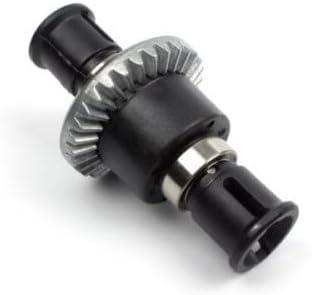
This image displays the BlackZon Drive Shaft Set, model 540126. It features a central differential gear assembly with two output shafts, designed for transmitting power to the wheels of an RC vehicle. The components are primarily black with a metallic gear and bearing visible.
3. ప్యాకేజీ విషయాలు
Upon opening the package, please verify that all components are present and undamaged. The BlackZon Drive Shaft Set 540126 typically includes:
- Drive Shaft Assembly (Front)
- Drive Shaft Assembly (Rear)
- Associated hardware (e.g., pins, grub screws, bearings if applicable)
Note: Specific contents may vary slightly. Refer to the product packaging for a precise list.
4. భద్రతా సమాచారం
Always prioritize safety when working with RC components and tools. Adhere to the following guidelines:
- కంటి రక్షణ: Always wear safety glasses to protect your eyes from small flying debris or chemicals.
- సాధనం నిర్వహణ: Use appropriate tools for the task and handle them with care to prevent injury.
- చిన్న భాగాలు: Keep small components away from children and pets to prevent choking hazards.
- వాహన శక్తి: Disconnect the vehicle's battery before performing any maintenance or installation to prevent accidental activation.
- పదునైన అంచులు: Be aware of any sharp edges on components that could cause cuts.
5. సెటప్ మరియు ఇన్స్టాలేషన్
Installation of the drive shaft set requires basic mechanical aptitude and appropriate tools. If you are unsure about any step, consult a qualified RC technician or refer to your vehicle's specific service manual.
- వాహనాన్ని సిద్ధం చేయండి: Ensure the RC vehicle is powered off and the battery is disconnected. Place the vehicle on a stable, clean surface.
- Remove Old Drive Shafts: Carefully remove the wheels, then detach the existing drive shafts from both the differential output and the wheel hub. Note the orientation and any shims or spacers.
- భాగాలను తనిఖీ చేయండి: Before installing the new drive shafts, inspect the differential output cups and wheel hubs for wear or damage. Replace any worn parts.
- Install New Drive Shafts: Insert the new BlackZon drive shafts into the differential output cups and then connect them to the wheel hubs. Ensure all pins and grub screws are securely fastened. Apply a small amount of thread-locking compound to metal-to-metal screws if recommended by your vehicle's manufacturer.
- మళ్లీ కలపండి: Reattach the wheels and ensure all fasteners are tightened to the manufacturer's specifications.
- పరీక్ష కార్యాచరణ: Manually rotate the wheels to check for smooth operation and proper engagement of the drive shafts.
6. ఆపరేటింగ్ మార్గదర్శకాలు
While drive shafts are passive components, their longevity is directly affected by how the RC vehicle is operated. Adhere to these guidelines:
- Avoid Excessive Stress: Minimize sudden acceleration, hard landings, and impacts that can put undue stress on the drive train.
- Proper Gearing: Ensure your vehicle's gearing is appropriate for the motor and terrain to prevent overloading the drive shafts.
- భూభాగ అవగాహన: Avoid operating in conditions that could cause the drive shafts to bind or become clogged with debris (e.g., thick mud, deep sand).
- సాధారణ తనిఖీ: Periodically check the drive shafts for signs of wear, bending, or damage during operation.
7. నిర్వహణ
Regular maintenance will extend the life of your BlackZon Drive Shaft Set:
- శుభ్రపరచడం: After each use, especially in dirty or wet conditions, clean the drive shafts to remove dirt, dust, and debris. A soft brush and compressed air can be effective.
- సరళత: Apply a small amount of appropriate grease or lubricant to the universal joints or CV joints (if applicable) to reduce friction and wear. Consult your vehicle's manual for recommended lubricants.
- తనిఖీ: Regularly inspect the drive shafts for any signs of wear, cracks, bends, or loose connections. Pay close attention to the pins, bearings, and joint areas.
- ఫాస్టెనర్ తనిఖీ: Ensure all screws and pins holding the drive shafts in place are tight. Re-tighten as necessary.
- బేరింగ్ తనిఖీ: If your drive shafts incorporate bearings, ensure they spin freely and are not gritty. Replace worn bearings promptly.
8. ట్రబుల్షూటింగ్
This section addresses common issues related to drive shafts:
| లక్షణం | సాధ్యమైన కారణం | పరిష్కారం |
|---|---|---|
| Clicking or grinding noise from drive train | Worn or damaged universal joints/CV joints; debris in joints; loose pins. | Inspect and clean joints. Replace worn components or tighten loose pins. |
| ఆపరేషన్ సమయంలో వైబ్రేషన్ | Bent drive shaft; unbalanced wheel; worn bearings. | Inspect drive shaft for bends and replace if necessary. Check wheel balance and replace worn bearings. |
| Loss of power to wheels | Broken drive shaft; stripped differential output cup or wheel hub. | Inspect drive shafts for breakage. Check differential output and wheel hub for damage and replace as needed. |
| Drive shaft pops out | Excessive suspension travel; incorrect length drive shaft; worn outdrive cups. | Check suspension limits. Ensure correct drive shaft length for your vehicle. Replace worn outdrive cups. |
9. స్పెసిఫికేషన్లు
Key specifications for the BlackZon Drive Shaft Set 540126:
- మోడల్: 540126
- బ్రాండ్: బ్లాక్జోన్
- తయారీదారు: HPI
- వస్తువు బరువు: 7 ఔన్సులు (సుమారు 198 గ్రాములు)
- ASIN: B0CDCD1JVX
- సిఫార్సు చేసిన వయస్సు: 8 months and up (for handling the product, not for operating an RC vehicle)
10. వారంటీ మరియు మద్దతు
BlackZon products are manufactured to high standards. For information regarding warranty coverage, terms, and conditions, please refer to the warranty card included with your purchase or visit the official BlackZon website. For technical support, replacement parts, or further assistance, please contact your retailer or the manufacturer directly. Keep your proof of purchase for warranty claims.


