HOVERAir X1 Self-Flying Camera Drone User Manual
Model: Hover X1
1. పరిచయం
Welcome to the HOVERAir X1 Self-Flying Camera Drone user manual. This guide provides essential information for setting up, operating, maintaining, and troubleshooting your HOVERAir X1 drone. Please read this manual thoroughly before using the device to ensure safe and optimal performance.
The HOVERAir X1 is a lightweight, foldable, and intelligent self-flying camera designed for effortless content creation. Its advanced features, including intelligent flight paths and hands-free control, make it an ideal companion for capturing your adventures.
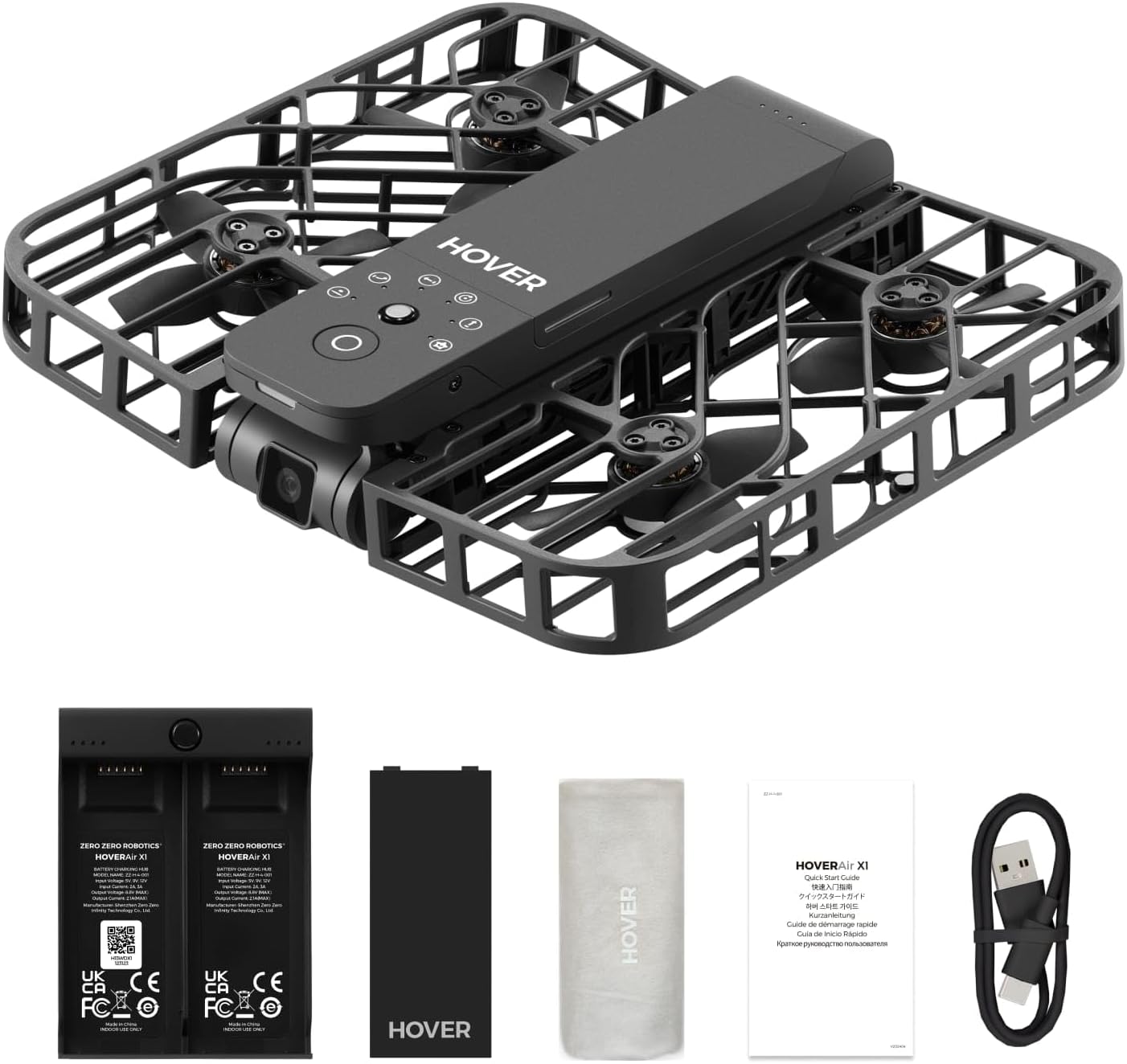
Figure 1.1: The HOVERAir X1 Self-Flying Camera Drone in its unfolded state, ready for flight.
2. పెట్టెలో ఏముంది
Upon unboxing your HOVERAir X1, please verify that all components listed below are present and in good condition.
- HOVERAir X1 Self-Flying Camera (with pre-installed battery)
- బ్యాటరీ ఛార్జింగ్ హబ్
- అదనపు బ్యాటరీ
- USB కేబుల్
- నిల్వ బ్యాగ్
- వినియోగదారు మాన్యువల్ (ఈ పత్రం)

Figure 2.1: All components included in the HOVERAir X1 package.
3. ఉత్పత్తి ముగిసిందిview
The HOVERAir X1 is engineered for portability and ease of use, featuring a compact, foldable design and robust safety features.
3.1. డిజైన్ మరియు పోర్టబిలిటీ
Weighing only 125g (4.41oz), the HOVERAir X1 is lighter than most smartphones, making it exceptionally portable. Its foldable structure allows it to be easily stored and carried, fitting into small bags or even pockets. This design eliminates the need for FAA registration in many regions.
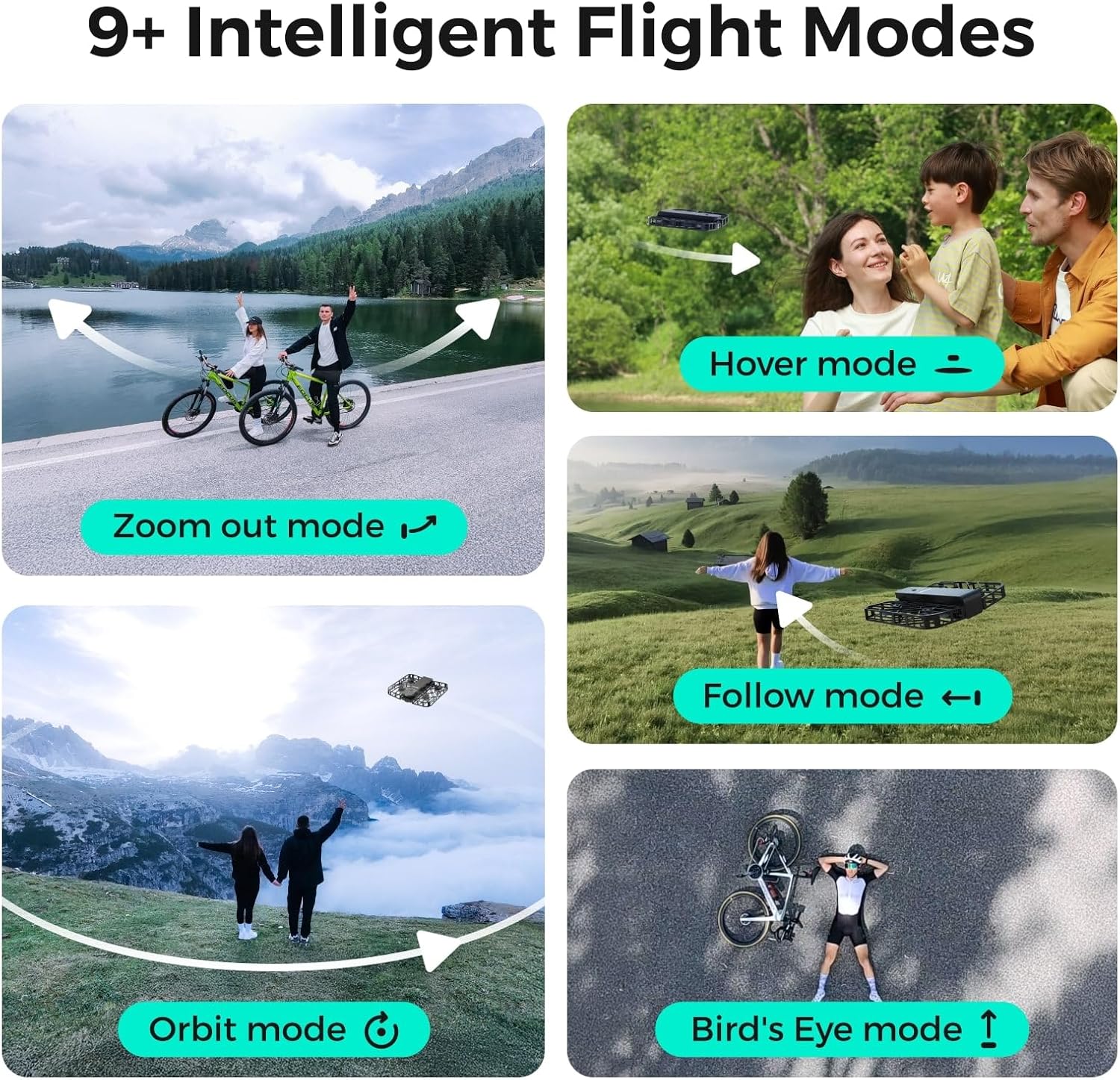
Figure 3.1: The HOVERAir X1's ultra-lightweight and foldable design for easy transport.
3.2. భద్రతా లక్షణాలు
The drone features a fully enclosed design with safety guards around its propellers, providing an additional layer of protection for both the device and its surroundings. This design ensures safe operation, even during close-range interactions.

Figure 3.2: The HOVERAir X1's enclosed design and durable material for enhanced safety.
3.3. Camera and Stabilization
The HOVERAir X1 supports a maximum of 2.7K@30fps and 1080P HDR video shooting. It incorporates a triple stabilization system to ensure smooth video effects and excellent fast motion capture, ideal for dynamic activities.

Figure 3.3: Visual comparison demonstrating the effectiveness of Triple Stabilization for smooth video.
Additionally, the drone features Face AE Technology, which optimizes exposure and color balance to make photos of subjects appear more natural and vibrant.

Figure 3.4: Before and after comparison illustrating the benefits of Face AE Technology for natural-looking photos.
4. సెటప్
Follow these steps to prepare your HOVERAir X1 for its first flight.
4.1 బ్యాటరీని ఛార్జ్ చేస్తోంది
- Connect the USB cable to the Battery Charging Hub.
- USB కేబుల్ యొక్క మరొక చివరను అనుకూలమైన USB పవర్ అడాప్టర్లోకి ప్లగ్ చేయండి (చేర్చబడలేదు).
- Insert the drone batteries into the charging hub. The indicator lights on the hub will show the charging status.
- Once fully charged, disconnect the batteries and the charging hub.
4.2. ప్రారంభ పవర్ ఆన్
- Unfold the HOVERAir X1 drone until it clicks into place.
- సూచిక లైట్లు వెలిగే వరకు డ్రోన్లోని పవర్ బటన్ను నొక్కి పట్టుకోండి.

Figure 4.1: Visual guide for turning on the HOVERAir X1 and selecting a flight mode.
5. ఆపరేటింగ్ సూచనలు
The HOVERAir X1 offers various intelligent flight modes and intuitive controls for a seamless flying experience.
5.1. Palm Takeoff
The HOVERAir X1 is designed for easy palm takeoff. Once powered on and a flight mode is selected, simply hold the drone flat in your palm, and it will automatically take off.
5.2. ఇంటెలిజెంట్ ఫ్లైట్ మోడ్లు
The drone comes pre-programmed with several intelligent flight paths, allowing for hands-free content capture.
- హోవర్ మోడ్: The drone hovers stably in place, ideal for static shots.
- మోడ్ని అనుసరించండి: The drone tracks your movement, keeping you in the frame. It can follow at speeds up to 15 mph.
- Zoom Out Mode: The drone flies backward and upward, revealing the surrounding environment.
- ఆర్బిట్ మోడ్: The drone circles around a designated subject.
- Bird's Eye Mode: The drone ascends to capture a top-down view.
- మాన్యువల్ కంట్రోల్: Allows for direct control via the HOVER X1 App for precise flight adjustments.

Figure 5.1: Illustrations of the various intelligent flight modes available with the HOVERAir X1.
5.3. సంజ్ఞ నియంత్రణలు
The HOVERAir X1 supports intuitive gesture controls for certain flight actions.
- Gesture for Landing: Cross your hands above your head.
- Gesture for Bird's Eye: Raise both your hands.
- Gesture for Zoom Out: Wave both your hands twice.
- Gesture for Orbit-R (Right): Wave your hand twice to the right.
- Gesture for Orbit-L (Left): Wave your hand twice to the left.

Figure 5.2: Visual guide to performing various gesture controls for the HOVERAir X1.
6. App Features (HOVER X1 App)
The HOVER X1 App enhances your drone experience with real-time monitoring and content management.
- ప్రత్యక్ష పర్యవేక్షణ: View real-time camera feed from the drone on your mobile device.
- మాన్యువల్ కంట్రోల్: Take direct control of the drone's flight paths and camera angles.
- One-click Download: Easily download photos and videos from the drone's internal 32GB storage to your phone.
- తక్షణ భాగస్వామ్యం: Share your captured moments directly to social media platforms.
7. నిర్వహణ
Proper maintenance ensures the longevity and performance of your HOVERAir X1.
- శుభ్రపరచడం: Gently wipe the drone's body and propellers with a soft, dry cloth. Avoid using liquid cleaners directly on the drone.
- ప్రొపెల్లర్ తనిఖీ: Regularly check propellers for any signs of damage (cracks, bends). Replace damaged propellers immediately.
- బ్యాటరీ సంరక్షణ: Store batteries in a cool, dry place. Do not overcharge or fully discharge batteries. If storing for extended periods, charge them to approximately 50-60%.
- ఫర్మ్వేర్ నవీకరణలు: Periodically check the HOVER X1 App for available firmware updates to ensure optimal performance and access to new features.
8. ట్రబుల్షూటింగ్
If you encounter issues with your HOVERAir X1, refer to the following common problems and solutions.
| సమస్య | సాధ్యమైన కారణం | పరిష్కారం |
|---|---|---|
| డ్రోన్ పవర్ ఆన్ అవ్వదు | Low battery; Incorrect power button press | Charge the battery fully; Press and hold the power button for 2-3 seconds. |
| ఎగురుతున్నప్పుడు డ్రోన్ అస్థిరంగా ఉంది | Propeller damage; Strong winds; Calibration needed | Inspect and replace damaged propellers; Fly in calm conditions; Perform IMU calibration via the app. |
| Cannot connect to HOVER X1 App | Bluetooth/Wi-Fi off; App not updated; Drone not in pairing mode | Ensure Bluetooth/Wi-Fi is enabled on your device; Update the app to the latest version; Restart drone and app. |
| చిత్రం/వీడియో నాణ్యత బాగాలేదు | Dirty camera lens; Insufficient lighting; Drone vibration | Clean the camera lens; Fly in well-lit conditions; Check for propeller damage or loose parts. |
| డ్రోన్ సంజ్ఞలకు ప్రతిస్పందించడం లేదు | Incorrect gesture; Insufficient lighting; Drone too far | Ensure gestures are performed correctly and clearly; Fly in good lighting; Maintain close proximity to the drone. |
If the problem persists, please contact HOVERAir customer support for further assistance.
9. స్పెసిఫికేషన్లు
| ఫీచర్ | వివరాలు |
|---|---|
| బ్రాండ్ | HOVERAir |
| మోడల్ పేరు | X1 ని హోవర్ చేయండి |
| వస్తువు బరువు | 125 గ్రాములు |
| కొలతలు (L x W x H) | 10.63"L x 6.69"W x 1.97"H (మడతపెట్టబడింది) |
| వీడియో క్యాప్చర్ రిజల్యూషన్ | 2.7K@30fps, 1080P HDR |
| వీడియో అవుట్పుట్ రిజల్యూషన్ | 1920x1080 పిక్సెల్స్ |
| మద్దతు ఉన్న చిత్ర ఆకృతి | jpeg, png |
| కనెక్టివిటీ టెక్నాలజీ | Wi-Fi, బ్లూటూత్ |
| నియంత్రణ రకం | అనువర్తన నియంత్రణ |
| బ్యాటరీ కెపాసిటీ | 2100 మిల్లీamp Hours (approx. 11 minutes flight per battery) |
| అంతర్గత నిల్వ | 32GB |
| Maximum Follow Speed | 15 mph |
| నైపుణ్యం స్థాయి | Beginner to Intermediate |
| మెటీరియల్ | నైలాన్, ప్లాస్టిక్ |
10. భద్రతా మార్గదర్శకాలు
Adhere to these safety guidelines to ensure a safe and enjoyable experience with your HOVERAir X1.
- విమాన ప్రయాణానికి ముందు తనిఖీ: Always inspect the drone for any damage, especially propellers, before each flight.
- పర్యావరణ అవగాహన: Fly in open areas, away from people, animals, buildings, and obstacles. Avoid flying in strong winds, rain, or snow.
- బ్యాటరీ భద్రత: Use only original HOVERAir batteries and charging equipment. Do not puncture, disassemble, or expose batteries to extreme temperatures.
- గోప్యతను గౌరవించండి: Be mindful of privacy laws and personal space when capturing photos or videos.
- వయస్సు సిఫార్సు: This product is recommended for adult use.
- Emergency Landing: In case of an emergency, ensure the drone lands in a clear area to prevent injury or damage.
- No FAA Registration Required: Due to its lightweight design (under 250g), the HOVERAir X1 is exempt from FAA registration requirements in the United States. However, always check local regulations.
11. వారంటీ మరియు మద్దతు
The HOVERAir X1 comes with a 1 సంవత్సరాల వారంటీ కొనుగోలు తేదీ నుండి, తయారీ లోపాలను కవర్ చేస్తుంది. వారంటీ క్లెయిమ్ల కోసం దయచేసి మీ కొనుగోలు రుజువును ఉంచుకోండి.
For technical support, warranty inquiries, or any other questions, please visit the official HOVERAir webవారి వద్ద అందించిన సంప్రదింపు సమాచారం ద్వారా వారి కస్టమర్ సేవా బృందాన్ని సైట్ చేయండి లేదా సంప్రదించండి webసైట్ లేదా మీ కొనుగోలు వేదిక.
Manufacturer: Shenzhen Zero Zero Infinity Technology Co.,Ltd.
UPC: 198168847985


