1. పరిచయం
This manual provides comprehensive instructions for the installation, operation, and maintenance of your TAFFIO LMGQ9899-BO Android Head Unit. This 9-inch multimedia system is specifically designed for Porsche Cayenne models manufactured between 2003 and 2010, including compatibility with the Bose amplifier system. It features an Android 12 operating system, GPS navigation, integrated CarPlay, and Android Auto functionalities.
2. భద్రతా సమాచారం
Please read all safety instructions carefully before installation and operation. Failure to follow these instructions may result in injury or damage to the device or vehicle.
- ప్రొఫెషనల్ ఇన్స్టాలేషన్ సిఫార్సు చేయబడింది: Due to the complexity of vehicle electronics, professional installation is highly recommended.
- పవర్ డిస్కనెక్ట్: Always disconnect the vehicle's battery before beginning any installation work to prevent electrical shorts and damage.
- వైరింగ్: Ensure all wiring connections are secure and properly insulated to prevent short circuits. Do not modify the wiring harness.
- డ్రైవింగ్ భద్రత: మీ డ్రైవింగ్ దృష్టి మరల్చే విధంగా పరికరాన్ని ఆపరేట్ చేయవద్దు. ఎల్లప్పుడూ రోడ్డు భద్రతకు ప్రాధాన్యత ఇవ్వండి.
- వెంటిలేషన్: Ensure the unit has adequate ventilation and is not obstructed by other components.
3. ప్యాకేజీ విషయాలు
క్రింద జాబితా చేయబడిన అన్ని వస్తువులు మీ ప్యాకేజీలో చేర్చబడ్డాయని నిర్ధారించుకోండి. ఏవైనా వస్తువులు తప్పిపోయినా లేదా దెబ్బతిన్నా, దయచేసి మీ రిటైలర్ను సంప్రదించండి.

మూర్తి 3.1: పైగాview of included components. This image displays the main head unit, frame, MOST adapter, USB cables, GPS antenna, 4G antenna, RCA plugs, SIM card slot, backup camera cable, power cable with CAN BUS, antenna adapter, and mounting screws.
- 1x TAFFIO 9-inch Multimedia + Navigation System
- 1x Frame for Porsche Cayenne (2003-2010)
- 1x Power Cable with CAN BUS Decoder
- 1x MOST Adapter for BOSE AMP (for vehicles with Bose sound system)
- 1x GPS యాంటెన్నా
- 1x 4G యాంటెన్నా
- 2x USB కేబుల్స్
- 1x RCA Audio/Video Cables Set (including video input, audio input, subwoofer output)
- 1x Backup Camera Input Cable
- 1x Antenna Adapter
- మౌంటు స్క్రూలు
- 1x User Manual (English, PDF available for download)
4. సెటప్ మరియు ఇన్స్టాలేషన్
The TAFFIO LMGQ9899-BO is designed for Plug & Play installation, minimizing the need for additional adapters or mounting frames. However, careful attention to wiring is crucial.
4.1 వైరింగ్ రేఖాచిత్రం
Refer to the following diagram for proper connection of the head unit components.

మూర్తి 4.1: Connection points for the TAFFIO LMGQ9899-BO. This diagram illustrates the rear panel connections and the main wiring harness, detailing inputs for GPS, 4G, video, audio, camera, USB, power, CAN-BUS, and connections to the original car cables.
- GPS యాంటెన్నా: నావిగేషన్ కార్యాచరణ కోసం GPS యాంటెన్నాను కనెక్ట్ చేయండి.
- 4G యాంటెన్నా: Connect the 4G antenna for mobile data connectivity.
- Video Plugs: Connect external video sources or outputs.
- Audio Plugs: Connect external audio sources or outputs (e.g., subwoofer).
- Camera IN: Connect a backup camera here. The unit supports automatic switching when reversing.
- USB (1 & 2): మీడియా ప్లేబ్యాక్ లేదా ఛార్జింగ్ కోసం USB పరికరాలను కనెక్ట్ చేయండి.
- విద్యుత్ తీగ: Connect the main power cable to the vehicle's harness.
- CAN-BUS Connector: Connect the CAN-BUS decoder for vehicle communication.
- Connect to Original Car Cable (1 & 2): These are primary connections to the vehicle's existing wiring.
- Connect to TAFFIO Radio Cable: Specific connection for the radio antenna.
4.2 బోస్ AMP ఇంటిగ్రేషన్
For Porsche Cayenne models equipped with the Bose sound system, utilize the included MOST Adapter. This adapter ensures proper audio signal transmission and compatibility with the factory ampజీవితకాలం.
4.3 ప్రారంభ పవర్-అప్
After installation, reconnect the vehicle's battery. The unit should power on automatically with the ignition. Follow any on-screen prompts for initial setup, such as language selection and time zone.
5. ఆపరేటింగ్ సూచనలు
The TAFFIO head unit features an intuitive Android interface with a capacitive multi-touch screen.
5.1 ప్రధాన ఇంటర్ఫేస్ ముగిసిందిview
The main screen provides quick access to core functions like Clock, Music, Navigation, and Radio.

మూర్తి 5.1: Main user interface with shortcuts to essential applications.
5.2 యాప్ నిర్వహణ
Access the full list of installed applications by swiping up or tapping the app drawer icon. You can download additional apps from the Play Store.

మూర్తి 5.2: App drawer showing available applications.
5.3 GPS నావిగేషన్
The unit supports various navigation applications. Use the pre-installed navigation software or download your preferred app from the Play Store. The 2-Zone function allows navigation in the front while other media plays in the back.
5.4 కార్ప్లే & ఆండ్రాయిడ్ ఆటో
The head unit features integrated Wireless CarPlay and Android Auto functionality, eliminating the need for external adapters.

మూర్తి 5.3: Wireless CarPlay interface.

మూర్తి 5.4: Android Auto interface.
To activate: Connect your smartphone via Bluetooth or USB. Follow the on-screen prompts to enable CarPlay or Android Auto.
5.5 బ్లూటూత్ విధులు
Pair your mobile phone via Bluetooth for hands-free calling and A2DP music streaming.
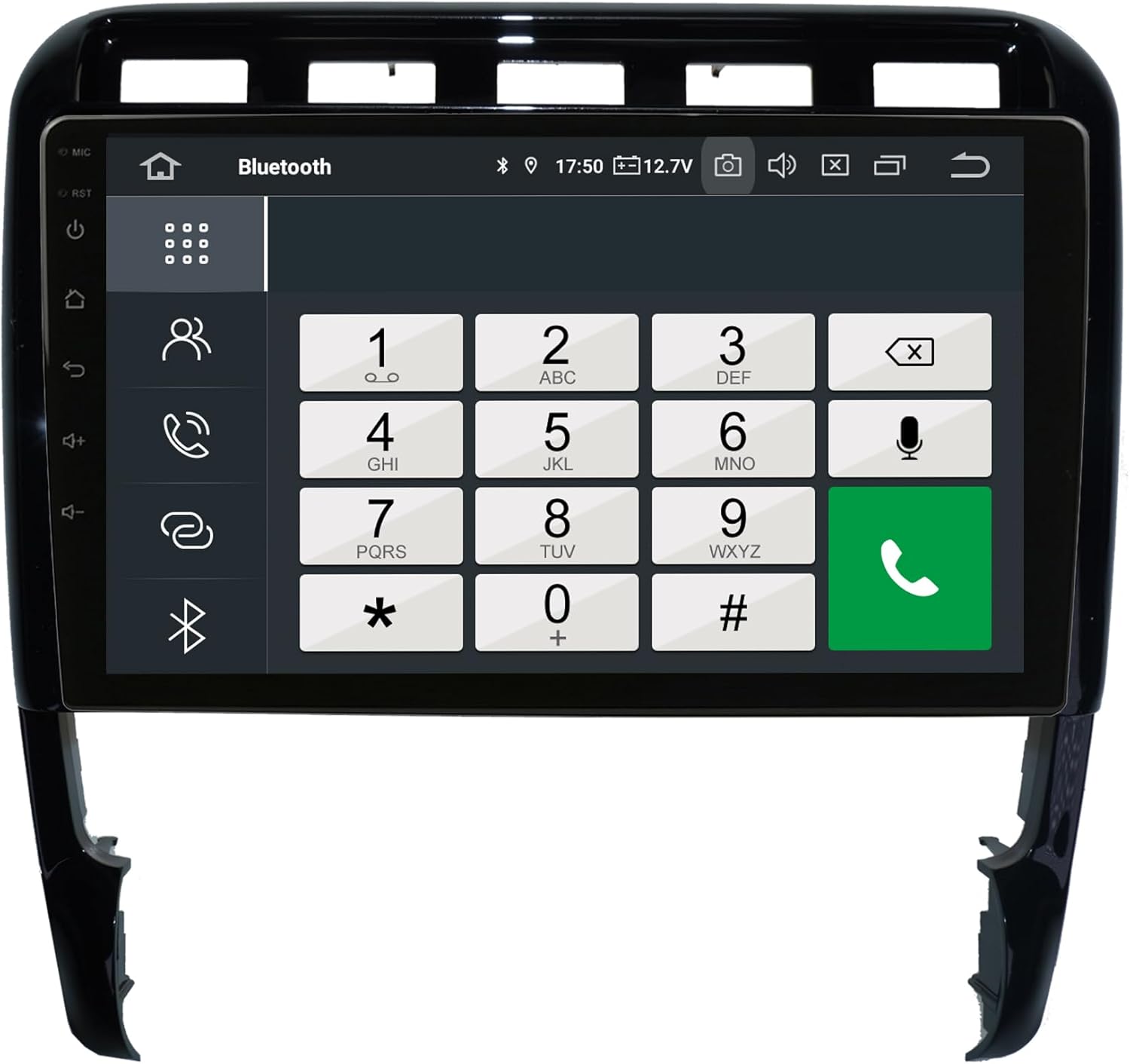
మూర్తి 5.5: Bluetooth phone dialer interface.
జత చేయడం: Go to Bluetooth settings on the head unit and your phone. కోసం వెతకండి available devices and select the head unit. Confirm the pairing code.
5.6 Radio (FM/AM)
The unit includes an FM/AM tuner with RDS (Radio Data System) for displaying station information.

మూర్తి 5.6: Radio tuner interface.
స్కానింగ్: Use the scan function to find available stations. Save your favorite stations to presets.
5.7 ఆడియో సెట్టింగ్లు (ఈక్వలైజర్)
Adjust audio output using the integrated equalizer. Preset options (Pop, Classic, Rock, Jazz) and custom user settings for Bass/Treble/Balance are available.

మూర్తి 5.7: Amplifier and audio balance settings.
5.8 ఇతర లక్షణాలు
- మీడియా ప్లేబ్యాక్: Play music, pictures, and videos directly from USB/SD/SDHC slots.
- వైఫై: Connect to WLAN hotspots or your smartphone's hotspot for internet access.
- వెనుక కెమెరా: Automatic switching to the rear camera view రివర్స్ చేసినప్పుడు.
- ఆటో-మెమరీ: All saved settings and positions are automatically retained.
- Day and Night Display: Automatic or manual adjustment of display brightness.
6. నిర్వహణ
Proper care ensures the longevity and optimal performance of your head unit.
- స్క్రీన్ క్లీనింగ్: స్క్రీన్ను సున్నితంగా తుడవడానికి మృదువైన, మెత్తటి బట్టను ఉపయోగించండి. మొండి మరకల కోసం, కొద్దిగా dampen the cloth with water or a screen-specific cleaner. Avoid harsh chemicals or abrasive materials.
- సాధారణ శుభ్రపరచడం: Keep the unit and surrounding area free of dust and debris. Use a soft brush or compressed air for vents and crevices.
- ఉష్ణోగ్రత: విపరీతమైన ఉష్ణోగ్రతలకు యూనిట్ను బహిర్గతం చేయకుండా ఉండండి.
- సాఫ్ట్వేర్ అప్డేట్లు: Periodically check for software updates to ensure optimal performance and access to new features. Refer to the manufacturer's website or the unit's settings for update procedures.
7. ట్రబుల్షూటింగ్
If you encounter issues, refer to the following common problems and solutions before contacting support.
| సమస్య | సాధ్యమైన కారణం | పరిష్కారం |
|---|---|---|
| యూనిట్ పవర్ ఆన్ చేయదు. | విద్యుత్ సరఫరా లేదు; ఫ్యూజ్ ఎగిరిపోయింది; వైరింగ్ తప్పుగా ఉంది. | Check power connections and vehicle fuses. Ensure wiring is correct as per diagram. |
| ధ్వని లేదు లేదా ధ్వని నాణ్యత తక్కువగా ఉంది. | Incorrect audio settings; Loose speaker wires; MOST adapter issue (for Bose systems). | Check volume and equalizer settings. Verify speaker connections. Ensure MOST adapter is correctly installed and functioning. |
| GPS సిగ్నల్ బలహీనంగా లేదా తప్పుగా ఉంది. | GPS యాంటెన్నా అడ్డుపడింది లేదా సరిగ్గా ఇన్స్టాల్ చేయబడలేదు. | GPS యాంటెన్నా స్పష్టంగా ఉందని నిర్ధారించుకోండి view ఆకాశం నుండి మరియు సురక్షితంగా అనుసంధానించబడి ఉంది. |
| బ్లూటూత్ కనెక్షన్ సమస్యలు. | ఫోన్ జత చేసే మోడ్లో లేదు; జోక్యం; తప్పు జత చేసే ప్రక్రియ. | Ensure Bluetooth is enabled on both devices. Delete previous pairings and try again. Move closer to the unit. |
| CarPlay/Android Auto కనెక్ట్ కావడం లేదు. | Incorrect phone settings; USB cable issue; Software glitch. | Ensure your phone is compatible and has the latest OS. Try a different USB cable. Restart both the head unit and your phone. |
| టచ్స్క్రీన్ స్పందించలేదు. | Temporary software issue; Screen damage. | Perform a soft reset (refer to device settings for reset option). If issue persists, contact support. |
For issues not covered here, please consult the PDF manual available for download or contact customer support.
8. స్పెసిఫికేషన్లు
| ఫీచర్ | స్పెసిఫికేషన్ |
|---|---|
| మోడల్ సంఖ్య | LMGQ9899-BO |
| ఆపరేటింగ్ సిస్టమ్ | ఆండ్రాయిడ్ 12 |
| CPU | Octa-Core 1.6Ghz |
| RAM | 4GB |
| అంతర్గత నిల్వ | 64GB ఫ్లాష్ |
| ప్రదర్శన పరిమాణం | 9 అంగుళాలు |
| ప్రదర్శన రకం | కెపాసిటివ్ మల్టీ-టచ్ స్క్రీన్ |
| రిజల్యూషన్ | పూర్తి HD |
| కనెక్టివిటీ | Bluetooth, WIFI, USB, 4G (via antenna) |
| నావిగేషన్ | GPS (Worldwide map support) |
| ప్రత్యేక లక్షణాలు | Integrated CarPlay & Android Auto, RDS Radio, 2-Zone Function, Back-Zone Function, Rear Camera Input, Play Store access |
| ఆడియో అవుట్పుట్ మోడ్ | AUX, 4x Audio Outputs, 1x Subwoofer Output |
| తయారీదారు | Real Media GmbH & Co. KG - Germany |
9. వారంటీ మరియు మద్దతు
Your TAFFIO LMGQ9899-BO head unit comes with a 2 సంవత్సరాల వారంటీ కొనుగోలు చేసిన తేదీ నుండి. ఈ వారంటీ సాధారణ ఉపయోగంలో తయారీ లోపాలు మరియు లోపాలను కవర్ చేస్తుంది.
For warranty claims, technical support, or further assistance, please contact your retailer or the manufacturer directly. Ensure you have your proof of purchase and product model number readily available.
తయారీదారు: Real Media GmbH & Co. KG - Germany


