1. పరిచయం
This manual provides detailed instructions for the setup, operation, and maintenance of your Dexnor Floating Cantilever Magnetic Stand Trackpad Backlit Keyboard Case. This accessory is designed to enhance your Samsung Galaxy Tab experience by providing a laptop-like functionality with a precise trackpad, comfortable backlit keyboard, and versatile magnetic stand.
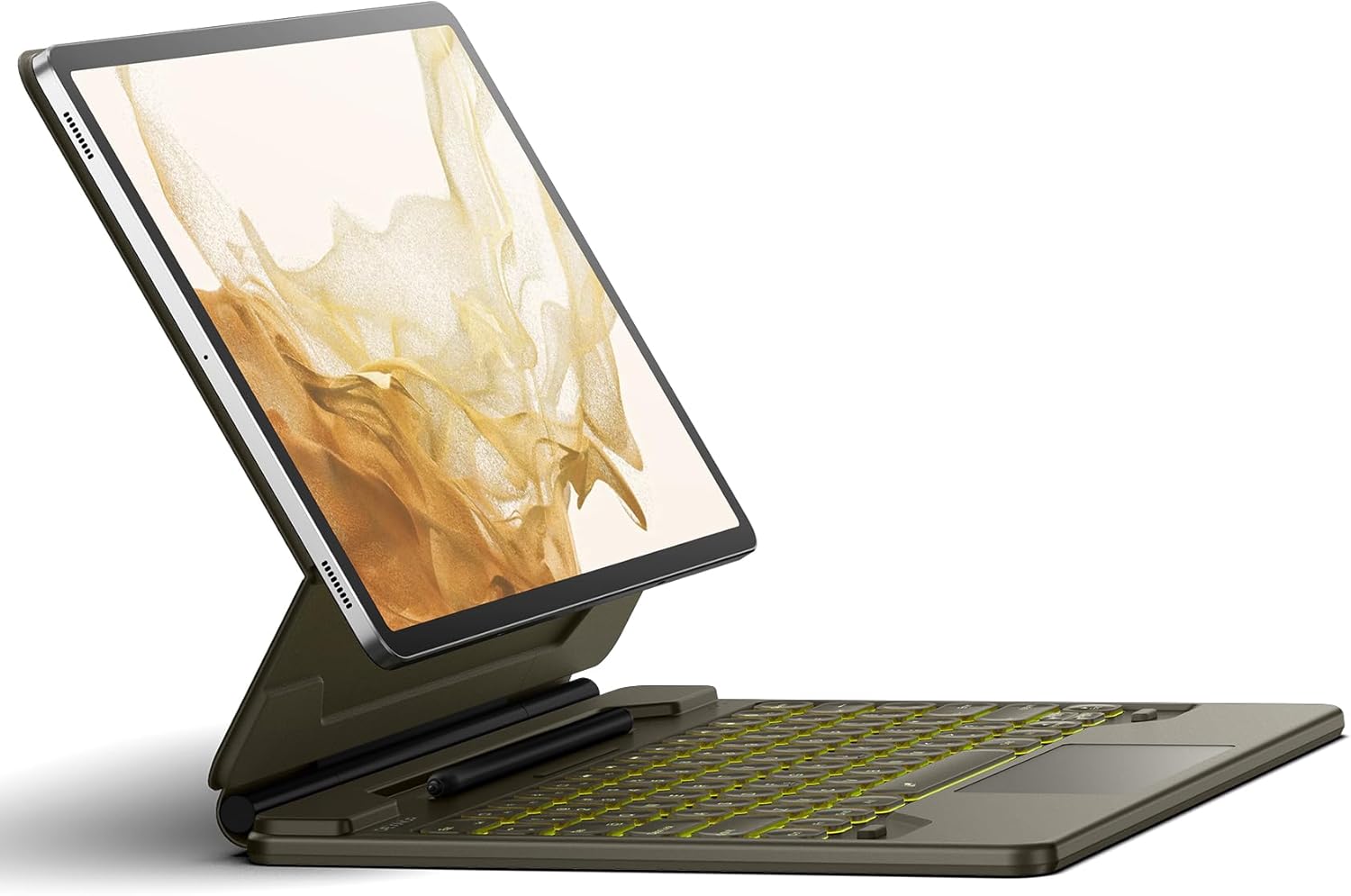
Image 1.1: The Dexnor Keyboard Case with a tablet in the floating cantilever position, showcasing the backlit keyboard and trackpad.
2. అనుకూలత
This keyboard case is specifically designed for 12.4-inch Samsung Galaxy Tab models. Please verify your tablet model before use to ensure proper fit and functionality.
- Samsung Galaxy Tab S10+ Plus (2024 Release)
- Samsung Galaxy Tab S9+ Plus (2023 Release)
- Samsung Galaxy Tab S9 FE+ Plus (2023 Release)
- Samsung Galaxy Tab S8+ Plus (Model SM-X800/X806/X808) (2022 Release)
- Samsung Galaxy Tab S7 FE (Model SM-T730/T733/T735/T736/T738) (2021 Release)
- Samsung Galaxy Tab S7+ Plus (Model SM-T970/T975/T976/T978) (2020 Release)
Note: This keyboard case is NOT compatible with Samsung Galaxy Tab S9 11-inch or S9 FE 10.9-inch models.

Image 2.1: Visual guide to compatible Samsung Galaxy Tab S series models, all featuring a 12.4-inch screen size.
3. ప్యాకేజీ విషయాలు
ప్యాకేజీని తెరిచినప్పుడు, దయచేసి ఈ క్రింది అన్ని అంశాలు ఉన్నాయని నిర్ధారించుకోండి:
- Dexnor Bluetooth Keyboard Case for Samsung Galaxy Tab
- USB-C ఛార్జింగ్ కేబుల్
- త్వరిత-ప్రారంభ గైడ్
- వినియోగదారు మాన్యువల్ (ఈ పత్రం)
4. సెటప్
4.1 ప్రారంభ ఛార్జింగ్
Before first use, fully charge the keyboard. Connect the provided USB-C charging cable to the keyboard's charging port and a compatible USB power adapter (not included). The charging indicator light will show the charging status.
4.2 మీ టాబ్లెట్ను అటాచ్ చేయడం
The keyboard case features a strong magnetic attachment system. Align your Samsung Galaxy Tab with the magnetic area on the back cover of the case. The magnets will securely hold the tablet in place, transforming it into a laptop-like setup.

Image 4.1: Illustration of the strong magnetic attachment points between the tablet and the keyboard case, ensuring a secure connection.
4.3 బ్లూటూత్ జత చేయడం
- కీబోర్డ్ ఛార్జ్ అయ్యిందని నిర్ధారించుకోండి.
- Turn on the keyboard by sliding the power switch. The Bluetooth indicator light will begin to flash, indicating it is in pairing mode.
- On your Samsung Galaxy Tab, go to సెట్టింగ్లు > కనెక్ట్ చేయబడిన పరికరాలు > బ్లూటూత్.
- బ్లూటూత్ ఆన్ చేసి, అందుబాటులో ఉన్న పరికరాల కోసం శోధించండి.
- Select "Dexnor Keyboard" (or similar name) from the list of found devices.
- Follow any on-screen prompts to complete the pairing process. The Bluetooth indicator light on the keyboard will turn solid when successfully paired.
5. ఆపరేటింగ్ సూచనలు
5.1 తేలియాడే కాంటిలివర్ స్టాండ్
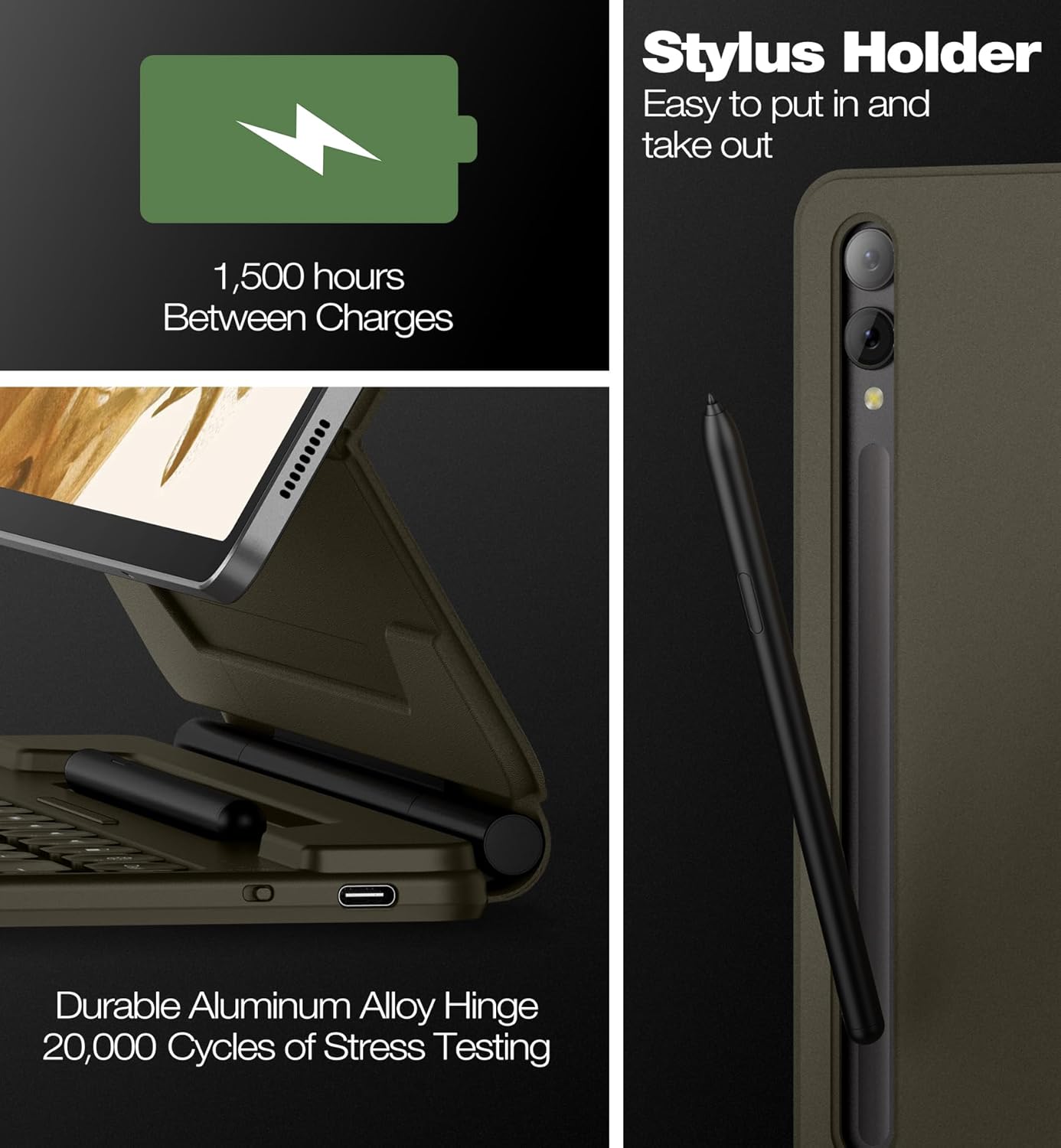
The durable aluminum alloy hinge allows for smooth adjustment of the tablet's viewing angle. Simply push or pull the tablet to achieve your desired angle for typing, drawing, viewing, or reading. The stand supports a wide range of angles for optimal comfort.

Image 5.1: The floating cantilever design allows for a comfortable viewing angle, adjustable up to 120 degrees.
5.2 High-Precision Trackpad
The integrated trackpad supports multi-finger gestures, providing a precise and responsive navigation experience similar to a laptop mouse. Common gestures include:
- సింగిల్ ట్యాప్: ఎడమ-క్లిక్ చేయండి.
- రెండు వేళ్లతో నొక్కడం: Right-click (context menu).
- Two-finger Scroll: పైకి/క్రిందికి లేదా ఎడమ/కుడికి స్క్రోల్ చేయండి.
- జూమ్ చేయడానికి పించ్ చేయండి: Zoom in/out with two fingers.
- Three-finger Swipe Up: View ఇటీవలి యాప్లు.
- Three-finger Swipe Down: Go to home screen.

Image 5.2: A hand demonstrating the use of the multi-touch trackpad for precise navigation on the tablet screen.
5.3 బ్యాక్లిట్ కీబోర్డ్
The keyboard features 7 solid color backlights with 3 adjustable brightness levels, allowing for comfortable typing in various lighting conditions, including low-light environments. Use the dedicated backlight key (often represented by a light bulb icon or Fn + a specific key) to cycle through colors and brightness levels.
చిత్రం 5.3: క్లోజప్ view of the backlit keys, illustrating the illumination for typing in dark conditions.
5.4 S Pen Holders
The keyboard case includes two convenient S Pen storage options:
- Built-in Magnetic Holder: Located within the keyboard assembly, this holder is for secure storage of your S Pen when not in use.
- Cut-out Slot on Back Cover: This slot allows for both charging and storage of your S Pen, ensuring it is always ready for use and prevents loss.

Image 5.4: The integrated stylus holder on the keyboard case, designed for easy access and secure storage of the S Pen.
5.5 Auto Wake/Sleep Function
The case supports auto wake/sleep functionality. Opening the case will automatically wake your tablet, and closing it will put the tablet to sleep, helping to conserve battery life for both the tablet and the keyboard.
6. నిర్వహణ
To ensure the longevity and optimal performance of your Dexnor keyboard case, follow these maintenance guidelines:
- శుభ్రపరచడం: Use a soft, dry, lint-free cloth to wipe the surface of the keyboard and case. For stubborn stains, slightly dampనీరు లేదా తేలికపాటి, రాపిడి లేని క్లీనర్తో గుడ్డను తుడవండి. అధిక తేమను నివారించండి.
- బ్యాటరీ సంరక్షణ: To maximize battery lifespan, avoid fully discharging the keyboard frequently. Recharge the battery when the low battery indicator appears. Store the keyboard in a cool, dry place if not used for extended periods.
- విపరీతమైన పరిస్థితులను నివారించండి: Do not expose the keyboard to extreme temperatures, direct sunlight, or high humidity.
- జాగ్రత్తగా నిర్వహించండి: While the case offers protection, avoid dropping or subjecting it to strong impacts.
7. ట్రబుల్షూటింగ్
If you encounter issues with your Dexnor keyboard case, refer to the following common problems and solutions:
| సమస్య | సాధ్యమైన కారణం | పరిష్కారం |
|---|---|---|
| కీబోర్డ్ బ్లూటూత్ ద్వారా కనెక్ట్ కావడం లేదు. | Low battery; Bluetooth off on tablet; Not in pairing mode; Interference. | Charge the keyboard. Ensure Bluetooth is enabled on your tablet. Put the keyboard into pairing mode. Move closer to the tablet and away from other wireless devices. |
| Trackpad not responding. | Bluetooth connection lost; Trackpad disabled (if applicable); Software glitch. | Reconnect Bluetooth. Restart the tablet and keyboard. Check tablet settings for trackpad options. |
| Backlight not working or changing. | Low battery; Incorrect key combination. | Charge the keyboard. Ensure you are using the correct key combination (e.g., Fn + backlight key) to adjust settings. |
| Tablet not waking/sleeping automatically. | Tablet not properly seated; Feature disabled in tablet settings. | Ensure the tablet is correctly aligned and seated in the case. Check your tablet's display settings for auto wake/sleep options. |
ఈ పరిష్కారాలను ప్రయత్నించిన తర్వాత కూడా సమస్య కొనసాగితే, దయచేసి మరింత సహాయం కోసం కస్టమర్ మద్దతును సంప్రదించండి.
8. స్పెసిఫికేషన్లు
| ఫీచర్ | వివరాలు |
|---|---|
| మోడల్ | DK001 |
| కనెక్టివిటీ | బ్లూటూత్ |
| బ్యాటరీ కెపాసిటీ | 800mAh (లిథియం పాలిమర్) |
| పని సమయం | Up to 320 hours (without backlight) |
| స్టాండ్బై సమయం | 1500 గంటల వరకు |
| ఛార్జింగ్ సమయం | సుమారు 4 గంటలు |
| బ్యాక్లైట్ రంగులు | 7 solid colors (RGB support) |
| ప్రకాశం స్థాయిలు | 3 సర్దుబాటు స్థాయిలు |
| మెటీరియల్ | PU Leather, Aluminum, Polycarbonate, Acrylonitrile Butadiene Styrene |
| ఉత్పత్తి కొలతలు | 29.03 x 23.29 x 2.16 సెం.మీ |
| వస్తువు బరువు | 920 గ్రా |
| ప్రత్యేక లక్షణాలు | Floating Cantilever Design, Precision Touchpad, S Pen Holders, Auto Wake/Sleep, Durable Aluminum Alloy Hinge |
9. వారంటీ మరియు మద్దతు
All Dexnor keyboard cases are guaranteed with a one-year manufacturer's warranty from the date of purchase. This warranty covers defects in materials and workmanship under normal use. It does not cover damage caused by accident, misuse, abuse, neglect, or unauthorized modification.
For technical support, warranty claims, or any questions regarding your product, please contact Dexnor customer service through the retailer's platform or the official Dexnor website. Please have your purchase receipt and product model number (DK001) ready when contacting support.


