పరిచయం
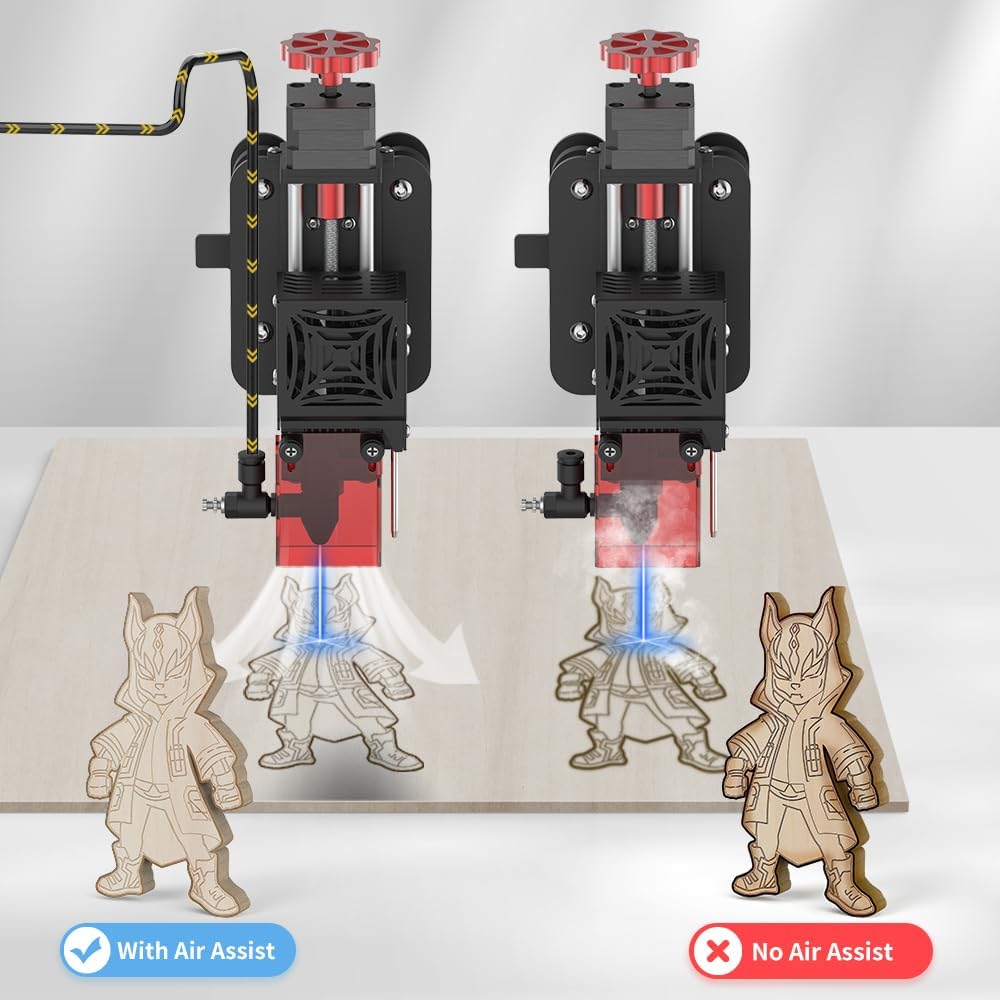
The Twotrees Air Assist Set is designed to enhance the performance of compatible laser engravers, including models TS2-10W, TS2-20W, TTS-25, TTS-55, and TTS-10. This system provides a controlled airflow to the laser's focal point, which helps to remove smoke and debris during engraving and cutting processes. This results in cleaner cuts, reduced charring, and improved engraving precision. This manual provides essential information for the safe and effective installation, operation, and maintenance of your air assist set.

భద్రతా సమాచారం
Please read and understand all safety instructions before installing or operating the air assist set. Failure to follow these instructions may result in injury or damage to the equipment.
- Always disconnect power to the laser engraver before installing or performing maintenance on the air assist set.
- Ensure all connections are secure to prevent air leaks or electrical hazards.
- Operate the air assist set in a well-ventilated area to dissipate smoke and fumes effectively.
- Keep the air pump away from water or excessive moisture.
- Do not obstruct the air intake or outlet of the pump.
- This product is designed for use with compatible laser engravers. Do not attempt to use it for other purposes.
ప్యాకేజీ విషయాలు
ఇన్స్టాలేషన్ ప్రారంభించే ముందు అన్ని భాగాలు ఉన్నాయని నిర్ధారించుకోండి:
- Air Pump Unit
- Silicone Air Tube
- Pneumatic Fitting Reducer
- Cylinder Regulating Valve (SL8-M5)
- Power Adapter with Adjustable Airflow Control
- Mounting Hardware (screws, brackets, if applicable)
స్పెసిఫికేషన్లు
| ఫీచర్ | వివరాలు |
|---|---|
| మోడల్ సంఖ్య | 630203011 |
| గాలి ప్రవాహం | Adjustable, 10-30 L/min |
| అనుకూలత | Twotrees TS2-10W, TS2-20W, TTS-25, TTS-55, TTS-10 Laser Engravers |
| ఇన్పుట్ వాల్యూమ్tage | 12V (via power adapter) |
| వస్తువు బరువు | 3.41 పౌండ్లు (సుమారు 1.55 కిలోలు) |
| ప్యాకేజీ కొలతలు | 10.43 x 7.32 x 5 అంగుళాలు (సుమారు 26.5 x 18.6 x 12.7 సెం.మీ) |
సెటప్ మరియు ఇన్స్టాలేషన్
Follow these steps to properly install the air assist set with your laser engraver. Refer to the diagrams for visual guidance.
- Connect the Silicone Tube to the Air Pump: Connect the silicone tube (ID 8 OD 10 L70mm) to the air pump's outlet. Ensure a snug fit.
- Attach Pneumatic Fitting Reducer: Connect the pneumatic fitting reducer (PG 10-8) to the other end of the silicone tube.
- Connect Longer Silicone Tube: Connect the longer silicone tube (ID 6 OD 8 L2500mm) to the pneumatic fitting reducer PG 10-8.
- Attach Cylinder Regulating Valve to Laser Head: Connect the cylinder regulating valve (SL8-M5 black nickel-plated) to the air inlet on your laser head.
- Connect Silicone Tube to Regulating Valve: Connect the remaining end of the silicone tube (ID 6 OD 8 L2500mm) to the cylinder regulating valve SL8-M5 black nickel-plated.

Once all connections are secure, connect the air pump's power adapter to a suitable power outlet. The power adapter typically includes an adjustable airflow control dial.

ఆపరేషన్
Operating the Twotrees Air Assist Set is straightforward once installed. The primary function is to provide a continuous stream of air to the laser's cutting or engraving point.
- పవర్ ఆన్: Ensure the air pump is connected to power and the laser engraver is ready for operation.
- గాలి ప్రవాహాన్ని సర్దుబాటు చేయండి: Use the dial on the power adapter to adjust the airflow rate. A higher airflow (up to 30 L/min) is generally beneficial for cutting thicker materials or when significant smoke is generated. Lower airflow (down to 10 L/min) may be suitable for delicate engraving tasks. Experiment with different settings to find the optimal airflow for your specific material and task.
- Observe Results: The air assist will help clear smoke and debris, leading to cleaner edges and reduced charring on your material.

నిర్వహణ
Regular maintenance ensures the longevity and optimal performance of your air assist set.
- క్లీన్ ఎయిర్ ఫిల్టర్: Periodically check and clean the air intake filter (if present) on the pump to prevent dust accumulation, which can reduce airflow and strain the motor.
- ట్యూబింగ్ను తనిఖీ చేయండి: Examine the silicone air tubes for any kinks, cracks, or blockages. Replace damaged tubing promptly.
- Keep Pump Clean: Wipe down the exterior of the air pump with a dry or slightly damp దుమ్ము మరియు చెత్తను తొలగించడానికి వస్త్రం. కఠినమైన రసాయనాలను ఉపయోగించవద్దు.
- నిల్వ: When not in use for extended periods, store the air assist set in a clean, dry environment.
ట్రబుల్షూటింగ్
If you encounter issues with your air assist set, refer to the following common problems and solutions:
| సమస్య | సాధ్యమైన కారణం | పరిష్కారం |
|---|---|---|
| గాలి ప్రవాహం లేదా బలహీనమైన గాలి ప్రవాహం లేదు |
|
|
| Excessive noise from pump |
|
|
| Air assist not improving cut quality |
|
|
వారంటీ మరియు మద్దతు
For warranty information or technical support, please refer to the documentation provided with your original purchase or contact Twotrees customer service directly. Keep your purchase receipt and model number (630203011) handy when contacting support.
మీరు తరచుగా తయారీదారు అధికారిక వెబ్సైట్లో మద్దతు సంప్రదింపు వివరాలను కనుగొనవచ్చు webసైట్ లేదా ఉత్పత్తిని కొనుగోలు చేసిన రిటైలర్ ద్వారా.


