పరిచయం
This manual provides detailed instructions for the operation and maintenance of your Sharp Alarm Clock. Please read this manual thoroughly before using the product to ensure proper function and longevity. This alarm clock is designed for ease of use and features convenient charging options for your devices.
కీ ఫీచర్లు
- Super Fast USB-C Charging: Equipped with a USB Type-C port for rapid charging of compatible smartphones, including the latest models.
- ఫాస్ట్ 2 Amp USB-A ఛార్జింగ్: Includes a standard USB Type-A port delivering 2 Amps for efficient charging of various devices.
- ద్వంద్వ అలారాలు: Set two independent alarms for different wake-up times.
- 9 నిమిషాల స్నూజ్: Provides a convenient snooze function for extra rest.
- 3-Step Dimmer: Adjustable display brightness with three levels to suit your preference.
- Easy-to-Read Green LED Display: Clear 0.7-inch green LED numbers for visibility day or night.
- ఐచ్ఛిక బ్యాటరీ బ్యాకప్: Retains time and alarm settings during power outages (requires 2 x AAA batteries, not included).
ఉత్పత్తి ముగిసిందిview
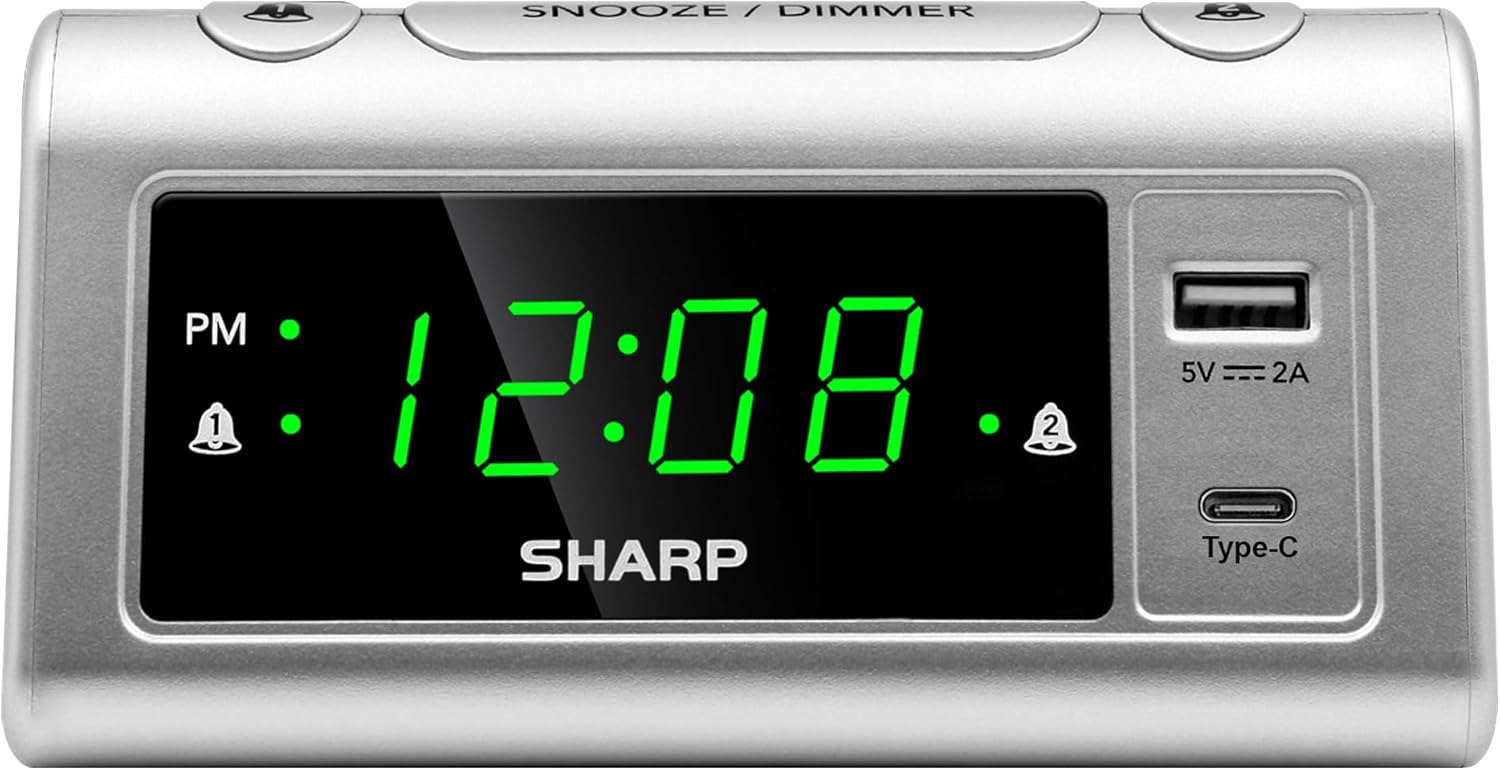
ముందు view of the Sharp Alarm Clock, showcasing the large green LED time display, PM indicator, alarm indicators, and the integrated USB-A and USB-C charging ports on the right side.

పై నుండి క్రిందికి view of the alarm clock with labels indicating the 'Time Set', 'Time Advancing', 'Time Receding', 'Alarm 1 Set ON/OFF', 'Alarm 2 Set ON/OFF', 'Snooze/Dimmer Control (3-Levels of Brightness)', 'Super Fast Charging USB-C', and 'Fast Charging 2 Amp USB'. Dimensions are also shown as 5.65 inches wide and 2.95 inches high.
సెటప్
1. పవర్ కనెక్షన్
Plug the AC power cord into a standard 120V AC wall outlet. The clock display will illuminate, and the time will default to 12:00 AM.
2. బ్యాటరీ బ్యాకప్ ఇన్స్టాలేషన్
For optional battery backup, insert 2 x AAA batteries (not included) into the battery compartment located on the bottom of the unit. This feature ensures that time and alarm settings are retained during a power interruption. The display will not be lit during battery backup, but the alarm will still sound.

The bottom of the alarm clock, revealing the battery compartment for 2 AAA batteries (not included) to provide backup power for settings.
ఆపరేటింగ్ సూచనలు
1. సమయాన్ని నిర్ణయించడం
- నొక్కండి మరియు పట్టుకోండి టైమ్ సెట్ button. The hour digits will begin to flash.
- పట్టుకొని ఉండగా టైమ్ సెట్, నొక్కండి గంట గంటను సర్దుబాటు చేయడానికి పదే పదే బటన్ను నొక్కండి. సరైన AM/PM సెట్టింగ్ కోసం PM సూచికను గమనించండి.
- పట్టుకొని ఉండగా టైమ్ సెట్, నొక్కండి నిమిషం నిమిషాలను సర్దుబాటు చేయడానికి పదే పదే బటన్ను నొక్కండి.
- విడుదల చేయండి టైమ్ సెట్ సమయాన్ని నిర్ధారించడానికి బటన్.
2. Setting Alarms (Dual Alarms)
This clock features two independent alarms (Alarm 1 and Alarm 2).
- నొక్కండి మరియు పట్టుకోండి అలారం 1 సెట్ button. The hour digits for Alarm 1 will flash.
- పట్టుకొని ఉండగా అలారం 1 సెట్, నొక్కండి గంట కావలసిన అలారం గంటను సెట్ చేయడానికి బటన్.
- పట్టుకొని ఉండగా అలారం 1 సెట్, నొక్కండి నిమిషం button to set the desired alarm minutes.
- విడుదల చేయండి అలారం 1 సెట్ నిర్ధారించడానికి బటన్.
- To activate Alarm 1, press the అలారం 1 ఆన్/ఆఫ్ button until the alarm indicator (bell icon) appears next to 'AL1' on the display.
- 1-5 దశలను పునరావృతం చేయండి అలారం 2 సెట్ మరియు అలారం 2 ఆన్/ఆఫ్ to set and activate the second alarm.
3. స్నూజ్ ఫంక్షన్
అలారం మోగినప్పుడు, పెద్ద బటన్ను నొక్కండి స్నూజ్ / డిమ్మర్ button on top of the clock. The alarm will pause for 9 minutes and then sound again.
4. డిస్ప్లే డిమ్మర్
To adjust the brightness of the LED display, repeatedly press the స్నూజ్ / డిమ్మర్ button when the alarm is not sounding. Cycle through the three brightness levels (High, Medium, Low) and an Off setting.

The Sharp Alarm Clock displaying the time, with a hand adjusting the dimmer function on the top of the unit. This allows for comfortable viewవివిధ లైటింగ్ పరిస్థితుల్లో ing.
5. USB ఛార్జింగ్ పోర్టులు
The alarm clock features both a USB Type-C port and a standard USB Type-A port for charging your electronic devices. Simply connect your device's charging cable to the appropriate port on the right side of the clock.
- USB టైప్-C: Provides super-fast charging for compatible devices like the iPhone 15 or Galaxy smartphones.
- USB టైప్-A: 2 డెలివరీ చేస్తుంది Amps of fast charging power for other USB-powered devices.

The Sharp Alarm Clock with a smartphone connected to its USB-C port, indicating active charging. The clock also features a USB-A port for additional device charging.
నిర్వహణ
- శుభ్రపరచడం: మృదువైన, పొడి గుడ్డతో గడియారాన్ని తుడవండి. రాపిడి క్లీనర్లు లేదా ద్రావకాలను ఉపయోగించవద్దు.
- పవర్ కార్డ్: ఏదైనా నష్టం జరిగిందా అని పవర్ కార్డ్ను క్రమం తప్పకుండా తనిఖీ చేయండి. దెబ్బతిన్నట్లయితే, వాడకాన్ని ఆపివేసి, కస్టమర్ సపోర్ట్ను సంప్రదించండి.
- బ్యాటరీ భర్తీ: Replace AAA backup batteries annually or when the clock's settings are no longer retained during power outages.
ట్రబుల్షూటింగ్
| సమస్య | పరిష్కారం |
|---|---|
| గడియార ప్రదర్శన ఖాళీగా ఉంది. | Ensure the AC power cord is securely plugged into a working outlet. Check if the dimmer is set to 'Off'. |
| అలారం మోగడం లేదు. | Verify that the alarm is set and activated (bell icon visible). Check the alarm time is correct (AM/PM). |
| USB ports are not charging. | Ensure the clock is powered via AC. Check the charging cable and device compatibility. |
| పవర్ OU తర్వాత సమయం/సెట్టింగ్లు పోయాయిtage. | Install fresh AAA batteries for the backup function. |
స్పెసిఫికేషన్లు
- బ్రాండ్: పదునైన
- మోడల్: B0CHXR25FJ
- రంగు: వెండి
- ప్రదర్శన రకం: LED (ఆకుపచ్చ)
- ఉత్పత్తి కొలతలు: 5.56"అడుగు x 2.67"అడుగు
- శక్తి మూలం: కార్డెడ్ ఎలక్ట్రిక్
- బ్యాటరీ బ్యాకప్: 2 x AAA బ్యాటరీలు (చేర్చబడలేదు)
- USB-C అవుట్పుట్: సూపర్ ఫాస్ట్ ఛార్జింగ్
- USB-A అవుట్పుట్: 2 Amps Fast Charging
- ప్రత్యేక లక్షణాలు: Charging Port, Corded, Dual Alarms, 3-Step Dimmer, Snooze
అధికారిక ఉత్పత్తి వీడియో
An official video from Sharp, titled 'Sharp Clocks - Keeps the Rhythm of Your Day', showcasing the features and design of Sharp alarm clocks, including this model.
వారంటీ మరియు మద్దతు
For warranty information or technical support, please refer to the documentation included with your product or visit the official Sharp webసైట్. ఏవైనా వారంటీ క్లెయిమ్లకు కొనుగోలు రుజువుగా మీ కొనుగోలు రసీదును ఉంచండి.


