1. పరిచయం
ధన్యవాదాలు, ధన్యవాదాలు.asing the LEHMANN LHOHC-2013C Electric Convector Heater. This manual provides essential information for the safe and efficient operation, installation, and maintenance of your new heater. Please read this manual thoroughly before use and retain it for future reference.
2. భద్రతా సూచనలు
అగ్ని ప్రమాదాలు, విద్యుత్ షాక్ మరియు గాయాల ప్రమాదాన్ని తగ్గించడానికి విద్యుత్ ఉపకరణాలను ఉపయోగిస్తున్నప్పుడు ఎల్లప్పుడూ ప్రాథమిక భద్రతా జాగ్రత్తలను పాటించండి.
సాధారణ భద్రత
- హీటర్ను మూత పెట్టవద్దు. హీటర్ను కప్పి ఉంచడం వల్ల వేడెక్కడం మరియు మంటలు చెలరేగవచ్చు.
- మండే పదార్థాలను (కర్టెన్లు, ఫర్నిచర్, కాగితం మొదలైనవి) హీటర్ నుండి కనీసం 1 మీటర్ (3 అడుగులు) దూరంలో ఉంచండి.
- బాత్రూమ్లు, లాండ్రీ ప్రాంతాలు లేదా నీటితో సంబంధంలోకి వచ్చే అవకాశం ఉన్న ఇండోర్ ప్రదేశాలలో హీటర్ను ఉపయోగించవద్దు.
- Ensure the heater is placed on a stable, level surface to prevent tipping.
- ఈ ఉపకరణం వారి భద్రతకు బాధ్యత వహించే వ్యక్తి ద్వారా ఉపకరణాన్ని ఉపయోగించడం గురించి పర్యవేక్షణ లేదా సూచనలను అందించినట్లయితే తప్ప, తక్కువ శారీరక, ఇంద్రియ లేదా మానసిక సామర్థ్యాలు లేదా అనుభవం మరియు జ్ఞానం లేని వ్యక్తులు (పిల్లలతో సహా) ఉపయోగించడం కోసం ఉద్దేశించబడలేదు. .
- పిల్లలు ఉపకరణంతో ఆడకుండా ఉండేలా పర్యవేక్షించాలి.
విద్యుత్ భద్రత
- వాల్యూమ్ నిర్ధారించుకోండిtagరేటింగ్ లేబుల్పై సూచించబడిన e మీ మెయిన్స్ వాల్యూమ్కు సరిపోతుందిtage.
- Do not operate the heater with a damaged cord or plug. If the supply cord is damaged, it must be replaced by the manufacturer, its service agent, or similarly qualified persons to avoid a hazard.
- పవర్ కార్డ్ను కార్పెట్ కింద నడపవద్దు లేదా త్రో రగ్గులు, రన్నర్లు లేదా ఇలాంటి కవరింగ్లతో కప్పవద్దు. త్రాడు ట్రిప్ చేయబడని ట్రాఫిక్ ప్రాంతాల నుండి దూరంగా అమర్చండి.
- ఉపయోగంలో లేనప్పుడు లేదా శుభ్రపరిచే ముందు ఎల్లప్పుడూ హీటర్ను అన్ప్లగ్ చేయండి.

Image: The LEHMANN LHOHC-2013C convector heater features an overheat protection system, indicated by a shield icon, to ensure safe operation.
3. ఉత్పత్తి ముగిసిందిview
The LEHMANN LHOHC-2013C is a 2000W electric convector heater designed for efficient heating in various indoor environments. It features multiple heating levels, an adjustable thermostat, remote control, and Wi-Fi connectivity for smart operation.
ముఖ్య లక్షణాలు:
- పవర్ అవుట్పుట్: 2000W వరకు
- తాపన స్థాయిలు: 3 (750వా, 1250వా, 2000వా)
- నియంత్రణ: Digital display, Remote Control, Wi-Fi App Control
- థర్మోస్టాట్: Adjustable for precise temperature control
- టైమర్: Programmable On/Off timer
- భద్రత: Automatic anti-freeze function, Overheat protection
- పోర్టబిలిటీ: Lightweight (3.8 kg) with integrated handle

Image: The LEHMANN LHOHC-2013C convector heater, showcasing its sleek design, accompanied by its remote control and a smartphone displaying the Tuya smart control application.

Image: Visual representation of the heater's key features, including 2000W power, silent operation, remote control capability, timer function, and an energy-saving 750W mode.
4. సెటప్
అన్ప్యాకింగ్ మరియు అసెంబ్లీ
- హీటర్ను దాని ప్యాకేజింగ్ నుండి జాగ్రత్తగా తొలగించండి.
- Check for any damage during transit. If damaged, do not operate and contact customer support.
- Attach the feet to the base of the heater using the provided screws. Ensure they are securely fastened for stability.
ప్లేస్మెంట్
- హీటర్ను దృఢమైన, స్థాయి ఉపరితలంపై ఉంచండి.
- Ensure there is adequate clearance around the heater (at least 1 meter from walls, furniture, and curtains).
- హీటర్ను నేరుగా పవర్ అవుట్లెట్ క్రింద ఉంచవద్దు.
- Avoid placing the heater in areas with high humidity or direct water exposure.
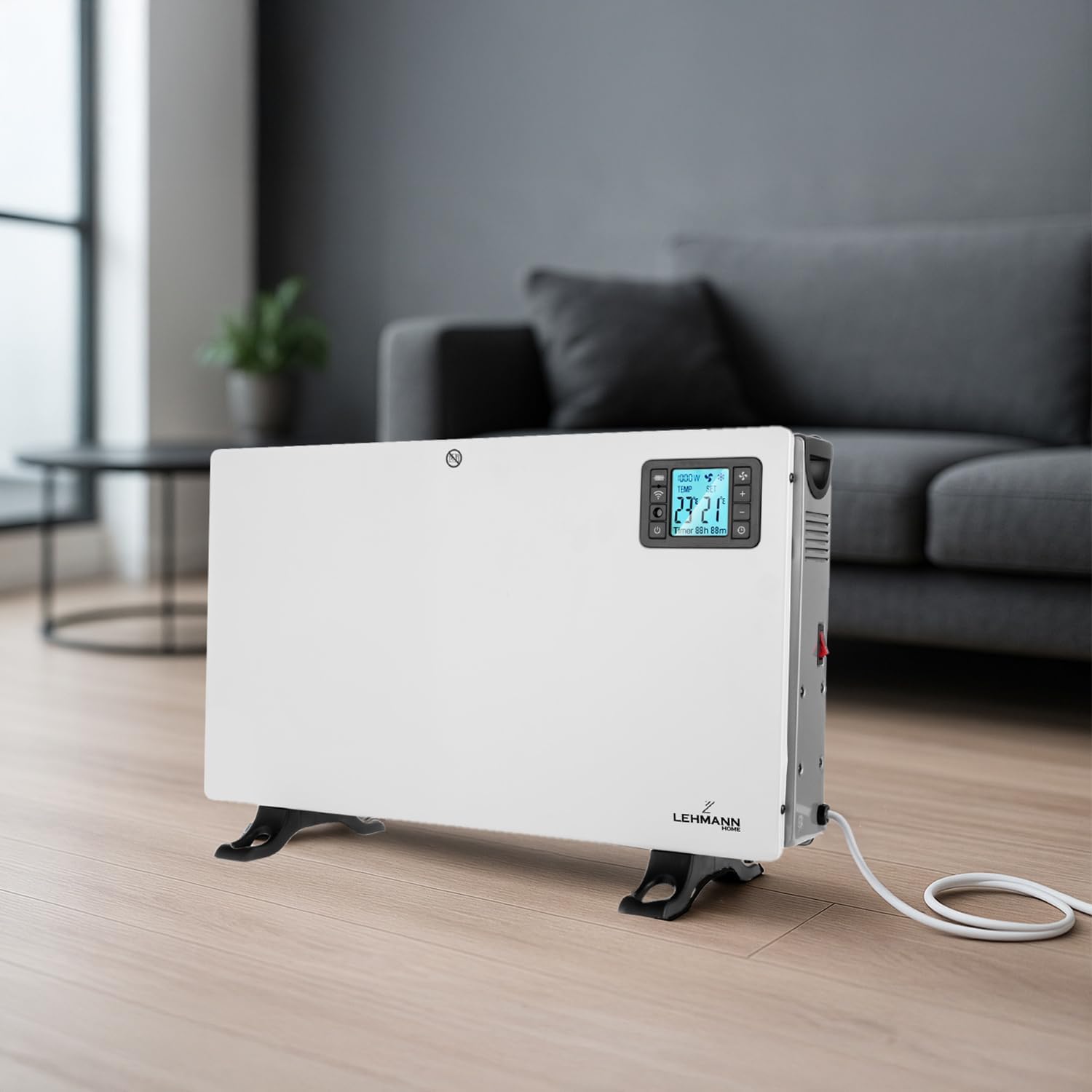
Image: The convector heater positioned in a living room, demonstrating suitable placement away from furniture and walls for optimal heat distribution.
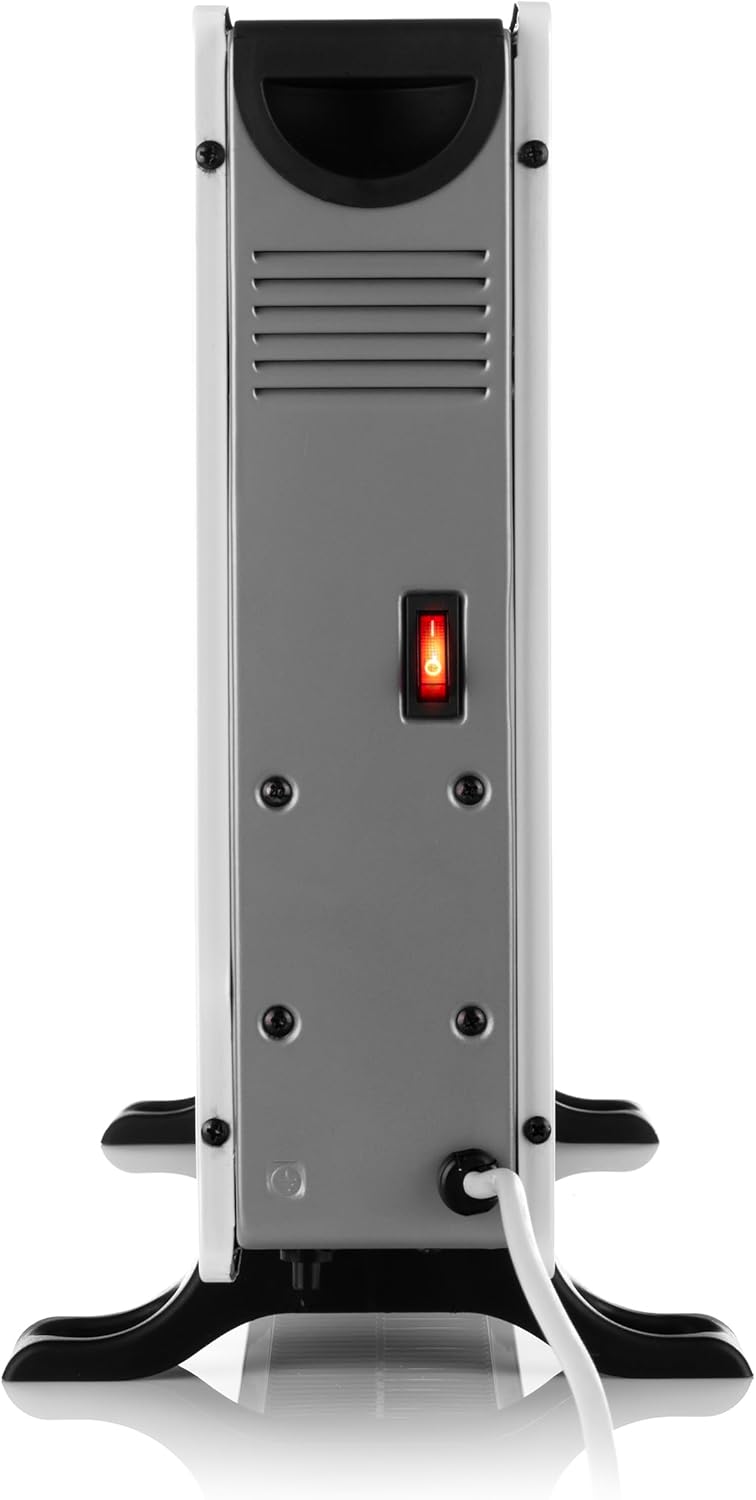
చిత్రం: ఒక వైపు view of the heater, highlighting the main power switch and the entry point for the power cord, essential for initial setup.
5. ఆపరేటింగ్ సూచనలు
పవర్ ఆన్/ఆఫ్
- Plug the heater into a suitable 230V power outlet.
- Turn on the main power switch located on the side of the unit.
- హీటర్ను ఆన్ చేయడానికి కంట్రోల్ ప్యానెల్ లేదా రిమోట్ కంట్రోల్లోని పవర్ బటన్ను నొక్కండి.
Adjusting Heating Levels
The heater offers three power settings:
- 750W: Low heat setting for energy-efficient operation.
- 1250W: Medium heat setting for moderate warmth.
- 2000W: High heat setting for rapid and powerful heating.
Use the mode selection button on the control panel or remote to cycle through these settings.

Image: The convector heater actively emitting heat, illustrated by upward arrows and the text 'FAST HEATING UP', highlighting its quick heating capability.
థర్మోస్టాట్ నియంత్రణ
The adjustable thermostat allows you to set your desired room temperature. The heater will automatically turn on and off to maintain this temperature.
- Use the '+' and '-' buttons on the control panel or remote to adjust the target temperature.
- The digital display will show the current room temperature and your set temperature.
రిమోట్ కంట్రోల్ ఆపరేషన్
చేర్చబడిన రిమోట్ కంట్రోల్ దూరం నుండి అన్ని హీటర్ ఫంక్షన్లకు అనుకూలమైన యాక్సెస్ను అందిస్తుంది.
- పవర్ బటన్: హీటర్ను ఆన్ లేదా ఆఫ్ చేస్తుంది.
- మోడ్ బటన్: Cycles through heating levels (750W, 1250W, 2000W).
- ఉష్ణోగ్రత సర్దుబాటు (+/-): Increases or decreases the target temperature.
- టైమర్ బటన్: Activates and adjusts the timer function.

Image: A hand holding the remote control, demonstrating the convenience of adjusting the heater settings from a comfortable distance in a living room environment.
Wi-Fi స్మార్ట్ నియంత్రణ
The LEHMANN LHOHC-2013C can be controlled remotely via a dedicated smartphone application (compatible with Tuya Smart Life app).
- Download the Tuya Smart Life app from your smartphone's app store.
- ఖాతాను నమోదు చేసి లాగిన్ చేయండి.
- Ensure your heater is powered on and in pairing mode (refer to app instructions for specific pairing steps).
- మీ పరికరాన్ని జోడించడానికి యాప్లోని సూచనలను అనుసరించండి.
- Once connected, you can adjust temperature, set schedules, and manage other functions from your smartphone, anywhere with an internet connection.

Image: A smartphone screen showing the Tuya app interface, illustrating how users can remotely set the desired temperature for the heater.
టైమర్ ఫంక్షన్
The integrated timer allows you to program the heater to turn on or off at specific times.
- Press the timer button on the control panel or remote.
- Use the '+' and '-' buttons to set the desired duration for the timer (e.g., hours until turn off/on).
- సెట్టింగ్ని నిర్ధారించండి.
Automatic Anti-freeze Function
This feature helps prevent freezing in unoccupied rooms. When activated, the heater enters standby mode. If the ambient temperature drops below 5°C, it automatically activates maximum heating until the room reaches 9°C, then returns to standby.
6. నిర్వహణ
క్లీనింగ్
- ఎల్లప్పుడూ హీటర్ను అన్ప్లగ్ చేసి, శుభ్రం చేసే ముందు పూర్తిగా చల్లబరచడానికి అనుమతించండి.
- బాహ్య ఉపరితలాలను మృదువైన, డితో తుడవండిamp గుడ్డ. రాపిడి క్లీనర్లు లేదా ద్రావకాలు ఉపయోగించవద్దు.
- హీటర్ లోపలికి నీరు రాకుండా చూసుకోండి.
- Clean the air inlet and outlet grilles regularly with a vacuum cleaner or soft brush to prevent dust buildup.
నిల్వ
- హీటర్ను ఎక్కువ కాలం నిల్వ ఉంచినట్లయితే, దానిని పూర్తిగా శుభ్రం చేయండి.
- హీటర్ను దాని అసలు ప్యాకేజింగ్లో చల్లని, పొడి ప్రదేశంలో నిల్వ చేయండి.
- నిల్వ చేసేటప్పుడు హీటర్ పైన బరువైన వస్తువులను ఉంచవద్దు.
7. ట్రబుల్షూటింగ్
If you encounter issues with your heater, please refer to the following common problems and solutions:
| సమస్య | సాధ్యమైన కారణం | పరిష్కారం |
|---|---|---|
| హీటర్ ఆన్ చేయదు. | No power supply; Main power switch off; Overheat protection activated. | Check power outlet and plug; Ensure main power switch is ON; Unplug, let cool, then restart. |
| హీట్ అవుట్పుట్ లేదు. | Low heat setting selected; Thermostat set too low; Room temperature already reached. | Increase heating level; Adjust thermostat to a higher temperature; Heater will resume heating when room temperature drops. |
| Wi-Fi కనెక్షన్ విఫలమైంది. | Incorrect Wi-Fi password; Router too far; App pairing issue. | Verify Wi-Fi password; Move heater closer to router; Re-attempt pairing process in the app. |
| హీటర్ అసాధారణ శబ్దాలు చేస్తుంది. | Dust buildup; Loose components. | Clean air grilles; If noise persists, discontinue use and contact support. |
ఈ పరిష్కారాలను ప్రయత్నించిన తర్వాత కూడా సమస్య కొనసాగితే, దయచేసి కస్టమర్ మద్దతును సంప్రదించండి.
8. స్పెసిఫికేషన్లు
| ఫీచర్ | స్పెసిఫికేషన్ |
|---|---|
| మోడల్ | LHOHC-2013C |
| బ్రాండ్ | లెమాన్ |
| టైప్ చేయండి | ఎలక్ట్రిక్ కన్వెక్టర్ హీటర్ |
| పవర్ అవుట్పుట్ | 2000W (3 levels: 750W, 1250W, 2000W) |
| వాల్యూమ్tage | 230V |
| నియంత్రణ పద్ధతులు | Digital Display, Remote Control, Wi-Fi App (Tuya Smart Life) |
| ప్రత్యేక లక్షణాలు | Adjustable Thermostat, On/Off Timer, Automatic Anti-freeze, Overheat Protection |
| కొలతలు (సుమారుగా) | 52 cm (వెడల్పు) x 38 cm (ఎత్తు) x 14 cm (లోతు) |
| బరువు | 3.8 కిలోలు |
| రంగు | తెలుపు |
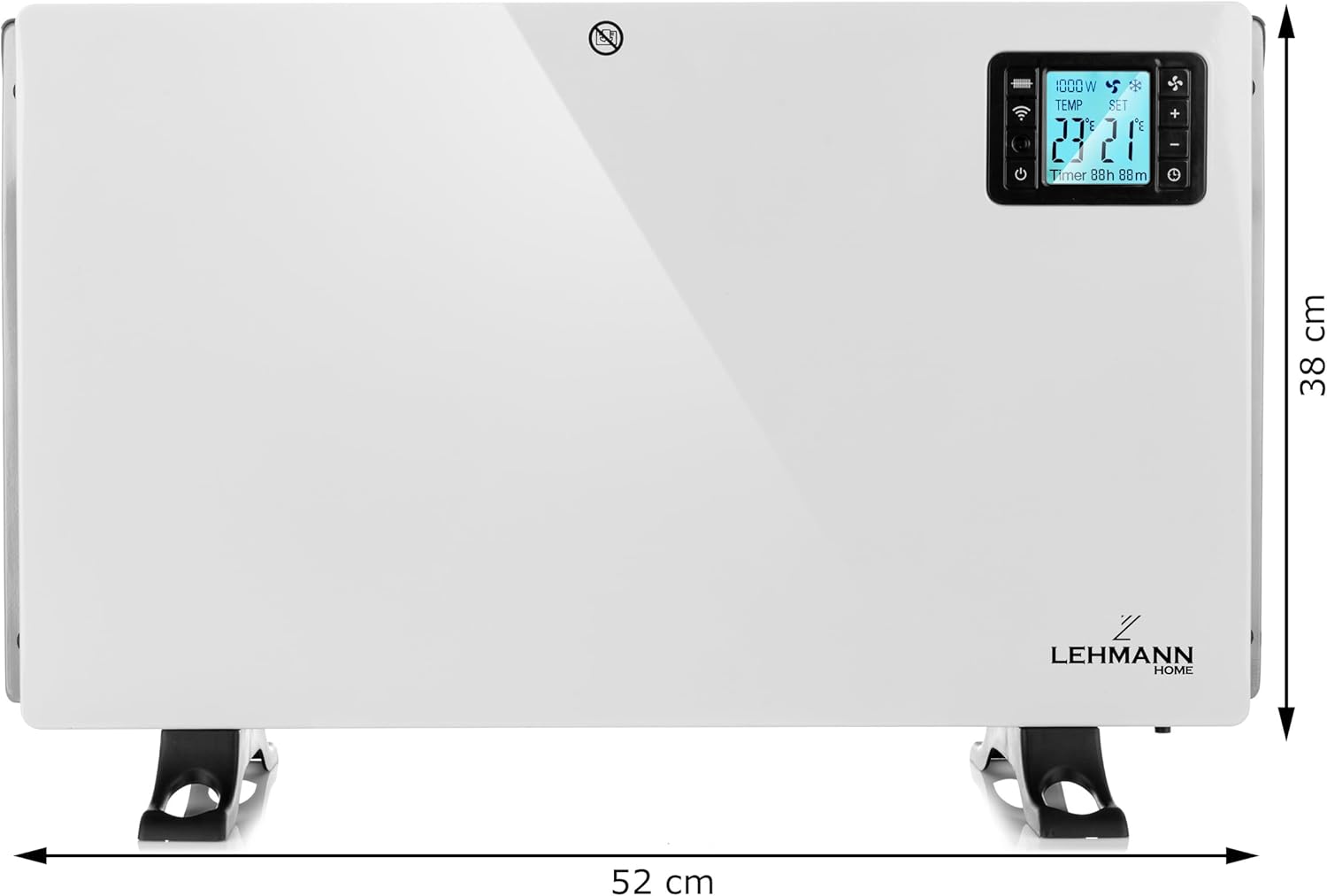
Image: The convector heater with its approximate dimensions clearly marked, showing a width of 52 cm and a height of 38 cm.
9. వారంటీ మరియు మద్దతు
Your LEHMANN LHOHC-2013C Electric Convector Heater comes with a standard manufacturer's warranty. Please refer to the warranty card included in your product packaging for specific terms and conditions, including warranty period and coverage details.
For technical support, troubleshooting assistance, or warranty claims, please contact LEHMANN customer service through the retailer where you purchased the product or visit the official LEHMANN webసంప్రదింపు సమాచారం కోసం సైట్.


