1. పరిచయం
This manual provides essential information for the safe and efficient use of your CHIQ U55QG7V 55-inch 4K QLED Android TV. Please read this manual thoroughly before operating the device and retain it for future reference.
The CHIQ U55QG7V features a frameless QLED display, delivering an immersive visual experience with stunning, realistic images. It integrates Android TV for seamless access to your favorite entertainment, music, and games, supporting popular streaming services like Netflix, Prime Video, and Google Play. Connectivity options include HDMI, USB, and Bluetooth, along with support for Chromecast and Google Smart Home.

చిత్రం: ముందు భాగం view of the CHIQ U55QG7V 55-inch 4K QLED Android TV, highlighting its frameless design and key features like 4K QLED, HDR10, Dolby Vision, and Alexa compatibility.
2. సెటప్
2.1 అన్బాక్సింగ్ మరియు ప్యాకేజీ కంటెంట్లు
Carefully remove the TV from its packaging. Ensure all components are present before proceeding with the setup. The package typically includes:
- CHIQ U55QG7V TV Unit
- టీవీ స్టాండ్ (2 ముక్కలు)
- బ్లూటూత్ రిమోట్ కంట్రోల్
- Batteries (AAA, 2 included)
- పవర్ ఛార్జర్
- వినియోగదారు మాన్యువల్ (ఈ పత్రం)

Image: The CHIQ U55QG7V TV displayed alongside its remote control, illustrating typical package contents.
2.2 టీవీ స్టాండ్ అటాచ్ చేయడం
If you are not wall-mounting the TV, attach the included stands. Place the TV face down on a soft, clean surface to prevent screen damage. Align each stand with the corresponding screw holes on the bottom of the TV and secure them with the provided screws.

చిత్రం: క్లోజప్ view of the TV stand, showing its design and how it connects to the television unit.
2.3 Physical Dimensions and Placement
Consider the dimensions for proper placement and ventilation. Ensure adequate space around the TV for airflow.
- Dimensions with stand (W x D x H): 1230.9 × 275 × 768.4 mm
- Dimensions without stand (W x D x H): 1230.9 × 88.6 × 713.4 mm

Image: Technical drawing illustrating the precise dimensions of the CHIQ U55QG7V television, both with and without its stand.
2.4 కనెక్ట్ పెరిఫెరల్స్
The TV offers various connectivity options. Connect your devices such as gaming consoles, Blu-ray players, soundbars, or external storage devices to the appropriate ports.
- HDMI పోర్ట్లు: For high-definition audio and video devices.
- USB పోర్ట్లు: మీడియా ప్లేబ్యాక్ లేదా బాహ్య పరికరాల కోసం USB డ్రైవ్లను కనెక్ట్ చేయడానికి.
- ఈథర్నెట్ పోర్ట్: వైర్డు ఇంటర్నెట్ కనెక్షన్ కోసం.
- బ్లూటూత్: అనుకూల ఆడియో పరికరాలు లేదా ఉపకరణాలకు వైర్లెస్ కనెక్షన్ కోసం.

చిత్రం: సైడ్ ప్రోfile of the CHIQ U55QG7V TV, highlighting the location of its various input and output ports for connecting external devices.
After connecting all necessary cables, plug the power cord into the TV and then into a wall outlet.
3. ఆపరేషన్
3.1 Initial Setup and Android TV Interface
Upon first power-on, the TV will guide you through the initial setup process, including language selection, network connection (Wi-Fi or Ethernet), and Google account sign-in. The Android TV interface provides easy access to apps, settings, and content.

Image: A screenshot of the Android TV home screen, displaying a selection of popular streaming applications and content recommendations.
You can download over 5000+ apps from the Google Play Store directly on your TV.
3.2 చిత్రం మరియు ధ్వని సెట్టింగ్లు
The CHIQ U55QG7V features 4K QLED technology with Dolby Vision HDR10 for enhanced visual quality. You can adjust picture modes (e.g., Standard, Vivid, Movie, Game) and sound settings (e.g., Standard, Music, Movie) to optimize your viewing experience. The TV also supports Dolby Audio and dbx-tv for improved sound.

Image: A visual comparison demonstrating the enhanced color and contrast provided by HDR10 and Dolby Vision technologies compared to standard 4K.
3.3 స్మార్ట్ ఫీచర్లు మరియు వాయిస్ కంట్రోల్
The TV works with Alexa and Google Assistant, allowing you to control the TV and other smart home devices using voice commands. Simply press the voice assistant button on your remote and speak your command.
Built-in Chromecast allows you to cast content from your smartphone, tablet, or computer directly to the TV screen.
4. నిర్వహణ
4.1 స్క్రీన్ను శుభ్రపరచడం
స్క్రీన్ను శుభ్రం చేయడానికి, మృదువైన, మెత్తటి బట్టతో సున్నితంగా తుడవండి. మొండి మరకల కోసం, కొద్దిగా dampనీటితో లేదా స్క్రీన్-నిర్దిష్ట శుభ్రపరిచే ద్రావణంతో వస్త్రాన్ని తుడవండి. కఠినమైన రసాయనాలు, రాపిడి పదార్థాలు లేదా స్క్రీన్పై నేరుగా స్ప్రే చేయడాన్ని నివారించండి.
4.2 సాధారణ సంరక్షణ
- టీవీని ప్రత్యక్ష సూర్యకాంతి మరియు వేడి వనరుల నుండి దూరంగా ఉంచండి.
- Ensure proper ventilation by not blocking the vents on the back of the TV.
- మెరుపులు కురిసినప్పుడు లేదా ఎక్కువసేపు ఉపయోగించకుండా ఉన్నప్పుడు టీవీని అన్ప్లగ్ చేయండి.
5. ట్రబుల్షూటింగ్
మీ టీవీలో సమస్యలు ఎదురైతే, సపోర్ట్ను సంప్రదించే ముందు కింది సాధారణ పరిష్కారాలను చూడండి.
5.1 శక్తి లేదు
- పవర్ కార్డ్ టీవీ మరియు వాల్ అవుట్లెట్ రెండింటికీ సురక్షితంగా ప్లగ్ చేయబడిందో లేదో తనిఖీ చేయండి.
- మరొక పరికరాన్ని ప్లగ్ చేయడం ద్వారా వాల్ అవుట్లెట్ పనిచేస్తుందని ధృవీకరించండి.
- వేరే పవర్ అవుట్లెట్ని ప్రయత్నించండి.
5.2 చిత్రం లేదు / పేలవమైన చిత్ర నాణ్యత
- సరైన ఇన్పుట్ సోర్స్ ఎంచుకోబడిందని నిర్ధారించుకోండి (ఉదా., HDMI 1, TV).
- టీవీ మరియు బాహ్య పరికరాల మధ్య ఉన్న అన్ని కేబుల్ కనెక్షన్లను తనిఖీ చేయండి.
- టీవీ మెనూలో చిత్ర సెట్టింగ్లను (ప్రకాశం, కాంట్రాస్ట్, రంగు) సర్దుబాటు చేయండి.
- If using an antenna, check antenna connection and signal strength.
5.3 ధ్వని లేదు / ధ్వని నాణ్యత తక్కువగా ఉంది
- టీవీ మరియు కనెక్ట్ చేయబడిన ఏవైనా ఆడియో పరికరాలలో వాల్యూమ్ పెంచండి.
- టీవీ మ్యూట్ చేయబడిందో లేదో తనిఖీ చేయండి.
- బాహ్య సౌండ్ సిస్టమ్లకు ఆడియో కేబుల్ కనెక్షన్లను ధృవీకరించండి.
- టీవీ మెనూలో సౌండ్ సెట్టింగ్లను సర్దుబాటు చేయండి.
5.4 రిమోట్ కంట్రోల్ పనిచేయడం లేదు
- బ్యాటరీలు సరిగ్గా చొప్పించబడ్డాయని మరియు అవి ఖాళీ కాకుండా చూసుకోండి. అవసరమైతే భర్తీ చేయండి.
- రిమోట్ మరియు టీవీ యొక్క IR సెన్సార్ మధ్య ఏవైనా అడ్డంకులను తొలగించండి.
- For Bluetooth remote, ensure it is paired with the TV. Refer to the pairing instructions in the TV's on-screen manual.
5.5 నెట్వర్క్ కనెక్టివిటీ సమస్యలు
- For Wi-Fi, ensure the Wi-Fi router is on and within range.
- మీ రౌటర్ మరియు మోడెమ్ను పునఃప్రారంభించండి.
- వైర్డు కనెక్షన్ కోసం, ఈథర్నెట్ కేబుల్ సురక్షితంగా కనెక్ట్ చేయబడిందని నిర్ధారించుకోండి.
- Check network settings on the TV to ensure correct configuration.
6. స్పెసిఫికేషన్లు
Below are the key technical specifications for the CHIQ U55QG7V 55-inch 4K QLED Android TV.
| ఫీచర్ | వివరాలు |
|---|---|
| బ్రాండ్ | CHIQ |
| మోడల్ సంఖ్య | U55QG7V |
| స్క్రీన్ పరిమాణం | 55 అంగుళాలు |
| ప్రదర్శన సాంకేతికత | QLED |
| రిజల్యూషన్ | 4K (3840 x 2160 పిక్సెల్లు) |
| రిఫ్రెష్ రేట్ | 60 Hz |
| ఆపరేటింగ్ సిస్టమ్ | ఆండ్రాయిడ్ టీవీ |
| కనెక్టివిటీ | Bluetooth, Ethernet, USB, Wi-Fi, HDMI |
| USB పోర్ట్లు | 1 |
| ప్రత్యేక లక్షణాలు | Dolby Vision, HDR10, Frameless Design, Works with Alexa, Google Assistant, Chromecast built-in |
| ఉత్పత్తి కొలతలు (స్టాండ్తో) | 1230.9 × 275 × 768.4 మిమీ |
| ఉత్పత్తి కొలతలు (స్టాండ్ లేకుండా) | 1230.9 × 88.6 × 713.4 మిమీ |
| విద్యుత్ సరఫరా | AC100-240V / 50-60HZ |
| ఎనర్జీ ఎఫిషియెన్సీ క్లాస్ | జి (ఎస్డిఆర్), జి (హెచ్డిఆర్) |
| Power Consumption (1000h) | 84 kWh (SDR), 84 kWh (HDR) |
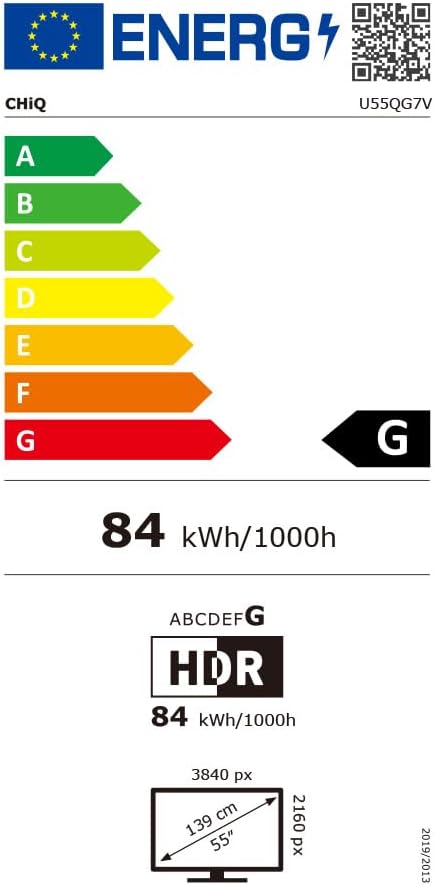
Image: The energy efficiency label for the CHIQ U55QG7V television, indicating its power consumption and class.
For detailed product information and energy label data, visit: EPREL ఉత్పత్తి సమాచారం
7. వారంటీ మరియు మద్దతు
7.1 వారంటీ సమాచారం
CHiQ provides a 24-month after-sales service for this product. All products come with a 2-year warranty (3 years for ES regions). Please retain your proof of purchase for warranty claims.
Additionally, Amazon offers a 30-day return policy without requiring a specific reason for return.
7.2 కస్టమర్ మద్దతు
For technical assistance or service inquiries, please contact CHiQ customer support. An online hotline staffed by professional employees is available on weekdays to assist you.
For the most up-to-date contact information, please refer to the official CHiQ webసైట్ లేదా మీ ఉత్పత్తి డాక్యుమెంటేషన్.