1. పరిచయం
The NITEBEAM CarryBright CBX4 is a comprehensive bicycle lighting system designed to enhance rider safety. It features front and rear turn signals, an integrated horn, and a smart wireless remote control for intuitive operation. This manual provides detailed instructions for setup, operation, maintenance, and troubleshooting to ensure optimal performance and longevity of your device.

2. ఉత్పత్తి ముగిసిందిview మరియు ఉపకరణాలు
The CBX4 system includes all necessary components for installation and immediate use. Please verify that all items listed below are present in your package.
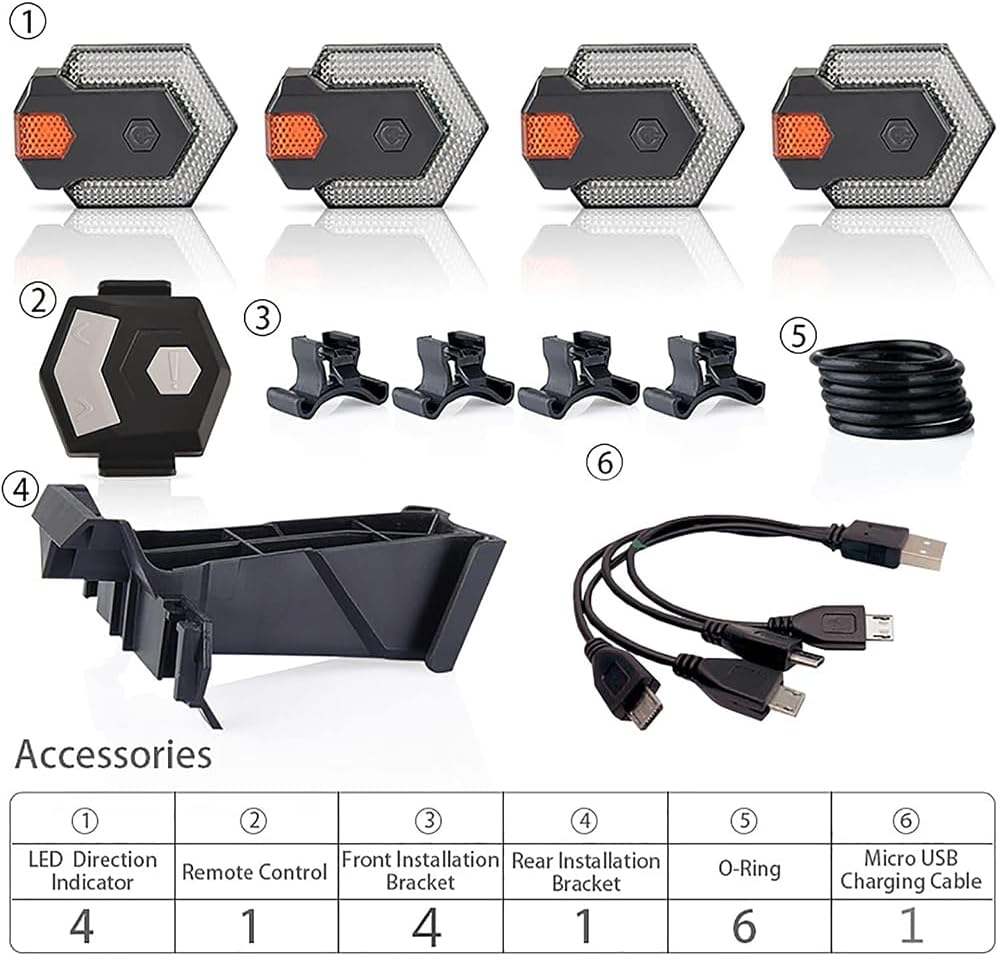
| అంశం నం. | వివరణ | పరిమాణం |
|---|---|---|
| ① (ఆంగ్లం) | LED దిశ సూచిక | 4 |
| ② (ఐదులు) | రిమోట్ కంట్రోల్ | 1 |
| ③ ③ లు | Front Installation Bracket | 4 |
| ④ (④) | Rear Installation Bracket | 1 |
| ⑤के से पाले | O-రింగ్ | 6 |
| ⑥ ⑥ के�े विश | మైక్రో USB ఛార్జింగ్ కేబుల్ | 1 |
3. సెటప్ మరియు ఇన్స్టాలేషన్
The CarryBright CBX4 is designed for easy installation and removal on various bicycle types, including standard bicycles, electric bicycles, and scooters. The lights can be mounted on handlebars or frames.
3.1 Installing the LED Direction Indicators
- Identify the desired mounting locations for the four LED indicators. Typically, two are mounted at the front (e.g., on handlebars or front fork) and two at the rear (e.g., on seat stays or rear rack).
- Attach the appropriate installation bracket (front or rear) to the chosen location using the provided O-rings. Ensure a secure fit.
- Slide each LED direction indicator onto its respective bracket until it clicks into place.
3.2 Installing the Remote Control
- Mount the remote control to a convenient location on your handlebar, typically near the grip for easy thumb access.
- Use the provided O-rings to secure the remote control bracket firmly to the handlebar.
- Slide the remote control onto its bracket.


4. ఛార్జింగ్ సూచనలు
The NITEBEAM CarryBright CBX4 lights are rechargeable via a standard USB port. Ensure the lights are fully charged before first use for optimal performance.
4.1 లైట్లను ఛార్జ్ చేయడం
- Connect the provided Micro USB charging cable to the charging port on each LED direction indicator.
- Plug the USB end of the cable into any standard USB power source (e.g., computer USB port, USB wall adapter, power bank).
- During charging, the indicator light on the unit will typically show a ఎరుపు కాంతి.
- Once fully charged, the indicator light will turn ఆకుపచ్చ కాంతి.
- Disconnect the lights from the charging cable once fully charged.
The included charging cable is designed to charge all four lights simultaneously for convenience.

5. ఆపరేటింగ్ సూచనలు
The NITEBEAM CarryBright CBX4 is operated wirelessly via the smart remote control. The lights are visible day and night, up to 100 meters, enhancing your visibility on the road.
5.1 రిమోట్ కంట్రోల్ విధులు
The remote control features intuitive buttons for various functions:
- ఎడమ మలుపు సిగ్నల్: Press the left arrow button (<) to activate the left turn signal. The lights will flash for approximately 30 seconds.
- Right Turn Signal: Press the right arrow button (>) to activate the right turn signal. The lights will flash for approximately 30 seconds.
- కొమ్ము: A short click of the central button (!) will sound the integrated horn (120 dB).
- Night Caution LED: A 1st hold press of the central button (!) activates the night caution LED mode.
- All Lights Flash: A 2nd hold press of the central button (!) will make all lights flash simultaneously (emergency/hazard mode).
- అన్ని లైట్లు ఆపివేయండి: A 3rd hold press of the central button (!) will turn all lights off.


6. నిర్వహణ
Proper maintenance ensures the longevity and reliable performance of your NITEBEAM CarryBright CBX4.
6.1 శుభ్రపరచడం
- Wipe the lights and remote control with a soft, damp గుడ్డ.
- Do not use abrasive cleaners or solvents, as these can damage the surface or internal components.
6.2 నీటి నిరోధకత
The CBX4 lights feature an IPX6 water resistance rating, meaning they are protected against high-pressure water jets from any direction. This allows for riding in rain or through puddles without concern. However, they are not designed for submersion.
6.3 బ్యాటరీ సంరక్షణ
- Recharge the batteries regularly, even if the lights are not used frequently, to maintain battery health.
- Avoid fully discharging the batteries before recharging.
- ఎక్కువ కాలం ఉపయోగంలో లేనప్పుడు పరికరాన్ని చల్లని, పొడి ప్రదేశంలో నిల్వ చేయండి.
7. ట్రబుల్షూటింగ్
If you encounter issues with your NITEBEAM CarryBright CBX4, refer to the following common problems and solutions:
| సమస్య | సాధ్యమైన కారణం | పరిష్కారం |
|---|---|---|
| లైట్లు ఆన్ చేయడం లేదు | తక్కువ బ్యాటరీ రిమోట్ కంట్రోల్ బ్యాటరీ తక్కువ సరిగ్గా జత చేయబడలేదు | Charge the lights fully Replace remote control battery (if applicable) Refer to pairing instructions (if provided, or try re-pairing by holding buttons) |
| Turn signals not flashing | రిమోట్ పరిధి వెలుపల ఉంది జోక్యం Light unit malfunction | Ensure remote is within 10m of lights Move away from strong electronic signals కస్టమర్ సపోర్ట్ను సంప్రదించండి |
| Horn not sounding | రిమోట్ కంట్రోల్ బ్యాటరీ తక్కువ Horn button malfunction | Replace remote control battery (if applicable) కస్టమర్ సపోర్ట్ను సంప్రదించండి |
| లైట్లు ఛార్జ్ కావడం లేదు | తప్పు కేబుల్ తప్పు USB పోర్ట్ ఛార్జింగ్ పోర్ట్ నష్టం | Try a different Micro USB cable వేరే USB పవర్ సోర్స్ని ప్రయత్నించండి కస్టమర్ సపోర్ట్ను సంప్రదించండి |
8. స్పెసిఫికేషన్లు
Detailed technical specifications for the NITEBEAM CarryBright CBX4.
- మోడల్: CBX4
- బ్రాండ్: NITEBEAM / CarryBright
- రంగు: తెలుపు, ఎరుపు
- శక్తి మూలం: బ్యాటరీ
- నీటి నిరోధక స్థాయి: IPX6 (వాటర్ప్రూఫ్)
- మౌంటు రకం: Handlebar mount or Frame mount
- ఉత్పత్తి కొలతలు: 19.5L x 18.5W x 4.4H centimeters (approximate package dimensions)
- బరువు: 340 g (approximate package weight)
- రిమోట్ కంట్రోల్ రేంజ్: Up to 10 meters (wireless)
- దృశ్యమానత: Up to 100 meters (day and night)
- Horn Output: 120 డిబి

9. వారంటీ మరియు మద్దతు
For warranty information or technical support, please refer to the contact details provided with your purchase or visit the official CarryBright webవారంటీ క్లెయిమ్ల కోసం మీ కొనుగోలు రుజువును ఉంచండి.
If you have any questions or require assistance, please do not hesitate to contact our customer service team.

