పరిచయం
The KLIM Journey Portable CD Player is a versatile audio device designed for modern listening while embracing classic CD playback. It offers multiple connectivity options including Bluetooth, FM transmission, and AUX, along with an SD card reader and FM radio. This manual provides comprehensive instructions for setting up, operating, maintaining, and troubleshooting your device to ensure an optimal listening experience.

Image: The KLIM Journey Portable CD Player, shown with its accessories including wired earphones, an AUX cable, a USB-C charging cable, and a protective carry pouch.
ప్యాకేజీ విషయాలు
- KLIM జర్నీ పోర్టబుల్ CD ప్లేయర్
- KLIM Fusion Wired Earphones
- Earphone Accessories (e.g., different size ear tips)
- USB-C ఛార్జింగ్ కేబుల్
- క్యారీ పర్సు
- వినియోగదారు మాన్యువల్ (ఈ పత్రం)
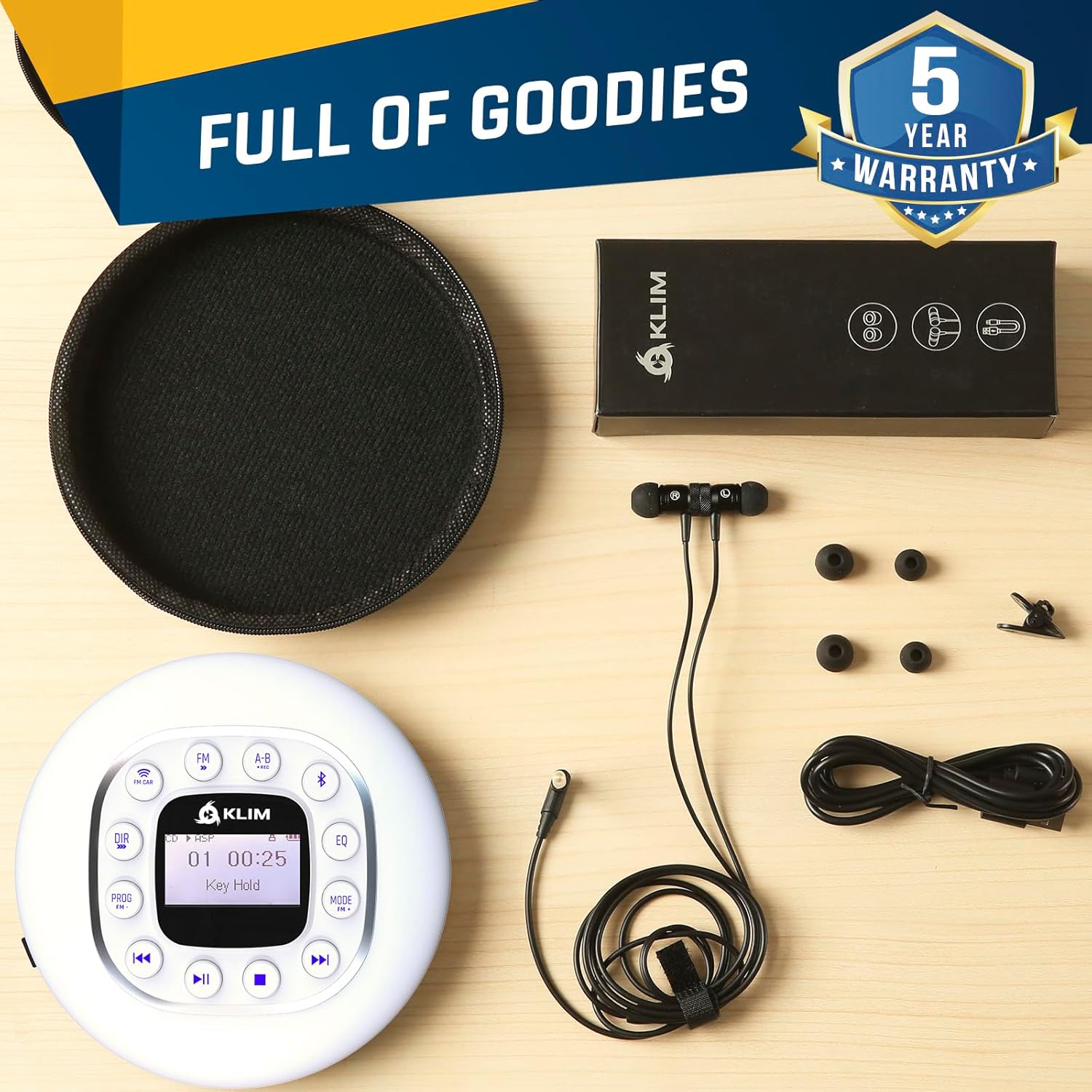
Image: A flat lay of all items included in the KLIM Journey package, neatly arranged on a wooden surface. This includes the white CD player, black wired earphones, a USB-C cable, and a black zippered carry pouch.
సెటప్
1. పరికరాన్ని ఛార్జ్ చేస్తోంది
Before first use, fully charge your KLIM Journey CD Player. Connect the included USB-C charging cable to the player's USB-C port and the other end to a compatible USB power adapter (not included) or a computer's USB port. The charging indicator light will show the charging status. A full charge provides over 14 hours of playback.
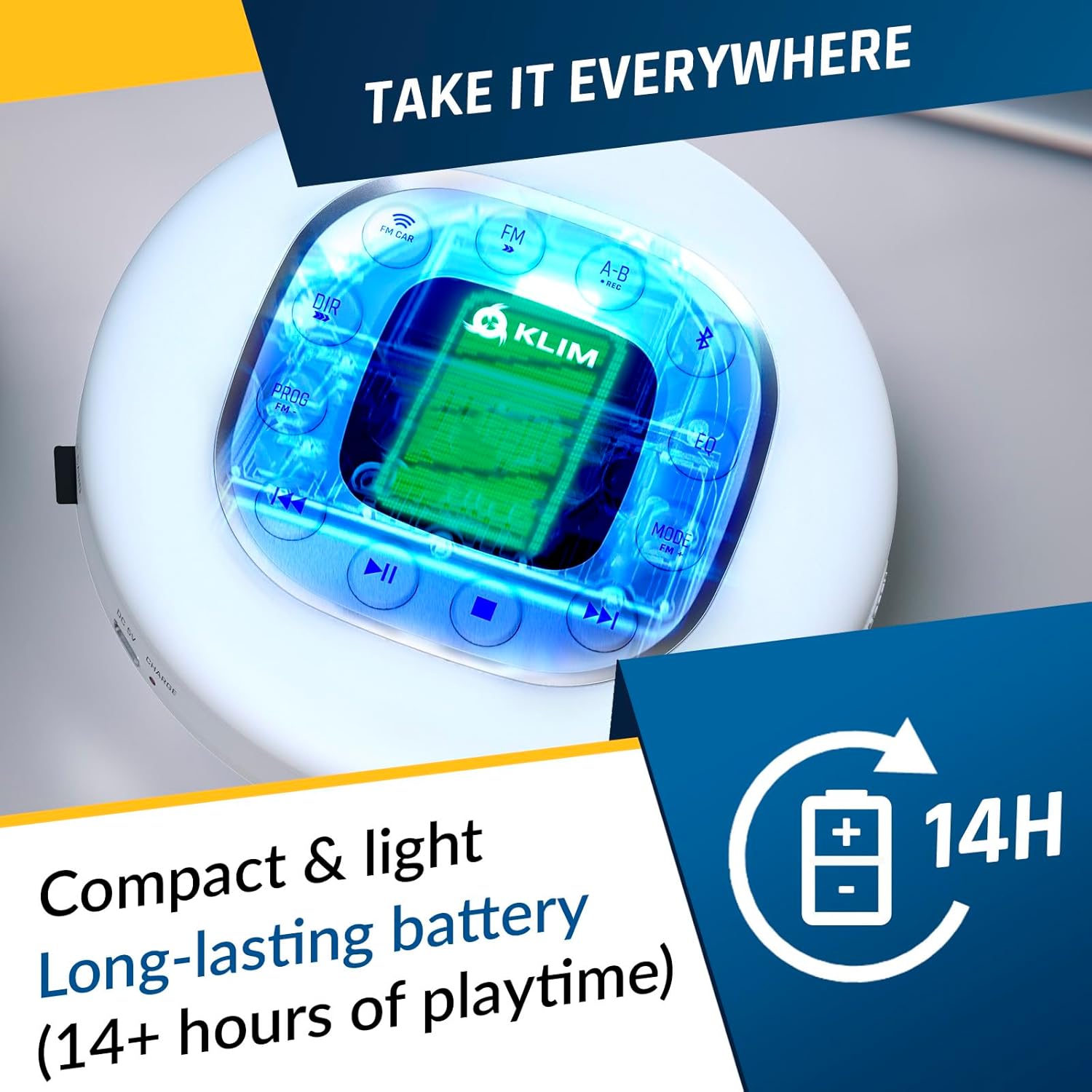
Image: The KLIM Journey CD Player with a bright, illuminated screen, emphasizing its compact design and long-lasting battery, indicated by a "14H" battery icon.
2. హెడ్ఫోన్లను కనెక్ట్ చేస్తోంది
Insert the 3.5mm jack of the included KLIM Fusion earphones into either of the two audio output ports on the side of the player. The KLIM Journey supports two sets of earphones simultaneously for shared listening.
3. CD ని చొప్పించడం
Gently slide the "OPEN" switch on the side of the player to open the CD compartment. Place your CD (CD, CD-R, CD-RW, HDCD, MP3 CD) onto the spindle, ensuring it clicks into place. Close the lid firmly until it latches.
ఆపరేటింగ్ సూచనలు
Device Controls Overview
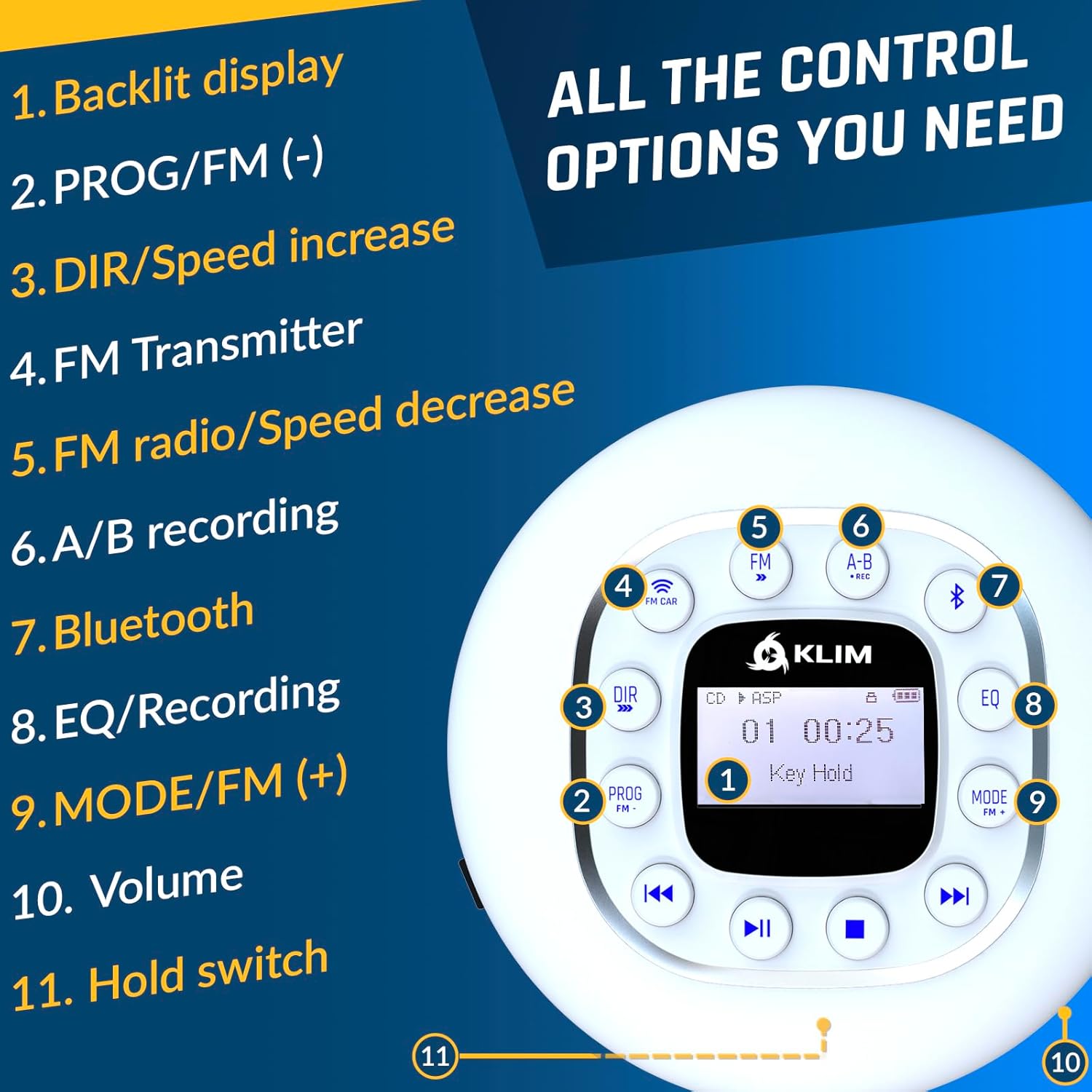
Image: A detailed diagram of the KLIM Journey CD Player's top panel, highlighting and numbering each control button and feature for easy identification and understanding.
- బ్యాక్లిట్ డిస్ప్లే: Shows track information, mode, battery status, etc.
- PROG/FM (-): Program playback order; in FM mode, decreases frequency.
- DIR/Speed Increase: Directory navigation for MP3 CDs; increases playback speed.
- FM CAR: Activates FM Transmitter mode for car connection.
- FM: Toggles FM radio mode.
- A-B/REC: A-B repeat function; long press for recording.
- బ్లూటూత్: బ్లూటూత్ జత చేసే మోడ్ను సక్రియం చేస్తుంది.
- EQ/Recording: Toggles equalizer presets; short press for recording.
- MODE/FM (+): Changes playback mode (Repeat, Random, Intro); in FM mode, increases frequency.
- వాల్యూమ్: ఆడియో అవుట్పుట్ వాల్యూమ్ను సర్దుబాటు చేస్తుంది.
- హోల్డ్ స్విచ్: Locks all buttons to prevent accidental presses.
- Previous Track/Rewind: Skips to previous track; long press to rewind.
- ప్లే/పాజ్: ప్లేబ్యాక్ను ప్రారంభిస్తుంది లేదా పాజ్ చేస్తుంది.
- ఆపు: ప్లేబ్యాక్ను ఆపివేస్తుంది.
- Next Track/Fast Forward: Skips to next track; long press to fast forward.
CD ప్లేబ్యాక్
- After inserting a CD, press the ప్లే/పాజ్ చేయండి ప్లేబ్యాక్ ప్రారంభించడానికి బటన్.
- ఉపయోగించండి మునుపటి ట్రాక్/రివైండ్ మరియు తదుపరి ట్రాక్/ఫాస్ట్ ఫార్వర్డ్ buttons to navigate tracks. Long press for fast forward/rewind.
- నొక్కండి ఆపు ప్లేబ్యాక్ని ముగించడానికి.
- The device features an anti-skip/anti-shock protection chip that preloads 100 seconds of music to prevent interruptions during movement.
Connecting to Your Car
The KLIM Journey offers three primary methods for connecting to your car's audio system:

Image: A visual representation of the three connection methods for the KLIM Journey to a car: Bluetooth, FM Transmitter, and AUX Cable, with corresponding icons and example car interiors.
- AUX కనెక్షన్:
Use the included AUX cable to connect the player's audio output to your car's AUX input port. This provides a direct, high-quality audio connection. Ensure your car has an AUX port.
- బ్లూటూత్ కనెక్షన్:
నొక్కండి బ్లూటూత్ button on the player to enter pairing mode. On your car's infotainment system, search for available Bluetooth devices and select "KLIM Journey". Once paired, audio will stream wirelessly. Note: Bluetooth compatibility may vary with different car models.
- FM ప్రసారం:
నొక్కండి FM CAR button. The player will display available FM frequencies. Tune your car's FM radio to the same frequency displayed on the KLIM Journey. This allows you to broadcast your music wirelessly to your car's radio. Choose a frequency that is clear of existing radio stations for best performance.
FM రేడియో ఆపరేషన్
- నొక్కండి FM FM రేడియో మోడ్కి మారడానికి బటన్.
- ఉపయోగించండి ప్రోగ్/ఎఫ్ఎమ్ (-) మరియు మోడ్/FM (+) కావలసిన పౌనఃపున్యాలకు ట్యూన్ చేయడానికి బటన్లు.
- The wired earphones act as an antenna for improved reception.
SD Card Playback & Recording
- Insert an SD card into the designated slot. The player will automatically detect and play compatible audio files (ఉదా., MP3).
- To record audio (e.g., from a CD or FM radio), press and hold the A-B/REC బటన్ లేదా చిన్నగా నొక్కండి EQ/Recording button (refer to specific model instructions for exact recording initiation). Ensure an SD card is inserted for recording functionality.
Equalizer (EQ) and Speed Control
- నొక్కండి EQ button repeatedly to cycle through different equalizer presets (e.g., Pop, Jazz, Rock, Classic, Bass, Normal) to customize your audio experience.
- ఉపయోగించండి DIR/Speed Increase button to adjust the playback speed of audio, useful for podcasts or audiobooks.
నిర్వహణ మరియు సంరక్షణ
- శుభ్రపరచడం: Use a soft, dry cloth to clean the exterior of the player. For the CD lens, use a specialized CD lens cleaner. Do not use abrasive cleaners or solvents.
- నిల్వ: Store the player in a cool, dry place away from direct sunlight and extreme temperatures. Use the included carry pouch for protection when not in use or during transport.
- బ్యాటరీ సంరక్షణ: బ్యాటరీ జీవితకాలాన్ని పొడిగించడానికి, బ్యాటరీని తరచుగా పూర్తిగా డిశ్చార్జ్ చేయకుండా ఉండండి. నిరంతరం ఉపయోగంలో లేకపోయినా, పరికరాన్ని క్రమం తప్పకుండా ఛార్జ్ చేయండి.
- CDలను నిర్వహించడం: Always handle CDs by their edges to avoid fingerprints and scratches. Store CDs in their cases when not in use.
ట్రబుల్షూటింగ్
| సమస్య | సాధ్యమైన కారణం | పరిష్కారం |
|---|---|---|
| ప్లేయర్ ఆన్ అవ్వదు. | Low battery; Hold switch engaged. | Charge the device; Disengage the Hold switch. |
| CD skips or playback is interrupted. | CD is dirty or scratched; Excessive vibration. | Clean the CD; Ensure the player is on a stable surface or use the anti-shock feature. |
| హెడ్ఫోన్ల నుండి శబ్దం లేదు. | Headphones not properly connected; Volume too low; Headphones faulty. | Ensure headphones are fully plugged in; Increase volume; Test with another pair of headphones. |
| బ్లూటూత్ ద్వారా కనెక్ట్ చేయడం సాధ్యం కాలేదు. | Player not in pairing mode; Device too far; Interference. | Press Bluetooth button to enter pairing mode; Move devices closer; Turn off other Bluetooth devices. |
| FM transmission has static/interference. | Chosen FM frequency is occupied. | Select a different, clear FM frequency on the player and car radio. |
స్పెసిఫికేషన్లు
| ఫీచర్ | వివరాలు |
|---|---|
| మోడల్ పేరు | KLIM నోమాడ్ |
| కొలతలు | 14 x 14 x 2.8 సెం.మీ |
| బరువు | 250 గ్రాములు |
| అనుకూల మీడియా రకాలు | CD, CD-R, CD-RW, HDCD, MP3 CD |
| మద్దతు ఉన్న ఆడియో ఫార్మాట్లు | MP3 |
| కనెక్టివిటీ టెక్నాలజీ | Bluetooth, AUX, FM Transmission |
| శక్తి మూలం | బ్యాటరీ పవర్డ్ (పునర్వినియోగపరచదగిన లిథియం-కోబాల్ట్) |
| బ్యాటరీ లైఫ్ | 14+ గంటలు (సుమారుగా) |
| ప్రత్యేక లక్షణాలు | Anti-skip/Anti-shock protection, SD Card Reader, FM Radio, Recording, Speed Control, Equalizer |

Image: The rear packaging of the KLIM Journey, displaying technical specifications and product features in English, French, German, Italian, and Spanish, along with manufacturing details.
వారంటీ మరియు మద్దతు
KLIM Technologies offers a 5 సంవత్సరాల వారంటీ on the KLIM Journey Portable CD Player. This warranty covers manufacturing defects and ensures long-term reliability of your device.
For technical support, warranty claims, or any questions regarding your KLIM Journey, please visit the official KLIM website or contact their customer service directly. Refer to the contact information provided in your product packaging or on the KLIM Technologies Australia Amazon store page.
If you are not satisfied with the product, you may return it within 30 days for a full refund, as per Amazon's return policy.

Image: A promotional banner from KLIM highlighting their mission, commitment to quality, and a 5-year warranty, featuring images of their product engineers and specialists.


