1. పరిచయం
Thank you for choosing AMAFACE C01-purple Bluetooth Headphones. These wireless earbuds are designed for comfort and performance, featuring an open-back design, long battery life, and intuitive controls, making them ideal for sports and daily use. This manual provides detailed instructions to help you get the most out of your new headphones.
2. పెట్టెలో ఏముంది
- AMAFACE C01-purple Bluetooth Headphones (Left and Right Earbuds)
- ఛార్జింగ్ కేసు
- USB-C ఛార్జింగ్ కేబుల్
- వినియోగదారు మాన్యువల్

Image: The AMAFACE C01-purple Bluetooth Headphones, including both earbuds and their transparent charging case, as they appear when unboxed.
3. సెటప్
3.1 హెడ్ఫోన్లను ఛార్జ్ చేయడం
Before first use, fully charge the headphones and charging case. Place the earbuds into the charging case. Connect the USB-C cable to the charging port on the case and the other end to a USB power source. The smart LED indicators on the charging case will illuminate to show charging status and battery level.
- ఇయర్బడ్ ప్లేటైమ్: ఒక్కసారి ఛార్జ్ చేస్తే 5 గంటల వరకు.
- ఛార్జింగ్ కేస్తో మొత్తం ప్లేటైమ్: 25 గంటల వరకు.
- ఛార్జింగ్ సమయం: పూర్తి ఛార్జ్ కోసం సుమారు 2 గంటలు.

Image: The earbuds and charging case, highlighting the 25-hour total battery life and 5-hour single charge playtime.

Image: A visual representation of the charging case and earbuds, illustrating the 25 hours of total battery life and 5 hours of single charge playtime.
3.2 బ్లూటూత్ జత చేయడం
The headphones feature automatic connection for seamless pairing.
- ఇయర్బడ్లు ఛార్జింగ్ కేసులో ఉన్నాయని మరియు కేస్ తెరిచి ఉందని నిర్ధారించుకోండి.
- మీ పరికరంలో (స్మార్ట్ఫోన్, టాబ్లెట్, మొదలైనవి), బ్లూటూత్ సెట్టింగ్లకు వెళ్లండి.
- కోసం వెతకండి new devices and select "C01" from the list.
- కనెక్ట్ చేసిన తర్వాత, ఇయర్బడ్లు ఉపయోగించడానికి సిద్ధంగా ఉంటాయి. కేస్ నుండి తీసివేసినప్పుడు అవి చివరిగా జత చేసిన పరికరానికి స్వయంచాలకంగా తిరిగి కనెక్ట్ అవుతాయి.

Image: A visual guide demonstrating the one-step auto-pairing process with a smartphone's Bluetooth settings, showing "C01" as a connected device.
3.3 హెడ్ఫోన్లు ధరించడం
The AMAFACE C01-purple headphones are designed with an earhook for a secure and comfortable fit, especially during physical activity. They rest gently on top of your ears, providing an open-back listening experience.
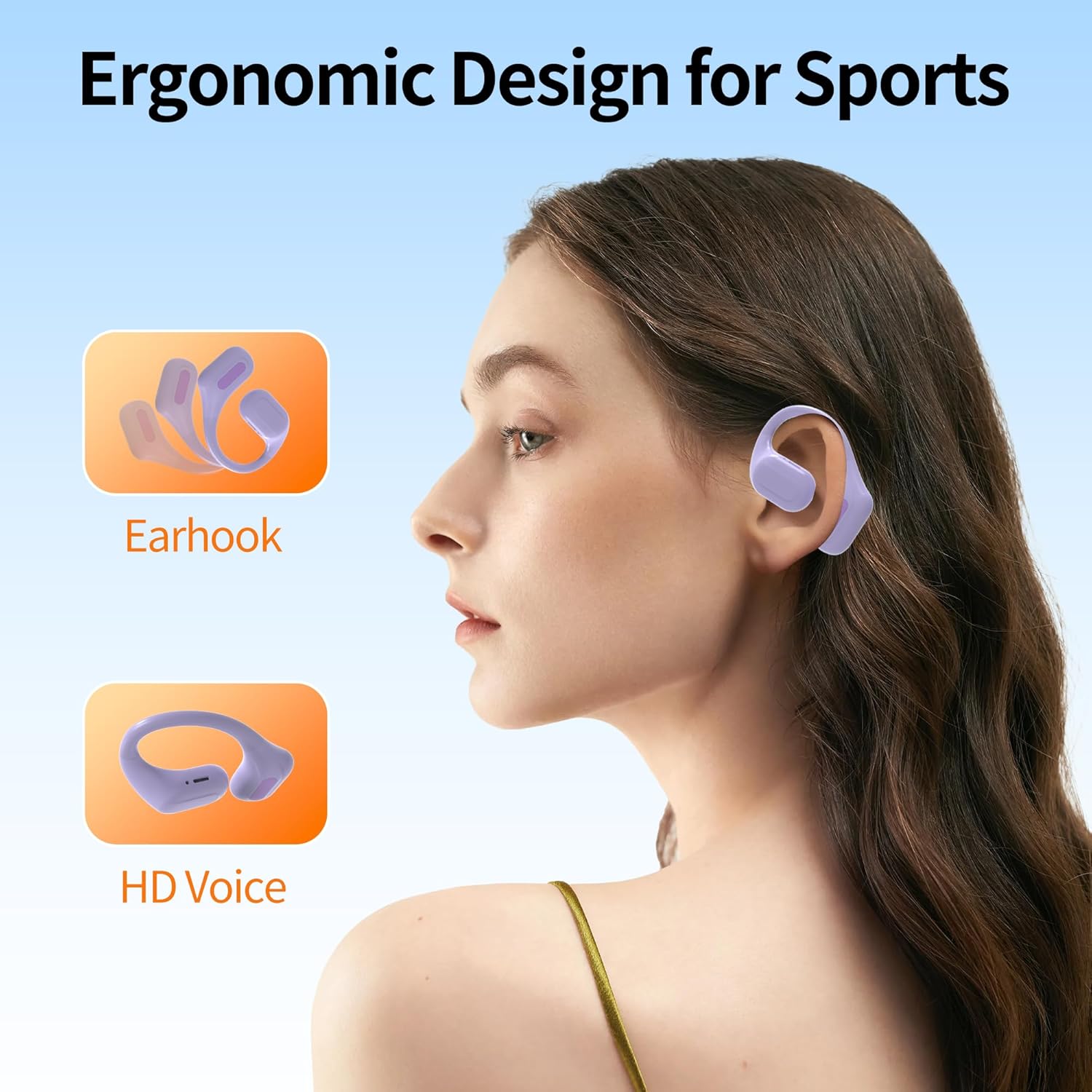
Image: A woman wearing the AMAFACE C01-purple headphones, illustrating their ergonomic earhook design suitable for sports and active use.

Image: A diagram illustrating the correct placement of the left and right earbuds, and demonstrating correct and incorrect wearing methods for optimal fit and sound.
4. ఆపరేటింగ్ సూచనలు
4.1 టచ్ నియంత్రణలు
The AMAFACE C01-purple headphones feature intuitive touch controls on each earbud for easy management of audio playback and calls.
| చర్య | ఫంక్షన్ |
|---|---|
| 1x నొక్కండి | ప్లే/పాజ్ చేయండి, కాల్కి సమాధానం ఇవ్వండి |
| 2x Tap (Left Earbud) | వాల్యూమ్ డౌన్ |
| 2x Tap (Right Earbud) | వాల్యూమ్ అప్ |
| 3x నొక్కండి | Previous/Next Track (depending on earbud) |
| లాంగ్ ప్రెస్ 2s | కాల్ తిరస్కరించండి, వాయిస్ అసిస్టెంట్ను యాక్టివేట్ చేయండి |
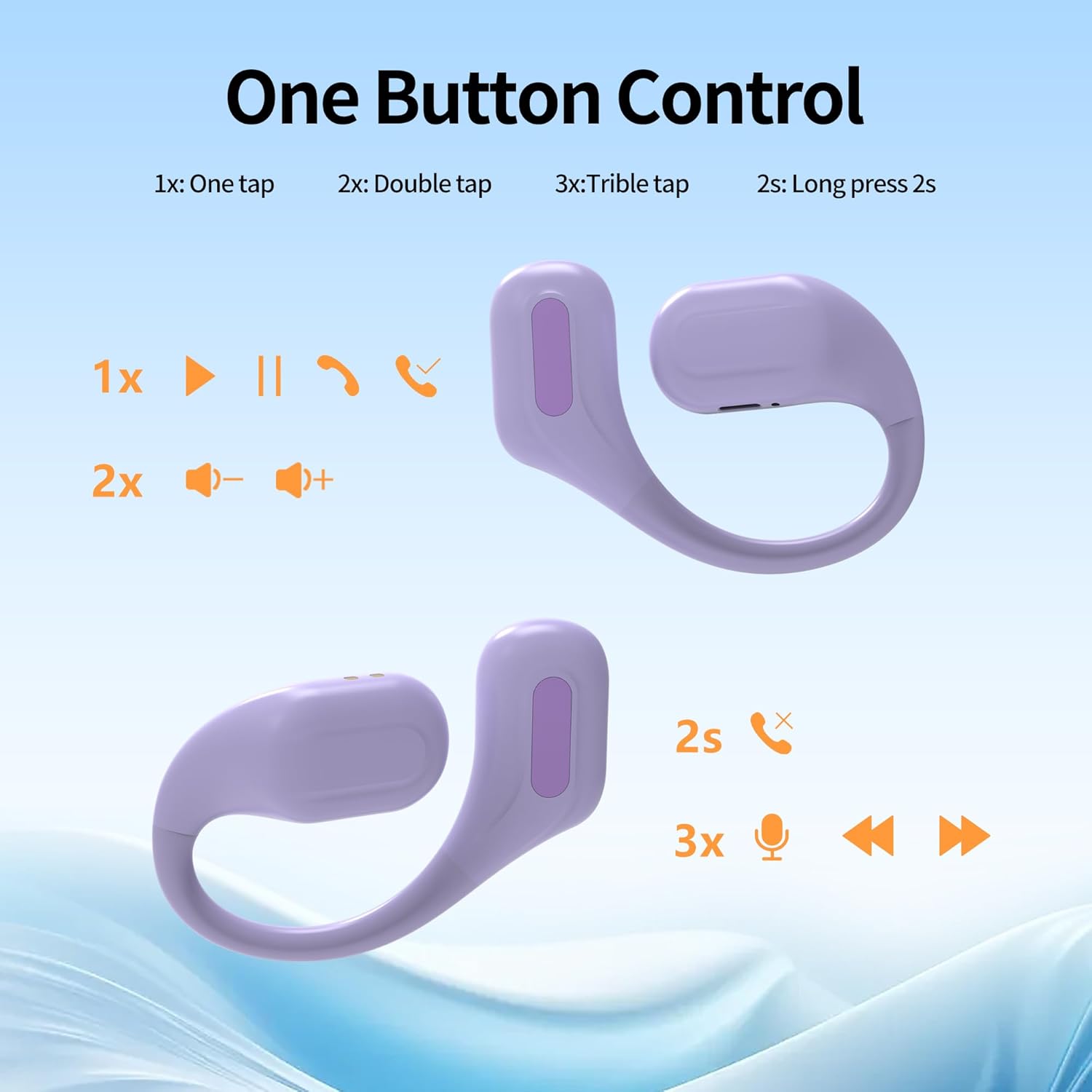
Image: A diagram illustrating the various touch control functions for the earbuds, including single tap, double tap, triple tap, and long press actions.

చిత్రం: ఒక ఓవర్view of the simple touch controls, highlighting features like Bluetooth 5.3, intelligent chips, binaural/single ear use, IPX5 waterproof rating, automatic pairing, call answering, and up to 22 hours of battery life.
4.2 ముఖ్య లక్షణాలు
- ఓపెన్-బ్యాక్ డిజైన్: Allows you to remain aware of your surroundings while enjoying audio, enhancing safety during outdoor activities.
- హైఫై స్టీరియో సౌండ్: Equipped with 10mm composite membrane speaker drivers for pure, balanced audio and deep, resonant bass.
- IPX6 Sweat-Resistant: Designed to withstand sweat and rain, making them suitable for intense workouts and outdoor use.
- Built-in Cool Lights: The charging case features smart LED lights that flash in multiple colors when turned on, adding a unique visual element.
- బ్లూటూత్ 5.3 టెక్నాలజీ: స్థిరమైన మరియు వేగవంతమైన వైర్లెస్ కనెక్టివిటీని అందిస్తుంది.

Image: The charging case showcasing its built-in cool lights, which offer 5 types of light switching and indicate the battery status for the earbuds.

Image: A visual representation emphasizing the deep and powerful bass capabilities of the AMAFACE C01-purple headphones, with miniature figures enjoying music.

Image: A woman wearing the open-ear design headphones, highlighting the "Open-Ear Design" and "Born for Sports!" slogans, indicating a new way of hearing.

Image: The earbuds being splashed with water, illustrating their IPX5 sweat-resistant feature which protects internal components from damage.

Image: A close-up of the earbud's internal components, emphasizing the "Latest Bluetooth 5.3 Technology" for lightning-fast connectivity and seamless streaming.

Image: Four panels showing individuals using the headphones in different settings, illustrating benefits such as game mode support, not missing important notices, awareness of surroundings during exercise, and ability to talk while listening to music.
4.3 అధికారిక ఉత్పత్తి వీడియో
Video: An official product video demonstrating the unboxing, features, and usage of the AMAFACE C01 Sport Earbuds, including the changing LED lights of the charging case.
5. నిర్వహణ
To ensure the longevity and optimal performance of your AMAFACE C01-purple headphones, follow these maintenance guidelines:
- శుభ్రపరచడం: ఇయర్బడ్లు మరియు ఛార్జింగ్ కేసును మృదువైన, పొడి, మెత్తటి బట్టతో సున్నితంగా తుడవండి. కఠినమైన రసాయనాలు లేదా రాపిడి పదార్థాలను ఉపయోగించవద్దు.
- నీటి బహిర్గతం: While the headphones are IPX6 sweat-resistant, avoid submerging them in water or exposing them to strong jets of water. Dry them thoroughly if they get wet.
- నిల్వ: ఉపయోగంలో లేనప్పుడు, హెడ్ఫోన్లను దుమ్ము మరియు నష్టం నుండి రక్షించడానికి వాటి ఛార్జింగ్ కేసులో నిల్వ చేయండి. తీవ్రమైన ఉష్ణోగ్రతలకు దూరంగా చల్లని, పొడి ప్రదేశంలో నిల్వ చేయండి.
- ఛార్జింగ్: ఛార్జింగ్ కోసం అందించిన USB-C కేబుల్ లేదా సర్టిఫైడ్ దానికి సమానమైన దాన్ని మాత్రమే ఉపయోగించండి.
6. ట్రబుల్షూటింగ్
మీ హెడ్ఫోన్లతో సమస్యలు ఎదురైతే, ఈ క్రింది పరిష్కారాలను ప్రయత్నించండి:
| సమస్య | పరిష్కారం |
|---|---|
| హెడ్ఫోన్లు జత కావడం లేదు | Ensure Bluetooth is enabled on your device. Place earbuds back in the case, close, then open to re-enter pairing mode. Forget "C01" from your device's Bluetooth list and try pairing again. Ensure earbuds are charged. |
| ఒక ఇయర్బడ్ నుండి శబ్దం లేదు | Check if both earbuds are charged. Place both earbuds back in the charging case, close the lid, wait a few seconds, then open the lid and try again. |
| ఛార్జింగ్ కేసు ఛార్జింగ్ కాదు | Ensure the USB-C cable is securely connected to both the case and the power source. Try a different USB port or power adapter. |
| తక్కువ వాల్యూమ్ లేదా పేలవమైన ధ్వని నాణ్యత | Adjust the volume on both your device and the earbuds. Ensure earbuds are clean and free of debris. Check for any obstructions on the speaker grilles. |
| అడపాదడపా కనెక్షన్ | Ensure your device is within the Bluetooth range (approximately 10 meters). Avoid obstacles between your device and the headphones. Reduce interference from other wireless devices. |
7. స్పెసిఫికేషన్లు
| ఫీచర్ | వివరాలు |
|---|---|
| మోడల్ పేరు | C01-purple |
| బ్రాండ్ | అమాఫేస్ |
| కనెక్టివిటీ టెక్నాలజీ | వైర్లెస్ (బ్లూటూత్ 5.3) |
| చెవి ప్లేస్మెంట్ | On Ear (Earhook) |
| నీటి నిరోధక స్థాయి | IPX6 వాటర్ రెసిస్టెంట్ |
| బ్యాటరీ లైఫ్ (ఇయర్బడ్స్) | 5 గంటల వరకు |
| మొత్తం ప్లేటైమ్ (కేస్తో సహా) | 25 గంటల వరకు |
| ఛార్జింగ్ సమయం | సుమారు 2 గంటలు |
| నియంత్రణ రకం | టచ్ కంట్రోల్ |
| ఆడియో డ్రైవర్ రకం | డైనమిక్ డ్రైవర్ (10మి.మీ) |
| వస్తువు బరువు | 6 గ్రాములు (ఒక్కో ఇయర్బడ్) |
| ఫ్రీక్వెన్సీ రేంజ్ | 20 హెర్ట్జ్ - 20,000 హెర్ట్జ్ |
| ఇంపెడెన్స్ | 32 ఓం |
8. వారంటీ మరియు మద్దతు
AMAFACE products are manufactured to the highest quality standards. For any questions, technical support, or warranty claims, please refer to the contact information provided with your purchase or visit the official AMAFACE store on Amazon: AMAFACE Amazon Store.


