1. పరిచయం
Thank you for choosing the Baseus Bowie E5x True Wireless Stereo (TWS) Earphones. These earphones are designed to provide a high-quality audio experience with convenient wireless connectivity. This manual will guide you through the setup, operation, and maintenance of your new earphones.

Figure 1: Baseus Bowie E5x TWS Earphones and Charging Case with Retail Packaging
2. ప్యాకేజీ విషయాలు
అన్ని అంశాలు ఉన్నాయని నిర్ధారించుకోవడానికి దయచేసి ప్యాకేజీలోని విషయాలను తనిఖీ చేయండి:
- Baseus Bowie E5x TWS Earphones (Left and Right)
- ఛార్జింగ్ కేసు
- USB-C ఛార్జింగ్ కేబుల్
- వినియోగదారు మాన్యువల్ (ఈ పత్రం)

Figure 2: Baseus Bowie E5x Charging Case and USB-C Charging Cable
3. ఉత్పత్తి ముగిసిందిview
Familiarize yourself with the components of your Baseus Bowie E5x earphones:
- ఇయర్బడ్స్: Left (L) and Right (R) earbuds with touch control areas and charging contacts.
- ఛార్జింగ్ కేసు: Used for charging the earbuds and for storage. Features a USB-C charging port and LED indicators.
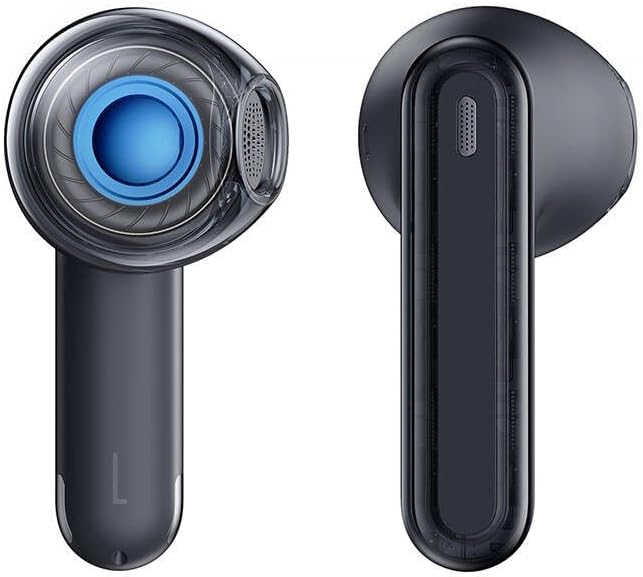
Figure 3: Left and Right Baseus Bowie E5x Earbuds
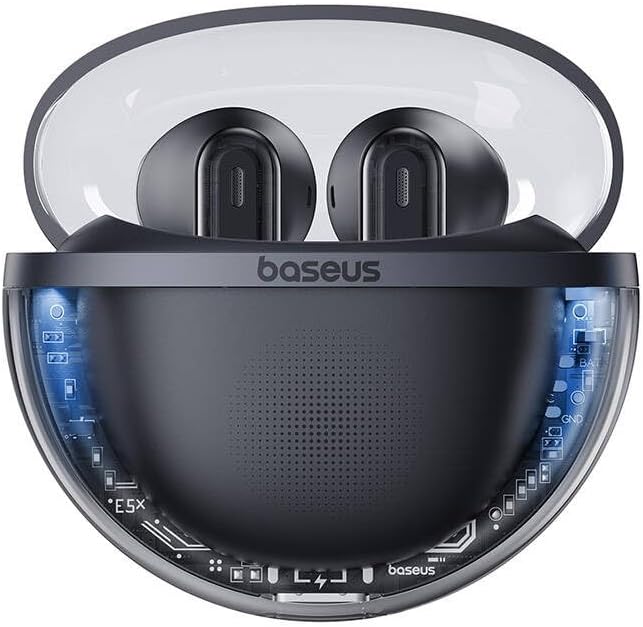
Figure 4: Baseus Bowie E5x Charging Case with Earbuds Inserted
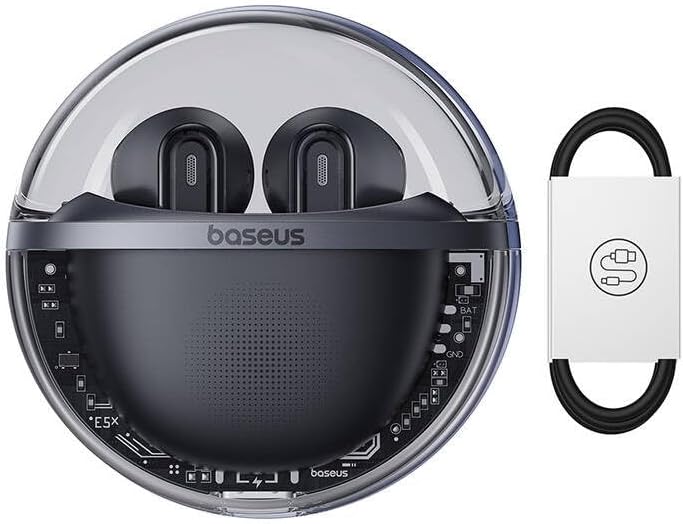
Figure 5: Close-up of an Earbud's Speaker
4. సెటప్
4.1 ఇయర్ఫోన్లు మరియు కేస్ను ఛార్జ్ చేయడం
- ప్రారంభ ఛార్జ్: Before first use, fully charge the charging case and earbuds. Place the earbuds into the charging case.
- కేసు వసూలు చేయడం: Connect the provided USB-C cable to the charging port on the case and the other end to a USB power adapter (not included). The LED indicator on the case will show charging status.
- ఇయర్బడ్లను ఛార్జ్ చేస్తోంది: When placed in the charging case, the earbuds will automatically begin charging. The case's indicator lights will show the charging status of the earbuds.
4.2 బ్లూటూత్ జత చేయడం
- పవర్ ఆన్: Open the charging case. The earbuds will automatically power on and enter pairing mode (indicated by flashing LED lights on the earbuds).
- బ్లూటూత్ని యాక్టివేట్ చేయండి: మీ పరికరంలో (స్మార్ట్ఫోన్, టాబ్లెట్, కంప్యూటర్), బ్లూటూత్ను ప్రారంభించండి.
- పరికరాన్ని ఎంచుకోండి: In your device's Bluetooth settings, search for available devices and select "Baseus Bowie E5x".
- కనెక్ట్ చేయండి: Once selected, the earbuds will connect to your device. A voice prompt or steady LED light will confirm successful pairing.
- తిరిగి కనెక్ట్ చేయండి: ప్రారంభ జత చేసిన తర్వాత, ఇయర్బడ్లను కేస్ నుండి బయటకు తీసినప్పుడు అవి చివరిగా జత చేసిన పరికరానికి స్వయంచాలకంగా కనెక్ట్ అవుతాయి, అయితే పరికరంలో బ్లూటూత్ ప్రారంభించబడి ఉంటుంది.
5. ఆపరేటింగ్ సూచనలు
The Baseus Bowie E5x earphones feature intuitive touch controls:
| ఫంక్షన్ | యాక్షన్ (ఎడమ/కుడి ఇయర్బడ్) |
|---|---|
| పవర్ ఆన్ | Open charging case / Long press touch area (if off) |
| పవర్ ఆఫ్ | Place earbuds into charging case and close lid / Disconnect Bluetooth and wait |
| ప్లే/పాజ్ చేయండి | Double tap touch area |
| తదుపరి ట్రాక్ | కుడివైపు ఇయర్బడ్ని మూడుసార్లు నొక్కండి |
| మునుపటి ట్రాక్ | ఎడమ ఇయర్బడ్ను మూడుసార్లు నొక్కండి |
| సమాధానం/కాల్ ముగించు | Double tap touch area |
| కాల్ని తిరస్కరించండి | టచ్ ప్రాంతాన్ని 2 సెకన్ల పాటు ఎక్కువసేపు నొక్కండి |
| వాయిస్ అసిస్టెంట్ని యాక్టివేట్ చేయండి | టచ్ ప్రాంతాన్ని 3 సెకన్ల పాటు ఎక్కువసేపు నొక్కండి |
| Switch to Gaming Mode (Low Latency) | Specific gesture (refer to product packaging or Baseus app for exact control) |
గమనిక: Specific touch controls for features like volume adjustment or gaming mode may vary. Refer to the official Baseus app or product packaging for the most accurate and customizable controls.
6. నిర్వహణ
To ensure the longevity and optimal performance of your earphones, follow these maintenance tips:
- శుభ్రపరచడం: ఇయర్బడ్లు మరియు ఛార్జింగ్ కేసును మృదువైన, పొడి, మెత్తటి బట్టతో క్రమం తప్పకుండా శుభ్రం చేయండి. కఠినమైన రసాయనాలు లేదా రాపిడి పదార్థాలను ఉపయోగించవద్దు.
- ఛార్జింగ్ పరిచయాలు: సరైన ఛార్జింగ్ ఉండేలా చూసుకోవడానికి ఇయర్బడ్లు మరియు కేస్ లోపల ఛార్జింగ్ కాంటాక్ట్లు శుభ్రంగా మరియు శిధిలాలు లేకుండా ఉన్నాయని నిర్ధారించుకోండి.
- నిల్వ: ఉపయోగంలో లేనప్పుడు, ఇయర్ఫోన్లను దుమ్ము మరియు నష్టం నుండి రక్షించడానికి వాటి ఛార్జింగ్ కేసులో నిల్వ చేయండి.
- విపరీతమైన పరిస్థితులను నివారించండి: ఇయర్ఫోన్లను తీవ్రమైన ఉష్ణోగ్రతలు, తేమ లేదా ద్రవాలకు బహిర్గతం చేయవద్దు.
7. ట్రబుల్షూటింగ్
If you encounter issues with your Baseus Bowie E5x earphones, try the following solutions:
- ధ్వని లేదు:
- ఇయర్బడ్లు ఛార్జ్ అయ్యాయని నిర్ధారించుకోండి.
- Check if Bluetooth is enabled on your device and connected to "Baseus Bowie E5x".
- మీ పరికరం మరియు ఇయర్ఫోన్లు రెండింటిలోనూ వాల్యూమ్ను సర్దుబాటు చేయండి.
- మీ పరికరంతో ఇయర్బడ్లను తిరిగి జత చేయడానికి ప్రయత్నించండి.
- ఇయర్బడ్లు ఒకదానితో ఒకటి జత కాకపోవడం:
- రెండు ఇయర్బడ్లను తిరిగి ఛార్జింగ్ కేసులో ఉంచండి, మూత మూసివేసి, కొన్ని సెకన్లు వేచి ఉండి, ఆపై మూతను మళ్ళీ తెరవండి.
- రెండు ఇయర్బడ్లు తగినంత ఛార్జ్ కలిగి ఉన్నాయని నిర్ధారించుకోండి.
- ఛార్జింగ్ సమస్యలు:
- USB-C కేబుల్ మరియు పవర్ అడాప్టర్ను తనిఖీ చేయండి.
- ఇయర్బడ్లపై మరియు కేస్ లోపల ఛార్జింగ్ కాంటాక్ట్లను శుభ్రం చేయండి.
- ఛార్జింగ్ కేసు కూడా ఛార్జ్ అయ్యిందని నిర్ధారించుకోండి.
- Connection Drops/Unstable:
- మీ కనెక్ట్ చేయబడిన పరికరానికి దగ్గరగా వెళ్లండి.
- బలమైన విద్యుదయస్కాంత జోక్యం ఉన్న వాతావరణాలను నివారించండి.
- బ్లూటూత్ కనెక్షన్ని డిస్కనెక్ట్ చేసి, మళ్లీ కనెక్ట్ చేయండి.
If the issue persists, consult the Baseus official website or customer support for further assistance.
8. స్పెసిఫికేషన్లు
| ఫీచర్ | వివరాలు |
|---|---|
| బ్రాండ్ | బేసియస్ |
| మోడల్ | Bowie E5x |
| రంగు | నలుపు |
| భాగాలు చేర్చబడ్డాయి | 1 package (Earphones, Charging Case, USB-C Cable, Manual) |
| కనెక్టివిటీ | ట్రూ వైర్లెస్ స్టీరియో (TWS) |
| ఛార్జింగ్ పోర్ట్ | USB-C |
గమనిక: ముందస్తు నోటీసు లేకుండా స్పెసిఫికేషన్లు మారవచ్చు.
9. వారంటీ మరియు మద్దతు
Baseus products come with a manufacturer's warranty. Please refer to the warranty card included in your package or visit the official Baseus webమీ ప్రాంతానికి సంబంధించిన వివరణాత్మక వారంటీ నిబంధనలు మరియు షరతుల కోసం సైట్ను చూడండి.
For technical support, troubleshooting, or service inquiries, please contact Baseus customer support through their official webసైట్ లేదా మీ ఉత్పత్తి ప్యాకేజింగ్లో అందించిన సంప్రదింపు సమాచారం.
అధికారిక Webసైట్: www.baseus.com


