టాబ్ ఫెయిరీ 10

TAB ఫెయిరీ10 రోబోట్ వాక్యూమ్ మరియు మాప్ కాంబో యూజర్ మాన్యువల్

Model: Fairy 10

1. పరిచయం

Thank you for choosing the TAB Fairy10 Robot Vacuum and Mop Combo. This advanced cleaning device is designed to provide a comprehensive and hands-free cleaning experience for your home. Featuring powerful suction, intelligent navigation, and a multifunctional docking station, the Fairy10 simplifies floor maintenance. This manual provides essential information for setup, operation, and maintenance to ensure optimal performance and longevity of your device.

2. భద్రతా సమాచారం

పరికరాన్ని ఉపయోగించే ముందు దయచేసి అన్ని భద్రతా సూచనలను జాగ్రత్తగా చదవండి. భవిష్యత్తు సూచన కోసం ఈ మాన్యువల్‌ని ఉంచండి.

3. ప్యాకేజీ విషయాలు

ప్యాకేజీలో అన్ని భాగాలు ఉన్నాయని నిర్ధారించుకోండి:
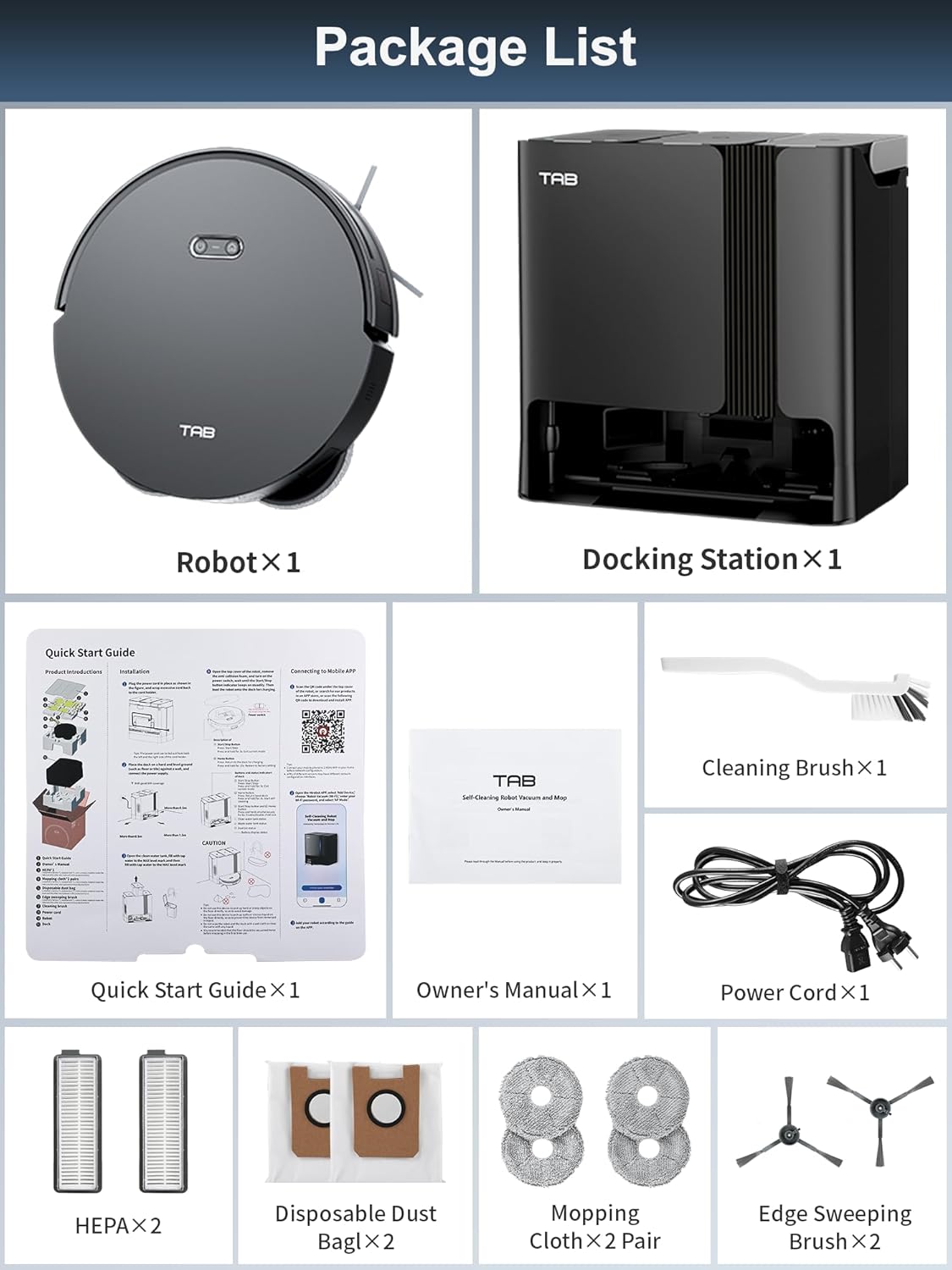
Package contents of TAB Fairy10 including robot, docking station, brushes, filters, and manuals.

Image: All components included in the TAB Fairy10 package, neatly laid out.

4. ఉత్పత్తి ముగిసిందిview

The TAB Fairy10 consists of the robot vacuum and a multifunctional docking station.

TAB Fairy10 Robot Vacuum and Mop Combo with its docking station and a smartphone displaying the app interface.

Image: The TAB Fairy10 robot vacuum positioned in front of its docking station, with a smartphone showing the companion app.

4.1 రోబోట్ వాక్యూమ్

The robot features a compact design with hidden LiDAR navigation, allowing it to access tighter spaces. It is equipped with a multi-directional floating brush and dual rotary mops for effective cleaning.

4.2 Multifunctional Docking Station

The docking station serves as an all-in-one hub for the robot, providing self-draining, self-washing, self-drying, self-cleaning, and self-refilling capabilities.

Diagram showing the four main functions of the docking station: Self-Mop Cleaning, Self-Dust Emptying, Self-Mop Drying, and Self-Refilling.

Image: A visual representation of the docking station's capabilities, including self-mop cleaning, self-dust emptying, self-mop drying, and self-refilling.

5. సెటప్

5.1 అన్‌ప్యాకింగ్

ప్యాకేజింగ్ నుండి అన్ని భాగాలను జాగ్రత్తగా తొలగించండి. భవిష్యత్తులో రవాణా లేదా నిల్వ కోసం ప్యాకేజింగ్ సామగ్రిని ఉంచుకోండి.

5.2 డాకింగ్ స్టేషన్ ప్లేస్‌మెంట్

Place the docking station on a hard, level surface against a wall. Ensure there is at least 0.5 meters (1.6 feet) of clear space on both sides and 1.5 meters (4.9 feet) in front of the station for the robot to dock properly. Connect the power adapter to the docking station and plug it into a wall outlet.

5.3 రోబోట్ తయారీ

Install the side brushes by pressing them into their slots until they click. Ensure the mop pads are securely attached to the mop module.

5.4 ప్రారంభ ఛార్జింగ్

Place the robot onto the docking station. Ensure the charging contacts align. The robot will begin charging automatically. For first use, fully charge the robot before operation.

5.5 యాప్ ఇన్‌స్టాలేషన్ మరియు కనెక్షన్

Download the official TAB app from your smartphone's app store. Follow the in-app instructions to connect your Fairy10 robot. This typically involves creating an account, adding the device, and connecting it to your home Wi-Fi network.

5.6 మ్యాపింగ్

Once connected, initiate a mapping run through the app. The hidden LiDAR navigation system will efficiently scan and map your home, creating a detailed floor plan for optimized cleaning routes.

Robot vacuum using LiDAR to quickly map a room, showing blue laser lines and a generated map on a smartphone.

Image: The robot vacuum actively mapping a room using its LiDAR system, with a visual representation of the map being created on a smartphone screen.

6. ఆపరేటింగ్ సూచనలు

6.1 శుభ్రపరచడం ప్రారంభించడం/ఆపడం

You can start or stop a cleaning cycle using the button on the robot or through the TAB app. The robot will automatically return to the docking station upon completion or when its battery is low.

6.2 క్లీనింగ్ మోడ్‌లు

The Fairy10 offers versatile cleaning modes to suit your needs:

Four cleaning modes: Only Sweep, Only Mop, Sweep Then Mop, and Mop While Sweep, each with an illustrative image of the robot performing the task.

చిత్రం: విజువల్ ఎక్స్amples of the four available cleaning modes: sweep only, mop only, sweep then mop, and mop while sweeping.

Robot vacuum cleaning a carpet, with '6000Pa' text indicating powerful suction.

Image: The robot vacuum demonstrating its powerful 6000Pa suction on a carpeted surface.

Robot vacuum with dual rotating mops cleaning a hard floor, highlighting 180 RPM rotation, 15mm lift, and 10N pressure.

Image: The robot vacuum actively mopping a hard floor, showcasing its dual rotating mops and key specifications like rotation speed, lift, and pressure.

6.3 Scheduled Cleaning

Set specific cleaning times via the app to automate your cleaning routine. The robot will start and return to the dock as scheduled.

Robot vacuum returning to its docking station after a scheduled cleaning, with a notification 'Scheduled cleaning setting success'.

Image: The robot vacuum returning to its base, indicating a successful scheduled cleaning setup.

6.4 Targeted Cleaning Zones

Use the app to define specific areas for cleaning, such as the kitchen, living room, or bedroom, allowing for customized cleaning preferences.

Smartphone app showing a floor plan with marked cleaning zones, alongside images of the robot cleaning in a kitchen, living room, and bedroom.

Image: The app interface displaying targeted cleaning zones, with corresponding images of the robot cleaning different rooms.

6.5 No-Go Zones

Set virtual boundaries or no-go zones in the app to prevent the robot from entering specific areas, protecting delicate items or preventing access to certain rooms.

Robot vacuum operating in a living room, with a 'NO-GO ZONE' indicated in an adjacent dining area, demonstrating virtual boundary setting.

Image: The robot vacuum avoiding a designated 'No-Go Zone' in a home environment.

6.6 చైల్డ్ లాక్

Activate the child lock feature in the app to prevent unintended operation by children or pets, ensuring safety.

A child playing on the floor near the robot vacuum, with a shield icon indicating the child lock feature is active.

Image: The robot vacuum with a child lock icon, illustrating its safety feature when children or pets are present.

6.7 Lidar Navigation and Obstacle Avoidance

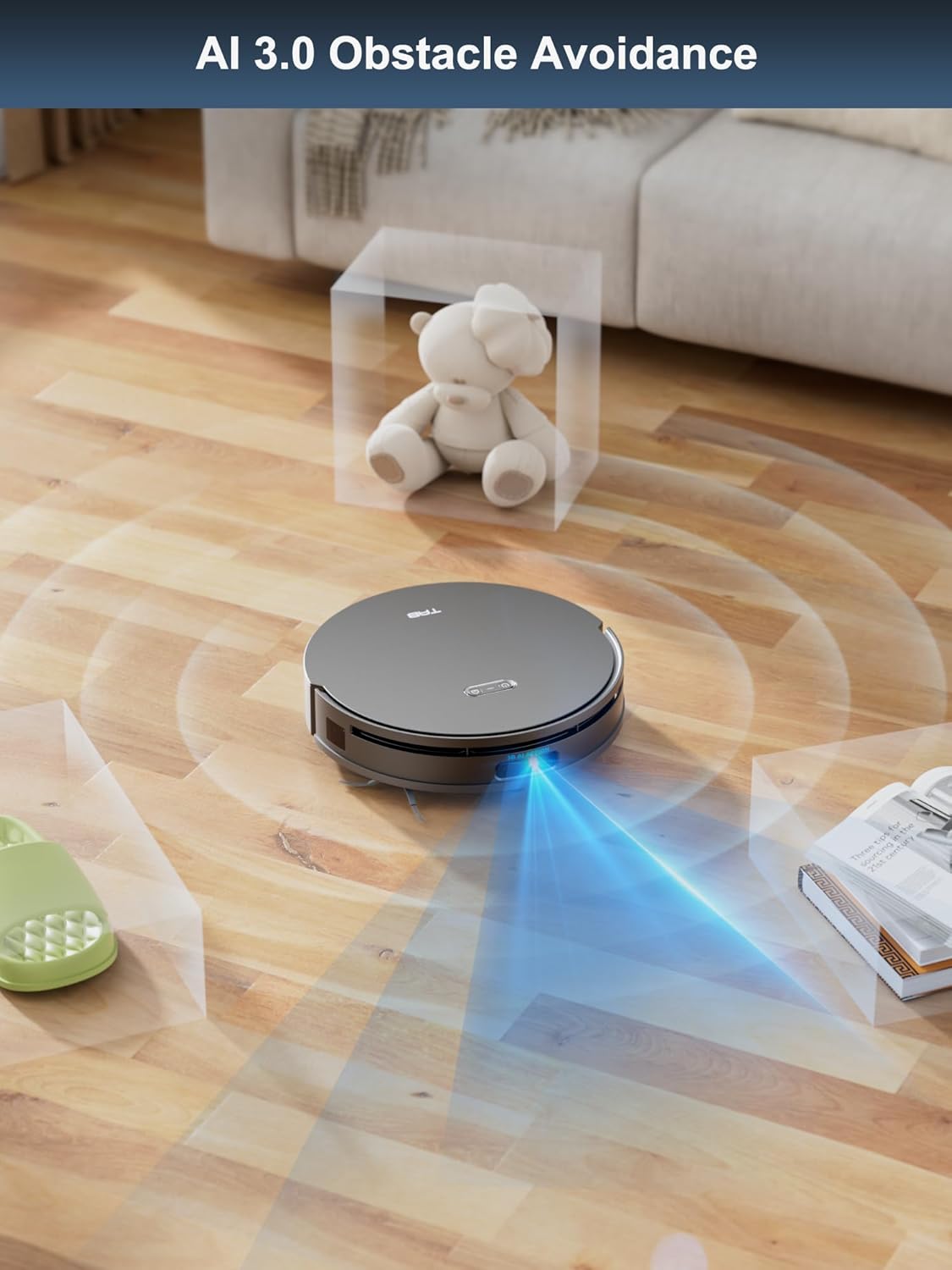
The hidden LiDAR navigation system allows the robot to create precise maps and navigate efficiently, even in tight spaces. AI 3.0 Obstacle Avoidance helps the robot detect and avoid objects on the floor, reducing the need for pre-cleaning.

Robot vacuum with hidden LiDAR navigation moving under a sofa, showing its compact design.

Image: The robot vacuum demonstrating its hidden LiDAR navigation by cleaning under a sofa, highlighting its ability to access tight spaces.

Robot vacuum using AI 3.0 obstacle avoidance to detect and navigate around a teddy bear and books on the floor.

Image: The robot vacuum employing AI 3.0 obstacle avoidance to detect and navigate around various items on the floor.

6.8 Auto Mop Lifting

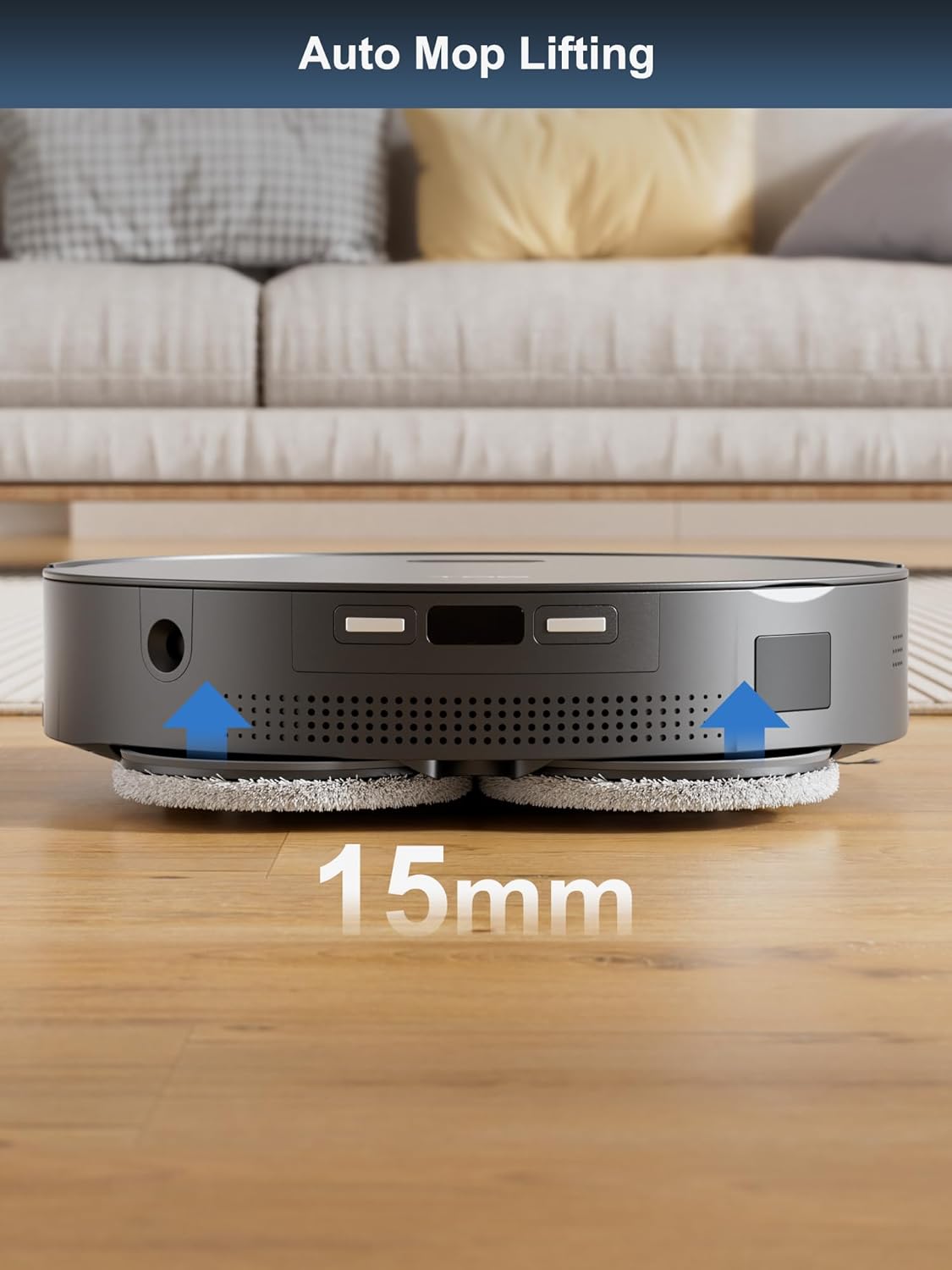
The robot automatically lifts its mops by 15mm when it detects carpets, preventing them from getting wet during vacuuming cycles.

Robot vacuum automatically lifting its mops by 15mm when transitioning from hard floor to carpet.

Image: The robot vacuum demonstrating its auto mop lifting feature, raising its mops by 15mm as it approaches a carpet.

7. నిర్వహణ

Regular maintenance ensures the optimal performance and longevity of your TAB Fairy10.

7.1 Self-Cleaning Features

The docking station automates several maintenance tasks:

Two panels showing 'Self-cleans Mop' with water jets cleaning the mop pads, and 'Hot Air Drying' with air circulating to dry the pads.

Image: The self-cleaning and hot air drying processes for the mop pads within the docking station.

పారదర్శకం view of the docking station showing dust being emptied from the robot into the dust bag.

చిత్రం: ఒక పారదర్శకం view of the docking station illustrating the automatic dust emptying process.

7.2 రోబోట్‌ను శుభ్రపరచడం

7.3 Cleaning the Docking Station

7.4 వినియోగ వస్తువులను భర్తీ చేయడం

Replace consumables according to usage or as indicated by the app:

8. ట్రబుల్షూటింగ్

If you encounter issues with your TAB Fairy10, refer to the following common solutions:

సమస్యసాధ్యమైన కారణంపరిష్కారం
రోబోట్ ఆన్ చేయదుబ్యాటరీ తక్కువగా ఉంది; పవర్ స్విచ్ ఆఫ్ చేయబడిందిరోబోట్‌ను ఛార్జ్ చేయండి; పవర్ స్విచ్ ఆన్‌లో ఉందని నిర్ధారించుకోండి.
రోబోట్ డాక్ చేయలేరుDocking station obstructed; Incorrect placementClear obstacles around the dock; Ensure proper placement as per setup instructions
పేలవమైన శుభ్రపరిచే పనితీరుFull dustbin; Clogged brushes/filters; Worn mop padsEmpty dustbin/replace dust bag; Clean brushes/filters; Replace mop pads
యాప్ కనెక్టివిటీ సమస్యలుIncorrect Wi-Fi password; Robot too far from router; App outdatedVerify Wi-Fi credentials; Move robot closer to router; Update app to latest version
Mops not dryingAir vents blocked; Drying cycle not initiatedCheck for obstructions in air vents; Ensure drying function is enabled in app

For further assistance, please refer to the support section of the TAB app or visit the official TAB webసైట్.

9. స్పెసిఫికేషన్లు

ఫీచర్స్పెసిఫికేషన్
బ్రాండ్TAB
మోడల్ పేరుఫెయిరీ 10
ప్రత్యేక ఫీచర్Auto Mop Washing, Auto-Docking, Automatic Dust Collection
రంగునలుపు
ఉత్పత్తి కొలతలు18.8"లీ x 18.8"వా x 19.2"హ
ఫిల్టర్ రకంగుళిక
బ్యాటరీ లైఫ్120 నిమిషాల
శక్తి మూలంబ్యాటరీ ఆధారితమైనది
నియంత్రణ పద్ధతియాప్
అనుకూల పరికరాలుస్మార్ట్ఫోన్లు
వస్తువు బరువు42.1 పౌండ్లు

10. వారంటీ మరియు మద్దతు

For warranty information and customer support, please refer to the official TAB website or contact their customer service directly. Details can typically be found in the TAB app under the 'Support' or 'About Us' sections.

ఆన్‌లైన్ వనరులు:

సంబంధిత పత్రాలు - ఫెయిరీ 10

ముందుగాview TAB T6-ప్రో స్మార్ట్ కార్డ్‌లెస్ వెట్ డ్రై వాక్యూమ్ క్లీనర్ మరియు మాప్ యూజర్ మాన్యువల్
TAB T6-Pro స్మార్ట్ కార్డ్‌లెస్ వెట్ డ్రై వాక్యూమ్ క్లీనర్ మరియు మాప్ కోసం సమగ్ర వినియోగదారు మాన్యువల్, భద్రతా సూచనలు, అసెంబ్లీ, ఆపరేషన్, నిర్వహణ మరియు ట్రబుల్షూటింగ్‌ను కవర్ చేస్తుంది.
ముందుగాview TAB R6 కార్పెట్ క్లీనర్ మెషిన్ యూజర్ మాన్యువల్
TAB R6 కార్పెట్ క్లీనర్ మెషిన్ కోసం సమగ్ర వినియోగదారు మాన్యువల్, భద్రతా సూచనలు, ఉత్పత్తి పరిచయం, తయారీ, ఆపరేటింగ్ సూచనలు, నిర్వహణ మరియు ట్రబుల్షూటింగ్‌ను కవర్ చేస్తుంది.
ముందుగాview EG200/EG300 సిరీస్ ఉత్పత్తి సమాచారం మరియు పునరుద్ధరించబడిన వస్తువు గైడ్
EG200 మరియు EG300 సిరీస్ ఉత్పత్తులకు సంబంధించిన సమాచారం, ఉపకరణాలపై గమనికలు, మోడల్ వైవిధ్యాలు మరియు పునరుద్ధరించబడిన యూనిట్ల మార్గదర్శకాలతో సహా. ఈ పత్రం సూచన లేదా మద్దతు మార్గదర్శిగా పనిచేస్తుంది.
ముందుగాview TAB EG200/EG300 సిరీస్ ఉత్పత్తి సమాచారం మరియు గమనికలు
పైగాview EG201, EG351, మరియు EG351A మోడల్‌లతో సహా TAB EG200, EG300 సిరీస్ ఉత్పత్తుల యొక్క ఈ పత్రం ఉపకరణాలు, దృష్టాంత చిత్రాలు మరియు పునరుద్ధరించబడిన యూనిట్ల నిర్వహణకు సంబంధించిన సాధారణ సమాచారం మరియు ముఖ్యమైన గమనికలను అందిస్తుంది.
ముందుగాview TAB R6 కార్పెట్ క్లీనర్ మెషిన్ యూజర్ మాన్యువల్
TAB R6 కార్పెట్ క్లీనర్ మెషిన్ కోసం యూజర్ మాన్యువల్, సురక్షితమైన ఆపరేషన్, నిర్వహణ మరియు ట్రబుల్షూటింగ్ కోసం సమగ్ర సూచనలను అందిస్తుంది.
ముందుగాview TAB e.module L5.1 లిథియం-అయాన్ ఎనర్జీ స్టోరేజ్ సిస్టమ్ ఆపరేషన్ మాన్యువల్
ఈ మాన్యువల్ TAB e.module L5.1 లిథియం-అయాన్ ఎనర్జీ స్టోరేజ్ సిస్టమ్ యొక్క ఇన్‌స్టాలేషన్, ఆపరేషన్ మరియు భద్రతా జాగ్రత్తల కోసం సమగ్ర సూచనలను అందిస్తుంది. దాని లక్షణాలు, స్పెసిఫికేషన్లు, ఫ్రంట్ ప్యానెల్ నియంత్రణలు మరియు సరైన నిర్వహణ విధానాల గురించి తెలుసుకోండి.