1. పరిచయం
This manual provides essential instructions for the proper setup, operation, and maintenance of your Motorola Solutions T803 Two-Way Radio. Please read this manual thoroughly before using your device to ensure optimal performance and safety.
The Motorola Solutions T803 is a robust two-way radio designed for reliable communication in various environments. It features IP54 weatherproofing, Bluetooth connectivity for smartphone integration, and a range of up to 35 miles under optimal conditions. The device supports the TALKABOUT app, allowing users to share locations, send messages, and control radio settings off-grid.

Image: Two Motorola Solutions T803 two-way radios.
2. ప్యాకేజీ విషయాలు
మీ ప్యాకేజీ కింది అంశాలను కలిగి ఉందని ధృవీకరించండి:
- 2 x Motorola Solutions T803 Radios
- 1 x USB-C నుండి USB-A కేబుల్
- 1 x Dual Bay Charging Dock
- 2 x 1300 mAh NiMH Rechargeable Batteries
- 2 x బెల్ట్ క్లిప్లు
- 16 x Personalization Stickers

Image: All components included in the Motorola T803 package.
3. సెటప్
3.1 బ్యాటరీ ఇన్స్టాలేషన్
- రేడియో పవర్ ఆఫ్ చేయబడిందని నిర్ధారించుకోండి.
- రేడియో వెనుక భాగంలో బ్యాటరీ కంపార్ట్మెంట్ కవర్ను గుర్తించండి.
- Press down on the latch and slide the cover off.
- Insert the 1300 mAh NiMH rechargeable battery pack into the compartment, ensuring the contacts align correctly.
- Replace the battery compartment cover and slide it until it clicks into place.

Image: Motorola T803 radio with open battery compartment.
3.2 బ్యాటరీలను ఛార్జ్ చేయడం
Before initial use, fully charge the batteries. The T803 radios come with a dual bay charging dock.
- Connect the USB-C to USB-A cable to the charging dock and a compatible USB power source (not included).
- Place the radios into the charging bays. Ensure the charging contacts on the radio align with those on the dock.
- The battery indicator on the radio display will show charging status. A full charge typically takes several hours.
3.3 బెల్ట్ క్లిప్ను జోడించడం
- రేడియో వెనుక భాగంలో ఉన్న పొడవైన కమ్మీలతో బెల్ట్ క్లిప్ను సమలేఖనం చేయండి.
- Slide the clip downwards until it locks securely into place.
- To remove, push the release tab on the clip and slide it upwards.

Image: Motorola T803 radio with belt clip attached.
4. ఆపరేటింగ్ సూచనలు
4.1 పవర్ ఆన్/ఆఫ్ మరియు వాల్యూమ్
- పవర్ ఆన్ చేయడానికి, నొక్కి పట్టుకోండి శక్తి/మెనూ డిస్ప్లే వెలిగే వరకు బటన్ను నొక్కి ఉంచండి.
- శక్తిని ఆపివేయడానికి, నొక్కండి మరియు పట్టుకోండి శక్తి/మెనూ డిస్ప్లే ఆఫ్ అయ్యే వరకు బటన్.
- Rotate the volume knob located at the top of the radio to adjust the listening volume.
4.2 ఛానెల్ మరియు గోప్యతా కోడ్ ఎంపిక
The T803 operates on 22 FRS channels and supports 121 privacy codes to minimize interference.
- నొక్కండి మెనూ ఛానెల్ నంబర్ మెరిసే వరకు బటన్ను నొక్కి ఉంచండి.
- ఉపయోగించండి + or - మీకు కావలసిన ఛానెల్ని ఎంచుకోవడానికి బటన్లను నొక్కండి (1-22).
- నొక్కండి మెనూ again, and the privacy code will flash.
- ఉపయోగించండి + or - buttons to select a privacy code (1-121).
- నొక్కండి మెనూ లేదా ది PTT మీ ఎంపికను నిర్ధారించడానికి బటన్.
4.3 ప్రసారం మరియు స్వీకరించడం
- అన్ని రేడియోలు ఒకే ఛానెల్ మరియు గోప్యతా కోడ్కు సెట్ చేయబడ్డాయని నిర్ధారించుకోండి.
- ప్రసారం చేయడానికి, నొక్కి పట్టుకోండి పుష్-టు-టాక్ (PTT) button located on the side of the radio. Speak clearly into the microphone.
- విడుదల చేయండి PTT ప్రతిస్పందన కోసం వినడానికి బటన్.
4.4 TALKABOUT App Integration (Bluetooth)
The T803 can connect to your smartphone via Bluetooth to utilize the TALKABOUT app for enhanced features, especially in areas without cellular service.
- Download the TALKABOUT app from your smartphone's app store.
- Enable Bluetooth on your smartphone and radio.
- Open the TALKABOUT app and follow the on-screen instructions to pair your radio.
- యాప్ ద్వారా, మీరు:
- Share and track locations with other app users.
- Send text messages off-grid.
- Control various radio settings remotely.
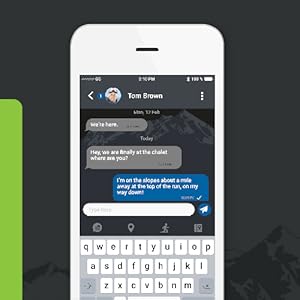
Image: TALKABOUT app messaging.
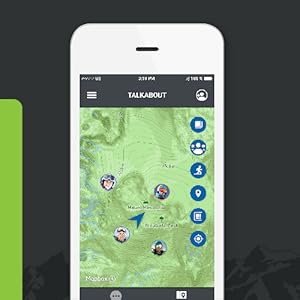
Image: TALKABOUT app location tracking.
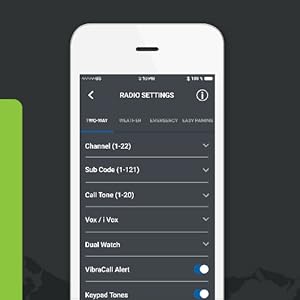
Image: TALKABOUT app radio settings.
4.5 ప్రత్యేక లక్షణాలు
- కాల్ హెచ్చరిక: Send an audible alert to other radios in your group.
- ఇంటిగ్రేటెడ్ ఫ్లాష్లైట్: ప్రకాశం కోసం అంతర్నిర్మిత ఫ్లాష్లైట్ను సక్రియం చేయండి.
- NOAA వాతావరణ రేడియో & హెచ్చరికలు: Receive real-time weather updates and alerts.
- what3words: Communicate precise locations using unique three-word addresses, even without the app.

Image: Top of the Motorola T803 radio with flashlight active.
5. నిర్వహణ
5.1 బ్యాటరీ సంరక్షణ
- To maximize battery life, fully charge the NiMH batteries before first use and after extended periods of non-use.
- Avoid overcharging or completely draining the batteries frequently.
- If storing the radios for a long time, remove the batteries.
5.2 శుభ్రపరచడం
The T803 has an IP54 weather-resistant rating, meaning it is protected against dust and splashing water. To clean your radio:
- ఒక మృదువైన, d తో బాహ్య తుడవడంamp గుడ్డ.
- రాపిడి క్లీనర్లు లేదా ద్రావకాలు ఉపయోగించవద్దు.
- Ensure the battery compartment cover is securely closed before exposing the radio to moisture.
5.3 నిల్వ
Store your radios in a cool, dry place away from direct sunlight and extreme temperatures when not in use.
6. ట్రబుల్షూటింగ్
If you encounter issues with your Motorola Solutions T803 radio, refer to the following common problems and solutions:
| సమస్య | సాధ్యమైన పరిష్కారం |
|---|---|
| రేడియో పవర్ ఆన్ చేయదు. | Check battery installation. Ensure batteries are charged. |
| ప్రసారం చేయలేము లేదా స్వీకరించలేము. | Verify radios are on the same channel and privacy code. Check volume level. Ensure PTT button is fully pressed when transmitting. |
| Poor audio quality or limited range. | Ensure batteries are fully charged. Reduce obstacles between radios. Adjust privacy codes to avoid interference. Range is highly dependent on terrain and conditions. |
| బ్లూటూత్ జత చేయడంలో సమస్యలు. | Ensure Bluetooth is enabled on both devices. Restart both devices. Clear previous pairings on your smartphone. |
For further assistance, consult the Motorola Solutions support webసైట్ లేదా కస్టమర్ సేవను సంప్రదించండి.
7. స్పెసిఫికేషన్లు
- మోడల్ సంఖ్య: T803
- కొలతలు: 1.28 x 2.2 x 7.52 అంగుళాలు
- బరువు: 4.8 ఔన్సులు
- బ్యాటరీలు: 2 x 1300 mAh NiMH Rechargeable (included), compatible with 2 x AA batteries
- ఛానెల్లు: 22 FRS ఛానెల్లు
- గోప్యతా సంకేతాలు: 121
- Maximum Talking Range: Up to 35 miles (terrain and conditions dependent)
- నీటి నిరోధకత: IP54 (వాతావరణ నిరోధకం)
- ప్రత్యేక లక్షణాలు: Call Alert, Integrated Flashlight, NOAA Weather Radio & Alerts, Bluetooth Connectivity
- తయారీదారు: Motorola సొల్యూషన్స్
8. వారంటీ మరియు మద్దతు
8.1 వారంటీ సమాచారం
For detailed warranty information regarding your Motorola Solutions T803 Two-Way Radio, please refer to the warranty card included in your product packaging or visit the official Motorola Solutions webసైట్. వారంటీ నిబంధనలు మరియు షరతులు ప్రాంతం మరియు కొనుగోలు తేదీని బట్టి మారవచ్చు.
8.2 కస్టమర్ మద్దతు
If you require technical assistance, have questions about your product, or need to report an issue, please contact Motorola Solutions customer support. You can find contact information and additional resources on the official Motorola Solutions webసైట్: motorolasolutions.com/talkabout


