1. పరిచయం
Thank you for choosing the Rapoo 1530 Silent Wireless Optical Mouse. This manual provides detailed instructions for the proper setup, operation, and maintenance of your new device. Please read this manual thoroughly before use to ensure optimal performance and longevity of your mouse.
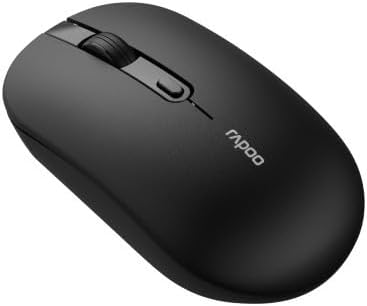
Figure 1: Rapoo 1530 Silent Wireless Optical Mouse (Top View)
2. ప్యాకేజీ విషయాలు
ప్యాకేజీలో అన్ని వస్తువులు ఉన్నాయని నిర్ధారించుకోండి:
- Rapoo 1530 Silent Wireless Optical Mouse
- USB రిసీవర్
- త్వరిత ప్రారంభ గైడ్ (ఈ మాన్యువల్)
- AA Battery (may be pre-installed or included separately)
3. సెటప్
3.1. బ్యాటరీ ఇన్స్టాలేషన్
- మౌస్ దిగువన బ్యాటరీ కంపార్ట్మెంట్ కవర్ను గుర్తించండి.
- కవర్ని స్లైడ్ చేయండి.
- సరైన ధ్రువణతను (+/-) నిర్ధారించుకుని, ఒక AA బ్యాటరీని చొప్పించండి.
- బ్యాటరీ కంపార్ట్మెంట్ కవర్ను సురక్షితంగా మూసివేయండి.
3.2. USB రిసీవర్ను కనెక్ట్ చేయడం
- Remove the USB receiver from its storage slot, usually located inside the battery compartment or on the underside of the mouse.
- మీ కంప్యూటర్లో అందుబాటులో ఉన్న USB పోర్ట్కి USB రిసీవర్ని ప్లగ్ చేయండి.
- మీ కంప్యూటర్ అవసరమైన డ్రైవర్లను స్వయంచాలకంగా గుర్తించి ఇన్స్టాల్ చేయాలి. దీనికి కొన్ని క్షణాలు పట్టవచ్చు.
3.3. పవర్ చేయడం
Locate the On/Off switch on the underside of the mouse. Slide the switch to the "On" position. The mouse is now ready for use.
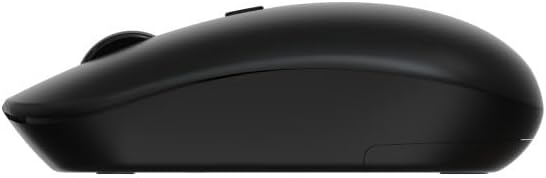
Figure 2: Rapoo 1530 Silent Wireless Optical Mouse (Side View)
4. ఆపరేటింగ్ సూచనలు
4.1. ప్రాథమిక విధులు
- ఎడమ క్లిక్ చేయండి: Primary action, select items, open links.
- కుడి క్లిక్ చేయండి: Secondary action, opens context menus.
- స్క్రోల్ వీల్: పత్రాల ద్వారా పైకి లేదా క్రిందికి స్క్రోల్ చేయండి మరియు web పేజీలు.
- Middle Click (Scroll Wheel Press): Opens links in new tabs, or other application-specific functions.
4.2. సైలెంట్ క్లిక్ ఫీచర్
The Rapoo 1530 mouse is designed with silent click technology, significantly reducing click noise for a quieter working environment.
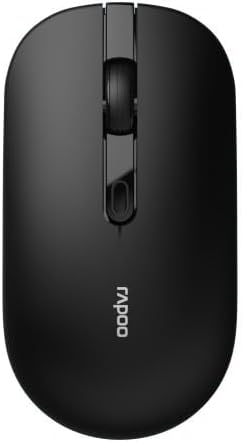
Figure 3: Rapoo 1530 Silent Wireless Optical Mouse (Button Layout)
5. నిర్వహణ
5.1. శుభ్రపరచడం
సరైన పనితీరును నిర్వహించడానికి, మీ మౌస్ను క్రమం తప్పకుండా శుభ్రం చేయండి:
- Disconnect the mouse from your computer (or turn it off).
- కొద్దిగా మెత్తని, మెత్తని బట్టను ఉపయోగించండి dampఉపరితలాన్ని తుడవడానికి నీరు లేదా తేలికపాటి శుభ్రపరిచే ద్రావణంతో నానబెట్టండి.
- ఆప్టికల్ సెన్సార్ కోసం, ఏదైనా దుమ్ము లేదా చెత్తను సున్నితంగా తొలగించడానికి పొడి కాటన్ శుభ్రముపరచును ఉపయోగించండి.
- కఠినమైన రసాయనాలు లేదా రాపిడి పదార్థాలను ఉపయోగించడం మానుకోండి.
5.2. బ్యాటరీ భర్తీ
When the mouse performance degrades or it stops responding, it may be time to replace the battery. Follow the battery installation steps in Section 3.1.
6. ట్రబుల్షూటింగ్
| సమస్య | పరిష్కారం |
|---|---|
| మౌస్ స్పందించడం లేదు |
|
| Cursor lagging or erratic movement |
|
| కనెక్షన్ సమస్యలు |
|
7. స్పెసిఫికేషన్లు
- బ్రాండ్: రాపూ
- మోడల్ పేరు: 1530 నిశ్శబ్దం
- మోడల్ సంఖ్య: 819660
- కనెక్టివిటీ: వైర్లెస్ (USB రిసీవర్)
- సెన్సార్ రకం: ఆప్టికల్
- రంగు: Black (as per product images, though description mentions "multicolore" which might be a generic placeholder or refer to a range of colors)
- శక్తి మూలం: 1x AA బ్యాటరీ
- ప్రత్యేక లక్షణాలు: సైలెంట్ క్లిక్ టెక్నాలజీ
8. వారంటీ మరియు మద్దతు
రాపూ ఉత్పత్తులు విశ్వసనీయత మరియు పనితీరు కోసం రూపొందించబడ్డాయి. వారంటీ సమాచారం మరియు సాంకేతిక మద్దతు కోసం, దయచేసి అధికారిక రాపూను చూడండి. webమీ స్థానిక రిటైలర్ను సంప్రదించండి లేదా సంప్రదించండి. వారంటీ క్లెయిమ్ల కోసం మీ కొనుగోలు రుజువును ఉంచండి.
For further assistance, visit the official Rapoo support page or contact their customer service.


