పరిచయం
This manual provides comprehensive instructions for the setup, operation, and maintenance of your Blaupunkt 43QD7050 43-inch 4K Ultra HD QLED Google TV. Please read this manual thoroughly before using the television to ensure proper functionality and safety.

చిత్రం: ముందు భాగం view of the Blaupunkt 43QD7050 QLED Google TV, highlighting its display and features.
ముఖ్యమైన భద్రతా సమాచారం
ఈ టెలివిజన్ను ఉపయోగిస్తున్నప్పుడు అగ్ని ప్రమాదం, విద్యుత్ షాక్ మరియు గాయం ప్రమాదాన్ని తగ్గించడానికి ఎల్లప్పుడూ ప్రాథమిక భద్రతా జాగ్రత్తలను అనుసరించండి. భవిష్యత్తు సూచన కోసం ఈ మాన్యువల్ను ఉంచండి.
- టెలివిజన్ను వర్షం లేదా తేమకు గురిచేయవద్దు.
- వెంటిలేషన్ ఓపెనింగ్స్ను నిరోధించవద్దు.
- పవర్ కార్డ్ కు సరైన గ్రౌండింగ్ ఉండేలా చూసుకోండి.
- మెరుపులు కురిసినప్పుడు లేదా ఎక్కువసేపు ఉపయోగించనప్పుడు టెలివిజన్ను అన్ప్లగ్ చేయండి.
- అన్ని సేవలను అర్హత కలిగిన సేవా సిబ్బందికి సూచించండి.
పెట్టెలో ఏముంది
Verify that all components are present upon unpacking your television.
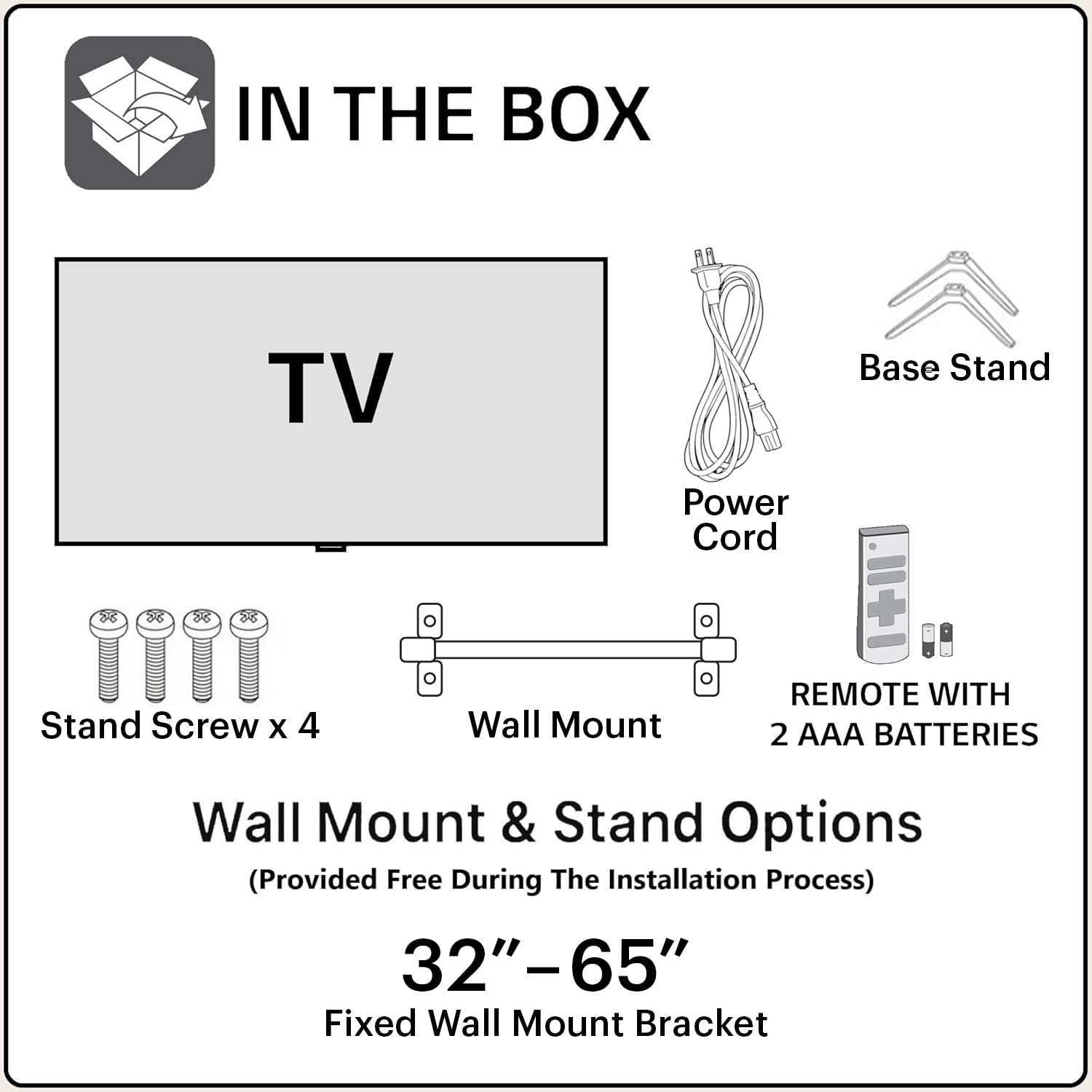
Image: Diagram showing the items included in the product packaging: TV, remote control, wall mount, stand screws, power cord, and AAA batteries.
- 1 x Blaupunkt 43QD7050 LED TV
- 1 x రిమోట్ కంట్రోల్
- 1 x Wall Mount Bracket (for 32"-65" models)
- 2 x AAA బ్యాటరీలు (రిమోట్ కంట్రోల్ కోసం)
- 1 x పవర్ కార్డ్
- 1 x Base Stand Set (with 4 stand screws)
- వినియోగదారు మాన్యువల్ (ఈ పత్రం)
ఫిజికల్ ఓవర్view
ముందు View

చిత్రం: ముందు భాగం view టెలివిజన్, షోasing the screen and minimal bezels.
వైపు View

చిత్రం: సైడ్ ప్రోfile టెలివిజన్ యొక్క సన్నని డిజైన్ను వివరిస్తుంది.
వెనుక View మరియు పోర్ట్లు

చిత్రం: వెనుక view of the television, detailing the location of various input and output ports.
The rear panel of the TV includes various ports for connectivity:
- HDMI పోర్ట్లు (x3): For connecting devices like gaming consoles, set-top boxes, and Blu-ray players. One port supports eARC.
- USB పోర్ట్లు (x2): USB నిల్వ పరికరాలను కనెక్ట్ చేయడానికి.
- ఈథర్నెట్ పోర్ట్: వైర్డు ఇంటర్నెట్ కనెక్షన్ కోసం.
- యాంటెన్నా/కేబుల్ ఇన్పుట్: యాంటెన్నా లేదా కేబుల్ టీవీని కనెక్ట్ చేయడానికి.
- ఆడియో అవుట్: బాహ్య ఆడియో సిస్టమ్లను కనెక్ట్ చేయడానికి.
- పవర్ ఇన్పుట్: పవర్ కార్డ్ కనెక్ట్ చేయడానికి.
సెటప్ గైడ్
1. స్టాండ్ ఇన్స్టాలేషన్ (ఐచ్ఛికం)
If you choose to place the TV on a stand, follow these steps:
- స్క్రీన్ దెబ్బతినకుండా ఉండటానికి టీవీని ముఖం కిందకి మెత్తగా, చదునైన ఉపరితలంపై జాగ్రత్తగా ఉంచండి.
- టీవీ అడుగున ఉన్న స్క్రూ రంధ్రాలతో బేస్ స్టాండ్లను సమలేఖనం చేయండి.
- అందించిన స్క్రూలతో ప్రతి స్టాండ్ను భద్రపరచండి.
2. వాల్ మౌంటింగ్ (ఐచ్ఛికం)
The TV comes with a wall mount bracket. Professional installation is recommended for wall mounting. Ensure the wall can support the weight of the TV.
- Refer to the wall mount bracket's instructions for specific installation details.
- Ensure adequate ventilation around the mounted TV.
3. పెరిఫెరల్స్ కనెక్ట్ చేయడం
మీ బాహ్య పరికరాలను టీవీ వెనుక ప్యానెల్లోని తగిన పోర్ట్లకు కనెక్ట్ చేయండి.
- HDMI: Use HDMI cables to connect devices like set-top boxes, gaming consoles, or Blu-ray players.
- USB: మీడియా ప్లేబ్యాక్ కోసం USB డ్రైవ్లను చొప్పించండి.
- ఈథర్నెట్: స్థిరమైన వైర్డు ఇంటర్నెట్ కనెక్షన్ కోసం ఈథర్నెట్ కేబుల్ను కనెక్ట్ చేయండి.
- శక్తి: పవర్ కార్డ్ను టీవీ పవర్ ఇన్పుట్కి మరియు తరువాత వాల్ అవుట్లెట్కి కనెక్ట్ చేయండి.

Image: Visual representation of the TV's connectivity options including HDMI, Bluetooth, Dual Band Wi-Fi, and USB.
4. ప్రారంభ పవర్ ఆన్ మరియు Google TV సెటప్
- టీవీని పవర్ అవుట్లెట్లోకి ప్లగ్ చేయండి.
- రిమోట్ కంట్రోల్ లేదా టీవీలోని పవర్ బటన్ను నొక్కండి.
- భాష ఎంపిక, నెట్వర్క్ కనెక్షన్ (Wi-Fi లేదా ఈథర్నెట్) మరియు Google ఖాతా సైన్-ఇన్తో సహా ప్రారంభ సెటప్ను పూర్తి చేయడానికి స్క్రీన్పై సూచనలను అనుసరించండి.
ఆపరేటింగ్ సూచనలు
రిమోట్ కంట్రోల్ విధులు

Image: Layout of the Blaupunkt TV remote control, showing buttons for power, navigation, volume, and quick access to streaming services.
రిమోట్ కంట్రోల్ టీవీ యొక్క లక్షణాలను నావిగేట్ చేయడానికి మిమ్మల్ని అనుమతిస్తుంది:
- పవర్ బటన్: టీవీని ఆన్ లేదా ఆఫ్ చేస్తుంది.
- నావిగేషన్ ప్యాడ్ (పైకి/క్రిందికి/ఎడమ/కుడి/సరే): మెనూ నావిగేషన్ మరియు ఎంపిక కోసం.
- వెనుక బటన్: మునుపటి స్క్రీన్కి తిరిగి వస్తుంది.
- హోమ్ బటన్: Google TV హోమ్ స్క్రీన్ను యాక్సెస్ చేస్తుంది.
- వాల్యూమ్ అప్/డౌన్: వాల్యూమ్ స్థాయిని సర్దుబాటు చేస్తుంది.
- మ్యూట్ బటన్: ధ్వనిని మ్యూట్ చేస్తుంది లేదా అన్మ్యూట్ చేస్తుంది.
- త్వరిత యాక్సెస్ బటన్లు: Dedicated buttons for Netflix, Prime Video, YouTube, and other services.
- గూగుల్ అసిస్టెంట్ బటన్: వాయిస్ నియంత్రణను సక్రియం చేస్తుంది.
Google TV ఇంటర్ఫేస్ నావిగేషన్
Google TV organizes your content from various streaming services into a personalized home screen.

Image: Screenshot of the Google TV interface, displaying personalized movie and show recommendations and a unified watchlist.
- Use the navigation pad to browse through recommended content, apps, and settings.
- Select an item by pressing the OK బటన్.
- Access the full list of installed apps from the "Apps" tab.
స్మార్ట్ ఫీచర్లు
- Voice Control (Google Assistant): Press the Google Assistant button on your remote and speak commands to search for content, control smart home devices, or get information.
- స్క్రీన్ మిర్రరింగ్: Cast content from your compatible smartphone or tablet to the TV using the built-in casting feature.
- యాప్లు & గేమ్లు: Access a wide range of applications and games from the Google Play Store.

Image: Display of the TV screen showcasing a selection of over 10,000 available apps and games, including popular streaming services.
నిర్వహణ
- స్క్రీన్ క్లీనింగ్: Gently wipe the screen with a soft, lint-free cloth. For stubborn marks, use a screen cleaner specifically designed for televisions, applied to the cloth, not directly to the screen.
- క్యాబినెట్ శుభ్రపరచడం: టీవీ క్యాబినెట్ను తుడవడానికి మృదువైన, పొడి వస్త్రాన్ని ఉపయోగించండి. రాపిడి క్లీనర్లను లేదా ద్రావకాలను ఉపయోగించవద్దు.
- సాఫ్ట్వేర్ అప్డేట్లు: The TV may receive automatic software updates. Ensure your TV is connected to the internet to receive these updates, which improve performance and add new features.
ట్రబుల్షూటింగ్
సాధారణ సమస్యలకు పరిష్కారాల కోసం ఈ విభాగాన్ని చూడండి.
| సమస్య | సాధ్యమైన పరిష్కారం |
|---|---|
| శక్తి లేదు | Ensure the power cord is securely plugged into both the TV and a working electrical outlet. Check the power indicator light on the TV. |
| చిత్రం లేదు, కానీ ధ్వని ఉంది | Check the input source. Press the "Input" button on the remote to cycle through sources. Ensure external devices are powered on and connected correctly. |
| శబ్దం లేదు, కానీ చిత్రం ఉంది | Check the volume level and ensure the TV is not muted. Verify audio settings in the TV menu. If using external speakers, check their connections and power. |
| రిమోట్ కంట్రోల్ పనిచేయడం లేదు | రిమోట్ కంట్రోల్లోని బ్యాటరీలను మార్చండి. రిమోట్ మరియు టీవీ యొక్క IR సెన్సార్ మధ్య ఎటువంటి అడ్డంకులు లేవని నిర్ధారించుకోండి. |
| పేలవమైన చిత్ర నాణ్యత | Check the cable connections. Adjust picture settings (brightness, contrast, sharpness) in the TV menu. For external devices, ensure they are outputting at the correct resolution. |
| Wi-Fi కనెక్షన్ సమస్యలు | Restart your router and modem. Go to the TV's network settings and reconnect to your Wi-Fi network. Ensure the TV is within range of your router. |
స్పెసిఫికేషన్లు
Detailed technical specifications for the Blaupunkt 43QD7050 QLED Google TV.

Image: Diagram illustrating the physical dimensions of the Blaupunkt 43QD7050 TV, including screen size, width, height, and depth.
| ఫీచర్ | వివరాలు |
|---|---|
| మోడల్ | 43క్యూడి 7050 |
| స్క్రీన్ పరిమాణం | 43 అంగుళాలు (108 సెం.మీ.) |
| ప్రదర్శన సాంకేతికత | QLED |
| రిజల్యూషన్ | 4K అల్ట్రా HD (3840 x 2160) |
| రిఫ్రెష్ రేట్ | 60 Hz |
| ఆపరేటింగ్ సిస్టమ్ | Google TV |
| సౌండ్ అవుట్పుట్ | 60 వాట్స్ |
| ఆడియో ఫీచర్లు | Dolby Digital Plus, DTS TruSurround, CyberSound Gen2 Technology |
| కనెక్టివిటీ | Dual Band Wi-Fi, 3 HDMI ports (eARC support), 2 USB ports, Ethernet, Bluetooth |
| ప్రత్యేక లక్షణాలు | 4K HDR, Google Assistant, Screen Mirroring, HDR 10+ |
| మెమరీ (RAM/స్టోరేజ్) | 2 GB RAM / 16 GB స్టోరేజ్ |
| ఉత్పత్తి కొలతలు (LxWxH) | 97 x 10 x 55 సెం.మీ (స్టాండ్ లేకుండా) |
| వస్తువు బరువు | 5.9 కిలోలు |
| మోడల్ సంవత్సరం | 2024 |

Image: Representation of the MediaTek MT9602 processor, highlighting its quad-core ARM Cortex A53 CPU and Mali-G52MC1 GPU for performance.
వారంటీ మరియు మద్దతు
Your Blaupunkt 43QD7050 television comes with a manufacturer's warranty.
- ఉత్పత్తి వారంటీ: కొనుగోలు చేసిన తేదీ నుండి 1 సంవత్సరం.
- Remote Accessories Warranty: కొనుగోలు చేసిన తేదీ నుండి 6 నెలలు.
- పుచీకత్తును దాఖలు చేయు: The brand warranty can be availed using the purchase invoice.
- కవర్ చేయని అంశాలు: Light bleeding and dot issues (Mura issues) occurring within acceptable Mura Inspection standards (2% guideline) are not considered panel defects and are not covered.
For customer support, service requests, or further inquiries, please contact:
- టోల్-ఫ్రీ సంప్రదింపు: 1800-274-4342
- ఇమెయిల్ ID: consumercare@blaupunkttv.in
- తయారీదారు చిరునామా: B-29,30,31, Phase-II, Noida, Gautam Buddha Nagar, Uttar Pradesh, 201301, India.
Please have your product model number (43QD7050) and purchase invoice ready when contacting support.


