1. పరిచయం
This manual provides detailed instructions for the GHUST MR23GA Replacement Magic Voice Remote Control. This remote is designed as a direct replacement for select LG C3, B3, G3, UR9000, QNED75, and QNED80 Series OLED and QNED EVO Smart TVs, offering seamless functionality without the need for complex programming.

Figure 1: GHUST MR23GA Remote Control - Front View
This image displays the front of the black remote control, showcasing its full array of buttons including the power button, number pad, navigation controls, volume and channel buttons, voice command button, and dedicated shortcut buttons for streaming services like Netflix and Prime Video.
2. భద్రతా సమాచారం
- బ్యాటరీలను పిల్లలకు అందుబాటులో లేకుండా ఉంచండి.
- పాత మరియు కొత్త బ్యాటరీలు లేదా వివిధ రకాల బ్యాటరీలను కలపవద్దు.
- రిమోట్ కంట్రోల్ ఎక్కువ కాలం ఉపయోగించబడకపోతే బ్యాటరీలను తీసివేయండి.
- Do not expose the remote control to direct sunlight, heat, or moisture.
- రిమోట్ కంట్రోల్ను పడవేయడం లేదా బలమైన ప్రభావాలకు గురిచేయడం మానుకోండి.
3. ప్యాకేజీ విషయాలు
ప్యాకేజీలో ఈ క్రింది అంశాలు ఉండాలి:
- 1 x GHUST MR23GA Replacement Magic Voice Remote Control
గమనిక: AAA బ్యాటరీలు చేర్చబడలేదు మరియు విడిగా కొనుగోలు చేయాలి.
4. ఉత్పత్తి ముగిసిందిview
The GHUST MR23GA remote control is designed for ease of use and durability, featuring a compact size and precise control. It is made of high-quality ABS materials.

Figure 2: Key Features of the Remote Control
This image illustrates the remote control alongside text indicating its key features: "Key sensitive" for responsive button presses, "Made of ABS materials" for durability, and "Advanced chip for precise control" ensuring reliable performance.

Figure 3: Ease of Use and Durability
This image emphasizes the remote's user-friendly design and robust construction, with icons and text indicating "more durable," "Signal stabilization," and "multiple functions." It also highlights that "No setup or programming required" for immediate use.
4.1. షార్ట్కట్ బటన్లు
The remote control includes dedicated shortcut buttons for quick access to popular streaming applications and services:
- నెట్ఫ్లిక్స్
- ప్రధాన వీడియో
- డిస్నీ+
- LG ఛానెల్లు
- స్లింగ్
- Alexa (Voice Search)

Figure 4: Dedicated Shortcut Buttons
This image shows the lower section of the remote control, clearly displaying the dedicated shortcut buttons for Netflix, Prime Video, Disney+, LG Channels, Sling, and Alexa, allowing for quick access to these applications.
5. సెటప్
5.1. బ్యాటరీలను వ్యవస్థాపించడం
The GHUST MR23GA remote control requires two (2) AAA batteries (not included) for operation. Follow these steps to install them:
- రిమోట్ కంట్రోల్ వెనుక బ్యాటరీ కంపార్ట్మెంట్ కవర్ను గుర్తించండి.
- కవర్ను క్రిందికి జారండి లేదా దాన్ని తెరవడానికి గడియను నొక్కండి.
- రెండు AAA బ్యాటరీలను చొప్పించండి, పాజిటివ్ (+) మరియు నెగటివ్ (-) టెర్మినల్స్ కంపార్ట్మెంట్ లోపల ఉన్న గుర్తులతో సరిగ్గా సమలేఖనం చేయబడ్డాయని నిర్ధారించుకోండి.
- బ్యాటరీ కంపార్ట్మెంట్ కవర్ సురక్షితంగా క్లిక్ అయ్యే వరకు దాన్ని తిరిగి స్థానంలోకి జారడం ద్వారా దాన్ని మూసివేయండి.
No programming or additional setup is required. Once batteries are installed, the remote is ready for use with compatible LG Smart TVs.
6. రిమోట్ కంట్రోల్ని ఆపరేట్ చేయడం
6.1. అనుకూలత
This replacement remote control is compatible with the following LG Smart TV models:
- OLED42C3AUA, OLED42C3PUA, OLED48C3PUA, OLED55C3PUA, OLED65C3AUA, OLED77C3PUA, OLED83C3PUA (LG C3 Series)
- OLED55B3PUA, OLED65B3PUA, OLED77B3PUA (LG B3 Series)
- OLED55G3PUA, OLED65G3PUA, OLED77G3PUA, OLED83G3PUA (LG G3 Series)
- 43UR9000PUA, 50UR9000PUA, 55UR9000PUA, 65UR9000PUA, 75UR9000PUA (LG UR9000 Series)
- 43QNED75URA, 50QNED75URA, 55QNED75URA, 65QNED75URA, 75QNED75URA (LG QNED75 Series)
- 50QNED80URA, 55QNED80URA, 65QNED80URA, 75QNED80URA, 86QNED80URA (LG QNED80 Series)
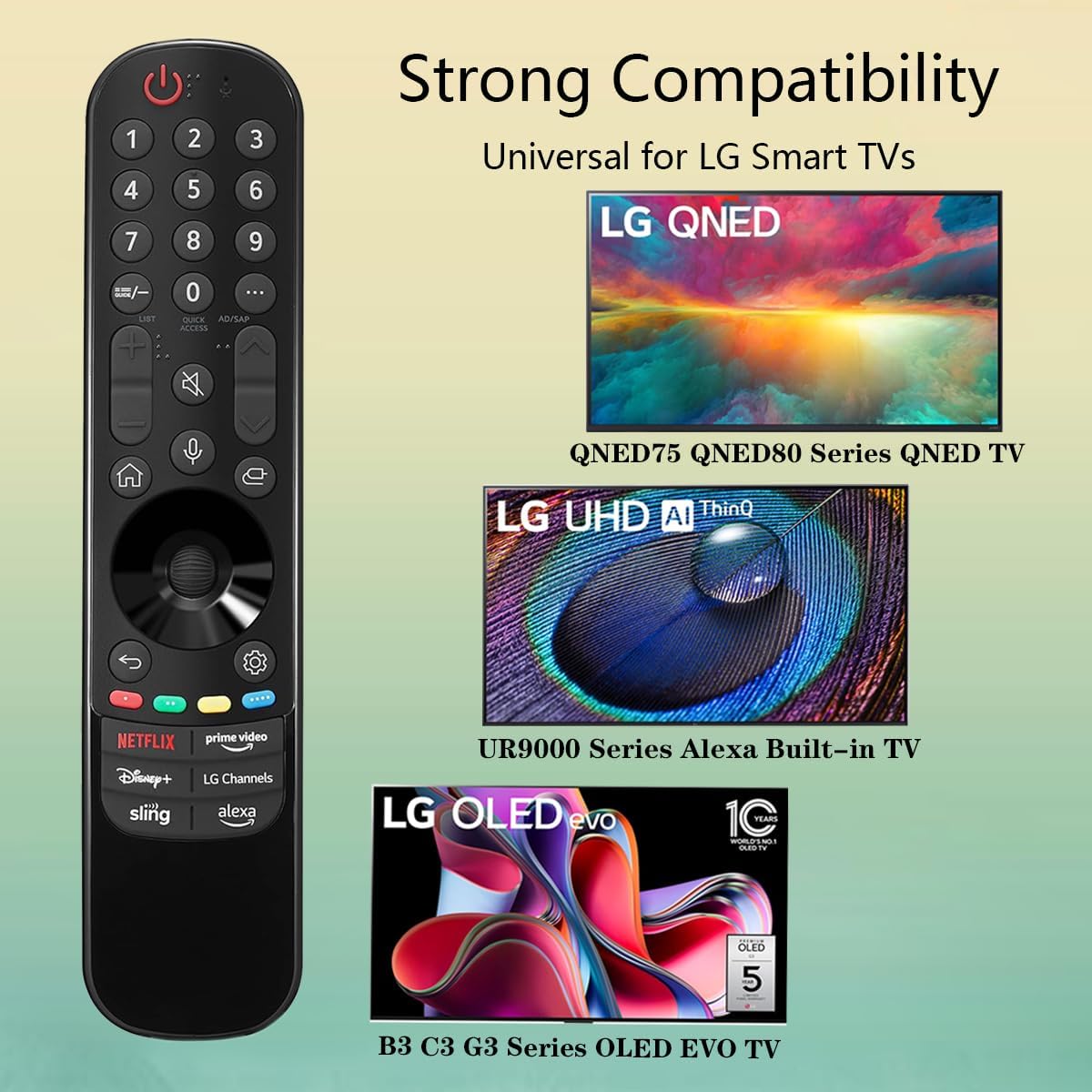
Figure 5: Strong Compatibility with LG Smart TVs
This image visually represents the broad compatibility of the remote control, showing it works with LG QNED (QNED75, QNED80 Series), LG UHD AI ThinQ (UR9000 Series Alexa Built-in TV), and LG OLED evo (B3, C3, G3 Series OLED EVO TV).
6.2. ప్రాథమిక విధులు
Point the remote control directly at your LG Smart TV. Press the desired buttons to control your television. Functions include:
- పవర్ బటన్: టీవీని ఆన్ లేదా ఆఫ్ చేస్తుంది.
- నంబర్ ప్యాడ్: ప్రత్యక్ష ఛానెల్ ఇన్పుట్ కోసం.
- వాల్యూమ్ అప్/డౌన్: టీవీ వాల్యూమ్ను సర్దుబాటు చేస్తుంది.
- ఛానల్ పైకి/క్రిందికి: టీవీ ఛానళ్లు మారుస్తాడు.
- నావిగేషన్ బటన్లు (పైకి, క్రిందికి, ఎడమ, కుడి, సరే): మెనూ నావిగేషన్ మరియు ఎంపిక కోసం.
- వెనుక బటన్: మునుపటి స్క్రీన్ లేదా మెనుకి తిరిగి వస్తుంది.
- హోమ్ బటన్: టీవీ హోమ్ స్క్రీన్ లేదా స్మార్ట్ హబ్ని యాక్సెస్ చేస్తుంది.
- వాయిస్ కమాండ్ బటన్: Activates voice control for compatible TVs (requires TV to support voice features).
- షార్ట్కట్ బటన్లు: Directly launch Netflix, Prime Video, Disney+, LG Channels, Sling, and Alexa.
7. నిర్వహణ
7.1. రిమోట్ కంట్రోల్ శుభ్రపరచడం
రిమోట్ కంట్రోల్ శుభ్రం చేయడానికి, మృదువైన, పొడి వస్త్రాన్ని ఉపయోగించండి. లిక్విడ్ క్లీనర్లు, స్ప్రేలు లేదా రాపిడి పదార్థాలను ఉపయోగించవద్దు, ఎందుకంటే ఇవి రిమోట్ ఉపరితలం లేదా అంతర్గత భాగాలను దెబ్బతీస్తాయి.
7.2. బ్యాటరీ భర్తీ
If the remote control's response becomes sluggish or it stops functioning, the batteries may need to be replaced. Refer to Section 5.1 for instructions on installing new batteries.
8. ట్రబుల్షూటింగ్
- రిమోట్ స్పందించడం లేదు:
- బ్యాటరీలు సరైన ధ్రువణతతో (+/-) సరిగ్గా చొప్పించబడ్డాయని నిర్ధారించుకోండి.
- పాత బ్యాటరీలను కొత్త AAA బ్యాటరీలతో భర్తీ చేయండి.
- Make sure there are no obstructions between the remote and the TV's IR receiver.
- రిమోట్ నేరుగా టీవీ వైపు ఉంచబడిందని నిర్ధారించుకోండి.
- Voice command not working:
- Verify that your LG Smart TV model supports voice control features.
- Ensure the TV's internet connection is stable, as voice commands often require online processing.
- పనిచేయని నిర్దిష్ట బటన్లు:
- Check for any physical damage or debris under the button.
- If only certain shortcut buttons are not working, ensure your TV's software is up to date and the corresponding apps are installed and functional.
9. స్పెసిఫికేషన్లు
| గుణం | వివరాలు |
|---|---|
| మోడల్ సంఖ్య | MR23GA |
| బ్రాండ్ | ఘాటు |
| ఉత్పత్తి కొలతలు | 7.3 x 1.6 x 1.2 అంగుళాలు |
| వస్తువు బరువు | 2.29 ఔన్సులు |
| బ్యాటరీలు అవసరం | 2 x AAA (చేర్చబడలేదు) |
| రంగు | నలుపు |
| ప్రత్యేక ఫీచర్ | వాయిస్ శోధన |
| అనుకూల పరికరాలు | Television (Specific LG Smart TV models) |

చిత్రం 6: రిమోట్ కంట్రోల్ కొలతలు
This image provides a visual representation of the remote control's dimensions, showing its length as 7.3 inches, width as 1.6 inches, and thickness as 1.2 inches.
10. వారంటీ మరియు మద్దతు
For any questions regarding the quality of our products or for technical assistance, please contact GHUST customer service. We are committed to resolving any issues promptly to ensure your satisfaction.
నిర్దిష్ట వారంటీ నిబంధనలు మరియు సంప్రదింపు సమాచారం కోసం దయచేసి మీ కొనుగోలు డాక్యుమెంటేషన్ను చూడండి.


