1. పరిచయం
Thank you for choosing the Flyrivergo YZM-61 Digital Platform Scale. This manual provides essential information for the safe and efficient operation of your scale. Please read these instructions carefully before use and retain them for future reference. This industrial-grade digital platform scale is designed for accurate weighing in various settings, including industrial, commercial, and small business environments, with a maximum capacity of 660 lbs (300 kg) and an accuracy of 0.1 lbs (50g).
2. భద్రతా సమాచారం
Observe the following safety precautions to prevent injury or damage to the scale:
- గరిష్ట బరువు సామర్థ్యం 660 పౌండ్లు (300 కిలోలు) మించకూడదు.
- Place the scale on a stable, level surface to ensure accurate readings.
- Avoid dropping or subjecting the scale to severe impacts.
- Keep the scale away from water and excessive moisture.
- Do not attempt to disassemble or repair the scale yourself. Contact qualified personnel for service.
- Use only the provided AC adapter for charging and power.
- బ్యాటరీని ఛార్జ్ చేసేటప్పుడు సరైన వెంటిలేషన్ ఉండేలా చూసుకోండి.
3. ప్యాకేజీ విషయాలు
అన్ప్యాక్ చేసేటప్పుడు అన్ని భాగాలు ఉన్నాయని నిర్ధారించుకోండి:
- Digital Platform Scale (Platform and Display Unit with Stand)
- ఎసి పవర్ అడాప్టర్
- వినియోగదారు మాన్యువల్
4. అసెంబ్లీ మరియు సెటప్
Follow these steps to assemble and prepare your scale for first use:
- అన్ప్యాకింగ్: ప్యాకేజింగ్ నుండి అన్ని భాగాలను జాగ్రత్తగా తొలగించండి. ఏదైనా నష్టం జరిగిందో లేదో తనిఖీ చేయండి.
- స్టాండ్ను సమీకరించండి: Attach the display unit to the vertical stand, and then secure the stand to the weighing platform. Ensure all connections are firm. Some models may require screwing the stand to the platform from underneath.
- పవర్ కనెక్షన్: Connect the AC power adapter to the scale's power input and plug it into a standard electrical outlet. The scale can operate directly from AC power or use its internal rechargeable DC battery.
- ప్రారంభ ఛార్జింగ్: For optimal battery life, fully charge the scale before its first use. The battery indicator on the display will show charging status. The scale can operate while charging.
- ప్లేస్మెంట్: Place the assembled scale on a firm, level surface. Adjust the four adjustable feet at the base of the platform to ensure stability and prevent wobbling. This is crucial for accurate measurements.
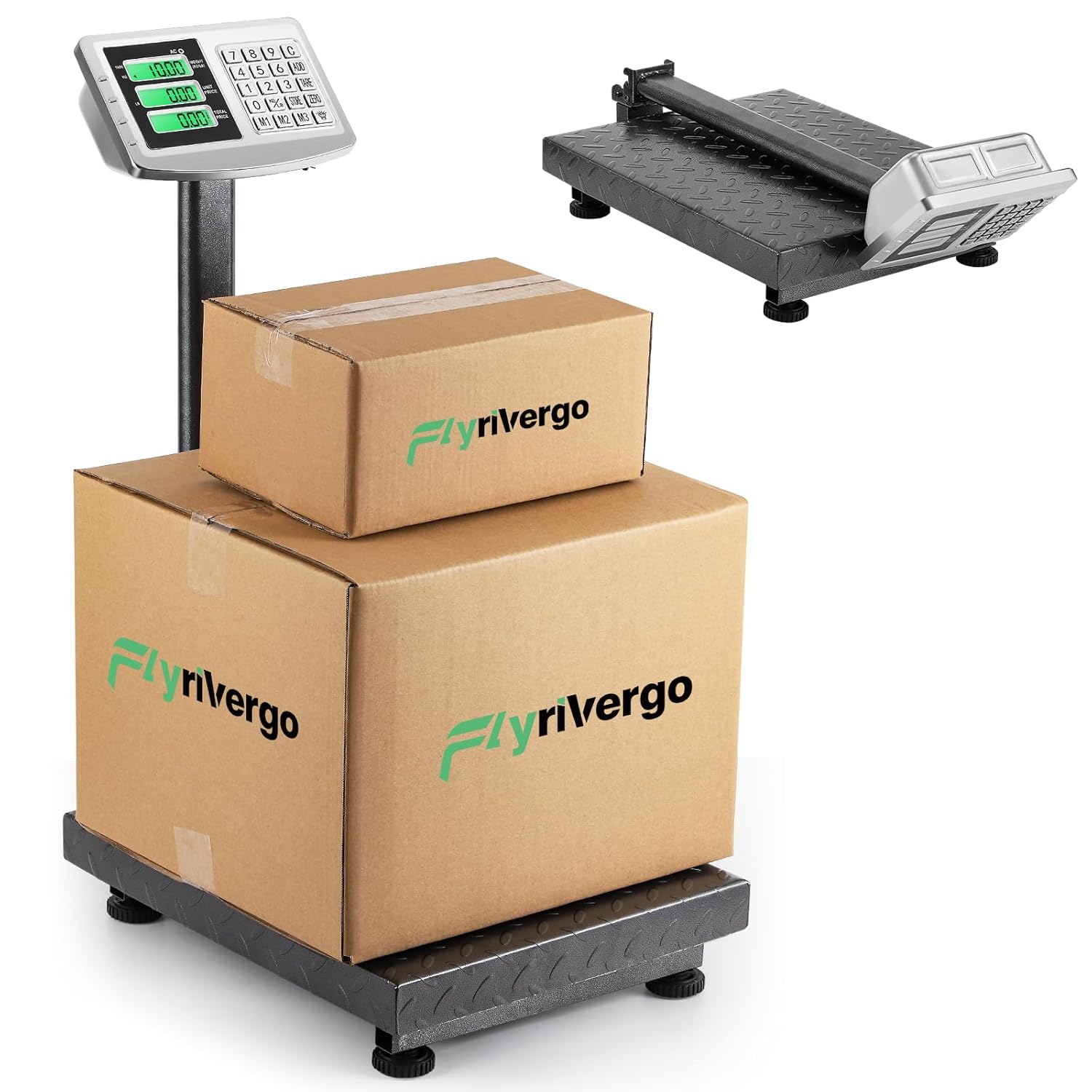
The Flyrivergo YZM-61 Digital Platform Scale, fully assembled, with two packages placed on its robust weighing platform. This image illustrates the scale's operational setup and capacity for handling various package sizes.

This image highlights the large platform of the Flyrivergo YZM-61 scale, showing the adjustable feet for stability and the textured carbon steel surface designed for secure weighing.
5. ఆపరేటింగ్ సూచనలు
Familiarize yourself with the scale's functions for accurate and efficient weighing.
5.1 పవర్ ఆన్/ఆఫ్
- నొక్కండి [ఆన్/ఆఫ్] స్కేల్ను ఆన్ లేదా ఆఫ్ చేయడానికి బటన్.
- The display will illuminate and perform a self-check before showing '0.00'.
5.2 Zeroing and Calibration
To ensure accuracy, zero the scale before each use or after placing an empty container.
- With nothing on the platform, press the [ZERO] button. The display will reset to '0.00'.
- This function compensates for minor weight fluctuations or an empty container.
5.3 బరువు వేసే విధానం
- Ensure the scale is zeroed.
- Carefully place the item to be weighed onto the center of the platform.
- Read the stable weight displayed on the screen.
5.4 Unit Conversion (LB/KG)
The scale supports switching between pounds (LB) and kilograms (KG).
- నొక్కండి [LB/KG] button to toggle between the two units.
- The active unit (KG or LB) will be indicated on the display.

The display of the Flyrivergo YZM-61 scale illustrating the unit conversion feature, showing how the weight indication changes between kilograms (KG) and pounds (LB).
5.5 తారే ఫంక్షన్
Use the Tare function to subtract the weight of a container, allowing you to weigh only the contents.
- ప్లాట్ఫాంపై ఖాళీ కంటైనర్ ఉంచండి.
- నొక్కండి [TARE] button. The display will reset to '0.00', effectively removing the container's weight.
- Now, place the items to be weighed into the container. The display will show the net weight of the items.
5.6 Pricing Function
This scale includes a pricing function for calculating total cost based on weight and unit price.
- After weighing an item, enter the unit price using the numeric keypad.
- The scale will automatically calculate and display the total price.
- Use memory buttons [M1], [M2], [M3] to store and recall frequently used unit prices.
5.7 సంచిత ఫంక్షన్
The accumulation function allows you to sum the weights or prices of multiple items.
- After weighing an item and, if applicable, setting its price, press the [జోడించు] button. The weight/price will be added to the total.
- తదుపరి అంశాల కోసం పునరావృతం చేయండి.
- కు view the accumulated total, refer to the display.
5.8 Battery Display and Overweight Reminder
- The display includes an indicator for the current battery level. Recharge the scale when the battery is low.
- An overweight reminder will activate if the weight on the platform exceeds the maximum capacity, protecting the scale from damage.

A close-up of the Flyrivergo YZM-61 scale's control panel and display, detailing its versatile functionality. Icons represent features such as unit conversion (KG/LB), tare removal, pricing, accumulation, and battery level display, indicating a comprehensive tool for various weighing needs.
6. నిర్వహణ
Proper maintenance ensures the longevity and accuracy of your scale.
- శుభ్రపరచడం: స్కేల్ ఉపరితలాన్ని మృదువైన, d తో తుడవండి.amp వస్త్రం. రాపిడి క్లీనర్లను ఉపయోగించవద్దు లేదా స్కేల్ను నీటిలో ముంచవద్దు.
- నిల్వ: When not in use, the scale's 90-degree folding design allows for convenient storage. Fold the display stand down to save space. Store in a dry, cool environment.
- బ్యాటరీ సంరక్షణ: Recharge the battery regularly, even if the scale is not in frequent use, to maintain battery health. Avoid completely draining the battery for extended periods.

This image illustrates the Flyrivergo YZM-61 scale's 90-degree folding design. It shows the scale in its upright, operational position and then transitioning to a compact, folded state, emphasizing its convenience for storage and transport.
7. ట్రబుల్షూటింగ్
మీ స్కేల్తో మీరు సమస్యలను ఎదుర్కొంటే, ఈ క్రింది సాధారణ సమస్యలు మరియు పరిష్కారాలను చూడండి:
| సమస్య | సాధ్యమైన కారణం | పరిష్కారం |
|---|---|---|
| స్కేల్ ఆన్ చేయబడదు | Low battery or no power connection | Connect the AC adapter and charge the battery. Ensure the power outlet is functional. |
| సరికాని రీడింగ్లు | Scale not level, unstable surface, or not zeroed | Place the scale on a firm, level surface. Adjust feet. Press [ZERO] before weighing. Avoid drafts or vibrations. |
| డిస్ప్లే 'ఓవర్లోడ్' చూపిస్తుంది | Weight exceeds maximum capacity | Remove excess weight immediately to prevent damage. |
| Cannot switch units (e.g., stuck on KG) | Incorrect operation or temporary software glitch | Ensure no weight is on the platform. Press [LB/KG] firmly. If issue persists, power cycle the scale (turn off, wait 10 seconds, turn on). |
| డిస్ప్లే మసకగా లేదా మిణుకుమిణుకుమంటూ ఉంది | తక్కువ బ్యాటరీ | Recharge the scale's battery. |
8. స్పెసిఫికేషన్లు
| ఫీచర్ | వివరాలు |
|---|---|
| మోడల్ సంఖ్య | YZM-61 |
| బ్రాండ్ | ఫ్లైరివర్గో |
| బరువు సామర్థ్యం | 660 పౌండ్లు (300 కిలోలు) |
| ఖచ్చితత్వం | 0.1 పౌండ్లు (50 గ్రా) |
| ప్రదర్శన రకం | LCD |
| విద్యుత్ సరఫరా | AC Adapter / DC Rechargeable Battery |
| బ్యాటరీ లైఫ్ | Up to 10 continuous days (on full charge) |
| మెటీరియల్ | All Stainless Steel body, Carbon Steel surface |
| ఫారమ్ ఫ్యాక్టర్ | ఫోల్డబుల్ |
| రంగు | బూడిద రంగు |
| సుమారు కొలతలు (సమావేశమైనవి) | Height: 31.5 inches (80 cm), Width: 15.7 inches (40 cm), Depth: 19.6 inches (50 cm) |
| సుమారు ప్యాకేజీ కొలతలు | 29.05 x 16.45 x 7.1 అంగుళాలు |
| సుమారు వస్తువు బరువు | 21.75 పౌండ్లు |

The Flyrivergo YZM-61 scale is shown with its key dimensions labeled: 31.5 inches (80 cm) height, 15.7 inches (40 cm) width, and 19.6 inches (50 cm) depth. This provides a clear understanding of the scale's physical footprint and capacity for handling various item sizes.
9. వారంటీ మరియు మద్దతు
For warranty information or technical support, please refer to the contact details provided with your purchase documentation or visit the official Flyrivergo webసైట్. ఏవైనా వారంటీ క్లెయిమ్లకు కొనుగోలు రుజువుగా మీ కొనుగోలు రసీదును ఉంచండి.


