పరిచయం
This manual provides essential information for the identification and proper use of your EasyKeys replacement key for CompX National A4360 locks. This key is specifically designed for use with file cabinets, desks, and cubicles that utilize the CompX National A4360 lock code.
Key Identification and Lock Code Verification
To ensure you have the correct replacement key, it is crucial to verify the lock code. The lock code determines the specific cut of your key.
Locating Your Lock Code
Your lock code can typically be found in one of the following locations:
- On the Original Key: The code is often stamped directly onto the key blade or head.
- On the Lock Face: For many locks, the code is engraved on the visible face of the lock cylinder.
- On a Label Inside/Behind the Lock: Some locks have a label with the code placed inside the cabinet or behind the lock mechanism.
- On the Cabinet/Door Label: Occasionally, the code may be on a label affixed to the cabinet or door itself.
ముఖ్యమైన గమనిక:
Lock codes are manufacturer-specific. Even if codes appear similar, key cuts vary by brand. Always confirm that the manufacturer (CompX National) and the code (A4360) match your lock.

Figure 1: Common locations to find your lock code.
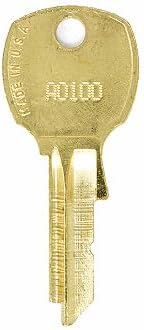
చిత్రం 2: ఉదాample of a replacement key with a stamped code.
కీ వినియోగం
To operate your lock, insert the key fully into the lock cylinder. Turn the key clockwise or counter-clockwise (depending on the specific lock mechanism) to engage or disengage the locking mechanism. Remove the key once the lock is secured or opened.
అనుకూలత: This key is compatible with CompX National A0100 - A7003 series locks, specifically for the A4360 code. It is also compatible with manufacturers such as Corry Jamestown, Steel-Age, and Brown-Morris for file క్యాబినెట్ తాళాలు.
నిర్వహణ
This replacement key requires minimal maintenance. Keep the key clean and dry. Avoid using excessive force when inserting or turning the key, as this can damage both the key and the lock mechanism. If the lock mechanism becomes stiff, a small amount of graphite lubricant can be applied to the keyway. Avoid oil-based lubricants, as they can attract dirt and debris.
ట్రబుల్షూటింగ్
Key Does Not Turn
- Incorrect Key: Double-check that the lock code on your key matches the code on your lock.
- అడ్డంకి: Ensure there are no foreign objects or debris in the keyway.
- లాక్ మెకానిజం సమస్యలు: If the key is correct and the keyway is clear, the lock mechanism itself may be damaged or jammed. Professional assistance may be required.
Key Is Difficult to Insert
- సమలేఖనం: Ensure the key is aligned correctly with the keyway.
- శిథిలాలు: Check for any debris in the keyway that might be obstructing insertion.
- Bent Key: Inspect the key for any signs of bending or damage. A bent key should not be forced into the lock.
ఉత్పత్తి లక్షణాలు
| ఫీచర్ | వివరాలు |
|---|---|
| బ్రాండ్ | EasyKeys |
| మోడల్ పేరు | A4360 |
| లాక్ రకం | కెమెరా |
| మెటీరియల్ | ఇత్తడి |
| ప్రత్యేక లక్షణాలు | Custom Cut Key, Durable |
| అంశం కొలతలు (L x W x H) | 0.5 x 0.5 x 1 అంగుళాలు |
| వస్తువు బరువు | 4 ఔన్సులు |
| అనుకూల తయారీదారులు | CompX National, Corry Jamestown, Steel-Age, Brown-Morris |
గమనిక: This key is cut on a NA14 D4291 key blank.
వారంటీ మరియు మద్దతు
For questions regarding your EasyKeys replacement key or for support, please refer to the EasyKeys store on Amazon or contact EasyKeys directly through their official channels. Specific warranty details may vary; please consult your purchase documentation for more information.