1. పరిచయం
Gems Lost & Found Labels provide a simple and effective solution for recovering lost personal items. Each label features a unique QR code that, when scanned, allows a finder to contact you directly without revealing your personal information. This manual will guide you through the activation process, proper application, and general use of your Gems Lost & Found Labels.

Image: A 10-pack of Gems Lost & Found Labels, featuring multiple QR codes on each sheet, ready for activation.
2. ఉత్పత్తి లక్షణాలు
- యాప్ అవసరం లేదు: Labels work with any smartphone camera. No additional application download is required for activation or scanning.
- No Subscription: Once purchased, the QR code labels function without any hidden fees or recurring subscriptions.
- ఉపయోగించడానికి సులభం: Activation involves three simple steps: stick the label, scan the QR code, and add your contact information.
- యూనివర్సల్ అనుకూలత: Compatible with both iOS and Android devices, allowing anyone to scan the labels.
- కమ్యూనిటీ మద్దతు: The Gems system is designed to facilitate contact from a global community, aiding in the recovery of lost items.
3. ప్యాకేజీ విషయాలు
Your Gems Lost & Found Labels package contains:
- 10 x Gems Lost & Found QR Code Labels
4. సెటప్ మరియు యాక్టివేషన్
Follow these steps to activate your Gems Lost & Found Labels:
- లేబుల్ వర్తించు: Choose a clean, smooth, and dry surface on your item where the label can adhere securely. Ensure the surface is free of dust, grease, or moisture for optimal adhesion.
- QR కోడ్ని స్కాన్ చేయండి: Using your smartphone's camera, scan the QR code on the newly applied label. Your phone will automatically prompt you to open a web లింక్.
- Enter Contact Information: ది web page will guide you to enter your preferred contact details (e.g., phone number for text messages, email address). This information will be displayed to the finder if your item is located. You can also add a description of the item and an optional image.
- క్రియాశీలతను నిర్ధారించండి: Once your details are entered and saved, your label is active and ready to help recover your item if it gets lost.
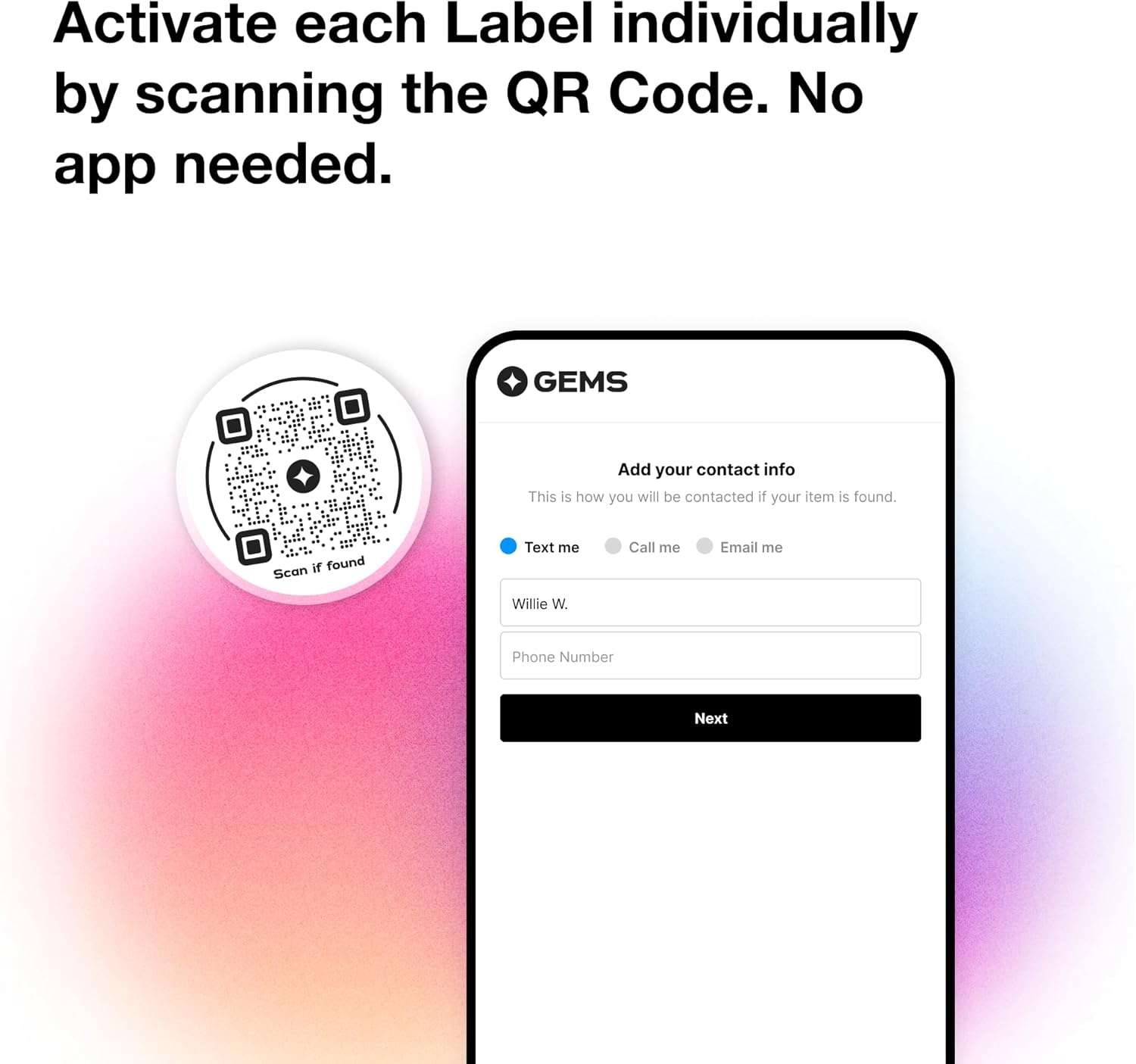
Image: A Gems Lost & Found Label securely applied to the side of a white water bottle, demonstrating proper placement.

Image: A smartphone screen displaying the interface for activating a Gems Lost & Found Label, showing the prompt to add contact information.

Image: A phone screen showing the 'Add item info' interface, where users can input details about the item and select a contact method.
5. ఆపరేటింగ్ సూచనలు
When an item with a Gems Lost & Found Label is found:
- The finder scans the QR code on the label using their smartphone camera.
- They are directed to a secure web page displaying the contact information you provided (e.g., an option to text or call you).
- The finder can then initiate contact with you directly, facilitating the return of your lost item. Your personal contact details are not directly visible on the label itself, ensuring privacy.

Image: A smartphone screen showing a message from a finder, indicating they have located the lost item and are attempting to make contact.
6. Application Guidelines
Gems Lost & Found Labels are versatile and can be applied to a wide range of personal items. Consider these examples for optimal use:
- సామాను: Apply to suitcases, backpacks, or carry-on bags for travel security.
- ఎలక్ట్రానిక్స్: Secure to laptops, tablets, cameras, or portable gaming devices.
- Personal Accessories: Attach to water bottles, lunchboxes, keys, or even pet collars.
- పత్రాలు: Consider placing inside passport covers or important document folders.

Image: A Gems Lost & Found Label affixed to a purple suitcase, demonstrating its use for travel items.

Image: A Gems Lost & Found Label placed on the back of a Nintendo Switch console, suitable for electronic devices.

Image: A Gems Lost & Found Label adhered to the cover of a passport, illustrating its use for important documents.
For best results, apply labels to flat, non-porous surfaces that are not frequently exposed to water or extreme abrasion.
7. నిర్వహణ
Gems Lost & Found Labels are designed for durability, but proper care can extend their lifespan and effectiveness:
- పొడిగా ఉంచండి: The labels are made of cardstock material. Avoid prolonged exposure to water or high humidity, as this can damage the label and make the QR code unreadable.
- శుభ్రమైన ఉపరితలం: Ensure the surface where the label is applied is clean and dry to maintain strong adhesion.
- క్రమం తప్పకుండా తనిఖీ చేయండి: Periodically check the labels for any signs of wear, peeling, or damage. Replace any compromised labels to ensure continued functionality.
8. ట్రబుల్షూటింగ్
If you encounter issues with your Gems Lost & Found Labels, consider the following:
- QR కోడ్ స్కాన్ కావడం లేదు:
- Ensure the label is clean and free from dirt or moisture.
- Check for adequate lighting when scanning.
- Hold the phone steady and at an appropriate distance from the QR code.
- Verify your phone's camera settings allow QR code scanning.
- Contact Information Not Updating:
- Ensure you have a stable internet connection when attempting to update your information.
- Clear your browser's cache and cookies, then try again.
- If issues persist, contact Gems customer support.
- Issue with Receiving Notifications (Text/Call):
- Verify that the phone number entered during activation is correct and active.
- Check your phone's spam filters or blocked numbers list.
- While the product is designed for global compatibility, some users have reported issues with non-US phone numbers for text messages. If you are experiencing this, consider using an email address as your primary contact method or contact customer support for assistance.
9. స్పెసిఫికేషన్లు
| బ్రాండ్ | రత్నాలు |
| మోడల్ సంఖ్య | GEMSLAF10 |
| వస్తువు బరువు | 1.44 ఔన్సులు |
| ప్యాకేజీ కొలతలు | 5.31 x 4.61 x 1.06 అంగుళాలు |
| రంగు | తెలుపు & నలుపు |
| ఆకారం | గుండ్రంగా |
| మెటీరియల్ రకం | కార్డ్స్టాక్ |
| పరిమాణం | చిన్నది |
10. మద్దతు & వారంటీ
For any questions, technical assistance, or support regarding your Gems Lost & Found Labels, please refer to the contact information provided on the product packaging or the official Gems website. While specific warranty details are not provided in this manual, Gems is committed to customer satisfaction and aims to assist with any product-related inquiries.
Your feedback is valuable. If you have suggestions or encounter issues not covered in this manual, please reach out to Gems customer service.


