1. పరిచయం
This user manual provides detailed instructions for the installation, operation, maintenance, and troubleshooting of the MACHINIST LGA 1151 H110 Motherboard. Please read this manual carefully before proceeding with installation to ensure proper functionality and to avoid potential issues.
2. ఉత్పత్తి ముగిసిందిview
The MACHINIST H110 motherboard is designed to support Intel 6th/7th generation Core i3/i5/i7, Pentium, and Celeron Series processors with an LGA 1151 socket. It features dual-channel DDR4 memory support, NVME/SATA M.2 interfaces, and various I/O ports for a versatile desktop computing experience.
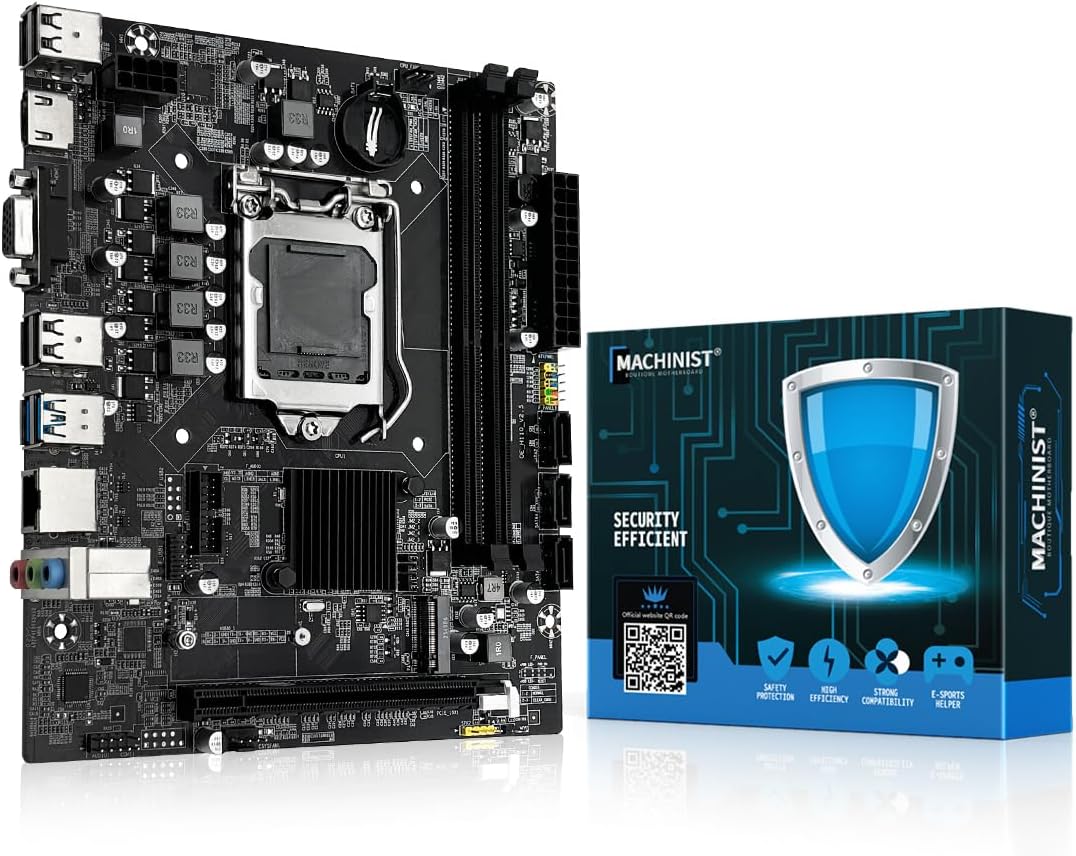
Figure 2.1: The MACHINIST H110 Motherboard alongside its retail packaging.
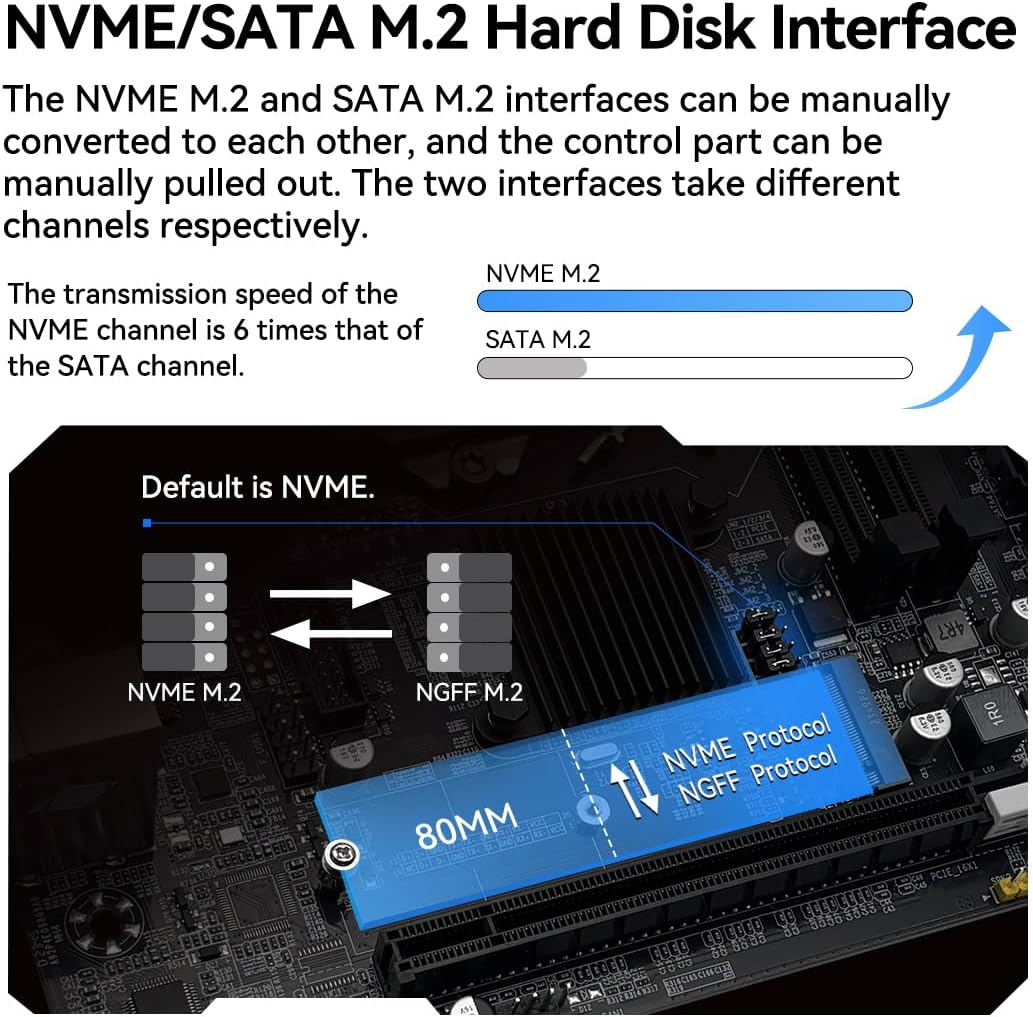
Figure 2.2: Detailed diagram of the H110 Motherboard's various interfaces and ports.
3 కీ ఫీచర్లు
- LGA 1151 Socket: Compatible with Intel 6th/7th gen Core i3/i5/i7, Pentium, Celeron Series processors. Note: Core i7 compatibility may vary; confirm your processor model.
- Dual Channel DDR4 Slot: Equipped with 2 DDR4 Non-ECC memory slots, supporting up to 2400MHz and a maximum capacity of 2x16GB (32GB total).
- NVME/SATA M.2 Interface: Supports both NVME M.2 (PCIe channel) and SATA M.2 (SATA channel) drives. These interfaces can be manually converted.
- ఇతర ఇంటర్ఫేస్లు: Includes PCIe 2.0 X16 Slot, SATA 3.0, USB 3.0, VGA, and High Definition Multimedia Interface (HDMI) for 1080P video output without a dedicated graphics card (requires CPU with integrated graphics).
- విద్యుత్ సరఫరా: Features a 4+1 phase power supply design with PWM Controller RT3607BC.
- PCB: Constructed with a 6-layer PCB for enhanced stability and performance.
- నెట్వర్క్: Integrated Realtek 8111H Gigabit network card for 100M LAN connectivity.

మూర్తి 3.1: క్లోజ్-అప్ view of the LGA 1151 CPU socket.

Figure 3.2: Illustration of the dual-channel DDR4 memory slots.

Figure 3.3: Diagram showing the NVME/SATA M.2 interface and conversion options.

Figure 3.4: Illustration of the VGA and HDMI output ports.
4. సెటప్ మరియు ఇన్స్టాలేషన్
4.1. CPU సంస్థాపన
- Carefully open the CPU socket retention arm.
- Align the triangular mark on your Intel LGA 1151 processor with the corresponding mark on the socket.
- బలవంతంగా ఒత్తిడి చేయకుండా CPU ని సాకెట్లో సున్నితంగా ఉంచండి.
- CPU ని భద్రపరచడానికి రిటెన్షన్ ఆర్మ్ను మూసివేయండి.
- తయారీదారు సూచనల ప్రకారం CPU కూలర్ను ఇన్స్టాల్ చేయండి.
4.2. మెమరీ సంస్థాపన
- Open the clips on both ends of the DDR4 memory slots.
- DDR4 మెమరీ మాడ్యూల్లోని నాచ్ను స్లాట్లోని కీతో సమలేఖనం చేయండి.
- క్లిప్లు సరిగ్గా అమర్చబడే వరకు మెమరీ మాడ్యూల్ యొక్క రెండు చివర్లను గట్టిగా నొక్కండి.
4.3. Storage Installation (M.2)
- Locate the NVME/SATA M.2 slot on the motherboard.
- If necessary, adjust the control part for NVME or SATA mode.
- Insert the M.2 drive into the slot at an angle.
- Gently push down the drive and secure it with the provided screw.
4.4. విద్యుత్ కనెక్షన్లు
- Connect the 24-pin ATX power connector from your power supply to the main 24-pin power socket on the motherboard.
- Connect the 4-pin CPU power connector from your power supply to the 4-pin CPU power socket near the CPU.
4.5. I/O Connections
Connect your peripherals (USB devices, audio cables, display cables) to the appropriate ports on the motherboard's rear I/O panel. Ensure all connections are secure.
4.6. Important Note: CR2032 Battery
The CR2032 battery for the motherboard's CMOS has been removed for shipping and is not included in the package. Please purchase and install a CR2032 battery yourself before first use.
5. Operating System and Drivers
After assembling your system, install your preferred operating system. For optimal compatibility and performance, Windows 10 is recommended. Drivers for the motherboard components can often be automatically installed by Windows 10. If manual driver installation is required, tools like 'Driver Talent' are recommended for driver detection and installation.
6. నిర్వహణ
6.1. CMOS Reset Procedure
A CMOS reset can resolve various system issues, including boot problems or incorrect BIOS settings. Follow these steps to reset the CMOS:
- Install Battery, Cut Off Power: Ensure the CR2032 battery is installed and disconnect the power supply from the motherboard.
- Short Both Pins: Locate the CMOS clear jumper (usually labeled 'CMOS1' or 'CLR_CMOS'). Use metal tweezers or another metal object to short the two pins for approximately 5 seconds to complete the reset.

Figure 6.1: Visual guide for performing a CMOS reset.
7. ట్రబుల్షూటింగ్
7.1. సాధారణ సమస్యలు మరియు పరిష్కారాలు
- System Won't Power On / Fans Don't Spin:
- Verify motherboard and CPU power connections are secure.
- Confirm CPU and memory model compatibility and condition.
- Ensure memory modules are properly seated in their slots.
- If issues persist, clear the CMOS (refer to Section 6.1).
- No Display (Fans Spin, Keyboard Lights Unresponsive):
- Verify motherboard and CPU power connections.
- Ensure memory modules are properly seated.
- Confirm CPU/memory model compatibility and condition.
- If issues persist, clear the CMOS (refer to Section 6.1).
- No Display (Fans Spinning, Caps Lock Indicator Lights Up):
- Verify the monitor is powered on and the display data cable is securely connected.
- If no external graphics card (GPU) is installed, confirm your CPU supports integrated graphics.
- If an external GPU is installed, ensure the data cable is connected to its output port.
- Check the condition of the display cable, GPU, and monitor.
- If issues persist, clear the CMOS (refer to Section 6.1).
8. స్పెసిఫికేషన్లు
| ఫీచర్ | స్పెసిఫికేషన్ |
|---|---|
| బ్రాండ్ | మెషినిస్ట్ |
| మోడల్ పేరు | H110 V2.5 |
| CPU సాకెట్ | LGA 1151 |
| అనుకూల ప్రాసెసర్లు | Intel 6-7th Gen Core i3/i5 Pentium, Celeron Series Processors on LGA 1151 Socket |
| చిప్సెట్ రకం | ఇంటెల్ H110 |
| RAM మెమరీ టెక్నాలజీ | DDR4 |
| మెమరీ క్లాక్ స్పీడ్ | 2 GHz (Up to 2400MHz) |
| గరిష్ట మెమరీ సామర్థ్యం | 32GB (2x16GB) |
| నిల్వ ఇంటర్ఫేస్ | NVME/SATA M.2, SATA 3.0 (3 ports) |
| USB ఇంటర్ఫేస్ | USB 3.0, USB 2.0 |
| వీడియో అవుట్పుట్ | VGA, HDMI (supports 1080P) |
| LAN | 100M (Realtek 8111H Gigabit) |
| PCIe విస్తరణ స్లాట్ | PCIe 2.0 X16 |
| ఆడియో | Realtek LAC887 chip (Front audio, Rear audio) |
| ప్యాకేజీ కొలతలు | 8.78 x 8.03 x 2.2 అంగుళాలు |
| వస్తువు బరువు | 1.21 పౌండ్లు |
| మూలం దేశం | చైనా |
9. వారంటీ మరియు మద్దతు
A physical user manual is not included in the product package. This digital manual serves as the primary source of information. For further support, driver downloads, or product information, please visit the official MACHINIST webసైట్:


