ఉత్పత్తి ముగిసిందిview
This document provides instructions for the EasyKeys Mailbox Replacement Key, specifically designed for Hudson locks with the code AE132. This key is compatible with Hudson Key Series AE01 - AE500 and is cut on an HL1 key blank. It is intended for use with Hudson mailbox locks, typically push-in style locks with an oval lock face.
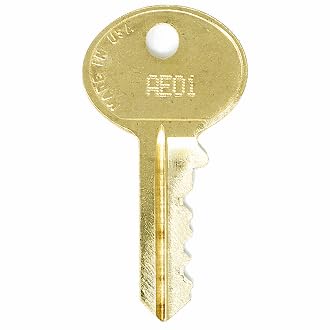
Image: EasyKeys Mailbox Replacement Key for Hudson AE132. This image shows the physical appearance of the replacement key.
Setup: Identifying Your Lock Code
Before using your replacement key, it is crucial to verify that your existing lock code and manufacturer match the product title (Hudson AE132). Incorrect key codes will not operate your lock. The lock code can typically be found in several locations:
- On the original key: The code is often stamped directly onto the key blade or head.
- On the lock face: For some locks, the code is engraved on the visible part of the lock cylinder.
- On a label inside/behind the lock: For mailbox locks, the code may be on a sticker or engraved on the lock body, accessible when the mailbox door is open or the lock is partially removed.
- On the cabinet/door label: Sometimes, the code is provided on a label affixed to the inside of the mailbox door or cabinet.

Image: Diagram illustrating common locations to find a lock code, including on the key, lock face, inside the lock, and on a cabinet/door label. This visual aid helps users locate their specific lock code for verification.
ముఖ్యమైన గమనిక: Lock codes are manufacturer-specific. Even if codes appear similar, key cuts vary by brand. Ensure your lock is a Hudson lock with the AE132 code.
ఆపరేటింగ్ సూచనలు
- Insert the Key: Gently insert the AE132 replacement key into the keyway of your Hudson mailbox lock. Do not force the key.
- Turn the Key: Once fully inserted, turn the key clockwise (or counter-clockwise, depending on your lock's mechanism) to unlock the mailbox. You should feel a distinct click as the lock mechanism engages.
- Open the Mailbox: With the lock disengaged, open the mailbox door.
- Locking the Mailbox: Close the mailbox door, insert the key, and turn it in the opposite direction until the lock engages. Remove the key.
If the key does not turn smoothly or the lock does not engage, refer to the Troubleshooting section.
నిర్వహణ మరియు సంరక్షణ
- శుభ్రముగా ఉంచు: Periodically wipe the key with a soft, dry cloth to remove dirt or debris.
- వంగడం మానుకోండి: Do not use excessive force when inserting or turning the key, as this can bend or break it.
- లూబ్రికేషన్ (అవసరమైతే): If the lock mechanism becomes stiff, a small amount of graphite lubricant (not oil-based lubricants) can be applied to the keyway. Consult a locksmith if unsure.
- నిల్వ: నష్టం లేదా నష్టాన్ని నివారించడానికి కీని సురక్షితమైన స్థలంలో భద్రపరచండి.
ట్రబుల్షూటింగ్
- Key does not insert fully:
- Check for obstructions in the keyway. Ensure the key is oriented correctly. Verify that the key code AE132 matches your lock. If the key is bent or damaged, it may need replacement.
- Key inserts but does not turn:
- Ensure the key is fully inserted. The lock mechanism might be stiff; try gently wiggling the key while applying slight turning pressure. Do not force it. The lock might be jammed or corroded. Consider applying graphite lubricant. If the issue persists, the lock itself may require professional attention or replacement.
- Key turns but lock does not open/close:
- This indicates an issue with the internal mechanism of the lock, not the key itself. The cam or latch might be dislodged or broken. Professional locksmith service or lock replacement is recommended.
స్పెసిఫికేషన్లు
| బ్రాండ్ | EasyKeys |
| మోడల్ పేరు | AE132 |
| తయారీదారు | హడ్సన్ |
| Key Code Series | AE01 - AE500 |
| Key Blank Type | HL1 |
| మెటీరియల్ | ఇత్తడి |
| లాక్ రకం అనుకూలత | Cam lock, Push-in style, Oval lock face |
| అంశం కొలతలు (L x W x H) | 0.5 x 0.5 x 1 అంగుళాలు |
| వస్తువు బరువు | 0.25 పౌండ్లు (4 ఔన్సులు) |
| ప్రత్యేక లక్షణాలు | Adjustable Fit, Custom Cut Key, Durable |
మద్దతు మరియు సంప్రదించండి
For further assistance, questions, or to order additional replacement keys, please contact EasyKeys directly. Ensure you have your lock code and manufacturer information readily available when seeking support.
సందర్శించండి EasyKeys Store on Amazon మరిన్ని ఉత్పత్తులు మరియు సమాచారం కోసం.