పరిచయం
The Boult Z40 Ultra ANC in-ear earbuds are designed to provide a superior audio experience with advanced features such as Active Noise Cancellation, Dual Device Pairing, and extended playtime. This manual provides essential information for setting up, operating, maintaining, and troubleshooting your earbuds to ensure optimal performance and longevity.

Image: The Boult Z40 Ultra ANC earbuds resting in their open charging case, showcasing the sleek black design with bronze accents and the 'ANC' branding on the case.
పెట్టెలో ఏముంది
Upon unboxing your Boult Z40 Ultra ANC earbuds, please verify that all the following components are included:
- వినియోగదారు మాన్యువల్
- వైర్లెస్ ఛార్జింగ్ కేస్
- వారంటీ కార్డ్
- టైప్-సి ఫాస్ట్ ఛార్జింగ్ కేబుల్
- అదనపు జత ఇయర్టిప్స్
సెటప్ గైడ్
ప్రారంభ ఛార్జింగ్
Before first use, fully charge the earbuds and the charging case. Connect the provided Type-C cable to the charging port on the case and a compatible power source. The LED indicators on the case will show the charging status.
Pairing with a Single Device (Blink & Pair)
- ఛార్జింగ్ కేస్ను తెరవండి. ఇయర్బడ్లు ఆటోమేటిక్గా జత చేసే మోడ్లోకి ప్రవేశిస్తాయి.
- మీ పరికరంలో (స్మార్ట్ఫోన్, టాబ్లెట్, మొదలైనవి), బ్లూటూత్ను ప్రారంభించండి.
- కోసం వెతకండి "Boult Z40 Ultra" in the list of available Bluetooth devices.
- కనెక్ట్ చేయడానికి దాన్ని ఎంచుకోండి. వాయిస్ ప్రాంప్ట్ విజయవంతమైన జతను నిర్ధారిస్తుంది.

Image: A visual representation of the Boult Z40 Ultra earbuds highlighting the 'Blink & Pair' Bluetooth 5.3 fast pairing feature and the 3 EQ modes.
ద్వంద్వ పరికరం జత చేయడం
The Boult Z40 Ultra supports simultaneous connection to two devices, allowing seamless switching between them.
- Pair your Z40 Ultra with the first device as described above, then turn off the Bluetooth on this device.
- Activate Bluetooth on your second device and connect to "Boult Z40 Ultra".
- Re-enable Bluetooth on the first device.
- You will hear a voice confirmation: "Your earphones are now connected" for both devices.
- You can now enjoy music and calls from both connected devices, with automatic switching based on audio playback.

Image: An instructional diagram illustrating the steps for connecting the Boult Z40 Ultra earbuds to two devices simultaneously, showing a smartphone and a laptop.
ఆపరేటింగ్ సూచనలు
టచ్ కంట్రోల్స్
The Boult Z40 Ultra earbuds feature intuitive touch-sensitive pads for easy control of music, calls, and features.
| చర్య | Function (Left Earbud) | Function (Right Earbud) |
|---|---|---|
| సింగిల్ ట్యాప్ | మ్యూజిక్ ప్లే/పాజ్ | Call Receive/End |
| రెండుసార్లు నొక్కండి | Music Next/Back | Music Next/Back |
| మూడు నొక్కండి | Music Vol-/Vol+ | Music Vol-/Vol+ |
| Long Press (L) | Google/Siri అసిస్టెంట్ | N/A |
| Long Press (R) | N/A | Toggle Transparency Mode |
| Four Tap (L) | గేమ్/మ్యూజిక్ మోడ్ | N/A |
| Four Tap (R) | N/A | Toggle EQ Modes |

Image: A detailed diagram illustrating the tap-sensitive touch controls on the Boult Z40 Ultra earbuds for various functions like music playback, calls, voice assistant, and mode toggling.
యాక్టివ్ నాయిస్ క్యాన్సిలేషన్ (ANC) మరియు పారదర్శకత మోడ్
The Z40 Ultra features 32dB Active Noise Cancellation to minimize ambient noise, allowing for an immersive listening experience. Transparency Mode allows you to hear your surroundings without removing the earbuds. Toggle between these modes using the touch controls (Long Press on Right Earbud).

Image: A graphic explaining the Active Noise Cancellation feature of the Boult Z40 Ultra, showing how it filters out traffic, office, and ambient noise, with a user demonstrating the earbud in use.
EQ మోడ్లు
Customize your audio experience with three distinct Equalizer (EQ) modes: Hi-Fi, Rock, and Bass Boosted. Switch between these modes using the touch controls (Four Tap on Right Earbud) to match your audio preference.
గేమింగ్ మోడ్ (అల్ట్రా తక్కువ జాప్యం)
Activate Combat Gaming Mode for an ultra-low latency of 45ms, ensuring synchronized audio and visuals during gameplay. This mode enhances responsiveness for a competitive edge. Toggle this mode using the touch controls (Four Tap on Left Earbud).

Image: A visual demonstrating the Combat Gaming Mode of the Boult Z40 Ultra, highlighting its 45ms ultra-low latency for enhanced responsiveness during gameplay, with a user playing a video game on a laptop.
వాయిస్ అసిస్టెంట్
Access your device's voice assistant (Google Assistant or Siri) by long-pressing the left earbud. This allows for hands-free control and commands.
నిర్వహణ
ఛార్జింగ్
To maintain optimal battery life, regularly charge your earbuds and case. The Z40 Ultra offers up to 100 hours of total playtime with the charging case (with ANC off). A full charge takes approximately 100 minutes for both the earbuds and the case.

Image: A visual emphasizing the 100 hours of playtime for the Boult Z40 Ultra earbuds, showing the earbuds and case in a relaxed setting, suggesting extended use without frequent charging.
నీటి నిరోధకత
The Boult Z40 Ultra earbuds are IPX5 water-resistant, making them splashproof and resistant to light rain and drizzle. They are also sweatproof. However, they are not designed for submersion in water. Avoid exposing them to heavy rain or direct water jets.
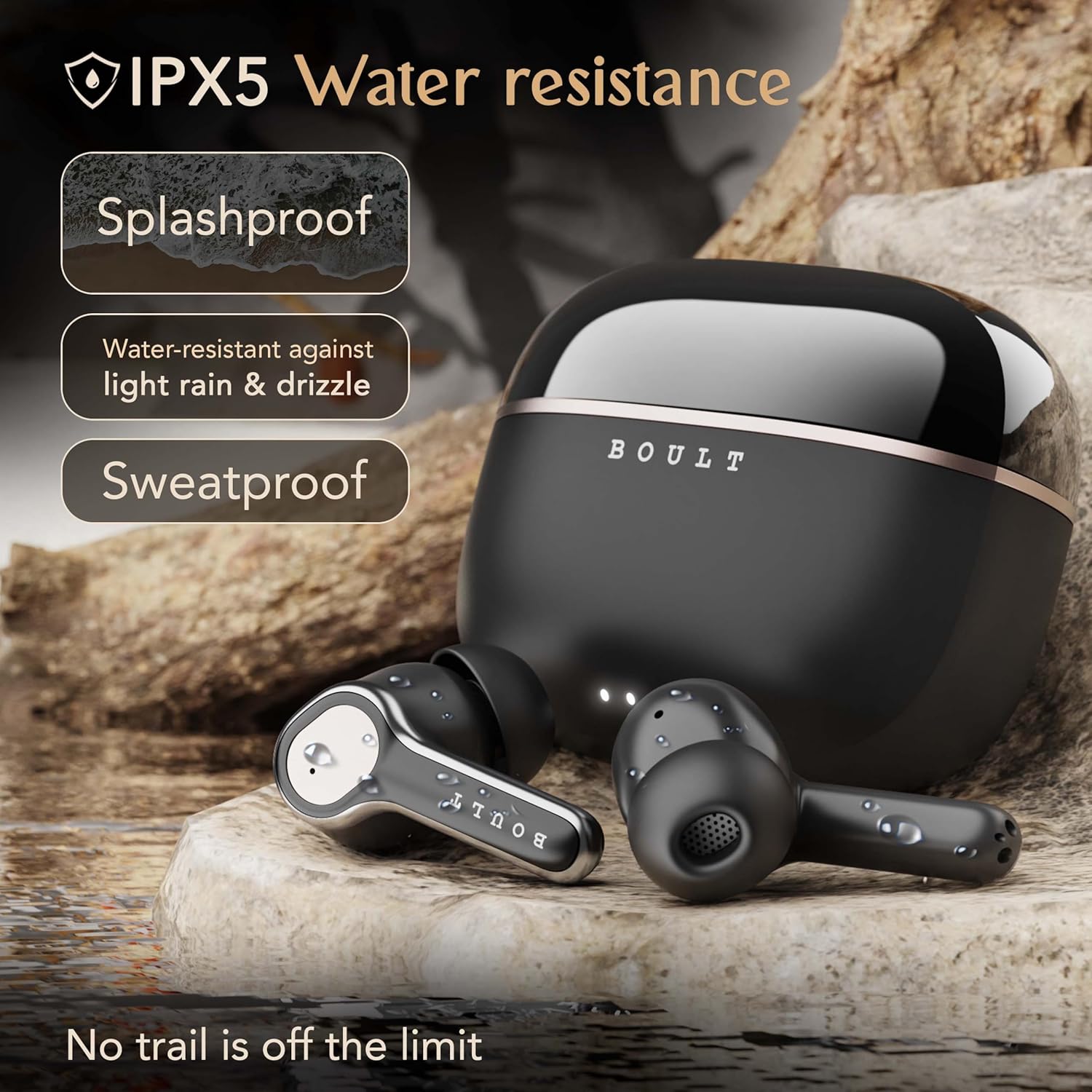
Image: A depiction of the Boult Z40 Ultra earbuds and charging case on a rocky, wet surface, illustrating their IPX5 water resistance, indicating they are splashproof and sweatproof.
క్లీనింగ్
Gently wipe the earbuds and charging case with a soft, dry, lint-free cloth. Do not use abrasive cleaners or solvents. For the eartips, remove them and clean with a damp గుడ్డ, తిరిగి అతికించే ముందు అవి పూర్తిగా పొడిగా ఉన్నాయని నిర్ధారించుకోండి.
ట్రబుల్షూటింగ్
If you encounter issues with your Boult Z40 Ultra earbuds, refer to the following common problems and solutions:
- ఇయర్బడ్లు జత కావడం లేదు: Ensure both earbuds are in the charging case, then open the lid to activate pairing mode. Check that Bluetooth is enabled on your device and that the earbuds are selected. Try forgetting the device on your phone and re-pairing.
- ఒకే ఒక ఇయర్బడ్ పనిచేస్తోంది: Place both earbuds back into the charging case, close the lid for a few seconds, then open it again. This often re-syncs them. Ensure both earbuds have sufficient charge.
- శబ్దం లేదు: Check the volume level on both your device and the earbuds. Ensure the earbuds are properly connected to your device. Try playing audio from a different application or device.
- పేలవమైన ధ్వని నాణ్యత: Ensure the earbuds are clean and free of debris. Try different sized eartips for a better seal in your ear canal. Move closer to your connected device to avoid interference.
- ఛార్జింగ్ సమస్యలు: ఛార్జింగ్ కేబుల్ కేస్ మరియు పవర్ సోర్స్ రెండింటికీ సురక్షితంగా కనెక్ట్ చేయబడిందని నిర్ధారించుకోండి. ఛార్జింగ్ పోర్ట్ శుభ్రంగా ఉందో లేదో తనిఖీ చేయండి. వేరే ఛార్జింగ్ కేబుల్ లేదా పవర్ అడాప్టర్ను ప్రయత్నించండి.
- ANC ప్రభావవంతంగా లేదు: Ensure the earbuds are properly seated in your ears to create a good seal. The effectiveness of ANC can vary based on the type of noise.
If the issue persists after trying these steps, please contact Boult customer support for further assistance.
స్పెసిఫికేషన్లు
Detailed technical specifications for the Boult Z40 Ultra ANC Earbuds:
- మోడల్ పేరు: Airbass (Z40 Ultra)
- శబ్ద నియంత్రణ: యాక్టివ్ నాయిస్ క్యాన్సిలేషన్ (32dB)
- కనెక్టివిటీ టెక్నాలజీ: వైర్లెస్, బ్లూటూత్ 5.3
- బ్లూటూత్ పరిధి: 10 మీటర్లు
- ఆడియో డ్రైవర్ పరిమాణం: 10 మిల్లీమీటర్లు (డైనమిక్ డ్రైవర్)
- ఫ్రీక్వెన్సీ రెస్పాన్స్: 20 హెర్ట్జ్ - 200 హెర్ట్జ్
- సున్నితత్వం: 103 డిబి
- ఇంపెడెన్స్: 32 ఓం
- Battery Life (Earbuds + Case): Up to 100 Hours (with ANC off)
- ఛార్జింగ్ సమయం: సుమారు 100 నిమిషాలు
- ఆడియో జాప్యం: 45 మిల్లీసెకన్లు (గేమింగ్ మోడ్)
- మైక్రోఫోన్లు: 4 Mics ENC (Environmental Noise Cancellation)
- నీటి నిరోధక స్థాయి: IPX5 (Splashproof, Sweatproof)
- నియంత్రణ రకం: టచ్, వాయిస్ (గూగుల్ అసిస్టెంట్, సిరి)
- చేర్చబడిన భాగాలు: Type-C Fast Charging Cable, User Manual, Warranty Card, Extra Pair of Eartips, Wireless Charging Case
- మెటీరియల్: రబ్బరు
- వస్తువు బరువు: 45 గ్రాములు
- ఉత్పత్తి కొలతలు: 5.6 x 5 x 2.9 సెం.మీ
- మూలం దేశం: భారతదేశం
వారంటీ మరియు మద్దతు
The Boult Z40 Ultra ANC Earbuds come with a 1 సంవత్సరాల తయారీదారు వారంటీ కొనుగోలు తేదీ నుండి. ఈ వారంటీ తయారీ లోపాలను కవర్ చేస్తుంది మరియు ఉత్పత్తి విశ్వసనీయతను నిర్ధారిస్తుంది.
For warranty claims, technical support, or any inquiries, please refer to the contact information provided on the Warranty Card included in your product packaging or visit the official Boult webకస్టమర్ సర్వీస్ వివరాల కోసం సైట్.


