1. పరిచయం
This manual provides instructions for the safe operation, maintenance, and troubleshooting of your FLEX 24V Brushless Cordless 1/2-Inch Hammer Drill Turbo Mode Kit, model FX1271T-2B. Please read this manual thoroughly before using the tool to ensure proper and safe operation.
The FLEX FX1271T-2B is a powerful 24V brushless cordless hammer drill designed for demanding drilling and driving applications. It features a 1/2-inch full-metal ratcheting chuck, two-speed settings, a Turbo Mode for increased speed, and an anti-kickback safety feature. This kit includes the drill, a 2.5Ah Lithium-Ion Battery, a 5.0Ah Lithium-Ion Battery, and a 160W Fast Charger.
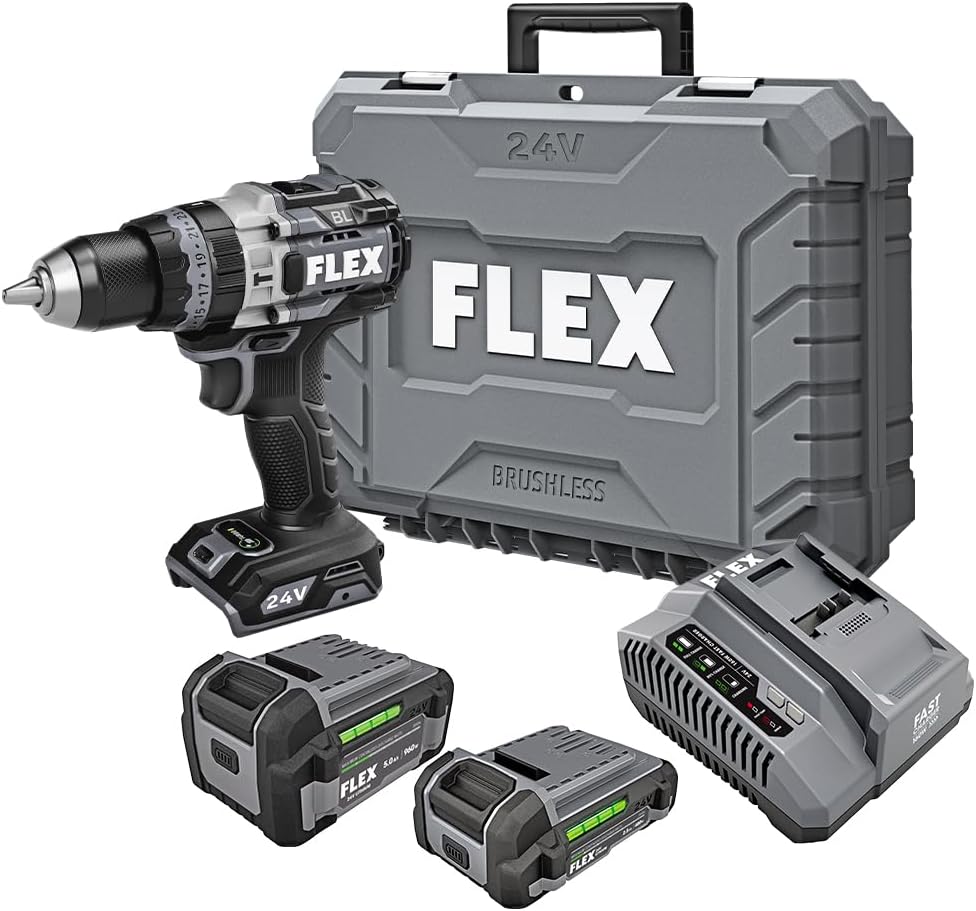
Figure 1: FLEX 24V Brushless Cordless 1/2-Inch Hammer Drill Kit (FX1271T-2B) including drill, two batteries, charger, and carrying case.
2. సాధారణ భద్రతా సూచనలు
హెచ్చరిక: ఈ పవర్ టూల్తో అందించబడిన అన్ని భద్రతా హెచ్చరికలు, సూచనలు, దృష్టాంతాలు మరియు స్పెసిఫికేషన్లను చదవండి. దిగువ జాబితా చేయబడిన అన్ని సూచనలను పాటించడంలో వైఫల్యం విద్యుత్ షాక్, అగ్ని మరియు/లేదా తీవ్రమైన గాయానికి దారితీయవచ్చు.
2.1 పని ప్రాంత భద్రత
- పని ప్రదేశం శుభ్రంగా మరియు బాగా వెలుతురుగా ఉంచండి. చిందరవందరగా లేదా చీకటిగా ఉన్న ప్రాంతాలు ప్రమాదాలను ఆహ్వానిస్తున్నాయి.
- మండే ద్రవాలు, వాయువులు లేదా ధూళి వంటి పేలుడు వాతావరణంలో పవర్ టూల్స్ ఆపరేట్ చేయవద్దు. పవర్ టూల్స్ దుమ్ము లేదా పొగలను మండించగల స్పార్క్లను సృష్టిస్తాయి.
- పవర్ టూల్ను ఆపరేట్ చేస్తున్నప్పుడు పిల్లలను మరియు పక్కనే ఉన్నవారిని దూరంగా ఉంచండి. పరధ్యానం మీ నియంత్రణను కోల్పోయేలా చేస్తుంది.
2.2 విద్యుత్ భద్రత
- పవర్ టూల్ ప్లగ్లు తప్పనిసరిగా అవుట్లెట్తో సరిపోలాలి. ప్లగ్ని ఏ విధంగానూ సవరించవద్దు. ఎర్త్డ్ (గ్రౌండెడ్) పవర్ టూల్స్తో ఎలాంటి అడాప్టర్ ప్లగ్లను ఉపయోగించవద్దు. సవరించని ప్లగ్లు మరియు మ్యాచింగ్ అవుట్లెట్లు విద్యుత్ షాక్ ప్రమాదాన్ని తగ్గిస్తాయి.
- పైపులు, రేడియేటర్లు, శ్రేణులు మరియు రిఫ్రిజిరేటర్ల వంటి మట్టి లేదా గ్రౌన్దేడ్ ఉపరితలాలతో శరీర సంబంధాన్ని నివారించండి. మీ శరీరం ఎర్త్ లేదా గ్రౌన్దేడ్ అయినట్లయితే విద్యుత్ షాక్ ప్రమాదం ఎక్కువగా ఉంటుంది.
- పవర్ టూల్స్ వర్షం లేదా తడి పరిస్థితులకు బహిర్గతం చేయవద్దు. పవర్ టూల్లోకి ప్రవేశించిన నీరు విద్యుత్ షాక్ ప్రమాదాన్ని పెంచుతుంది.
2.3 వ్యక్తిగత భద్రత
- ఎల్లప్పుడూ కంటి రక్షణను ధరించండి. భద్రతా గ్లాసెస్, గాగుల్స్ లేదా ఫేస్ షీల్డ్ ఉపయోగించండి.
- ఈ ఉపకరణాన్ని ఎక్కువసేపు ఉపయోగించేటప్పుడు వినికిడి రక్షణను ధరించండి.
- సరిగ్గా డ్రెస్ చేసుకోండి. వదులుగా ఉండే దుస్తులు లేదా నగలు ధరించవద్దు. మీ జుట్టు మరియు దుస్తులను కదిలే భాగాల నుండి దూరంగా ఉంచండి.
- అప్రమత్తంగా ఉండండి, మీరు ఏమి చేస్తున్నారో చూడండి మరియు పవర్ టూల్ను ఆపరేట్ చేసేటప్పుడు ఇంగితజ్ఞానాన్ని ఉపయోగించండి.
2.4 సాధన వినియోగం మరియు సంరక్షణ
- శక్తి సాధనాన్ని బలవంతం చేయవద్దు. మీ అప్లికేషన్ కోసం సరైన పవర్ సాధనాన్ని ఉపయోగించండి.
- ఏదైనా సర్దుబాట్లు చేయడానికి, ఉపకరణాలను మార్చడానికి లేదా పవర్ టూల్స్ నిల్వ చేయడానికి ముందు పవర్ టూల్ నుండి బ్యాటరీ ప్యాక్ని డిస్కనెక్ట్ చేయండి.
- నిష్క్రియ పవర్ టూల్స్ పిల్లలకు అందుబాటులో లేకుండా నిల్వ చేయండి మరియు పవర్ టూల్ లేదా ఈ సూచనల గురించి తెలియని వ్యక్తులను పవర్ టూల్ను ఆపరేట్ చేయడానికి అనుమతించవద్దు.
- పవర్ టూల్స్ మరియు ఉపకరణాలను నిర్వహించండి. కదిలే భాగాలు తప్పుగా అమర్చడం లేదా బైండింగ్ చేయడం, భాగాలు విచ్ఛిన్నం చేయడం మరియు పవర్ టూల్ యొక్క ఆపరేషన్ను ప్రభావితం చేసే ఏదైనా ఇతర పరిస్థితి కోసం తనిఖీ చేయండి.
2.5 బ్యాటరీ సాధనం వినియోగం మరియు సంరక్షణ
- తయారీదారు పేర్కొన్న ఛార్జర్తో మాత్రమే రీఛార్జ్ చేయండి. ఒక రకమైన బ్యాటరీ ప్యాక్కు సరిపోయే ఛార్జర్ను మరొక బ్యాటరీ ప్యాక్తో ఉపయోగించినప్పుడు అగ్ని ప్రమాదాన్ని సృష్టించవచ్చు.
- ప్రత్యేకంగా నియమించబడిన బ్యాటరీ ప్యాక్లతో మాత్రమే పవర్ టూల్స్ ఉపయోగించండి. ఏదైనా ఇతర బ్యాటరీ ప్యాక్ల ఉపయోగం గాయం మరియు అగ్ని ప్రమాదాన్ని సృష్టించవచ్చు.
- బ్యాటరీ ప్యాక్ ఉపయోగంలో లేనప్పుడు, పేపర్ క్లిప్లు, నాణేలు, కీలు, గోర్లు, స్క్రూలు లేదా ఒక టెర్మినల్ నుండి మరొక టెర్మినల్కు కనెక్ట్ చేయగల ఇతర చిన్న మెటల్ వస్తువులు వంటి ఇతర మెటల్ వస్తువుల నుండి దూరంగా ఉంచండి. బ్యాటరీ టెర్మినల్లను కలిపి షార్ట్ చేయడం వలన కాలిన గాయాలు లేదా మంటలు సంభవించవచ్చు.
- దుర్వినియోగ పరిస్థితులలో, బ్యాటరీ నుండి ద్రవాన్ని బయటకు తీయవచ్చు; పరిచయాన్ని నివారించండి. అనుకోకుండా పరిచయం ఏర్పడితే, నీటితో ఫ్లష్ చేయండి. ద్రవం కళ్లను సంప్రదించినట్లయితే, అదనంగా వైద్య సహాయం తీసుకోండి. బ్యాటరీ నుండి విడుదలయ్యే ద్రవం చికాకు లేదా కాలిన గాయాలకు కారణం కావచ్చు.
3. చేర్చబడిన భాగాలు
Your FLEX 24V Brushless Cordless 1/2-Inch Hammer Drill Kit (FX1271T-2B) includes the following items:
- FLEX 24V Brushless Cordless 1/2-Inch Hammer Drill
- (1) FLEX 24V 2.5Ah Lithium-Ion Battery (FX0111-1)
- (1) FLEX 24V 5.0Ah Lithium-Ion Battery (FX0121-1)
- FLEX 160W Fast Charger
- సహాయక హ్యాండిల్
- క్యారీయింగ్ కేసు

Figure 2: The FLEX Advantage highlights the included 2.5Ah and 5.0Ah Lithium-Ion batteries, emphasizing their power, runtime, and fast charging capabilities.
4. సెటప్ మరియు ప్రారంభ ఉపయోగం
4.1 బ్యాటరీని ఛార్జ్ చేయడం
- 160W ఫాస్ట్ ఛార్జర్ను ప్రామాణిక పవర్ అవుట్లెట్కి కనెక్ట్ చేయండి.
- బ్యాటరీ ప్యాక్ను ఛార్జర్పైకి స్లైడ్ చేసి, అది సరైన స్థానంలోకి వచ్చే వరకు ఉంచండి.
- The charger's indicator lights will show the charging status. A fully charged battery will be indicated by a solid green light.
- పూర్తిగా ఛార్జ్ అయిన తర్వాత, ఛార్జర్ నుండి బ్యాటరీని తీసివేయండి.
4.2 బ్యాటరీని వ్యవస్థాపించడం
- Align the battery pack with the battery port on the base of the drill handle.
- Slide the battery into the port until it locks securely into place. Ensure it is fully seated to prevent accidental dislodgement during operation.
- To remove the battery, press the release button(s) on the sides of the battery pack and slide it out.
4.3 సహాయక హ్యాండిల్ను అటాచ్ చేయడం
For improved control and safety, especially during high-torque applications or hammer drilling, attach the auxiliary handle.
- సహాయక హ్యాండిల్ cl ను విప్పు.amp దానిని అపసవ్య దిశలో తిప్పడం ద్వారా.
- Slide the handle over the front of the drill body, positioning it to your preferred angle.
- cl బిగించండిamp by rotating it clockwise until the handle is securely fastened.

Figure 3: The drill with the auxiliary handle attached, providing enhanced control and stability, particularly when the anti-kickback feature engages.
4.4 డ్రిల్ బిట్స్ లేదా యాక్సెసరీలను ఇన్స్టాల్ చేయడం
- Ensure the drill is off and the battery is removed for safety.
- Grip the rear collar of the 1/2-inch full-metal ratcheting chuck and rotate the front collar counter-clockwise to open the chuck jaws.
- Insert the drill bit or accessory fully into the chuck jaws.
- Rotate the front collar clockwise to tighten the chuck jaws firmly around the bit. The ratcheting mechanism will provide an audible click when securely tightened.
- Gently pull on the bit to ensure it is properly secured.

Figure 4: Detail of the 1/2-inch full-metal ratcheting chuck, designed for secure bit retention and durability.
5. ఆపరేటింగ్ సూచనలు
5.1 పవర్ ఆన్/ఆఫ్ మరియు వేగ నియంత్రణ
- ట్రిగ్గర్ స్విచ్: Squeeze the trigger switch to turn the drill on. Release it to turn the drill off.
- వేరియబుల్ వేగం: The trigger switch is pressure-sensitive, allowing for variable speed control. Pressing the trigger further increases the speed.
- ఫార్వర్డ్/రివర్స్ సెలెక్టర్: Located above the trigger, push the selector left for forward rotation (drilling/driving) and right for reverse rotation (removing screws). Center position locks the trigger for safety.
5.2 Gear Selection (2-Speed)
The drill features a 2-speed gearbox for optimal performance across various applications.
- గేర్ 1 (తక్కువ వేగం, అధిక టార్క్): Slide the gear selector switch to position '1'. Ideal for driving screws, drilling large holes, or applications requiring maximum torque.
- Gear 2 (High Speed, Lower Torque): Slide the gear selector switch to position '2'. Suitable for fast drilling of smaller holes in wood or metal.
NOTE: Always ensure the drill is stopped before changing gear settings to prevent damage to the gearbox.
5.3 Mode Selection (Drill, Drive, Hammer Drill)
Rotate the collar behind the chuck to select the desired operating mode:
- డ్రిల్ మోడ్ (డ్రిల్ ఐకాన్): కలప, లోహం మరియు ప్లాస్టిక్లలో రంధ్రాలు వేయడానికి.
- Drive Mode (Screw Icon): For driving screws. The clutch settings (numbered ring) allow you to adjust the torque to prevent over-driving screws or damaging materials.
- హామర్ డ్రిల్ మోడ్ (హామర్ ఐకాన్): For drilling into masonry, brick, and concrete. This mode combines rotary action with a hammering motion.
5.4 టర్బో మోడ్
The Turbo Mode button, located on top of the drill, provides an immediate increase in speed for faster results when needed.
- నొక్కండి టర్బో button during operation to engage maximum speed.
- Release the button to return to the previously selected speed setting.

Figure 5: The Turbo Mode button, when pressed, provides increased speed for rapid task completion.
5.5 Anti-Kickback Feature
The drill is equipped with an advanced anti-kickback braking technology. If the drill bit binds during operation, the system will detect the sudden rotational force and rapidly stop the motor to reduce the risk of kickback and potential injury.
5.6 ఇంటిగ్రేటెడ్ LED లైట్
An LED light is integrated into the drill to illuminate the work area, improving visibility in dimly lit conditions. The light activates when the trigger is pressed.

Figure 6: The integrated LED light provides illumination for improved visibility in dark work environments.
5.7 Drilling into Masonry (Hammer Drill Mode)
When drilling into masonry, brick, or concrete:
- Select Hammer Drill Mode.
- Ensure the auxiliary handle is securely attached and held firmly with both hands.
- తగిన తాపీపని డ్రిల్ బిట్లను ఉపయోగించండి.
- Apply steady, firm pressure to the drill, allowing the hammering action to break up the material.

Figure 7: The FLEX hammer drill in action, demonstrating its capability to drill into tough materials with 1,400 in-lbs of torque.
6. నిర్వహణ
6.1 శుభ్రపరచడం
- Always disconnect the battery pack before performing any cleaning or maintenance.
- వెంటిలేషన్ ఓపెనింగ్స్ నుండి దుమ్ము మరియు చెత్తను శుభ్రం చేయడానికి మృదువైన బ్రష్ లేదా కంప్రెస్డ్ ఎయిర్ ఉపయోగించండి.
- టూల్ హౌసింగ్ను ప్రకటనతో తుడవండిamp వస్త్రం. కఠినమైన రసాయనాలు లేదా రాపిడి క్లీనర్లను ఉపయోగించవద్దు.
- సరైన బిట్ గ్రిప్పింగ్ ఉండేలా చక్ దవడలను శుభ్రంగా మరియు శిధిలాలు లేకుండా ఉంచండి.
6.2 నిల్వ
- Store the tool, batteries, and charger in a cool, dry place, away from direct sunlight and moisture.
- Ensure batteries are partially charged (not fully depleted or fully charged for long-term storage) before storing.
- Store the tool in its carrying case to protect it from damage.
7. ట్రబుల్షూటింగ్
| సమస్య | సాధ్యమైన కారణం | పరిష్కారం |
|---|---|---|
| డ్రిల్ ప్రారంభం కాదు. | బ్యాటరీ ఛార్జ్ చేయబడలేదు లేదా సరిగ్గా ఇన్స్టాల్ చేయబడలేదు. Forward/Reverse selector in center (locked) position. | Charge battery and ensure it is securely installed. Move selector to forward or reverse position. |
| ఆపరేషన్ సమయంలో శక్తి కోల్పోవడం. | బ్యాటరీ ఛార్జ్ తక్కువ. ఓవర్లోడ్ రక్షణ సక్రియం చేయబడింది. | బ్యాటరీని రీఛార్జ్ చేయండి. Reduce pressure on the tool; allow it to cool down. |
| బిట్ చక్ లో జారిపోతుంది. | చక్ తగినంతగా బిగించబడలేదు. చక్ దవడలు మురికిగా లేదా అరిగిపోయాయి. | చక్ ని మళ్ళీ గట్టిగా బిగించండి. చక్ దవడలను శుభ్రం చేయండి. సమస్య కొనసాగితే, చక్ను మార్చాల్సి రావచ్చు. |
| అధిక కంపనం లేదా శబ్దం. | Damaged or bent drill bit. వదులుగా ఉండే భాగాలు. | Replace drill bit. Check for loose screws or parts. If problem persists, discontinue use and contact service. |
8. స్పెసిఫికేషన్లు
| ఫీచర్ | వివరాలు |
|---|---|
| మోడల్ సంఖ్య | FX1271T-2B |
| వాల్యూమ్tage | 24 వోల్ట్లు |
| చక్ సైజు | 1/2-అంగుళాలు |
| చక్ రకం | Full-Metal Ratcheting |
| గరిష్ట టార్క్ | 1400 అంగుళాల పౌండ్లు |
| గరిష్ట భ్రమణ వేగం | 2500 RPM |
| స్పీడ్ల సంఖ్య | 2 |
| బ్యాటరీ సామర్థ్యం (చేర్చబడింది) | 2.5 Ah, 5.0 Ah Lithium-Ion |
| Charger Type (Included) | 160W ఫాస్ట్ ఛార్జర్ |
| ప్రత్యేక లక్షణాలు | Turbo Mode, Anti-Kickback, LED Light, Brushless Motor |
| వస్తువు బరువు | 15.37 పౌండ్లు (కిట్) |
| ఉత్పత్తి కొలతలు | 7.2"L x 4"W x 10"H (Tool) |
| డ్రిల్లింగ్ సామర్థ్యం (కలప) | 2 అంగుళాలు |
| డ్రిల్లింగ్ సామర్థ్యం (లోహం) | 2 అంగుళాలు |
9. వారంటీ మరియు మద్దతు
9.1 FLEX Limited Lifetime Warranty
This FLEX tool is protected by the FLEX Limited Lifetime Warranty. To qualify for this warranty, you must register your new FLEX tool, battery, or charger within 30 days of purchase through December 31, 2025. Registration can be completed at రిజిస్టర్మైఫ్లెక్స్.కామ్.
Please refer to the official FLEX website or your product packaging for full terms and conditions of the warranty.
9.2 కస్టమర్ మద్దతు
For technical assistance, replacement parts, or warranty claims, please contact FLEX customer support. Contact information can typically be found on the FLEX official webసైట్ లేదా మీ ఉత్పత్తి ప్యాకేజింగ్లో.
When contacting support, please have your model number (FX1271T-2B) and purchase date available.


