1. పరిచయం
Thank you for choosing the Muse MH08MB Portable Radio. This device is designed for versatility and durability, offering multiple power sources, audio playback options, and emergency features. Please read this manual carefully to ensure proper use and maintenance of your device.

మూర్తి 1: Muse MH08MB Portable Radio. This image displays the Muse MH08MB portable radio from a side angle, highlighting its integrated hand crank for dynamo charging, the solar panel on top, and the powerful LED flashlight on the front. A green lanyard is attached for portability.
2. భద్రతా సమాచారం
- పరికరాన్ని ఎక్కువసేపు తీవ్రమైన ఉష్ణోగ్రతలకు లేదా ప్రత్యక్ష సూర్యకాంతికి గురిచేయవద్దు.
- పరికరాన్ని వదలడం లేదా బలమైన ప్రభావాలకు గురిచేయడం మానుకోండి.
- Keep the device away from water and moisture, despite its splash-proof design, to prevent damage.
- పరికరాన్ని మీరే విడదీయడానికి లేదా మరమ్మతు చేయడానికి ప్రయత్నించవద్దు. అన్ని సర్వీసింగ్లను అర్హత కలిగిన సిబ్బందికి సూచించండి.
- Use only the specified charging methods (USB-C, solar, dynamo) to power the device.
3. ప్యాకేజీ విషయాలు
దయచేసి అన్ని అంశాలు ఉన్నాయో లేదో తనిఖీ చేయండి:
- Muse MH08MB Portable Radio
- USB-C ఛార్జింగ్ కేబుల్
- పవర్ అడాప్టర్
- వినియోగదారు మాన్యువల్ (ఈ పత్రం)
4. ఉత్పత్తి ముగిసిందిview
Familiarize yourself with the various parts and controls of your Muse MH08MB radio.

మూర్తి 2: పైగాview of Muse MH08MB Features. A detailed infographic summarizing all major features of the Muse MH08MB portable radio. It includes a jumbo display, FM radio with 5 presets, hands-free function, IP64 dust and splash resistance, siren, clock, 6 hours playtime, multiple charging options (USB-C, hand crank, solar), stereo pairing, LED flashlight, and an AUX-in jack.
ముఖ్య భాగాలు:
- డిజిటల్ ప్రదర్శన: Shows frequency, time, and other indicators.
- నియంత్రణ బటన్లు: Power, Play/Pause, Skip, Preset selection (1-5).
- టెలిస్కోపిక్ యాంటెన్నా: మెరుగైన రేడియో రిసెప్షన్ కోసం.
- LED ఫ్లాష్లైట్: Integrated light source.
- హ్యాండ్ క్రాంక్: For dynamo charging.
- సోలార్ ప్యానెల్: సౌర ఛార్జింగ్ కోసం.
- USB-C పోర్ట్: For charging the device and external devices.
- ఆక్స్-ఇన్ జాక్: బాహ్య ఆడియో మూలాలను కనెక్ట్ చేయడానికి.
- మైక్రోఫోన్: హ్యాండ్స్-ఫ్రీ కాల్స్ కోసం.
- సైరన్: Emergency alert function.

మూర్తి 3: టాప్ View with Antenna and Controls. This view of the Muse MH08MB portable radio features its telescopic antenna fully extended for improved radio reception. The top panel shows various control buttons, and the digital display is active.
5. పరికరాన్ని ఛార్జ్ చేస్తోంది
The Muse MH08MB offers multiple charging methods to ensure you always have power.
5.1. USB-C ఛార్జింగ్
- Connect the provided USB-C cable to the USB-C port on the radio.
- Connect the other end of the cable to the power adapter and plug it into a wall outlet.
- The charging indicator on the display will show the charging status.
5.2. సోలార్ ఛార్జింగ్
Place the radio with the solar panel facing direct sunlight. The solar panel will convert sunlight into energy to charge the internal battery. This method is ideal for maintaining charge or slow charging in outdoor environments.
5.3. Dynamo (Hand Crank) Charging
Extend the hand crank located on the side of the radio. Rotate the crank clockwise or counter-clockwise at a steady pace. Continuous cranking will generate power to charge the internal battery, useful in emergency situations or when other power sources are unavailable.

మూర్తి 4: Charging Options and IP64 Design. This infographic illustrates the versatile charging options of the Muse MH08MB, including solar power and hand-crank dynamo. It also points out the USB-C port for charging other devices and emphasizes its IP64 dust and splash-proof design.
6. సెటప్
6.1. ప్రారంభ పవర్ ఆన్
నొక్కండి మరియు పట్టుకోండి శక్తి button to turn on the device. The digital display will illuminate.
6.2. గడియారాన్ని అమర్చుట
పరికరం ఆన్లో ఉన్నప్పుడు, నొక్కండి గడియారం button (if available, or refer to the general controls for time setting). Use the Tune/Skip buttons to adjust the hour and minute. Press the గడియారం నిర్ధారించడానికి మళ్లీ బటన్.
7. ఆపరేటింగ్ సూచనలు
7.1. పవర్ ఆన్/ఆఫ్
నొక్కండి మరియు పట్టుకోండి శక్తి button for approximately 2 seconds to turn the radio on or off.
7.2. రేడియో ఆపరేషన్ (AM/FM)
- రేడియో ఆన్ చేయండి.
- Extend the telescopic antenna for optimal FM reception.
- నొక్కండి మోడ్ FM లేదా AM బ్యాండ్ని ఎంచుకోవడానికి బటన్.
- ఉపయోగించండి Tune/Skip buttons to manually tune to a station or press and hold to auto-scan for the next available station.
- To save a preset, tune to your desired station, then press and hold one of the Preset (1-5) buttons until the display confirms it's saved. To recall a preset, simply press the corresponding ప్రీసెట్ బటన్.
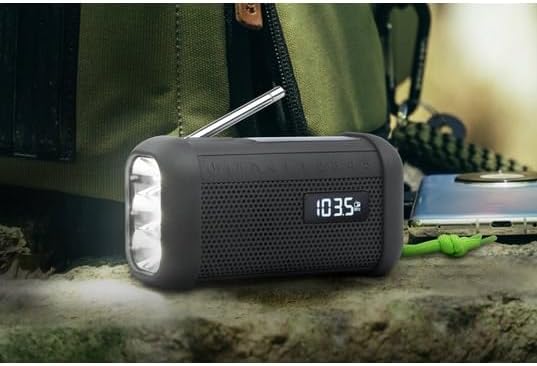
మూర్తి 5: Digital Display in Radio Mode. The Muse MH08MB portable radio is shown resting on a surface, with its digital display clearly indicating "103.5 MHz", signifying active FM radio tuning. The speaker grille and flashlight are also visible.
7.3. బ్లూటూత్ పెయిరింగ్
- Turn on the radio and switch to Bluetooth mode using the మోడ్ button. The display will show a Bluetooth indicator.
- మీ మొబైల్ పరికరంలో, బ్లూటూత్ని ప్రారంభించండి మరియు అందుబాటులో ఉన్న పరికరాల కోసం శోధించండి.
- Select "MH08MB" from the list of devices.
- Once paired, the radio will confirm the connection, and you can play audio from your device.
7.4. Hands-Free Microphone
When connected via Bluetooth to a smartphone, the integrated microphone allows for hands-free calling. When a call comes in, the radio will pause playback. Press the ప్లే/పాజ్ చేయండి కాల్కు సమాధానం ఇవ్వడానికి లేదా ముగించడానికి బటన్.
7.5. LED ఫ్లాష్లైట్
నొక్కండి ఫ్లాష్లైట్ button (or designated button) to turn the LED flashlight on or off. The flashlight features 3 ultra-bright LEDs.
7.6. Siren Function
అత్యవసర పరిస్థితిలో, నొక్కి పట్టుకోండి సైరన్ button to activate the emergency siren and flashing light. Press again to deactivate.
7.7. Stereo Pairing (TWS)
If you have two Muse MH08MB units, you can pair them for True Wireless Stereo (TWS) sound. Turn on both units and ensure they are in Bluetooth mode. On one unit, press and hold the స్టీరియో పెయిర్ button (refer to controls for exact button). The units will connect, providing a wider stereo soundstage.
7.8. AUX-IN మోడ్
Connect an external audio device (e.g., MP3 player) to the AUX-IN jack using a 3.5mm audio cable. Switch the radio to AUX mode using the మోడ్ button. Audio from the external device will play through the radio's speaker.
8. నిర్వహణ
- శుభ్రపరచడం: పరికరాన్ని మృదువైన, పొడి వస్త్రంతో తుడవండి. రాపిడి క్లీనర్లను లేదా ద్రావకాలను ఉపయోగించవద్దు.
- నిల్వ: ఎక్కువసేపు ఉపయోగంలో లేనప్పుడు ప్రత్యక్ష సూర్యకాంతి పడకుండా చల్లని, పొడి ప్రదేశంలో రేడియోను నిల్వ చేయండి.
- బ్యాటరీ సంరక్షణ: To prolong battery life, avoid fully discharging the battery frequently. Charge it regularly, especially if stored for a long time.
9. ట్రబుల్షూటింగ్
| సమస్య | సాధ్యమైన కారణం | పరిష్కారం |
|---|---|---|
| శక్తి లేదు | బ్యాటరీ అయిపోయింది | Charge the device using USB-C, solar, or dynamo. |
| పేలవమైన రేడియో రిసెప్షన్ | Antenna not extended or weak signal | Extend the telescopic antenna fully. Try moving to a different location. |
| బ్లూటూత్ కనెక్ట్ కావడం లేదు | Radio not in pairing mode or device too far | Ensure radio is in Bluetooth mode. Move your device closer. Forget and re-pair on your mobile device. |
| శబ్దం లేదు | Volume too low or incorrect mode | Increase volume. Ensure the correct mode (Radio, Bluetooth, AUX) is selected. |
10. స్పెసిఫికేషన్లు
| ఫీచర్ | వివరాలు |
|---|---|
| మోడల్ సంఖ్య | MH08MB |
| బ్రాండ్ | మ్యూస్ |
| రంగు | నలుపు |
| కనెక్టివిటీ | బ్లూటూత్ |
| రేడియో బ్యాండ్లు | AM/FM (5 digital presets) |
| శక్తి వనరులు | USB-C, Solar, Dynamo (Hand Crank) |
| బ్యాటరీ | 1 లిథియం-అయాన్ (చేర్చబడింది) |
| బ్యాటరీ లైఫ్ | Up to 6 hours (depending on volume/content) |
| ప్రత్యేక లక్షణాలు | Integrated Clock, Hands-free Microphone, LED Flashlight (3 ultra-bright LEDs), Siren, Stereo Pairing (TWS), NFC |
| నీటి నిరోధకత | IP64 (Dust and Splash-proof) |
| కొలతలు (L x W x H) | 15.8 x 6.4 x 8 సెం.మీ |
| చేర్చబడిన భాగాలు | Power adapter, USB-C Charging Cable, User manual |

మూర్తి 6: Product Dimensions. A technical diagram showing the dimensions of the Muse MH08MB portable radio: 158mm length, 80mm height, and 64mm width.
11. వారంటీ మరియు మద్దతు
Muse products are designed for reliability and performance. For warranty information and technical support, please refer to the warranty card included with your purchase or visit the official Muse webసైట్. ఏవైనా వారంటీ క్లెయిమ్ల కోసం మీ కొనుగోలు రుజువును ఉంచుకోండి.
For further assistance, please contact Muse customer service.


