పరిచయం
The Sharper Image Motor Battles RC Team Battle Racers offer an engaging remote-control combat experience. Designed for interactive play, these cars feature LED lights, sound effects, and damage indicators to enhance multiplayer action. This manual provides essential information for setting up, operating, and maintaining your RC Battle Racers.
- Thrilling RC Battle Action: Engage in interactive remote-control battles with cars designed for bumper car-style combat, perfect for team matches and one-on-one duels.
- Customizable LED Team Colors: Choose from four vibrant LED colors to represent your team, enhancing the excitement and personalizing each racer for battle.
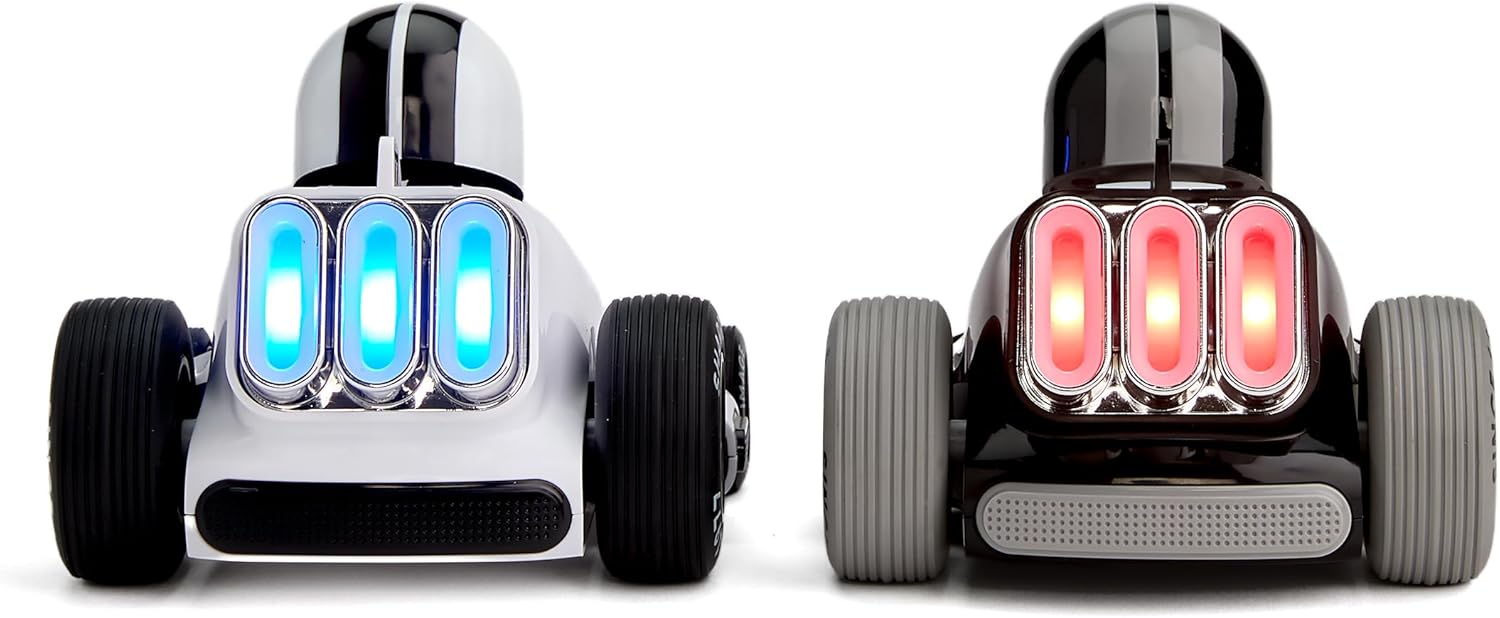
- Realistic Damage Indicators: Each car features three rear indicator lights that go out with every hit taken, tracking damage and adding an immersive layer to every battle—three hits, and you’re out!
- Long-Range Remote Control: Control your car smoothly from up to 100 feet away using the 2.4 GHz remote control for a seamless and responsive experience.
- Multiplayer Fun for All Ages: Combine multiple sets for larger team battles and epic multiplayer matches, making it an ideal choice for parties, family game nights, and friendly competitions.
పెట్టెలో ఏముంది
- రిమోట్ కంట్రోల్ (x2)
- RC Battle Racer Car (x2)
- ఉత్పత్తి మాన్యువల్

సెటప్
బ్యాటరీ సంస్థాపన
Ensure all batteries are installed correctly before use. A small screwdriver (not included) may be required to open battery compartments.
- రిమోట్ కంట్రోల్: Each remote control requires 1 AAA battery. Open the battery compartment on the back of the remote, insert the battery with correct polarity, and close the compartment.
- RC Battle Racer Car: Each car requires 3 AAA batteries. Open the battery compartment on the underside of the car, insert the batteries with correct polarity, and close the compartment.
పవర్ ఆన్ మరియు జత చేయడం
- Turn on each RC Battle Racer car using the on/off switch located on its underside.
- Turn on each remote control using its on/off switch. The remote's LED indicator will blink while attempting to connect.
- Once successfully paired, the remote's LED indicator will become a solid light. Each remote is color-coded to its corresponding car for easy identification.
ఆపరేటింగ్ సూచనలు
ప్రాథమిక నియంత్రణలు
Use the joysticks on the remote control to maneuver your RC Battle Racer:
- ఎడమ జాయ్స్టిక్: ముందుకు మరియు వెనుకకు కదలికలను నియంత్రిస్తుంది.
- కుడి జాయ్స్టిక్: Controls turning left and right.
Gameplay Mechanics
The RC Battle Racers are designed for interactive combat:
- Damage Indicators: Each car has three LED lights on its rear. When your car is hit by an opponent, one light will turn off. After three hits, all lights will be off, and your car is 'out' of the game.
- సౌండ్ ఎఫెక్ట్స్: The cars feature integrated sound effects that activate during gameplay, enhancing the combat experience.
- మల్టీప్లేయర్: These racers are ideal for head-to-head battles. You can combine multiple sets for larger team-based competitions.
నిర్వహణ
- శుభ్రపరచడం: Wipe the cars and remotes with a dry, soft cloth. Do not immerse in water or use harsh chemicals.
- నిల్వ: When not in use, store the RC Battle Racers and remotes in a cool, dry place away from direct sunlight. Remove batteries if storing for extended periods to prevent leakage.
ట్రబుల్షూటింగ్
- Car Not Responding: Ensure both the car and remote are powered on and have fresh batteries. Check that the remote's LED is solid, indicating a successful connection.
- పరిమిత పరిధి: Ensure there are no obstructions between the remote and the car. The optimal operating range is up to 100 feet.
- లైట్లు పనిచేయడం లేదు: Check battery levels. If lights are still not functioning, contact customer support.
స్పెసిఫికేషన్లు
| ఫీచర్ | వివరాలు |
|---|---|
| ఉత్పత్తి కొలతలు | 16.3 x 7.5 x 8.5 అంగుళాలు |
| వస్తువు బరువు | 5.09 పౌండ్లు |
| అంశం మోడల్ సంఖ్య | 1017622 |
| తయారీదారు సిఫార్సు చేసిన వయస్సు | 6 సంవత్సరాలు మరియు అంతకంటే ఎక్కువ |
| రిమోట్ కంట్రోల్ ఫ్రీక్వెన్సీ | 2.4 GHz |


