1. పరిచయం
This manual provides detailed instructions for the installation, operation, and maintenance of your CAMECHO Android 13 Car Radio. Please read this manual thoroughly before using the product to ensure proper function and safety. Keep this manual for future reference.
2. ఉత్పత్తి ముగిసిందిview
The CAMECHO Android 13 Car Radio is an advanced multimedia system designed for select Volkswagen Polo models. It features an 8-core processor, Android 13 operating system, and a 9-inch IPS capacitive touchscreen with 1024x600 resolution. Key functionalities include wireless Apple CarPlay, Android Auto, Mirror Link, GPS navigation, 4G/WiFi connectivity, Bluetooth 5.0, FM/AM/RDS radio, and DSP sound processing.
2.1 కీ ఫీచర్లు
- ఆపరేటింగ్ సిస్టమ్: ఆండ్రాయిడ్ 13
- ప్రాసెసర్: 8 Cores 2.0 GHz
- మెమరీ: 2GB RAM + 32GB ROM
- ప్రదర్శన: 9-inch IPS Capacitive Screen, 1024x600 Resolution
- కనెక్టివిటీ: 4G/SIM, WiFi, Bluetooth 5.0, USB
- ఇంటిగ్రేషన్: Wireless Apple CarPlay, Android Auto, Mirror Link
- ఆడియో: DSP (Digital Sound Processor), FM/AM/RDS Radio
- నావిగేషన్: అంతర్నిర్మిత GPS
- అదనపు ఫీచర్లు: Steering Wheel Control (SWC) support, Reversing camera input, Split Screen function
2.2. Applicable Vehicle Models
This car radio is compatible with the following Volkswagen Polo models:
- VW Polo (6C1, 6R1) 2009-2014
- VW Polo (6R, 6C) 2014-2017
- VW Polo Vivo Hatchback 2010-2017
- VW Polo (9N) 2001-2009
- VW Polo (9N-) 2008-2009
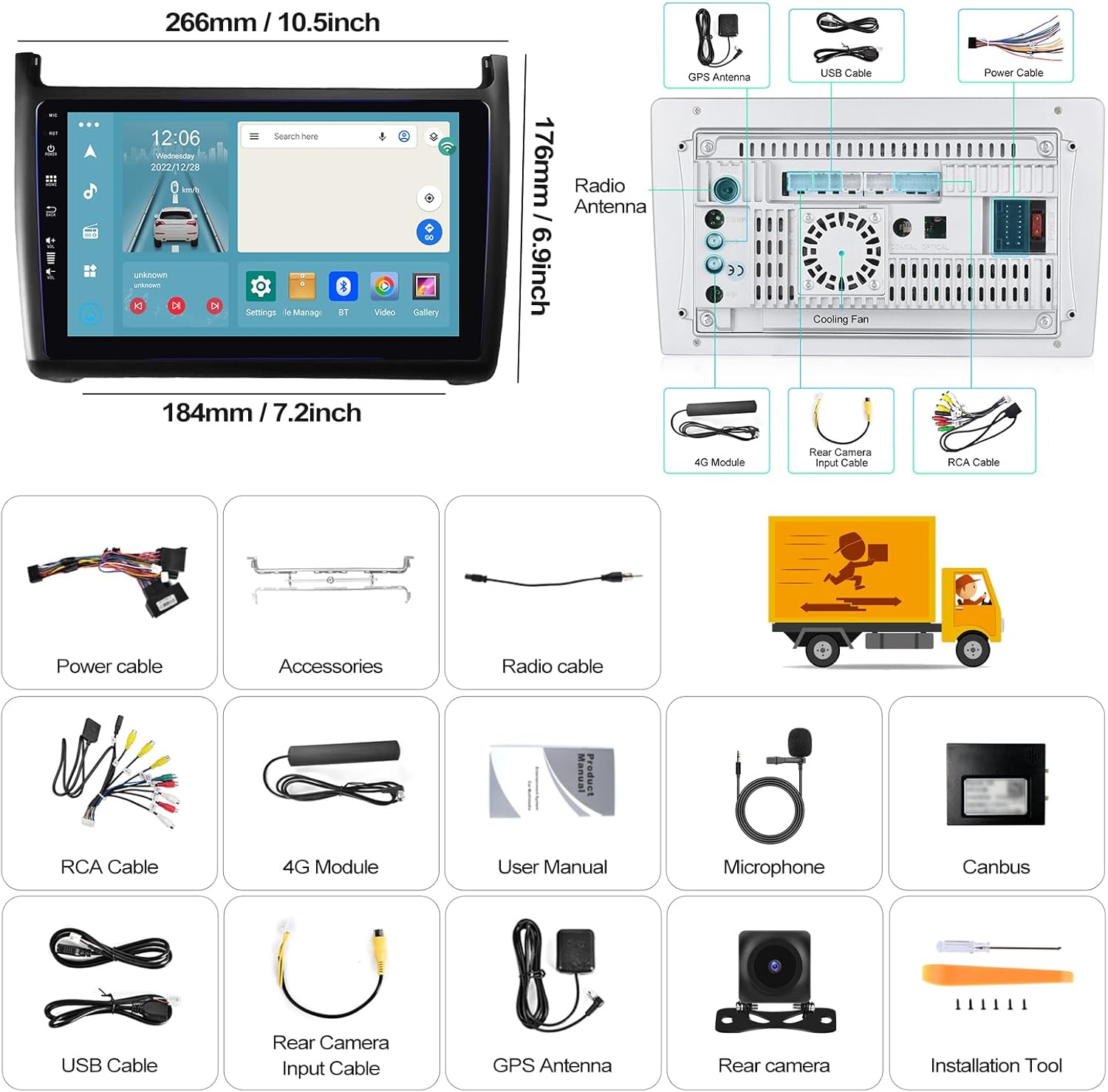
Image: Applicable Volkswagen Polo models and a visual comparison of the dashboard before and after the car radio installation.
3. సెటప్
3.1. ప్యాకేజీ విషయాలు
క్రింద జాబితా చేయబడిన అన్ని వస్తువులు మీ ప్యాకేజీలో చేర్చబడ్డాయని ధృవీకరించండి:
- ప్రధాన కార్ రేడియో యూనిట్
- పవర్ కేబుల్
- Accessories (Mounting Brackets)
- Radio Antenna Cable
- RCA కేబుల్
- 4G మాడ్యూల్ (వర్తిస్తే)
- వినియోగదారు మాన్యువల్
- మైక్రోఫోన్
- Canbus Decoder (if applicable)
- USB కేబుల్స్
- వెనుక కెమెరా ఇన్పుట్ కేబుల్
- GPS యాంటెన్నా
- Rear Camera (if included)
- Installation Tool (if included)

Image: Car radio unit dimensions and a visual representation of the packing list contents.
3.2. సంస్థాపన
Installation of the car radio requires technical knowledge and experience with car electronics. It is highly recommended to have the unit installed by a qualified professional to avoid damage to the product or your vehicle.
- తయారీ: Disconnect the vehicle's battery before starting the installation.
- పాత యూనిట్ తొలగించండి: Carefully remove the existing car radio or dashboard panel.
- వైరింగ్ కనెక్ట్ చేయండి: Connect the power cable, RCA cables, USB cables, GPS antenna, radio antenna, and any other necessary cables to the corresponding ports on the new car radio and the vehicle's wiring harness. Ensure all connections are secure.
- మౌంటు: Secure the car radio into the dashboard using the provided mounting brackets.
- పరీక్ష: Reconnect the vehicle's battery and perform a basic function test before fully reassembling the dashboard.
- మళ్లీ కలపండి: డాష్బోర్డ్ భాగాలను జాగ్రత్తగా తిరిగి అమర్చండి.

Image: Visual comparison of the car dashboard before and after installation.
3.3. Initial Configuration (WiFi/4G)
To access online features, connect the unit to the internet:
- వైఫై కనెక్షన్: సెట్టింగ్లు > నెట్వర్క్ & ఇంటర్నెట్ > Wi-Fiకి వెళ్లండి. మీకు కావలసిన నెట్వర్క్ను ఎంచుకుని, పాస్వర్డ్ను నమోదు చేయండి.
- 4G/SIM Connection: Insert a compatible SIM card into the designated slot (if your model includes a 4G module). Ensure mobile data is enabled in the settings.

Image: WiFi and 4G/SIM card connection options.
4. ఆపరేటింగ్ సూచనలు
4.1. వైర్లెస్ ఆపిల్ కార్ప్లే మరియు ఆండ్రాయిడ్ ఆటో
Connect your smartphone for seamless integration of navigation, calls, messages, and music.
- For Apple CarPlay: Activate Bluetooth on your iPhone and pair it with the car radio. Open the CarPlay application on the car radio. If connection fails, connect your phone to the car's hotspot and then reopen the CarPlay application. Maintain Bluetooth and hotspot connection.
- ఆండ్రాయిడ్ ఆటో కోసం: Ensure the Android Auto application is installed on your phone. Activate Bluetooth on your phone and pair it with the car radio. Open the Android Auto application on the car radio.

Image: Apple CarPlay interface.

Image: Android Auto interface.
4.2. Mirror Link Function
Mirror Link allows you to display your smartphone's screen content directly on the car radio's larger display.
- For iPhone (iOS): Turn on your iPhone's hotspot. Connect the car radio to your iPhone's hotspot via Wi-Fi. Open the "PhoneLink" app on the device and follow the instructions. Alternatively, use the AirPlay function on your iPhone, select the car radio, and mirror the screen.
- ఆండ్రాయిడ్ ఫోన్ల కోసం: Click on "PhoneLink" and scan the QR code to download the app. Follow the prompts to connect via USB cable or Wi-Fi. For USB connection, ensure "USB Debugging" is enabled in your phone's developer options and set USB configuration to "Data Transfer."

Image: Mirror Link function for iOS and Android devices.
4.3. GPS నావిగేషన్
The unit supports both online and offline navigation. Online maps require an internet connection (WiFi or 4G). Offline maps can be downloaded directly from the Play Store for use without internet access.

Image: GPS Navigation interface with online/offline options.
4.4. FM/AM/RDS Radio
Access radio stations with clear reception and RDS functionality for station information.
- ట్యూనింగ్: Use the touchscreen controls to scan for stations or manually tune to a specific frequency.
- ప్రీసెట్లు: Save your favorite stations to the 30 available preset slots.
- RDS: రేడియో డేటా సిస్టమ్ స్టేషన్ పేరు, పాట శీర్షిక మరియు ఇతర సమాచారాన్ని అందుబాటులో ఉన్న చోట ప్రదర్శిస్తుంది.

Image: FM/AM/RDS Radio interface.
4.5. DSP (డిజిటల్ సౌండ్ ప్రాసెసర్)
The integrated DSP allows for advanced audio customization, including a 36-band or 10-band equalizer, sound field adjustment, and sound type selection for enhanced audio quality.

Image: DSP 32EQ sound adjustment interface.
4.6. Bluetooth Hands-Free
Connect your phone via Bluetooth for hands-free calling and audio streaming.
- జత చేయడం: Enable Bluetooth on your phone and search for the car radio. Select the device and confirm pairing.
- కాల్లు: కారు రేడియో ఇంటర్ఫేస్ నుండి నేరుగా కాల్లు చేయండి మరియు స్వీకరించండి.
- ఆడియో స్ట్రీమింగ్: మీ ఫోన్ నుండి కారు స్పీకర్ల ద్వారా సంగీతాన్ని ప్లే చేయండి.

Image: Bluetooth hands-free calling interface.
4.7. స్ప్లిట్ స్క్రీన్
The split-screen function allows you to run two applications simultaneously on the display, such as navigation and music playback.

Image: Split-screen function displaying navigation and music.
4.8. Optional Functions (Accessories Sold Separately)
The car radio supports various optional accessories to enhance its functionality:
- బ్యాకప్ కెమెరా: Connect an external HD backup camera for clear rear view when reversing. Supports AHD 1080P, waterproof, day/night vision, and wide-angle features.
- ఓబీడీ2: Connect an OBD2 scanner to monitor vehicle diagnostics and performance data.
- DAB+: Connect a DAB+ module for digital audio broadcasting, offering higher quality radio and more stations.
- DVR: Connect an external DVR (Dash Cam) for recording driving footage.
- వీడియో అవుట్పుట్: Connect external monitors (e.g., headrest screens) to display video content from the car radio.

Image: Backup camera features.
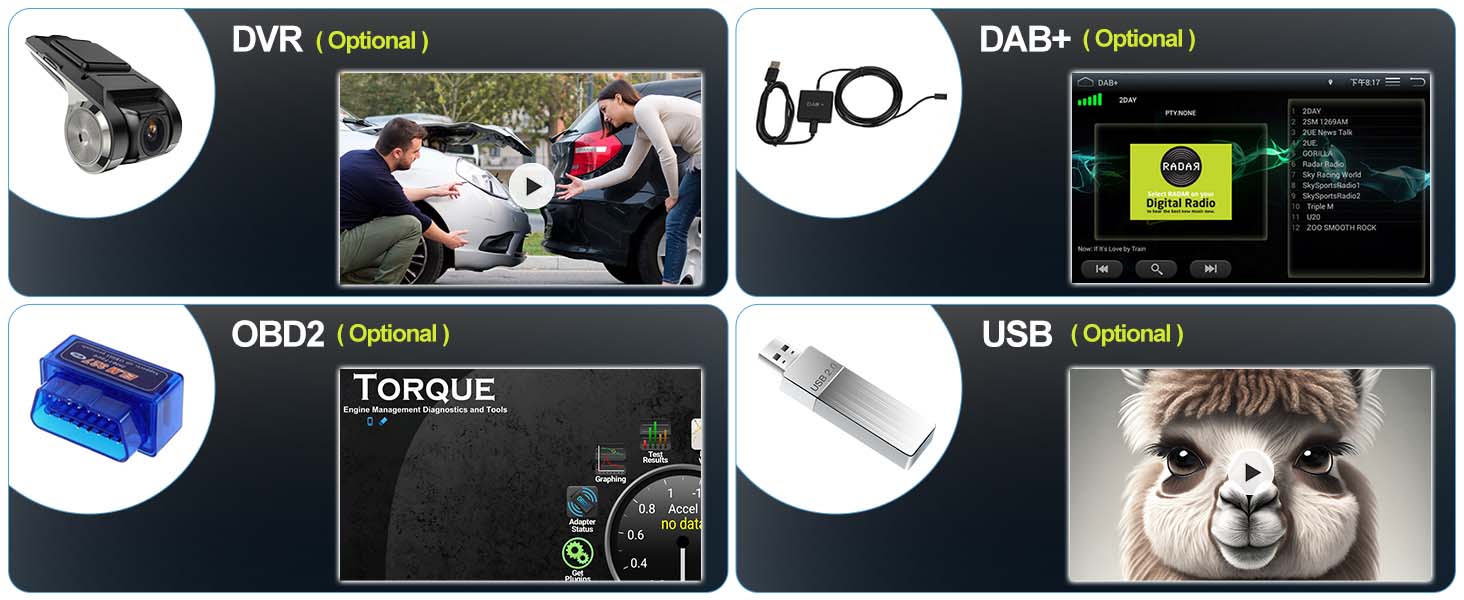
Image: Optional accessories including DVR, DAB+, OBD2, and USB.
5. నిర్వహణ
To ensure the longevity and optimal performance of your CAMECHO Android 13 Car Radio, follow these maintenance guidelines:
- స్క్రీన్ క్లీనింగ్: టచ్స్క్రీన్ను సున్నితంగా తుడవడానికి మృదువైన, మెత్తటి బట్టను ఉపయోగించండి. మొండి మరకల కోసం, కొద్దిగా dampనీటితో లేదా స్క్రీన్-సేఫ్ క్లీనర్తో వస్త్రాన్ని తుడవండి. కఠినమైన రసాయనాలు లేదా రాపిడి పదార్థాలను నివారించండి.
- సాధారణ శుభ్రపరచడం: యూనిట్ను దుమ్ము మరియు చెత్త లేకుండా ఉంచండి. వెంట్లు మరియు బటన్లను శుభ్రం చేయడానికి మృదువైన బ్రష్ లేదా కంప్రెస్డ్ ఎయిర్ను ఉపయోగించండి.
- సాఫ్ట్వేర్ అప్డేట్లు: Periodically check for available software updates through the unit's settings to ensure you have the latest features and bug fixes.
- విపరీతమైన ఉష్ణోగ్రతలను నివారించండి: యూనిట్ను తీవ్రమైన వేడి లేదా చలికి గురిచేయవద్దు, ఎందుకంటే ఇది దాని పనితీరు మరియు జీవితకాలాన్ని ప్రభావితం చేస్తుంది.
- పవర్ ఆఫ్ సరిగ్గా: Always turn off your vehicle's ignition properly to allow the unit to shut down correctly.
6. ట్రబుల్షూటింగ్
మీ కారు రేడియోతో మీకు సమస్యలు ఎదురైతే, ఈ క్రింది సాధారణ సమస్యలు మరియు పరిష్కారాలను చూడండి:
| సమస్య | సాధ్యమైన కారణం | పరిష్కారం |
|---|---|---|
| యూనిట్ పవర్ ఆన్ చేయదు | Incorrect wiring, blown fuse, vehicle battery issue | Check power connections, inspect vehicle fuses, ensure battery is charged. Consult a professional if necessary. |
| శబ్దం లేదు | Volume too low, speaker wiring issue, audio settings | Increase volume, check speaker connections, verify audio output settings in DSP. |
| GPS పనిచేయడం లేదు | GPS antenna not connected, poor signal, software issue | GPS యాంటెన్నా సరిగ్గా కనెక్ట్ చేయబడిందని మరియు స్పష్టమైన లైటింగ్ కలిగి ఉందని నిర్ధారించుకోండి view of the sky. Check GPS settings and update map software. |
| బ్లూటూత్ కనెక్షన్ సమస్యలు | Incorrect pairing, device compatibility, interference | Ensure Bluetooth is enabled on both devices. Delete previous pairings and re-pair. Try with a different device. |
| CarPlay/Android Auto కనెక్ట్ కావడం లేదు | Incorrect settings, cable issue, app version | Verify phone settings (Bluetooth, Wi-Fi, USB debugging). Try a different USB cable. Ensure apps are updated. |
| టచ్స్క్రీన్ స్పందించలేదు | సాఫ్ట్వేర్ లోపం, భౌతిక నష్టం | యూనిట్ను పునఃప్రారంభించండి. సమస్య కొనసాగితే, కస్టమర్ మద్దతును సంప్రదించండి. |
7. స్పెసిఫికేషన్లు
| ఫీచర్ | వివరాలు |
|---|---|
| బ్రాండ్ | CAMECHO |
| మోడల్ సంఖ్య | 77d6b9b8-4673-49af-b3aa-fea90888d4ef |
| రంగు | నలుపు |
| స్క్రీన్ పరిమాణం | 9 అంగుళాలు |
| కనెక్టివిటీ టెక్నాలజీ | బ్లూటూత్, USB, Wi-Fi |
| ప్రత్యేక లక్షణాలు | 4G, Android Auto, Apple CarPlay, DSP, AM/FM Tuner |
| కంట్రోలర్ రకం | పుష్ బటన్ |
| మొత్తం HDMI పోర్ట్లు | 1 |
| కనెక్టర్ రకం | RCA, USB, HDMI |
| సరౌండ్ సౌండ్ ఛానెల్ కాన్ఫిగరేషన్ | 5.1 |
| వీడియో ఎన్కోడింగ్ | H.264, H.265/HEVC, VP9, AV1, MPEG-4 |
| ఛానెల్ల సంఖ్య | 8 |
| ప్యాకేజీ కొలతలు | 29 x 20 x 7 సెం.మీ; 800 గ్రాములు |
8. వారంటీ మరియు మద్దతు
For technical assistance, troubleshooting, or warranty inquiries, please contact CAMECHO customer support.
- కస్టమర్ మద్దతు ఇమెయిల్: CAMECHOVIP@126.com
Please have your model number (77d6b9b8-4673-49af-b3aa-fea90888d4ef) and purchase information ready when contacting support.
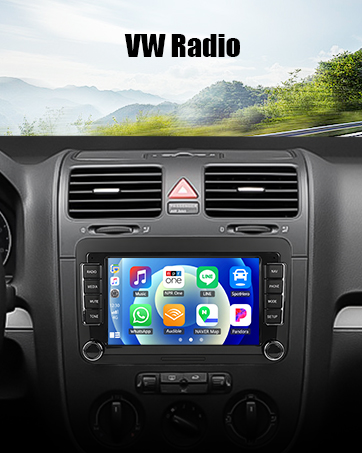
Image: Customer service contact information.


