పరిచయం
This manual provides detailed instructions for the setup, operation, and maintenance of your MageGee V560 Wireless Gaming Keyboard and Mouse Combo. Please read this manual thoroughly before use to ensure optimal performance and longevity of your device.

Image: The MageGee V560 Wireless Gaming Keyboard and Mouse Combo, featuring a blue, white, and purple color scheme, with the USB receiver visible.
ప్యాకేజీ విషయాలు
దయచేసి అన్ని అంశాలు ప్యాకేజీలో ఉన్నాయని ధృవీకరించండి:
- MageGee V560 Wireless Keyboard
- MageGee Wireless Mouse
- 2.4GHz USB Receiver (stored in mouse battery compartment)
- USB-C ఛార్జింగ్ కేబుల్
- వినియోగదారు మాన్యువల్

Image: Contents of the MageGee V560 package, including the keyboard, mouse, USB receiver, charging cable, and user manual.
సెటప్ సూచనలు
- USB రిసీవర్ను గుర్తించండి: Open the battery cover of the wireless mouse. The 2.4GHz USB receiver is stored inside the compartment next to the mouse battery slot.
- రిసీవర్ని కనెక్ట్ చేయండి: మీ కంప్యూటర్లో అందుబాటులో ఉన్న USB పోర్ట్కి USB రిసీవర్ని ప్లగ్ చేయండి.
- పవర్ ఆన్ పరికరాల: Ensure both the keyboard and mouse are powered on. The devices are plug-and-play and should connect automatically.
- ప్రారంభ ఛార్జ్: For optimal performance, it is recommended to fully charge both the keyboard and mouse before first use. Use the provided USB-C charging cable.

Image: Illustration showing the 2-in-1 USB receiver connecting the keyboard and mouse wirelessly to a laptop.
ఆపరేటింగ్ సూచనలు
కీబోర్డ్ విధులు
- RGB బ్యాక్లైటింగ్ నియంత్రణ:
- నొక్కండి FN + INS బ్యాక్లైట్ని ఆన్ లేదా ఆఫ్ చేయడానికి.
- నొక్కండి FN + PgUp or FN + PgDn to adjust the 3-level backlight brightness.
- నొక్కండి FN + 1 / 2 / 3 / 4 / 5 to switch between different backlight modes. Note: Backlight settings are not saved after power off.
- మల్టీమీడియా సత్వరమార్గాలు: ఉపయోగించండి FN కీ తో కలిపి F1-F12 keys for quick access to multimedia functions such as volume control, media playback, and more.
- ఎర్గోనామిక్ డిజైన్: The keyboard features a stepped layout and foldable brackets at the bottom, allowing you to adjust the typing angle for comfort during extended use.
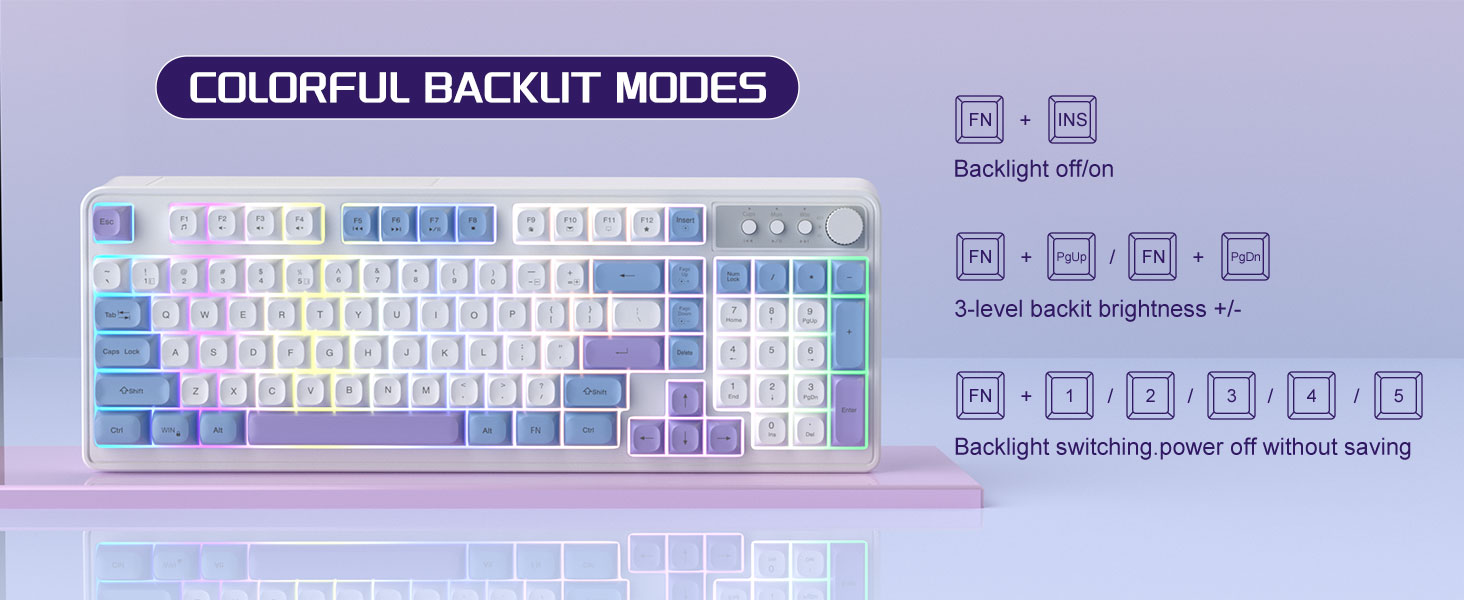
Image: The MageGee V560 keyboard displaying various colorful backlit modes, with instructions for controlling them.

Image: A visual representation of the 16 multimedia shortcuts available on the MageGee V560 keyboard, activated via the FN key.
మౌస్ విధులు
- DPI సర్దుబాటు: The mouse supports 6 levels of DPI adjustment (600-3200 DPI). Press the DPI button (usually located below the scroll wheel) to cycle through the sensitivity settings. Internal indicator lights will show the current DPI level.
- Breathing Backlight: The mouse features 7 dazzling color breathing backlights. This lighting is automatic and indicates mouse activity.

Image: The MageGee V560 mouse highlighting its DPI settings (1000, 1200, 1600 DPI) and showing the USB-C charging port.
ఛార్జింగ్ మరియు బ్యాటరీ జీవితం
- Both the keyboard and mouse are rechargeable. Use the provided USB-C charging cable to charge them.
- Keyboard Standby Time: 365 రోజుల వరకు.
- Mouse Standby Time: 270 రోజుల వరకు.
- ఆటో-స్లీప్ ఫంక్షన్: The devices automatically enter sleep mode after a period of inactivity to conserve battery power and extend battery life.

Image: An illustration demonstrating the intelligent auto-sleep feature of the MageGee V560 combo, which conserves battery life.
అనుకూలత
The MageGee V560 Wireless Gaming Keyboard and Mouse Combo is compatible with the following operating systems:
- విన్2000
- XPని గెలుచుకోండి
- నన్ను గెలవండి
- విస్టా
- విన్7
- విన్8
- విన్10
- ఆండ్రాయిడ్
- Linux
- Mac OS
ట్రబుల్షూటింగ్
If you encounter issues with your MageGee V560 combo, please refer to the following common solutions:
- పరికరం కనెక్ట్ కావడం లేదు:
- USB రిసీవర్ పనిచేసే USB పోర్ట్కి సురక్షితంగా ప్లగ్ చేయబడిందని నిర్ధారించుకోండి.
- కీబోర్డ్ మరియు మౌస్ రెండూ ఆన్లో ఉన్నాయని ధృవీకరించండి.
- Check the battery levels of both devices and charge if necessary.
- USB రిసీవర్ని వేరే USB పోర్ట్కి ప్లగ్ చేసి ప్రయత్నించండి.
- లాగ్ లేదా డిస్కనెక్షన్:
- Ensure the devices are within the 33 ft (10 meter) operating range of the USB receiver.
- Minimize interference from other 2.4GHz wireless devices (e.g., Wi-Fi routers, cordless phones).
- Charge the devices to ensure sufficient power.
- Keys Not Registering / Mouse Not Responding:
- Recharge the keyboard and mouse.
- Ensure the USB receiver is properly connected.
- మీ కంప్యూటర్ని పునఃప్రారంభించండి.
- బ్యాక్లైట్ సమస్యలు:
- కీబోర్డ్ ఛార్జ్ అయ్యిందని నిర్ధారించుకోండి.
- ఉపయోగించండి FN + INS to toggle the backlight.
- దీనితో ప్రకాశాన్ని సర్దుబాటు చేయండి FN + PgUp/PgDn.
స్పెసిఫికేషన్లు
| బ్రాండ్ | MageGee |
| మోడల్ | V560 |
| కనెక్టివిటీ టెక్నాలజీ | 2.4GHz వైర్లెస్ |
| ప్రత్యేక లక్షణాలు | RGB lighting, rechargeable keyboard and mouse, ergonomic design |
| అనుకూల పరికరాలు | Personal Computer (Win2000, Win XP, Win ME, Vista, Win7, Win8, Win10, Android, Linux, Mac OS) |
| వస్తువు బరువు | 1.87 పౌండ్లు |
| ప్యాకేజీ కొలతలు | 16.61 x 9.21 x 1.73 అంగుళాలు |
| తయారీదారు | MAGEGEE |
నిర్వహణ
- శుభ్రపరచడం: కీబోర్డ్ మరియు మౌస్ను శుభ్రం చేయడానికి మృదువైన, పొడి వస్త్రాన్ని ఉపయోగించండి. మొండి ధూళి కోసం, కొద్దిగా damp పరికరంలోకి ద్రవం ప్రవేశించకుండా చూసుకోవడానికి వస్త్రాన్ని ఉపయోగించవచ్చు.
- నిల్వ: పరికరాలను ప్రత్యక్ష సూర్యకాంతి మరియు తీవ్రమైన ఉష్ణోగ్రతలకు దూరంగా చల్లని, పొడి ప్రదేశంలో నిల్వ చేయండి.
- బ్యాటరీ సంరక్షణ: బ్యాటరీలను తరచుగా పూర్తిగా డిశ్చార్జ్ చేయవద్దు. బ్యాటరీ ఆరోగ్యాన్ని కాపాడుకోవడానికి వాటిని క్రమం తప్పకుండా ఛార్జ్ చేయండి.
వారంటీ మరియు మద్దతు
ఈ ఉత్పత్తి a తో వస్తుంది 1 సంవత్సరాల వారంటీ కొనుగోలు చేసిన తేదీ నుండి.
For any questions or support needs, please contact MageGee customer service via Amazon email. We aim to respond within 12 hours and provide a satisfactory solution.


