ఉత్పత్తి ముగిసిందిview
The PPLEE Alarm Clock (Model: CR1001EPRO) is an upgraded digital clock designed for bedrooms, featuring a large, bold number display for easy readability. It includes dual alarms, weekend/weekday modes, adjustable brightness and volume, and convenient Type-C and USB charging ports. This clock is designed to provide reliable timekeeping and alarm functions with power-off memory for uninterrupted use.

Figure 1: PPLEE Alarm Clock with large white LED display and charging phone.
కీ ఫీచర్లు
- Large Bold LED Display: 2.2-inch digits for clear visibility day and night, with an upgraded week display.
- Adjustable Brightness & Volume: 5 levels of brightness and volume to suit individual preferences and light sensitivity.
- ద్వంద్వ అలారాలు: Set two independent alarms with daily, weekday (MON-FRI), and weekend (SAT-SUN) modes for flexible scheduling.
- USB + Type-C Charging Ports: Conveniently charge mobile devices directly from the clock.
- DST & 12/24H Format: Easy Daylight Saving Time (DST) adjustment and switch between 12-hour and 24-hour time formats.
- Big Snooze Button: Allows for an extra 9 minutes of sleep.
- పవర్ ఆఫ్ మెమరీ: Retains time and alarm settings during power outages (requires backup batteries, not included).

Figure 2: Adjustable brightness levels of the alarm clock display.
సెటప్
1. పవర్ కనెక్షన్
Connect the provided AC adapter to the DC 5V IN port on the back of the alarm clock and plug it into a standard wall outlet. The display will light up.

చిత్రం 3: వెనుక view of the alarm clock with power and charging ports.
2. బ్యాటరీ బ్యాకప్ (ఐచ్ఛికం)
For power-off memory function, insert 2 AAA batteries (not included) into the battery compartment on the back of the clock. This will preserve time and alarm settings during power interruptions.

Figure 4: Illustration of the battery backup feature for power outage memory.
ఆపరేటింగ్ సూచనలు
1. సమయాన్ని నిర్ణయించడం
- నొక్కండి సమయం సరిచేయి button once. The hour digits will flash.
- ఉపయోగించండి గంట గంట సర్దుబాటు చేయడానికి బటన్.
- నొక్కండి MIN నిమిషాలు సర్దుబాటు బటన్.
- నొక్కండి సమయం సరిచేయి again or wait a few seconds for the setting to save automatically.
2. అలారాలను సెట్ చేయడం (ద్వంద్వ అలారాలు)
The clock supports two independent alarms (ALARM1 and ALARM2).
- నొక్కండి ALARM1 or ALARM2 బటన్. అలారం సమయం ఫ్లాష్ అవుతుంది.
- ఉపయోగించండి గంట మరియు MIN కావలసిన అలారం సమయాన్ని సెట్ చేయడానికి బటన్లు.
- నొక్కండి ALARM1 or ALARM2 button again to confirm and activate the alarm. An alarm icon will appear on the display.
- To select alarm mode (Daily, Weekday, Weekend), press the corresponding ALARM button repeatedly until the desired mode icon appears.

Figure 5: Dual alarm settings with weekday and weekend options.
3. స్నూజ్ ఫంక్షన్
అలారం మోగినప్పుడు, పెద్ద బటన్ను నొక్కండి తాత్కాలికంగా ఆపివేయండి/సరే button on top to temporarily silence the alarm for 9 minutes.
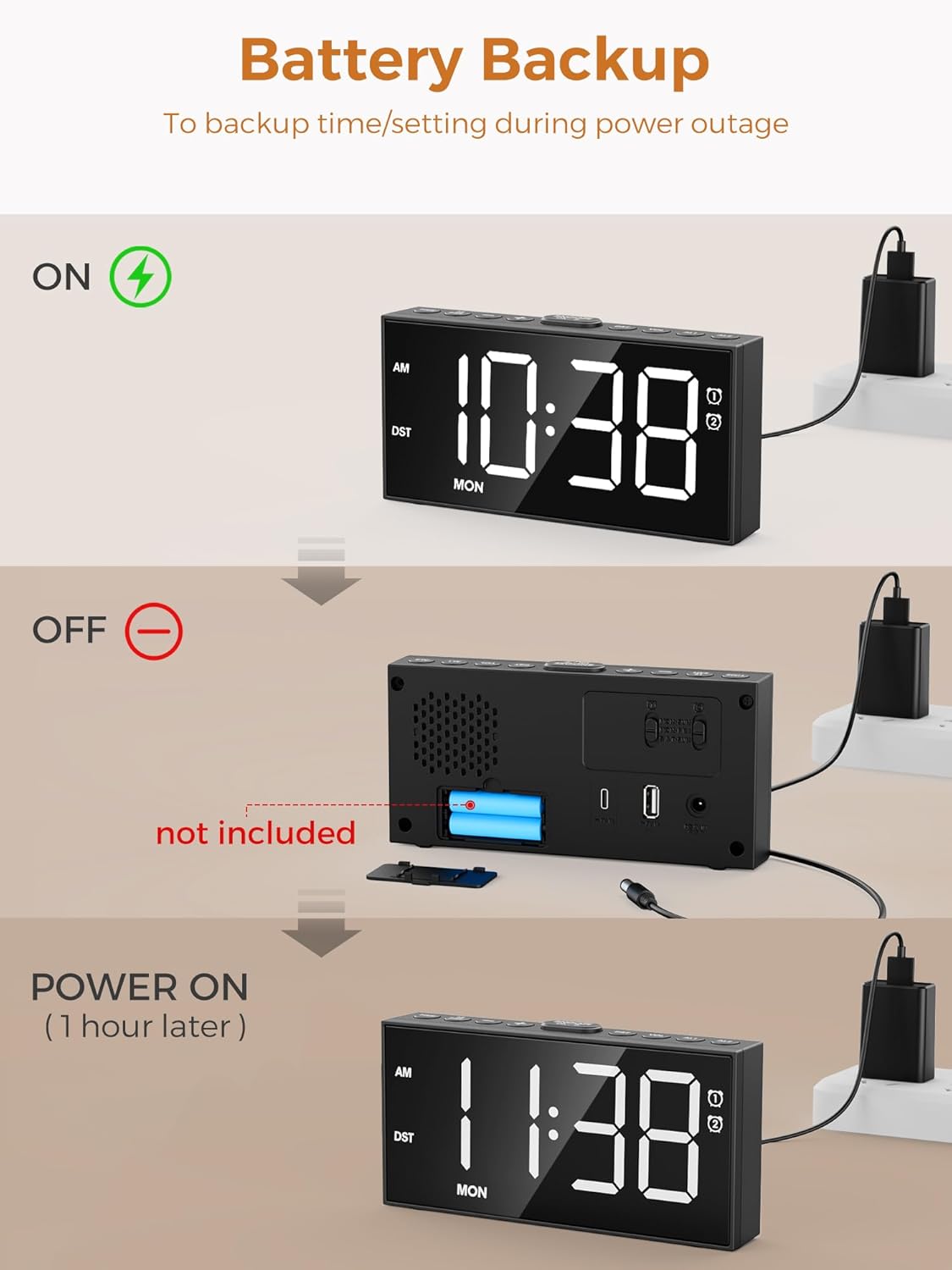
Figure 6: The large snooze button for temporary alarm silencing.
4. ప్రకాశం సర్దుబాటు
నొక్కండి మసకబారిన button repeatedly to cycle through 5 levels of display brightness.
5. వాల్యూమ్ సర్దుబాటు
ఉపయోగించండి VOL+ మరియు VOL- buttons on the side to adjust the alarm volume (5 levels).
6. 12/24 Hour Format & DST
నొక్కండి 12/24H button to switch between 12-hour (with AM/PM indicator) and 24-hour formats. Hold the DST button for 3 seconds to activate/deactivate Daylight Saving Time, which will adjust the time by one hour.

Figure 7: Time format and DST adjustment options.
నిర్వహణ
- Keep the clock clean by wiping it with a soft, dry cloth. Avoid abrasive cleaners.
- గడియారం చుట్టూ సరైన వెంటిలేషన్ ఉండేలా చూసుకోండి.
- గడియారాన్ని తీవ్రమైన ఉష్ణోగ్రతలు, ప్రత్యక్ష సూర్యకాంతి లేదా అధిక తేమకు గురిచేయకుండా ఉండండి.
- If using battery backup, replace batteries annually or when the display shows signs of dimming during power outages.
ట్రబుల్షూటింగ్
| సమస్య | సాధ్యమైన కారణం | పరిష్కారం |
|---|---|---|
| గడియార ప్రదర్శన ఆఫ్లో ఉంది లేదా మసకగా ఉంది. | No power or low brightness setting. | Check AC adapter connection. Press మసకబారిన ప్రకాశాన్ని పెంచడానికి బటన్. |
| అలారం మోగడం లేదు. | Alarm not activated, volume too low, or incorrect alarm mode. | Ensure alarm icon is displayed. Increase volume using VOL+. Verify correct alarm mode (Daily/Weekday/Weekend). |
| పవర్ OU తర్వాత సమయం/సెట్టింగ్లు పోయాయిtage. | బ్యాకప్ బ్యాటరీలు లేదా బ్యాటరీలు డెడ్ కాలేదు. | 2 AAA బ్యాకప్ బ్యాటరీలను ఇన్స్టాల్ చేయండి లేదా భర్తీ చేయండి. |
| Cannot charge devices via USB/Type-C. | కేబుల్ సమస్య లేదా పరికరం అననుకూలత. | Ensure charging cable is functional. Check device compatibility with 5V 1A output. |
స్పెసిఫికేషన్లు
- మోడల్: CR1001EPRO
- బ్రాండ్: PPLEE
- ప్రదర్శన రకం: LED
- శక్తి మూలం: Corded Electric (AC adapter included)
- బ్యాటరీ బ్యాకప్: 2 x AAA బ్యాటరీలు (చేర్చబడలేదు)
- ఛార్జింగ్ పోర్ట్లు: 1 x USB (5V 1A), 1 x Type-C (5V 1A)
- ఉత్పత్తి కొలతలు: 6.8"అడుగు x 3.4"అడుగు
- వస్తువు బరువు: 9.9 ఔన్సులు
- మెటీరియల్: యాక్రిలోనిట్రైల్ బుటాడిన్ స్టైరిన్
వారంటీ మరియు మద్దతు
This PPLEE Alarm Clock comes with an extended warranty. For any product inquiries, technical support, or warranty claims, please contact PPLEE Customer Service at Support@ppleee.net.
Please refer to the official PPLEE webఅత్యంత తాజా వారంటీ సమాచారం మరియు మద్దతు వనరుల కోసం సైట్.


