పరిచయం
This manual provides detailed instructions for the ELISWEEN Wireless Presenter Model WP006. It covers setup, operation, maintenance, and troubleshooting to ensure optimal performance and longevity of your device. Please read this manual thoroughly before using the product.
ప్యాకేజీ విషయాలు
మీ ప్యాకేజీలో అన్ని అంశాలు ఉన్నాయని ధృవీకరించండి:
- ELISWEEN Wireless Presenter (Model WP006)
- USB/Type-C Dual-Head Receiver
- ప్రొటెక్టివ్ క్యారీ కేస్
- వినియోగదారు మాన్యువల్ (ఈ పత్రం)
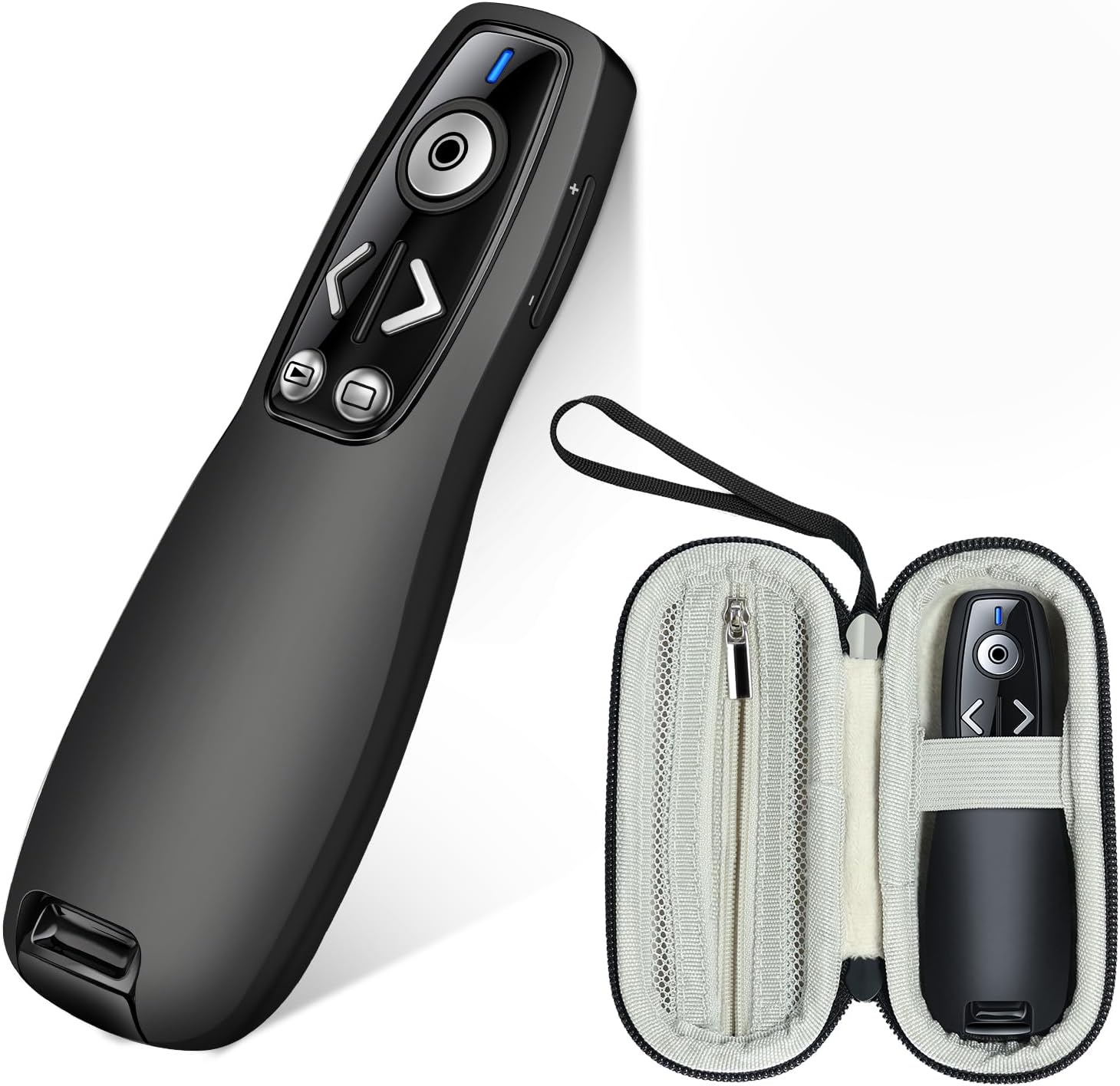
Image: The ELISWEEN Wireless Presenter and its included protective carry case.
ఉత్పత్తి ముగిసిందిview
The ELISWEEN Wireless Presenter WP006 is designed for seamless presentations. It features intuitive controls and a dual-head USB/Type-C receiver for broad compatibility.

చిత్రం: క్లోజప్ view of the ELISWEEN Wireless Presenter, highlighting its control buttons including Page Up/Down, Slide Show/Black Screen, Laser Pointer, and the wireless receiver storage.
ముఖ్య లక్షణాలు:
- పేజీ పైకి/క్రిందికి: Navigate through slides.
- Slide Show & Black Screen: Start/end presentations and black out the screen.
- లేజర్ పాయింటర్: Highlight specific content on the screen.
- వాల్యూమ్ నియంత్రణ: ఆడియో అవుట్పుట్ను సర్దుబాటు చేయండి.
- Switch Windows: Toggle between open applications.
- డ్యూయల్-హెడ్ రిసీవర్: USB-A and USB-C compatibility.
- ఇంటిగ్రేటెడ్ రిసీవర్ స్టోరేజ్: Securely store the receiver within the presenter.
సెటప్
1. బ్యాటరీ ఇన్స్టాలేషన్
The ELISWEEN Wireless Presenter requires 2 AAA batteries (not included).
- ప్రెజెంటర్ వెనుక భాగంలో బ్యాటరీ కంపార్ట్మెంట్ను గుర్తించండి.
- బ్యాటరీ కవర్ తెరవండి.
- సరైన ధ్రువణతను (+/-) నిర్ధారించుకోవడానికి రెండు AAA బ్యాటరీలను చొప్పించండి.
- బ్యాటరీ కవర్ను సురక్షితంగా మూసివేయండి.
2. రిసీవర్ని కనెక్ట్ చేస్తోంది
The presenter uses a dual-head USB/Type-C receiver for versatile connectivity.
- Remove the USB/Type-C receiver from its storage slot at the bottom of the presenter.
- Identify the appropriate port on your computer (USB-A or USB-C).
- Plug the receiver into the chosen USB port. The system will automatically detect and install the necessary drivers. No additional software installation is required.

Image: The wireless presenter with its USB receiver inserted into a laptop's USB port, illustrating the plug-and-play functionality.

Image: Two laptops demonstrating the dual compatibility of the receiver, showing both USB-A and USB-C connections.
3. పవర్ చేయడం ఆన్/ఆఫ్
Locate the power switch on the side of the presenter. Slide it to the "ON" position to activate the device. Slide it to "OFF" when not in use to conserve battery life.
ఆపరేటింగ్ సూచనలు
Once the receiver is connected and the presenter is powered on, you can begin your presentation.
- పేజీ పైకి/క్రిందికి: నొక్కండి < (Page Up) or > (Page Down) buttons to navigate through your presentation slides.
- Slide Show & Black Screen: తో బటన్ నొక్కండి play/pause icon to start or end a slide show. Press the button with the black screen icon to black out the screen during a presentation and press again to resume.
- లేజర్ పాయింటర్: నొక్కండి మరియు పట్టుకోండి circular button in the center to activate the red laser pointer. Release to turn it off.
- వాల్యూమ్ నియంత్రణ: ఉపయోగించండి + మరియు - buttons on the side of the presenter to adjust the system volume.
- Switch Windows: అంకితమైనదాన్ని నొక్కండి window icon button to switch between open applications on your computer.

Image: A presenter using the ELISWEEN Wireless Presenter to highlight content on a screen with its red laser pointer, demonstrating its long-range control.
అనుకూలత:
The ELISWEEN Wireless Presenter is compatible with a wide range of operating systems and presentation software:
- ఆపరేటింగ్ సిస్టమ్స్: Windows, Mac OS, Linux, Android
- సాఫ్ట్వేర్: PowerPoint, Excel, Word, Prezi, PDF, Keynote
నిర్వహణ
Presenter Care:
- Clean the presenter with a soft, dry cloth. Avoid using harsh chemicals or abrasive materials.
- Do not expose the presenter to extreme temperatures, humidity, or direct sunlight.
- Remove batteries if the presenter will not be used for an extended period to prevent leakage.
Carry Case Care:
The included protective carry case is made from durable EVA material to shield your presenter from drops, scratches, bumps, and dust.
- Keep the case clean by wiping it with a damp గుడ్డ.
- Utilize the internal mesh pocket for storing spare batteries or other small accessories.
- Always store the presenter in its case when transporting to ensure maximum protection.

చిత్రం: వివిధ views of the protective carry case, showcasing its zippered mesh pocket for accessories, comfortable hand strap, and the presenter securely stored inside.
ట్రబుల్షూటింగ్
| సమస్య | సాధ్యమైన కారణం | పరిష్కారం |
|---|---|---|
| Presenter not responding. |
|
|
| Laser pointer not working. |
|
|
| పరిమిత పరిధి లేదా అడపాదడపా కనెక్షన్. |
|
|
స్పెసిఫికేషన్లు
| మోడల్ సంఖ్య | WP006 |
| కనెక్టివిటీ | 2.4GHz Wireless (USB-A & USB-C dual-head receiver) |
| ఆపరేటింగ్ రేంజ్ | 100 అడుగుల (30 మీటర్లు) వరకు |
| లేజర్ రకం | Red Laser (Class 2) |
| శక్తి మూలం | 2 x AAA బ్యాటరీలు (చేర్చబడలేదు) |
| అనుకూల OS | Windows, Mac OS, Linux, Android |
| Dimensions (Presenter) | సుమారు 5.63 x 2.6 x 2.56 అంగుళాలు (ప్యాకేజీ కొలతలు) |
| Weight (Presenter) | సుమారు 1.94 ఔన్సులు |
| ప్రత్యేక లక్షణాలు | Ergonomic design, Integrated receiver storage, Volume control, Window switch, Full/Black screen function |
వారంటీ మరియు మద్దతు
For warranty information or technical support, please refer to the contact details provided with your purchase or visit the official ELISWEEN webవారంటీ క్లెయిమ్ల కోసం కొనుగోలు రుజువుగా మీ కొనుగోలు రసీదును ఉంచండి.
