1. పరిచయం
This manual provides instructions for the proper use and maintenance of your Vieta Pro VM-MF040BK Wireless ENC Lavalier Microphones. Please read this manual thoroughly before using the product to ensure optimal performance and longevity.
The Vieta Pro VM-MF040BK system includes two wireless lavalier microphones and a charging case, designed for high-quality audio recording with environmental noise cancellation (ENC). It offers broad compatibility with USB-C and Lightning devices.

Image 1.1: The Vieta Pro VM-MF040BK wireless microphone system, including two microphones and their charging case.
2. ప్యాకేజీ విషయాలు
ప్యాకేజీలో అన్ని అంశాలు ఉన్నాయని నిర్ధారించుకోండి:
- 2 x Vieta Pro Wireless Lavalier Microphones
- 1 x ఛార్జింగ్ కేస్
- 1 x USB-C రిసీవర్
- 1 x మెరుపు రిసీవర్
- 1 x USB ఛార్జింగ్ కేబుల్
- వినియోగదారు మాన్యువల్ (ఈ పత్రం)
3. ఉత్పత్తి ముగిసిందిview
3.1 మైక్రోఫోన్ ఫీచర్లు
- పవర్ బటన్: పవర్ ఆన్/ఆఫ్ చేయడానికి నొక్కి పట్టుకోండి.
- స్థితి సూచిక కాంతి: పవర్, జత చేయడం మరియు ఛార్జింగ్ స్థితిని సూచిస్తుంది.
- క్లిప్: For attaching the microphone to clothing.
- మైక్రోఫోన్ ఇన్పుట్: ఆడియోను క్యాప్చర్ చేస్తుంది.
- USB-C ఛార్జింగ్ పోర్ట్: For individual microphone charging (if not using case).
3.2 రిసీవర్ ఫీచర్లు
- USB-C కనెక్టర్: For Android, Mac, and Windows devices.
- మెరుపు కనెక్టర్: iOS పరికరాల కోసం.
- స్థితి సూచిక కాంతి: కనెక్షన్ స్థితిని సూచిస్తుంది.
- Pass-through Charging Port: Allows charging of the connected device while the receiver is in use.
3.3 ఛార్జింగ్ కేస్ ఫీచర్లు
- ఛార్జింగ్ స్లాట్లు: For storing and charging the microphones.
- USB-C ఛార్జింగ్ పోర్ట్: కేసును ఛార్జ్ చేయడం కోసం.
- బ్యాటరీ సూచిక: ఛార్జింగ్ కేస్ యొక్క బ్యాటరీ స్థాయిని చూపుతుంది.
4. సెటప్ మరియు కనెక్షన్
4.1 ప్రారంభ ఛార్జింగ్
మొదటిసారి ఉపయోగించే ముందు, మైక్రోఫోన్లు మరియు ఛార్జింగ్ కేసును పూర్తిగా ఛార్జ్ చేయండి.
- Place both microphones into the charging slots within the charging case.
- Connect the charging case to a power source using the provided USB charging cable. The battery indicator on the case will show charging progress.
- The microphone indicator lights will illuminate during charging and turn off when fully charged.
A full charge provides up to 10 hours of continuous use for each microphone.
4.2 మీ పరికరానికి కనెక్ట్ అవుతోంది
- మైక్రోఫోన్లను పవర్ ఆన్ చేయండి: Take the microphones out of the charging case. They will automatically power on and enter pairing mode. The indicator light will flash.
- రిసీవర్ను కనెక్ట్ చేయండి: Identify the correct receiver for your device (USB-C for Android/Mac/Windows, Lightning for iOS). Plug the receiver directly into your device's charging/data port.
- స్వయంచాలక జత చేయడం: The microphones will automatically pair with the receiver. Once paired, the indicator lights on both the microphones and the receiver will turn solid blue.
- కనెక్షన్ని ధృవీకరించండి: Open your recording application (e.g., camera app, voice recorder, podcast app) and ensure the audio input is recognized as the external microphone.
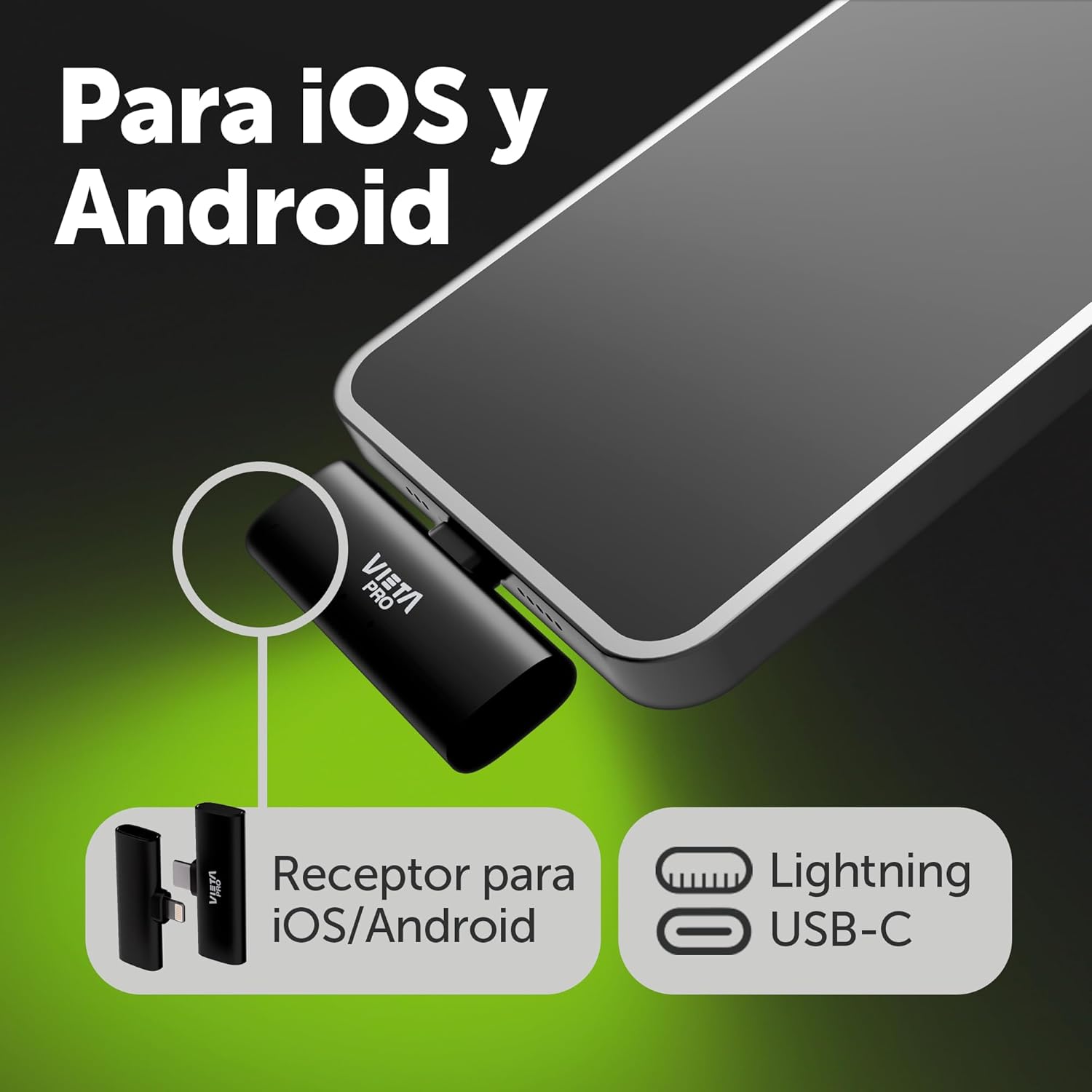
Image 4.2.1: The USB-C and Lightning receivers for broad device compatibility.

చిత్రం 4.2.2: ఉదాample of the Lightning receiver connected to an iOS device.
5. ఆపరేటింగ్ సూచనలు
5.1 Wearing the Microphone
Attach the microphone to your clothing using the integrated clip. For optimal sound quality, position the microphone approximately 6-8 inches (15-20 cm) from your mouth, ideally on your lapel or collar.

Image 5.1.1: Proper placement of the lavalier microphone on clothing.
5.2 Environmental Noise Cancellation (ENC)
The microphones feature built-in ENC technology to reduce ambient background noise. This function is active by default to ensure clear voice capture in various environments.
5.3 లాభ స్థాయి సర్దుబాటు
The microphones offer 3 levels of gain adjustment. Refer to your device's recording software or the microphone's physical controls (if available, not explicitly detailed in product info) to adjust the input sensitivity. Start with a medium gain level and adjust as needed to prevent audio clipping or low volume.
5.4 Monitoring Audio
Some devices and applications allow real-time audio monitoring through headphones connected to the device while the microphone is in use. This feature helps ensure optimal sound quality during recording.
5.5 పాస్-త్రూ ఛార్జింగ్
The receiver includes a pass-through charging port. This allows you to charge your connected mobile device (phone, tablet) simultaneously while using the microphone system, ensuring uninterrupted recording sessions.
6. నిర్వహణ మరియు సంరక్షణ
- శుభ్రపరచడం: Use a soft, dry cloth to clean the microphones and charging case. Do not use liquid cleaners or solvents.
- నిల్వ: Store the microphones in their charging case when not in use to protect them and keep them charged. Store in a cool, dry place.
- బ్యాటరీ సంరక్షణ: To prolong battery life, avoid fully discharging the batteries frequently. Charge regularly, even if not in constant use.
- విపరీతమైన పరిస్థితులను నివారించండి: ఉత్పత్తిని విపరీతమైన ఉష్ణోగ్రతలు, తేమ లేదా ప్రత్యక్ష సూర్యకాంతికి బహిర్గతం చేయవద్దు.
7. ట్రబుల్షూటింగ్
| సమస్య | సాధ్యమైన కారణం | పరిష్కారం |
|---|---|---|
| Microphones not powering on | తక్కువ బ్యాటరీ | Place microphones in the charging case and charge fully. |
| సౌండ్ రికార్డింగ్ లేదు |
|
|
| Poor audio quality / excessive background noise |
|
|
| Limited transmission range | అడ్డంకులు లేదా జోక్యం | Ensure a clear line of sight between the microphone and receiver. Avoid strong electromagnetic interference sources. The maximum range is 20 meters (65 feet). |
8. స్పెసిఫికేషన్లు
| ఫీచర్ | వివరాలు |
|---|---|
| మోడల్ సంఖ్య | VM-MF040BK |
| మైక్రోఫోన్ ఫారమ్ ఫ్యాక్టర్ | లావలియర్ (క్లిప్-ఆన్) |
| కనెక్టివిటీ టెక్నాలజీ | వైర్లెస్ |
| కనెక్టర్ రకం | USB-C, మెరుపు |
| ధ్రువ నమూనా | ఏకదిశాత్మక |
| ఫ్రీక్వెన్సీ రెస్పాన్స్ | 48 KHz (16-bit) |
| ప్రత్యేక లక్షణాలు | Environmental Noise Cancellation (ENC), 3 Gain Levels, Pass-through Charging |
| Battery Life (Microphone) | Up to 10 hours per microphone |
| ప్రసార పరిధి | 20 మీటర్లు (65 అడుగులు) వరకు |
| అనుకూల పరికరాలు | Android Mobile, iOS Mobile, Mac, Windows |
| శక్తి మూలం | Battery Powered (3 Lithium-ion batteries included) |
| మెటీరియల్ | రెసిన్ |
| రంగు | నలుపు |
9. వారంటీ మరియు మద్దతు
For warranty information and customer support, please refer to the documentation included with your purchase or visit the official Vieta Pro webవారంటీ క్లెయిమ్ల కోసం మీ కొనుగోలు రుజువును ఉంచండి.
For technical assistance or further inquiries, please contact Vieta Pro customer service.


