ROCAM Vibrating Alarm Clock User Manual
మోడల్: CR1027
1. పరిచయం
Thank you for choosing the ROCAM Vibrating Alarm Clock. This device is specifically designed to provide a reliable and effective wake-up solution for heavy sleepers, individuals with hearing impairments, and the deaf. Its powerful vibration, adjustable sound, and user-friendly features ensure you wake up on time without disturbing others. This manual provides detailed instructions on how to set up, operate, and maintain your alarm clock.
2. భద్రతా సమాచారం
- పరికరాన్ని తీవ్రమైన ఉష్ణోగ్రతలు, ప్రత్యక్ష సూర్యకాంతి లేదా అధిక తేమకు గురిచేయవద్దు.
- పరికరాన్ని నీరు మరియు ఇతర ద్రవాలకు దూరంగా ఉంచండి.
- పరికరాన్ని విడదీయడానికి లేదా మరమ్మతు చేయడానికి ప్రయత్నించవద్దు. సహాయం కోసం కస్టమర్ సపోర్ట్ని సంప్రదించండి.
- ఛార్జింగ్ కోసం అందించిన USB-C కేబుల్ను మాత్రమే ఉపయోగించండి.
- Keep out of reach of small children unless the child lock function is activated.
3. ప్యాకేజీ విషయాలు
అన్ని అంశాలు ఉన్నాయని నిర్ధారించుకోవడానికి దయచేసి ప్యాకేజీలోని విషయాలను తనిఖీ చేయండి:
- ROCAM Vibrating Alarm Clock (CR1027)
- USB-C ఛార్జింగ్ కేబుల్
- వినియోగదారు మాన్యువల్

Image: ROCAM Vibrating Alarm Clock and its packaging, including the device and charging cable.
4. ఉత్పత్తి ముగిసిందిview
Familiarize yourself with the various parts and controls of your ROCAM Vibrating Alarm Clock.

Image: Detailed diagram showing the top and bottom controls of the alarm clock.
నియంత్రణలు మరియు పోర్ట్లు:
- 1 / 2 Buttons: Alarm 1 and Alarm 2 settings.
- TIME / SNOOZE Button: Press to set time, press during alarm for snooze.
- - / + Buttons: Adjust values (time, volume, vibration).
- టైప్-సి ఛార్జింగ్ పోర్ట్: పరికరాన్ని ఛార్జ్ చేయడానికి.
- స్విచ్ ఆన్/ఆఫ్: ప్రధాన పవర్ స్విచ్.
- Child Lock Switch: చైల్డ్ లాక్ను యాక్టివేట్ చేస్తుంది/డియాక్టివేట్ చేస్తుంది.
- Alarm Mode Switch (MON-SUN / MON-FRI / SAT-SUN): Selects alarm days.
- Vibration Level Switch (Low / Medium / High): కంపన తీవ్రతను సర్దుబాటు చేస్తుంది.
- రీసెట్ బటన్: పరికరాన్ని ఫ్యాక్టరీ సెట్టింగ్లకు రీసెట్ చేస్తుంది.
5. సెటప్
5.1 పరికరాన్ని ఛార్జ్ చేస్తోంది
Before first use, fully charge the alarm clock. Connect the provided USB-C cable to the charging port on the device and the other end to a USB power adapter (not included) or a computer USB port. The battery indicator on the display will show charging status. A full charge takes approximately 4 hours and provides 3-5 months of operation, depending on usage.
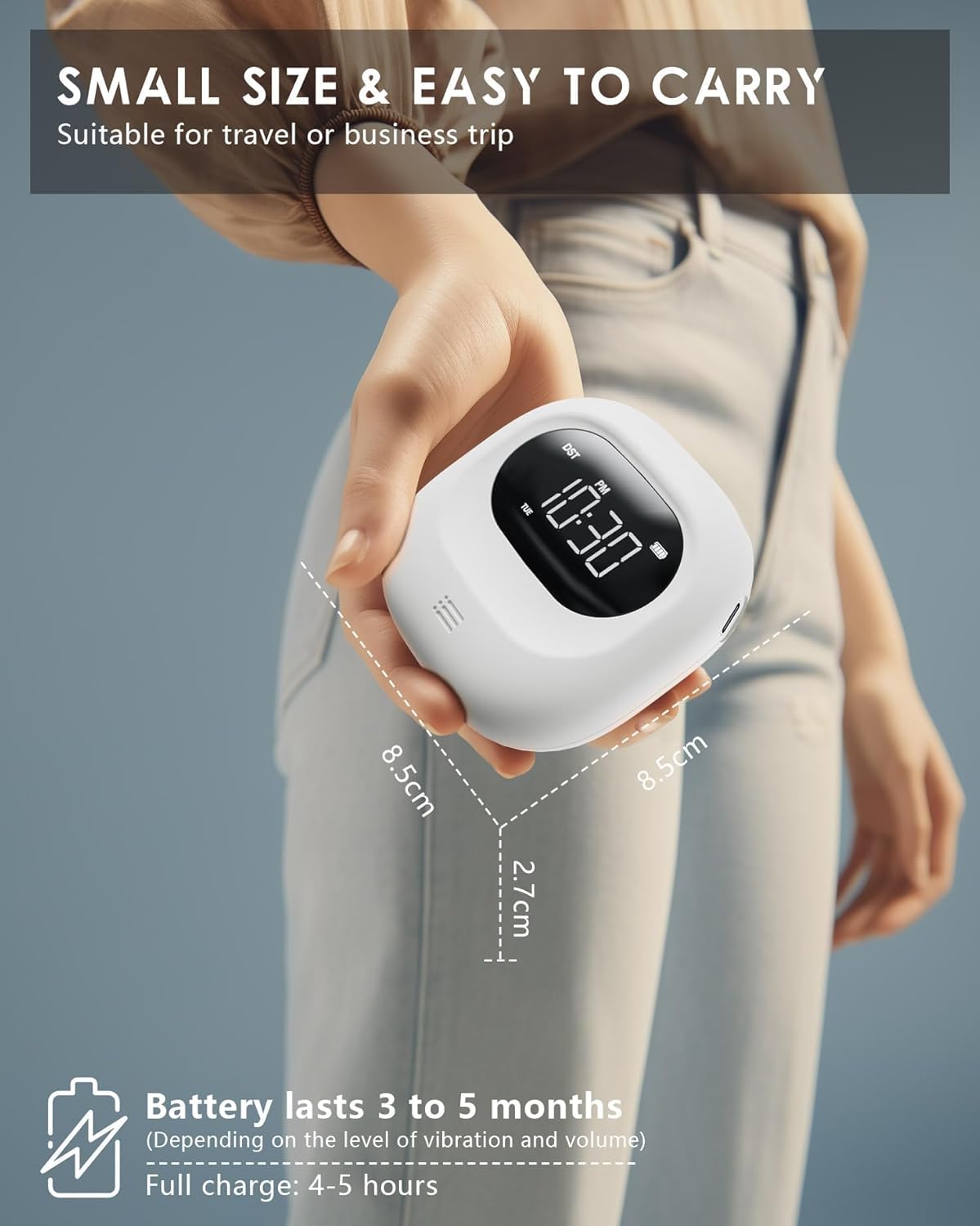
Image: The compact size of the alarm clock and its long battery life.
5.2 సమయాన్ని సెట్ చేయడం
- నొక్కండి మరియు పట్టుకోండి TIME / SNOOZE గంట అంకెలు మెరుస్తున్నంత వరకు బటన్.
- ఉపయోగించండి - or + గంటను సర్దుబాటు చేయడానికి బటన్లు.
- నొక్కండి TIME / SNOOZE నిమిషం సెట్టింగ్కి వెళ్లడానికి మళ్ళీ బటన్ నొక్కండి. ఉపయోగించండి - or + నిమిషాలు సర్దుబాటు చేయడానికి.
- నొక్కడం కొనసాగించండి TIME / SNOOZE to cycle through year, month, day settings, adjusting with - or +.
- నొక్కండి TIME / SNOOZE సమయ సెట్టింగ్ మోడ్ను నిర్ధారించడానికి మరియు నిష్క్రమించడానికి చివరిసారిగా.
6. ఆపరేటింగ్ సూచనలు
6.1 అలారాలను సెట్ చేయడం (డ్యూయల్ అలారం)
The alarm clock features two independent alarms (Alarm 1 and Alarm 2).

Image: Dual alarm settings for different schedules.
- నొక్కండి మరియు పట్టుకోండి 1 బటన్ (అలారం 1 కోసం) లేదా 2 అలారం గంట అంకెలు ఫ్లాష్ అయ్యే వరకు బటన్ (అలారం 2 కోసం).
- ఉపయోగించండి - or + కావలసిన అలారం గంటను సెట్ చేయడానికి బటన్లు.
- Press the alarm button (1 or 2) again to move to minute setting. Use - or + నిమిషాలు సెట్ చేయడానికి.
- Press the alarm button again to confirm and exit alarm setting mode.
- To activate/deactivate an alarm, short press the corresponding alarm button (1 or 2). డిస్ప్లేపై అలారం చిహ్నం కనిపిస్తుంది/అదృశ్యమవుతుంది.
6.2 Alarm Modes (Vibration, Sound, or Both)
You can choose from three alarm modes for each alarm:
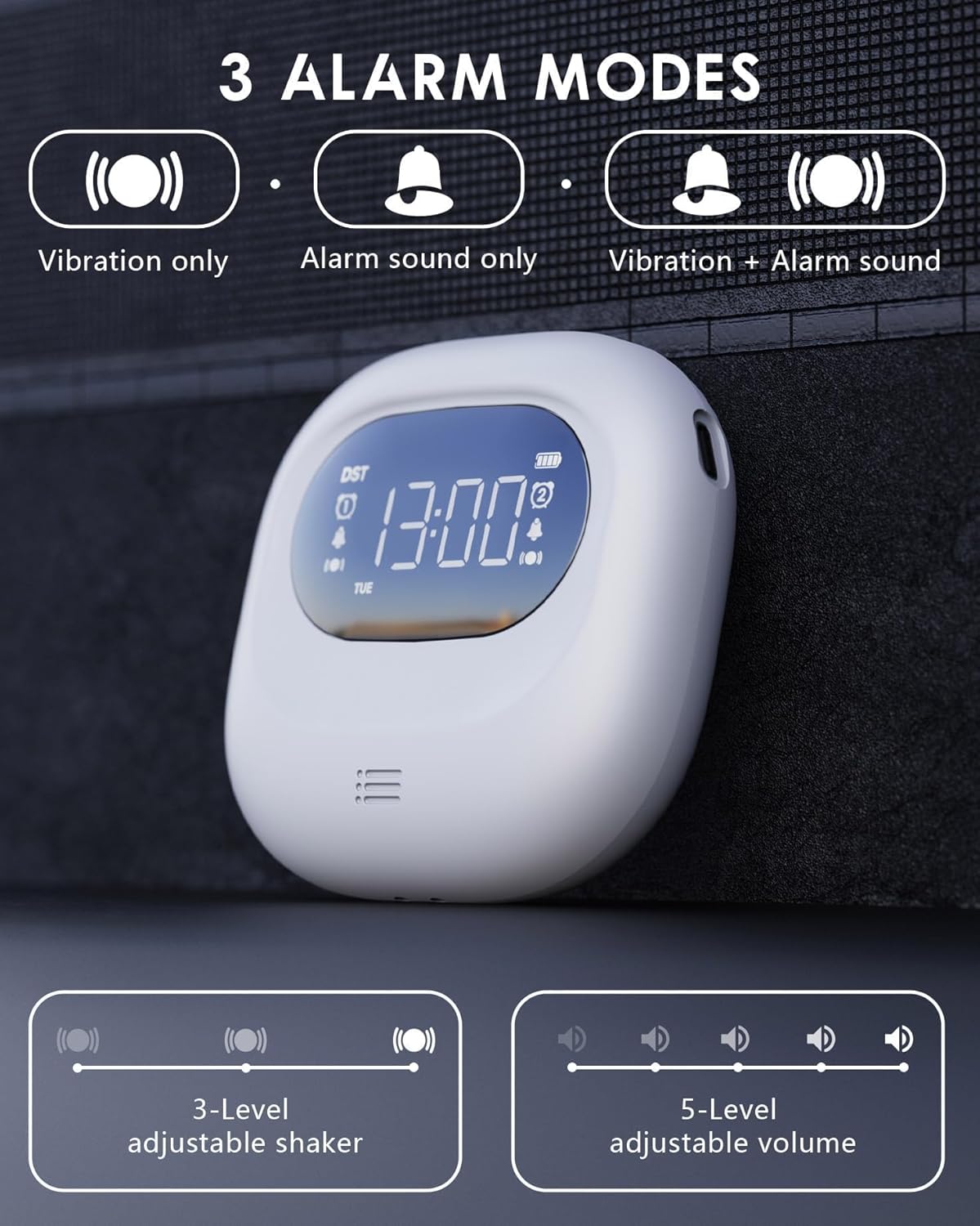
Image: Visual representation of the three alarm modes.
- వైబ్రేషన్ మాత్రమే: Ideal for silent wake-up without disturbing others.
- Alarm Sound Only: Functions as a traditional alarm clock.
- Vibration + Alarm Sound: Provides maximum wake-up assurance.
To select the alarm mode, use the dedicated switch on the side/back of the device, usually labeled with icons for vibration, sound, or both.
6.3 Volume and Vibration Intensity Adjustment
Adjust the alarm volume and vibration intensity to your preference.

Image: Alarm clock with buzzing sound waves and 5 volume levels.
- వాల్యూమ్: When the alarm is sounding, use the - or + buttons to adjust the volume (5 levels, 56-105 dB).

Image: Alarm clock on a pillow, showing three vibration intensity levels.
- కంపన తీవ్రత: Use the dedicated switch on the bottom of the device to select Low, Medium, or High vibration intensity (3 levels).
6.4 స్నూజ్ ఫంక్షన్
అలారం మోగినప్పుడు, నొక్కండి TIME / SNOOZE button to activate the snooze function. The alarm will pause for 9 minutes and then sound again. You can repeat this process multiple times.

Image: Alarm clock with snooze function details.
6.5 Time Format (12/24H, DST)
You can switch between 12-hour and 24-hour time formats, and activate Daylight Saving Time (DST).

Image: Display showing 12H, 24H, and DST time formats.
- 12/24H ఫార్మాట్: During time setting, press the TIME / SNOOZE button after setting the day to toggle between 12H and 24H formats.
- DST (పగటి ఆదా సమయం): During time setting, press the TIME / SNOOZE button after setting the 12/24H format to activate or deactivate DST. An icon will appear/disappear on the display.
6.6 చైల్డ్ లాక్ ఫంక్షన్
సెట్టింగ్లలో ప్రమాదవశాత్తు మార్పులను నివారించడానికి, చైల్డ్ లాక్ ఫంక్షన్ను యాక్టివేట్ చేయండి.

Image: Alarm clock with child lock feature, shown near a sleeping child.
- గుర్తించండి చైల్డ్ లాక్ switch on the bottom of the device.
- Slide the switch to the locked position to activate. The display will show a lock icon.
- Slide the switch to the unlocked position to deactivate.
6.7 Power Saving Screen Off Function
The alarm clock features an automatic screen off function to conserve battery life.

Image: Display showing power-saving features.
- The LED backlight will automatically turn off after 30 seconds of inactivity to enter power-saving mode.
- To wake up the display, press any button. Press the switch again for specific functions.
- Note: The backlight activates only during alarms or operations.
7. నిర్వహణ
7.1 శుభ్రపరచడం
To clean the alarm clock, gently wipe it with a soft, dry cloth. Do not use abrasive cleaners, solvents, or immerse the device in water.
7.2 బ్యాటరీ సంరక్షణ
The device uses a built-in rechargeable Lithium-polymer battery. To prolong battery life:
- బ్యాటరీని తరచుగా పూర్తిగా డిశ్చార్జ్ చేయడాన్ని నివారించండి.
- నిరంతరం ఉపయోగంలో లేకపోయినా, పరికరాన్ని క్రమం తప్పకుండా ఛార్జ్ చేయండి.
- Store the device in a cool, dry place if not used for extended periods.
8. ట్రబుల్షూటింగ్
If you encounter any issues with your ROCAM Vibrating Alarm Clock, please refer to the table below for common problems and solutions.
| సమస్య | సాధ్యమైన కారణం | పరిష్కారం |
|---|---|---|
| Alarm does not sound/vibrate. | అలారం యాక్టివేట్ కాలేదు. Incorrect alarm mode selected. తక్కువ బ్యాటరీ. | Ensure alarm icon is displayed. Check alarm mode switch (vibration/sound/both). పరికరాన్ని ఛార్జ్ చేయండి. |
| ప్రదర్శన ఖాళీగా ఉంది. | పవర్ సేవింగ్ మోడ్ యాక్టివేట్ చేయబడింది. పరికరం ఆఫ్ చేయబడింది. బ్యాటరీ క్షీణించింది. | Press any button to wake up display. ఆన్/ఆఫ్ స్విచ్ తనిఖీ చేయండి. పరికరాన్ని ఛార్జ్ చేయండి. |
| బటన్లు స్పందించడం లేదు. | చైల్డ్ లాక్ యాక్టివేట్ చేయబడింది. పరికరం స్తంభించిపోయింది. | Deactivate child lock switch. Press the Reset button on the bottom of the device. |
| సమయం తప్పు. | సమయం సరిగ్గా సెట్ కాలేదు. DST setting incorrect. | Re-set the time following Section 5.2. Adjust DST setting. |
9. స్పెసిఫికేషన్లు
| ఫీచర్ | వివరాలు |
|---|---|
| మోడల్ సంఖ్య | CR1027 |
| కొలతలు (L x W x H) | 8.5 x 3.81 x 8.5 సెం.మీ (3.35 x 1.5 x 3.35 అంగుళాలు) |
| బరువు | 140 గ్రా (4.94 oz) |
| శక్తి మూలం | Battery Powered (1 Lithium-polymer battery, included) |
| బ్యాటరీ లైఫ్ | 3-5 months (after 4h full charge) |
| అలారం వాల్యూమ్ | 5 స్థాయిలు (56-105 dB) |
| కంపన తీవ్రత | 3 levels (Low/Medium/High) |
| ప్రదర్శన రకం | డిజిటల్ LED |
| సమయ ఆకృతి | 12H/24H, DST compatible |
10. వారంటీ మరియు మద్దతు
ROCAM is committed to providing high-quality products and excellent customer service. This product comes with a 365-day service guarantee.
If you encounter any quality issues or require assistance, please do not hesitate to contact our expert support team. We value your feedback and continuously strive to improve our products.
మద్దతును సంప్రదించండి: support@rocam.net


