1. పరిచయం
ఈ మాన్యువల్ బ్లాక్ కోసం సమగ్ర సూచనలను అందిస్తుందిview BL9000 Pro 5G Rugged Smartphone. Designed for durability and high performance, this device features advanced thermal imaging capabilities, a powerful processor, and robust construction to withstand challenging environments. Please read this manual thoroughly to ensure proper use and maintenance of your device.
2. సెటప్
2.1 ప్యాకేజీ విషయాలు
- నలుపుview BL9000 Pro 5G Smartphone
- USB కేబుల్
- (Other accessories may vary by region or package)
2.2 SIM కార్డ్ మరియు నిల్వ సంస్థాపన
The BL9000 Pro supports dual card slots, accommodating 2 nano SIM cards or 1 nano SIM card and 1 micro SD/TF card (SIM/SD cards not included). Ensure the device is powered off before inserting or removing cards.
- పరికరం వైపున SIM కార్డ్ ట్రేని గుర్తించండి.
- ట్రేని తెరవడానికి అందించిన SIM ఎజెక్టర్ సాధనాన్ని ఉపయోగించండి.
- Carefully place the nano SIM card(s) and/or micro SD card into the designated slots.
- ట్రే ఫ్లష్ అయ్యే వరకు దాన్ని తిరిగి పరికరంలోకి సున్నితంగా నెట్టండి.
2.3 ప్రారంభ పవర్ ఆన్ మరియు సెటప్
Press and hold the power button until the Blackview logo appears. Follow the on-screen prompts to complete the initial setup, including language selection, Wi-Fi connection, and Google account sign-in.
3. ఆపరేటింగ్ సూచనలు
3.1 ప్రాథమిక ఫోన్ విధులు
- కాల్స్ చేయడం: Open the Phone app, dial the number, and press the call icon.
- సందేశాలు పంపడం: Open the Messages app, start a new conversation, enter recipient and text, then send.
- ఇంటర్నెట్ కనెక్టివిటీ: సెట్టింగ్లు > నెట్వర్క్ & ఇంటర్నెట్ > Wi-Fi ద్వారా Wi-Fiకి కనెక్ట్ అవ్వండి లేదా సెట్టింగ్లు > నెట్వర్క్ & ఇంటర్నెట్ > మొబైల్ నెట్వర్క్ ద్వారా మొబైల్ డేటాను ప్రారంభించండి.
3.2 డిస్ప్లే ఫీచర్లు
ది బ్లాక్view BL9000 Pro features a 6.78-inch 2.4K FHD+ display with a 120Hz dynamic refresh rate for smooth visuals. It also includes TÜV SÜD Low Blue Light certification and three eye-care modes to reduce eye strain.

Image: The 6.78-inch 2.4K FHD+ display with 120Hz refresh rate.

Image: Detailed specifications of the display, highlighting 120Hz refresh rate and eye-care features.
3.3 కెమెరా సిస్టమ్
The device is equipped with a 50MP True-Color Front camera and a pro-grade 50MP Anti-shake Rear camera, alongside a 13MP 120° Ultra-wide & Ultra-macro camera. It supports 4K video recording and various modes like Underwater Mode, Night Mode, and Pro mode.

చిత్రం: పైగాview of the camera specifications and features, including OIS Anti-shake.

Image: Additional camera modes and capabilities.
3.4 FLIR Thermal Imaging
The BL9000 Pro integrates the latest FLIR Lepton 3.5 thermal imaging camera, offering quadrupled resolution and an expanded 57° field of view. It supports simultaneous measurement and analysis at multiple points and can generate readable reports.

చిత్రం: ఉదాamples of thermal imaging applications.

Image: Key features of the FLIR thermal imaging system.
Video: Demonstration of the BL9000 Pro's FLIR thermal imaging capabilities, including temperature measurement and report generation.
3.5 పనితీరు మరియు నిల్వ
Powered by the TSMC's 6nm octa-core MediaTek Dimensity 8020 5G processor, the BL9000 Pro offers smooth performance. It comes with 36GB RAM (12GB physical + 24GB virtual) and 512GB ROM, supporting up to 49 background applications simultaneously.

Image: Visual representation of the phone's powerful processor, RAM, and ROM.

Image: Details on performance enhancements and energy saving features.
3.6 బ్యాటరీ మరియు ఛార్జింగ్
Equipped with an 8800mAh solid-state battery, the BL9000 Pro supports 120W super-fast charging, reaching 50% charge in just 20 minutes. It also features OTG (On-The-Go) functionality, allowing it to act as a power bank for other devices.

Image: Battery capacity and fast charging capabilities.

Image: Illustration of 120W fast charging and reverse charging.
3.7 Software and User Experience
Running on Android 14 with Doke OS 4.0, the BL9000 Pro offers enhanced privacy protection, per-app language preferences, and improved UI. Features include EasyShare for fast data transfer, call recording, exercise index tracking, and real-time subtitles for videos.

చిత్రం: పైగాview of Android 14 and Doke OS 4.0 features.

Image: Detailed features of the Doke OS 4.0 system.
3.8 Durability and Additional Features
The BL9000 Pro is built with CORNING GORILLA GLASS 7 and holds IP68 & IP69K professional military-grade waterproof certification, along with MIL-STD-810H drop-proof certification. It can withstand drops from up to 5m and remain waterproof for up to 1.5m deep for 30 minutes. Other features include Fingerprint Recognition, Face ID, NFC for payments, Glove mode, and comprehensive GPS navigation (GPS, Beidou, GLONASS, Galileo).

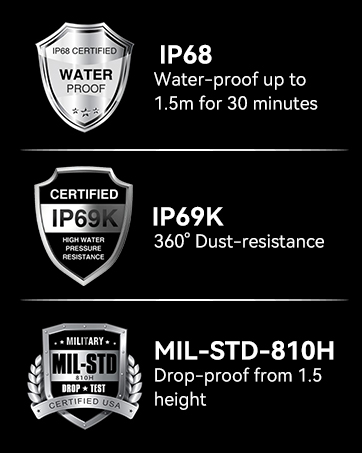

Image: Certifications for water, dust, and drop resistance.

చిత్రం: సమగ్ర ఓవర్view of durability and utility features.

Image: Connectivity and navigation features.
3.9 నెట్వర్క్ అనుకూలత
ది బ్లాక్view BL9000 Pro supports 5G networks and is compatible with GSM carriers such as T-Mobile, Movistar, Claro, Telcel, Bell Wireless, and Fido. It is not compatible with AT&T, Cricket, Verizon, Sprint, or Boost Mobile.

Image: Detailed list of supported network bands.
4. నిర్వహణ
4.1 మీ పరికరాన్ని శుభ్రపరచడం
Due to its rugged design, the BL9000 Pro can be cleaned with mild soap and water. Ensure all ports are securely closed before cleaning. Wipe with a soft, lint-free cloth. Avoid abrasive materials or harsh chemicals.
4.2 సాఫ్ట్వేర్ నవీకరణలు
Regularly check for software updates via Settings > System > System update to ensure your device has the latest features, security patches, and performance improvements.
5. ట్రబుల్షూటింగ్
5.1 సాధారణ సమస్యలు
- పరికరం ఆన్ చేయడం లేదు: Ensure the battery is charged. Connect to the 120W fast charger.
- నెట్వర్క్ కనెక్టివిటీ సమస్యలు: Verify SIM card installation. Check network settings and ensure you are within a supported carrier's coverage area.
- యాప్లు క్రాష్ అవుతున్నాయి లేదా స్తంభించిపోతున్నాయి: Clear app cache (Settings > Apps > [App Name] > Storage & cache > Clear cache). Restart the device. Ensure sufficient storage space.
- Thermal camera not working: Ensure the FLIR app is updated. Check for any physical obstructions on the thermal camera lens.
For more detailed troubleshooting or persistent issues, please refer to the official Blackview support resources or contact customer service.
6. స్పెసిఫికేషన్లు
| ఫీచర్ | స్పెసిఫికేషన్ |
|---|---|
| మోడల్ పేరు | BL9000Pro Blakcview Rugged Phone 24Y-Q |
| ఆపరేటింగ్ సిస్టమ్ | Android 14 (Doke OS 4.0) |
| ప్రాసెసర్ | TSMC's 6nm Octa-core MediaTek Dimensity 8020 5G |
| RAM | 36 GB (12GB భౌతిక + 24GB వర్చువల్) |
| అంతర్గత నిల్వ | 512 GB ROM (Flash UFS 3.1) |
| ప్రదర్శన పరిమాణం | 6.78 అంగుళాలు |
| డిస్ప్లే రిజల్యూషన్ | 2408 x 1080 (2.4K FHD+) |
| రిఫ్రెష్ రేట్ | 120Hz Dynamic |
| స్క్రీన్ రక్షణ | CORNING GORILLA GLASS 7 (Victus) |
| వెనుక కెమెరా | 50MP (OIS Anti-shake) + 13MP (120° Ultra-wide & Ultra-macro) |
| ఫ్రంట్ కెమెరా | 50MP True-Color |
| థర్మల్ ఇమేజింగ్ | FLIR Lepton 3.5 |
| బ్యాటరీ కెపాసిటీ | 8800 mAh లిథియం పాలిమర్ |
| ఛార్జింగ్ | 120W Super-fast Charging |
| మన్నిక రేటింగ్లు | IP68, IP69K, MIL-STD-810H |
| కనెక్టివిటీ | Dual 5G SIM, Wi-Fi 6, NFC, GPS (GPS, Beidou, GLONASS, Galileo) |
| ఆడియో | Dual Harman Kardon Smart-PA Speakers |
| కొలతలు | 7.8 x 7.76 x 1.85 అంగుళాలు |
| వస్తువు బరువు | 1.9 పౌండ్లు |
7. వారంటీ మరియు మద్దతు
నలుపుview offers a 2-year warranty for all Blackview phones. For smartphones, customers can enjoy a 24-month free repair warranty and lifetime technician support through the Blackview Official Flagship Store. Should any issues arise, please reach out to Blackview customer service for prompt assistance.
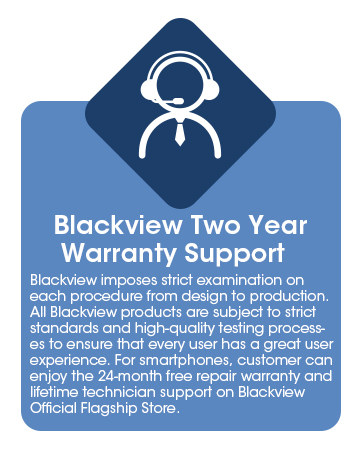
Image: Blackview's 2-year warranty and support details.


