పరిచయం
This user manual provides detailed instructions for the safe and effective operation, maintenance, and troubleshooting of the MAGUS Metal 600 Metallurgical Microscope. Please read this manual thoroughly before using the instrument to ensure optimal performance and longevity.
The MAGUS Metal 600 is a high-precision metallurgical microscope designed for observing the microstructure of metals, alloys, and other opaque materials. Its robust construction and advanced optical system make it suitable for various industrial and research applications.
భద్రతా జాగ్రత్తలు
Always observe the following safety precautions to prevent injury and damage to the microscope:
- మైక్రోస్కోప్ వంగిపోకుండా ఉండటానికి స్థిరమైన, స్థాయి ఉపరితలంపై ఉంచబడిందని నిర్ధారించుకోండి.
- పవర్ కార్డ్ను గ్రౌన్దేడ్ అవుట్లెట్కి కనెక్ట్ చేయండి.
- Do not expose the microscope to direct sunlight, high temperatures, or excessive humidity.
- Avoid touching optical surfaces with bare hands. Use a soft, lint-free cloth for cleaning.
- Turn off the power and unplug the microscope before cleaning or performing any maintenance.
- Do not attempt to disassemble or repair the microscope yourself. Refer to qualified service personnel.
ఉత్పత్తి భాగాలు మరియు పైగాview
The MAGUS Metal 600 Metallurgical Microscope consists of several key components, each playing a vital role in its operation.
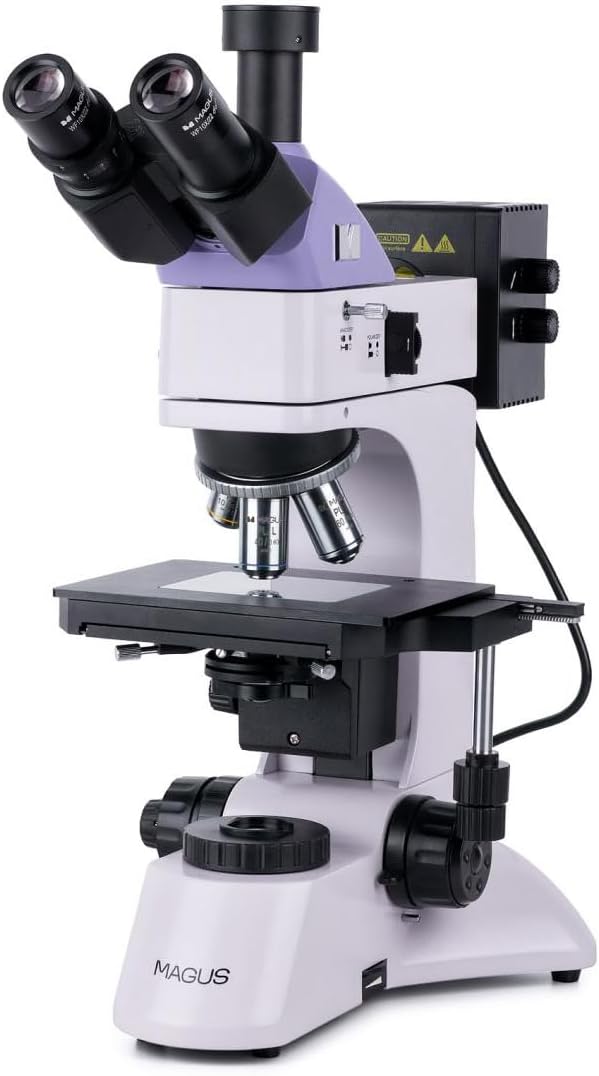
చిత్రం 1: పైగాview of the MAGUS Metal 600 Metallurgical Microscope. This image shows the complete microscope unit, including the binocular head, objective turret, mechanical stage, and coarse/fine focus knobs.
ముఖ్య భాగాలు:
- Binocular Head: Houses the eyepieces for viewing the magnified image.
- కనురెప్పలు: Typically 10x magnification, providing the initial magnification of the sample.
- Objective Turret (Revolver): Rotatable mechanism holding multiple objective lenses.
- ఆబ్జెక్టివ్ లెన్స్లు: Provide primary magnification (e.g., 5x, 10x, 20x, 50x, 100x).
- మెకానికల్ ఎస్tage: Platform for placing the sample, with X-Y movement controls.
- Coarse Focus Knob: For large adjustments to focus.
- Fine Focus Knob: For precise adjustments to focus.
- ప్రకాశం వ్యవస్థ: Provides light for viewing ది లుample, often with adjustable brightness.
- Field Diaphragm: Controls the diameter of the light beam entering the objective.
- ఎపర్చరు డయాఫ్రాగమ్: Controls the numerical aperture of the illumination.
సెటప్ మరియు అసెంబ్లీ
- అన్ప్యాకింగ్: ప్యాకేజింగ్ నుండి అన్ని భాగాలను జాగ్రత్తగా తొలగించండి. భవిష్యత్తులో రవాణా లేదా నిల్వ కోసం అసలు ప్యాకేజింగ్ను ఉంచండి.
- ప్లేస్మెంట్: Place the microscope body on a stable, vibration-free surface away from direct sunlight and heat sources.
- Install Binocular Head: Gently insert the binocular head into the top port of the microscope body. Secure it with the locking screw, if present.
- Insert Eyepieces: Insert the eyepieces into the eyepiece tubes of the binocular head.
- Install Objective Lenses: Rotate the objective turret to allow easy access. Screw each objective lens into its corresponding thread on the turret, starting with the lowest magnification.
- పవర్ కనెక్ట్ చేయండి: Connect the power cord to the microscope's power input and then to a grounded electrical outlet.
ఆపరేటింగ్ సూచనలు
1. Preparing the Sampలే:
- Ensure your metallurgical sample is properly prepared (polished and etched, if necessary) and clean.
- లను ఉంచండిample securely on the mechanical stage.
2. ప్రారంభ సెటప్:
- Turn on the microscope's power switch.
- Adjust the illumination brightness to a comfortable level using the dimmer control.
- Rotate the objective turret to select the lowest magnification objective (e.g., 5x or 10x).
- Adjust the interpupillary distance of the binocular head to match your eyes.
- Adjust the diopter setting on one eyepiece to compensate for differences in vision between your eyes.
3. Focusing and Observation:
- మెకానికల్ లను ఉపయోగించడంtage controls, position the sample so the area of interest is directly under the objective lens.
- While looking through the eyepieces, use the coarse focus knob to bring the sample into approximate focus.
- Use the fine focus knob for precise focusing.
- Adjust the field diaphragm and aperture diaphragm for optimal contrast and resolution.
- To change magnification, rotate the objective turret to the desired objective. Re-focus using the fine focus knob.
- For oil immersion objectives (e.g., 100x), apply a small drop of immersion oil directly onto the sample before rotating the objective into place. After use, clean the oil from the objective and sampలే వెంటనే.
నిర్వహణ మరియు సంరక్షణ
Proper maintenance ensures the longevity and optimal performance of your MAGUS Metal 600 microscope.
- క్లీనింగ్ ఆప్టిక్స్: Use a soft, lint-free cloth or lens paper specifically designed for optics. For stubborn smudges, a small amount of lens cleaning solution can be applied to the cloth, not directly to the lens.
- శరీరాన్ని శుభ్రపరచడం: మైక్రోస్కోప్ బాడీని మృదువైన, d తో తుడవండి.amp గుడ్డ. కఠినమైన రసాయనాలు లేదా రాపిడి క్లీనర్లను ఉపయోగించడం మానుకోండి.
- నిల్వ: When not in use, cover the microscope with a dust cover to protect it from dust and debris. Store in a cool, dry place.
- సరళత: Moving parts like the focus mechanism and mechanical stage are factory-lubricated. Do not attempt to lubricate them yourself unless specifically instructed by a qualified technician.
- బల్బ్ భర్తీ: If the illumination bulb needs replacement, ensure the microscope is unplugged and the bulb has cooled down. Refer to the specifications for the correct bulb type.
ట్రబుల్షూటింగ్
| సమస్య | సాధ్యమైన కారణం | పరిష్కారం |
|---|---|---|
| వెలుతురు లేదు | Power cord unplugged, bulb burnt out, dimmer set to minimum. | Check power connection, replace bulb, increase dimmer setting. |
| చిత్రం అస్పష్టంగా ఉంది / దృష్టి మసకగా ఉంది | Incorrect focus, objective not fully engaged, dirty objective/eyepiece. | Adjust focus knobs, rotate objective turret until it clicks, clean optics. |
| పొలంలో నల్లటి మచ్చలు view | Dust on eyepiece, objective, or sample. | Clean eyepieces, objectives, and ensure sample is clean. |
| చిత్రం చాలా చీకటిగా లేదా చాలా ప్రకాశవంతంగా ఉంది | Incorrect illumination setting, aperture/field diaphragm not adjusted. | Adjust dimmer, open/close aperture and field diaphragms. |
సాంకేతిక లక్షణాలు
| ఫీచర్ | వివరాలు |
|---|---|
| మోడల్ | MAGUS మెటల్ 600 |
| ఉత్పత్తి కొలతలు | 35 x 30 x 75 సెం.మీ |
| తయారీదారు | మాగస్ |
| తయారీదారు సూచన | 82896 |
| ASIN | B0D5TMWB5F |
| మైక్రోస్కోప్ రకం | Metallurgical, Upright |
| ప్రకాశం | Reflected (Epi-illumination) |
| కనుబొమ్మలు | WF10x/22mm (typical) |
| లక్ష్యాలు | Plan Achromatic (e.g., 5x, 10x, 20x, 50x, 100x oil) |
వారంటీ సమాచారం
MAGUS provides a standard warranty for the Metal 600 Metallurgical Microscope against defects in materials and workmanship under normal use. The warranty period typically begins from the date of purchase.
For detailed warranty terms and conditions, including coverage, exclusions, and claim procedures, please refer to the warranty card included with your product or visit the official MAGUS webవారంటీ క్లెయిమ్ల కోసం మీ కొనుగోలు రుజువును ఉంచండి.
కస్టమర్ మద్దతు
If you encounter any issues not covered in the troubleshooting section or require further assistance, please contact MAGUS customer support.
- ఆన్లైన్ మద్దతు: Visit the official MAGUS webతరచుగా అడిగే ప్రశ్నలు, ఉత్పత్తి నమోదు మరియు ఆన్లైన్ మద్దతు ఫారమ్ల కోసం సైట్.
- ఇమెయిల్ మద్దతు: Refer to your product documentation for the specific support email address.
- ఫోన్ మద్దతు: Contact numbers for regional support can be found on the MAGUS webసైట్.
When contacting support, please have your product model (Metal 600) and serial number (if applicable) ready.


