1. పరిచయం
Thank you for choosing the WOLFBOX J1772 to Tesla Charger Adapter. This adapter provides a convenient and efficient solution for charging your Tesla vehicle at J1772 charging stations. Designed for compatibility, speed, and safety, it ensures a reliable charging experience.
This manual provides essential information on the adapter's features, setup, operation, maintenance, and troubleshooting. Please read it thoroughly before use to ensure proper and safe operation.
2. ఉత్పత్తి ముగిసిందిview మరియు ప్యాకేజీ విషయాలు

Image: The WOLFBOX J1772 to Tesla Charger Adapter shown with its included carrying pouch.
పెట్టెలో ఏముంది:
- 1 x WOLFBOX J1772 to Tesla Adapter
3. అనుకూలత
The WOLFBOX J1772 to Tesla Adapter is designed for broad compatibility with Tesla vehicles and J1772 charging infrastructure.

Image: The adapter is compatible with all Tesla EV models, including Model 3, Model Y, Model X, Model S, and Cybertruck.
- Tesla Vehicles: Compatible with Tesla Model 3, Model Y, Model X, Model S, and Cybertruck.
- Charging Stations: Fits Tesla high-powered wall connectors, destination chargers, and mobile connectors (excluding Tesla Superchargers). Compatible with all J1772 vehicles.

Image: The adapter supports Level 1 and Level 2 charging (up to 80 Amps) via J1772, but is not compatible with Level 3 (DC Fast Charging) stations.
ముఖ్యమైన గమనిక: This adapter is designed for Level 1 (15-20 Amps) and Level 2 (up to 80 Amps) AC charging. It is కాదు compatible with Level 3 DC fast charging (Tesla Superchargers or other CCS/CHAdeMO DC fast chargers).
4. సెటప్ మరియు ఇన్స్టాలేషన్
Setting up the WOLFBOX J1772 to Tesla Adapter is straightforward. Follow these steps for a secure connection:

Image: Visual guide for connecting the J1772 adapter to a Tesla vehicle.
- Connect the Adapter to the J1772 Connector: Take the J1772 charging cable from the charging station. Insert the J1772 connector firmly into the WOLFBOX adapter until it clicks into place.
- Plug into Your Tesla Vehicle: Insert the WOLFBOX adapter (with the J1772 connector attached) into your Tesla vehicle's charging port. Ensure it is fully seated and locked securely.
- ఛార్జింగ్ ప్రారంభించండి: Once connected, your Tesla vehicle should recognize the charger and begin charging automatically or after you initiate it from your vehicle's touchscreen or mobile app.
5. ఆపరేటింగ్ సూచనలు
The WOLFBOX J1772 to Tesla Adapter facilitates efficient charging. Its design supports high current and voltage for fast charging needs.

Image: The adapter is designed for fast charging, supporting up to 80 Amps and 240 Volts AC.
- ఫాస్ట్ ఛార్జింగ్: The adapter is designed to handle a maximum current of 80A and 240V AC voltage, allowing for efficient and rapid charging of your Tesla.
- ఛార్జింగ్ స్థితి: Monitor your charging progress and status directly through your Tesla vehicle's display or the Tesla mobile application.
- డిస్కనెక్ట్ చేస్తోంది: To disconnect, first stop the charging session from your vehicle or the charging station, then unlock and remove the adapter from your Tesla, followed by detaching the J1772 connector from the adapter.
6. Safety and Durability
The WOLFBOX J1772 to Tesla Adapter is built with robust materials and incorporates multiple safety features to ensure a secure and reliable charging experience.

Image: The adapter undergoes rigorous testing for durability, including extensive plug-in cycles, drop tests, and resistance to vehicle weight.

Image: The adapter is weatherproof (IP65 rated) and holds multiple safety certifications.
- IP66 వాటర్ఫ్రూఫింగ్: Provides protection against water jets and dust ingress, making it suitable for outdoor use in various weather conditions.
- Built-in Security Lock: Ensures a secure connection during charging, preventing accidental disconnections.
- సమగ్ర రక్షణ: Designed with safeguards against lightning strikes, leaks, grounding issues, under-voltagఇ, ఓవర్-వాల్యూమ్tage, over-charging, over-heating, and over-current.
- మిలిటరీ-గ్రేడ్ మన్నిక: Tested for over 10,000 plug-in cycles, 6.5 ft drop resistance, and can withstand a 1.5-ton car drive-over.
7. నిర్వహణ
To ensure the longevity and optimal performance of your WOLFBOX J1772 to Tesla Adapter, follow these simple maintenance guidelines:
- శుభ్రపరచడం: Wipe the adapter with a clean, dry cloth. Do not use abrasive cleaners or solvents. Ensure the connectors are free of dust and debris before each use.
- నిల్వ: Store the adapter in a cool, dry place when not in use. Utilize the included carrying pouch for protection during travel or storage.
- తనిఖీ: Periodically inspect the adapter for any signs of damage, such as cracks, frayed wires, or bent pins. Do not use the adapter if any damage is observed.
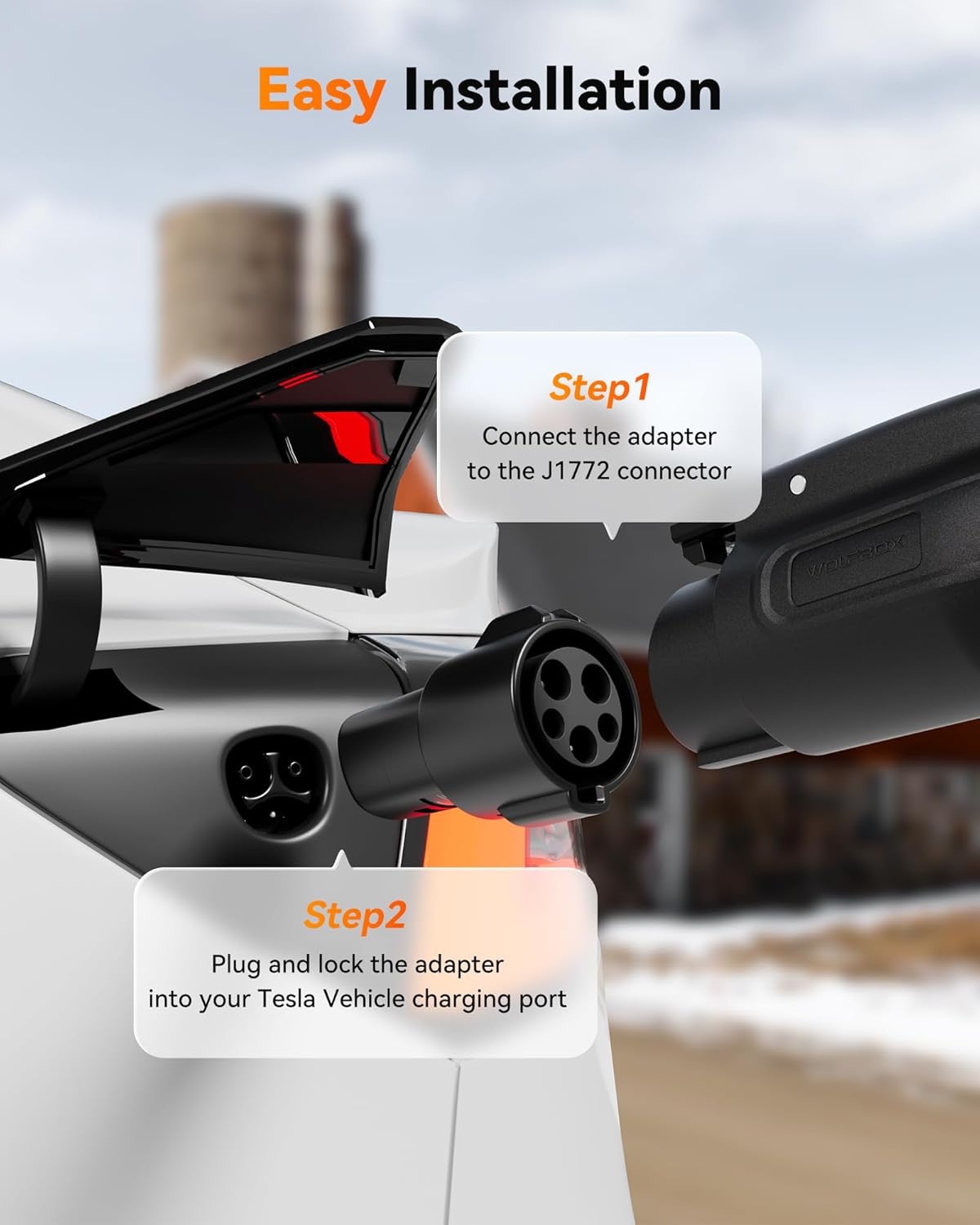
Image: The adapter's compact and lightweight design makes it easy to carry and store.
8. ట్రబుల్షూటింగ్
If you encounter issues while using your WOLFBOX J1772 to Tesla Adapter, refer to the following common troubleshooting steps:
| సమస్య | సాధ్యమైన కారణం | పరిష్కారం |
|---|---|---|
| Charging not initiating | Adapter not fully seated; Charging station issue; Vehicle not ready to charge. | Ensure adapter is firmly connected to both J1772 cable and Tesla port. Try another charging station. Check vehicle's charging settings. |
| నెమ్మదిగా ఛార్జింగ్ వేగం | Charging station output is low; Vehicle charging settings. | Verify the charging station's maximum output. Adjust vehicle's charging current settings if applicable. |
| అడాప్టర్ వెచ్చగా అనిపిస్తుంది | Normal operation during high current charging. | Slight warmth is normal. If it's excessively hot or emits smoke/smell, disconnect immediately and contact support. |
| Adapter not locking into Tesla port | Obstruction in port; Incorrect alignment. | Check for debris in the Tesla charging port. Ensure correct orientation and apply firm, even pressure. |
If the problem persists after attempting these solutions, please contact WOLFBOX customer support.
9. స్పెసిఫికేషన్లు
Detailed technical specifications for the WOLFBOX J1772 to Tesla Charger Adapter:
| ఫీచర్ | వివరాలు |
|---|---|
| మోడల్ సంఖ్య | AD-2 |
| గరిష్ట కరెంట్ | 80 Amps |
| ఇన్పుట్ వాల్యూమ్tage | 240 వోల్ట్స్ AC |
| కనెక్టర్ రకం | J1772 to Tesla (NACS) |
| అనుకూలత | Tesla Model 3/Y/X/S, Cybertruck |
| Waterproofing Rating | IP66 |
| వస్తువు బరువు | 7.4 ఔన్సులు |
| ప్యాకేజీ కొలతలు | 3.82 x 2.4 x 2.32 అంగుళాలు |
| రంగు | నలుపు |
10. వారంటీ మరియు మద్దతు
WOLFBOX stands behind the quality of its products.
వారంటీ సమాచారం:
The WOLFBOX J1772 to Tesla Charger Adapter comes with a 2 సంవత్సరాల వారంటీ from the date of purchase. This warranty covers manufacturing defects and ensures peace of mind regarding your investment.
కస్టమర్ మద్దతు:
For any questions, technical assistance, or warranty claims, please contact WOLFBOX customer support. Have your product model number (AD-2) and purchase details ready for faster service.
You can typically find support contact information on the WOLFBOX official webసైట్ లేదా మీరు ఉత్పత్తిని కొనుగోలు చేసిన రిటైలర్ ద్వారా.


